
hs-library
v1.0.5
Published
Optimistic UI library for React and Next.js. Modern, reusable components: Inputs, Buttons, Cards, Dropdowns, Modals, Toasts — and more magical UI tools for frontend developers. author: Hitesh Saini

Maintainers
 hiteshsaini09
Readme
🎨 hs-library — Modern React UI Components
Author: Hitesh Saini
License: ISC
Tags: react, next, dropdown, button, ui, input, card, modal, toast, component-library, optimistic-ui, tailwind, frontend, ux, reusable, react-components
📦 Installation
Install via npm or yarn:
npm install hs-library
# or
yarn add hs-library
🚀 Quick Start
Import components and styles from hs-library into your React or Next.js project:
import { Button, SearchableDropdown } from "hs-library";
import "hs-library/dist/index.css";
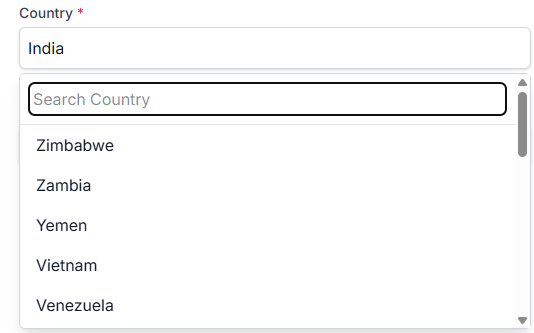
🌏 SearchableDropdown — Example
A powerful, customizable, and modern dropdown for React — with search support, async data fetching, and custom rendering.
import React, { useState } from "react";
import { SearchableDropdown } from "hs-library";
import "hs-library/dist/index.css";

export default function App() {
  const [formData, setFormData] = useState({ countryId: "" });

  const fetchCountries = async (searchTerm) => {
    // Example: fetch from API or filter local data
    console.log("Searching for:", searchTerm);
  };

  return (
    <SearchableDropdown
      id="countryId"
      label="Select Country"
      options={[{ value: "1", label: "India" }]}
      required
      formData={formData}
      setFormData={setFormData}
      onSearch={fetchCountries}
      RenderComponent={({ opt }) => (
        <div style={{ display: "flex", justifyContent: "space-between" }}>
          <span>{opt.label}</span>
          <span>
            <img src="https://flagcdn.com/16x12/in.png" alt="" />
          </span>
        </div>
      )}
    />
  );
}
🛠 Props
| Prop | Type | Required | Description |
|------------------|-----------|----------|-------------|
| id | string | ✅ | Field name key for form data. |
| label | string | ❌ | Label text for the dropdown. |
| options | array | ✅ | List of { value, label } options. |
| required | boolean | ❌ | Marks field as required. |
| formData | object | ✅ | State object holding form values. |
| setFormData | function| ✅ | State updater for form data. |
| onSearch | function| ❌ | Callback for search term updates (great for API calls). |
| RenderComponent| function| ❌ | Custom renderer for each dropdown option. |
✨ Features
- 🔍 Search-Optimized — Handles large datasets and API-based search without lag.
- 🎨 Fully Customizable — Override CSS, change dropdown item layouts, and style to match your app.
- 🔗 API Ready — Plug in any
fetchor Axios call to get options dynamically. - ⚡ Lightweight & Performant — Built for speed in modern React apps.
- ♻ Reusable Component — One dropdown, endless use cases (countries, products, tags, etc.).
- 🛠 Problem-Solver — Designed to handle common dropdown headaches like:
- Dynamic filtering
- Async loading states
- Custom option rendering
- Form integration
📸 Example UI
💡 Pro Tip
Easily integrate with any API — for example, pulling countries from REST Countries API and showing flags automatically.
📚 Other Components in hs-library
- Button — Modern button styles with variants
- Card — Flexible content containers
- Modal — Accessible and animated dialogs
- Toast — Notification system
- Inputs — Text, number, and more
📄 License
This project is licensed under the ISC License — see the LICENSE file for details.