
html-pdf-lite
v1.2.2
Published
Fast HTML to PDF for Node.js without Chromium or Puppeteer — 7.6x faster cold start, tiny PDFs, native color emoji. Ideal for invoices, reports, and serverless.

Maintainers
 bohard
Keywords
Readme
html-pdf-lite




HTML → PDF for Node.js — without Chromium. A lightweight HTML/CSS renderer on top of PDFKit: 7.6× faster cold start than Puppeteer, PDFs 52–94% smaller, and native color emoji — no headless browser, no Chromium to download.
Built for backends that generate invoices, receipts, and reports — especially serverless (Lambda, Vercel, Cloud Functions) where spinning up Chromium is too slow and too heavy.
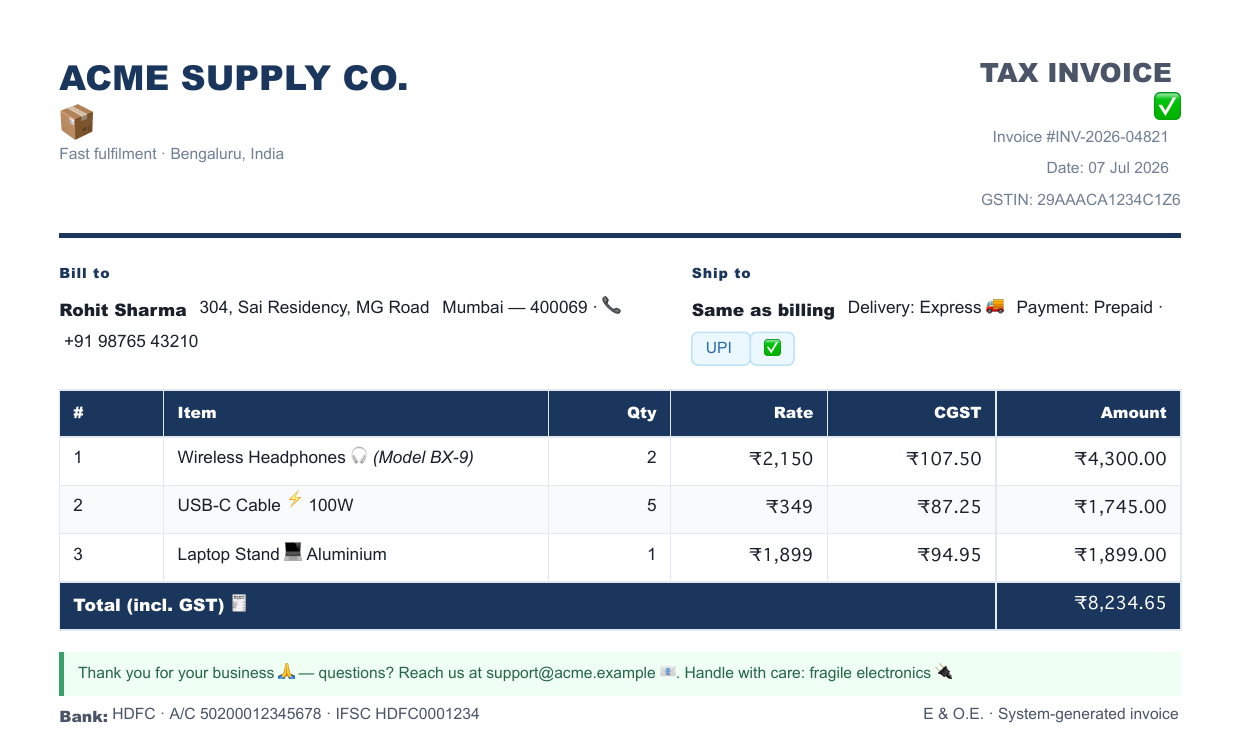
An invoice produced from plain HTML — dark header, striped rows, colspan totals, and real color emoji as selectable text. No browser involved.
Why html-pdf-lite
- 🪶 No Chromium — ~30 MB self-contained, and nothing downloaded at runtime (Puppeteer pulls ~170 MB+ of Chromium on top).
- ⚡ Fast cold start — ~86 ms vs ~654 ms for Puppeteer. Critical on serverless.
- 📦 Tiny PDFs — 52–94% smaller than headless-Chrome output.
- 😀 Native color emoji — embedded as real PDF Type 3 fonts (like Chromium), searchable/selectable, not images.
- 🧾 Made for documents — tables (
colspan/rowspan, repeating headers), flexbox, grid, page breaks, links, SVG, custom fonts. - 🟦 TypeScript types included · zero config to start.
Install
npm install html-pdf-liteQuick start
const fs = require('fs');
const { renderPdfFromHtml } = require('html-pdf-lite');

const pdf = await renderPdfFromHtml('<h1>Hello 👋</h1><p>Invoice ready ✅</p>');
fs.writeFileSync('out.pdf', pdf); // pdf is a Buffer
That's it — no browser, no options required. See the full options for fonts, margins, emoji, external CSS, and more.
html-pdf-lite vs the alternatives
| | html-pdf-lite | Puppeteer / Playwright | wkhtmltopdf | pdfmake / jsPDF | |:--|:--:|:--:|:--:|:--:| | Renders HTML + CSS | ✅ | ✅ | ✅ | ❌ (own API) | | No Chromium / native binary | ✅ | ❌ | ❌ | ✅ | | Install footprint | ~30 MB (self-contained) | ~170 MB+ (+ Chromium) | ~50 MB native | small | | Cold start | ~86 ms | ~650 ms | ~200 ms | fast | | Serverless-friendly | ✅ | ⚠️ heavy | ⚠️ binary | ✅ | | Color emoji | ✅ | ✅ | ⚠️ | ❌ | | Full Chrome CSS fidelity | ❌ | ✅ | ⚠️ | n/a |
Choose html-pdf-lite when you control the HTML (invoices, reports, tickets) and want speed + small footprint. Choose Puppeteer when you need pixel-perfect fidelity for arbitrary web pages.
What's new in 1.2.0
- 😀 Native color emoji (sbix / COLRv0) via PDF Type 3 fonts — searchable text, optional auto-download
- 📊 Table
rowspan+<thead>that repeats on every page - 📐 Explicit block
width+margin: autocentering (e.g.width: 200mm; margin: 0 auto) - ➗
<sub>/<sup>,<hr>, and percentage padding/margin - 🎨 Correct asymmetric borders with
border-radius - 🚀 Much faster — big cut in parse time and memoized layout for deeply nested flex/grid
Benchmarks
Measured on Node 22, A4 output, 15 iterations (warm):
| Template | html-pdf-lite | Puppeteer | Speedup | PDF Size | |:---------|-------------:|----------:|--------:|---------:| | Simple (h1 + p) | 61ms | 99ms | 1.6x | 1.4 KB vs 17 KB | | Invoice (flex + table) | 89ms | 98ms | 1.1x | 37 KB vs 84 KB | | Report (text-heavy) | 70ms | 95ms | 1.4x | 15 KB vs 32 KB | | Receipt (small table) | 63ms | 92ms | 1.5x | 1.8 KB vs 29 KB | | Styled (grid + cards) | 70ms | 100ms | 1.4x | 16 KB vs 41 KB | | Large table (50×6) | 87ms | 114ms | 1.3x | 18 KB vs 118 KB | | Cold start | 86ms | 654ms | 7.6x | — |
PDFs are 52–94% smaller. Cold start is 7.6x faster — critical for serverless.
Run npm run bench to reproduce (requires npm i -D puppeteer).
This makes it perfect for:
- APIs
- Invoices & reports
- Serverless (Lambda, Vercel, etc)
- High-volume PDF generation
⚠️ Not a full Chrome renderer
This engine focuses on speed and stability, not 100% Chrome CSS compatibility.
If you need:
- perfect flexbox
- advanced CSS grid
- bleeding-edge browser features
Use Puppeteer.
If you need:
- fast
- stable
- backend-grade PDFs
Use this.
API
renderPdfFromHtml(html, options)
Returns a Buffer containing the PDF contents.
Options:
rootSelector: CSS selector for the render root (default:body)fetchExternalCss: boolean (default:false)loadTimeoutMs: max wait for external resources (default:3000)externalCssTimeoutMs: HTTP timeout for external CSS (default:5000)imgLoadTimeoutMs: HTTP timeout for loading remote images (default:3000)imgLoadTimeout: alias forimgLoadTimeoutMsenableInternalAnchors: allowhref="#id"links to jump to named destinations (default:true)allowScripts: execute scripts in HTML (default:false, unsafe)ignoreInvalidImages: skip images PDFKit cannot decode (default:false)autoResolveFonts: search system font directories and matchfont-familynames (default:true)margins: override PDF page margins (points, all optional)svgScale: raster scale for inline SVGs (default:2)svgDpi: raster DPI for inline SVGs (default:72)- SVG images are rasterized via
@resvg/resvg-js. fonts: optional font paths used to match browser metrics (per-family overrides)fonts.Helvetica = "/path/to/Helvetica-Regular.ttf"(uses the same file for all variants)fonts.Helvetica = { regular, bold, italic, boldItalic }(variant-specific files)
Security
Do not run untrusted HTML. If you enable allowScripts, embedded scripts execute in your process. Always review or sanitize HTML before rendering.
Notes
Script execution is optional via allowScripts, but rendering is not a full browser engine and may differ from Chromium. Expect occasional layout or styling mismatches.
If something doesn't render correctly, please open an issue and attach a minimal HTML example.
Smoke Test
npm testFonts
You can supply custom font paths via the fonts option (per-family mapping).
- Glyph coverage depends on the font files you provide. Emoji, CJK, and other Unicode characters require fonts that include those glyphs.
Color emoji
Color emoji are rendered as native PDF Type 3 fonts — the same mechanism Chromium uses — so the result is real, searchable/selectable text, not loose images or per-emoji SVG. COLRv0 fonts (Segoe UI Emoji, Twemoji) embed as crisp vector glyphs; sbix fonts (Apple Color Emoji) embed each glyph's bitmap inside the Type 3 glyph (exactly as Chromium does for Apple emoji).
Options:
emojiFont: path to a color-emoji font (sbix or COLRv0) to use.autoResolveEmojiFont: use a known system emoji font (Apple Color Emoji on macOS, Segoe UI Emoji on Windows) when noemojiFontis given (default:true).autoDownloadEmojiFont: opt-in — download an openly-licensed Twemoji (COLRv0) font when none is available locally (default:false).emojiFontCacheDir: override the cache directory for the auto-downloaded font.
const pdfBuffer = await renderPdfFromHtml('<p>Hello 😁 world</p>', {
  // Use a specific color-emoji font:
  emojiFont: '/path/to/AppleColorEmoji.ttc',
  // ...or let it find a system font (default), and/or fall back to a download:
  autoResolveEmojiFont: true,
  autoDownloadEmojiFont: true,
  emojiFontCacheDir: '/tmp/emoji-fonts',
});
Supported font formats
Only the formats the underlying engine (fontkit) can actually decode are supported:
| Format | Example fonts | Supported | |:-------|:--------------|:---------:| | sbix | Apple Color Emoji | ✅ | | COLRv0 | Segoe UI Emoji, Twemoji | ✅ | | COLRv1 | modern Noto Color Emoji | ❌ | | CBDT/CBLC | older Noto Color Emoji | ❌ | | SVG-in-OpenType | various | ❌ |
Linux / serverless caveat
On a bare Linux server there is usually no fontkit-readable color-emoji font (the default Noto Color Emoji is COLRv1). To get color emoji there you must either supply emojiFont pointing at an sbix/COLRv0 font, or enable autoDownloadEmojiFont to fetch Twemoji. If no usable font is found, emoji simply fall back to the regular text font.
⚠️ Apple Color Emoji and Segoe UI Emoji are proprietary and are never bundled with this library. If you point
emojiFontat such a font on your own server, ensuring you have the right to use it is your responsibility. Only theautoDownloadEmojiFontpath fetches an openly-licensed font (Twemoji).
Limitations
- Not a full Chromium renderer
- Partial support for complex CSS layouts (flex/grid)
- SVG rendering is raster-based and slower for large SVGs
Pagination Support
- Supports
page-break-before: alwaysandbreak-before: page|always|left|right - Supports
break-inside: avoidandpage-break-inside: avoidfor block containers - Existing
page-break-after: alwayssupport remains - Full CSS fragmentation parity with browsers is not guaranteed
Links In PDF
<a href="https://...">,<a href="http://...">,<a href="mailto:...">, and<a href="tel:...">are exported as clickable PDF links<a href="#section-id">creates internalGoTolinks when a matchingid="section-id"destination exists- Internal anchors are controlled by
enableInternalAnchors(defaulttrue)
💛 Support
This project is free and open-source.
If it helped you, you can support development:
- 🇺🇦 / 🌍 Monobank jar: https://send.monobank.ua/jar/3WznEHehpC
Monobank jar accepts international cards (Apple Pay / Google Pay). A small processing fee may apply for non-Ukrainian cards.
License
MIT