
htstation
v0.1.2
Published
Amateur Radio (HAM Radio) BBS/APRS/WinLink packet station for UV-Pro, GA-5WB, VR-N76, VR-N7500, VR-N7600 radios with web interface

Maintainers
 ysainthilaire
Readme
Handi-Talky Station
This is a Amateur Radio (HAM Radio) tool for the UV-Pro, GA-5WB, VR-N76, VR-N7500, VR-N7600 radios. An Amateur radio license is required to use this software. You can get information on a license here.
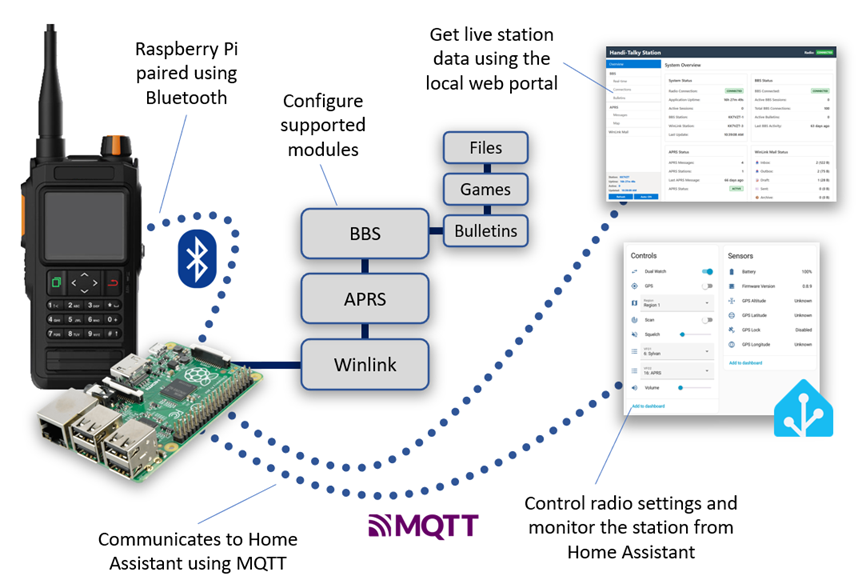
This is a base station software build in NodeJS that is tested to run on a Raspberry Pi and pairs to the radio over Bluetooth. Once setup, the software will offer various automated services. In general, the radio should be configured to monitor a home frequency and APRS at the same time. HTStation can run a BBS on the home frequence on one station id (N0CALL-2), and Winlink on a different station id (N0CALL-3) while at the same time monitoring APRS.
Radio Support
The following radios should work with this application:
- BTech UV-Pro
- RadioOddity GA-5WB
- Vero VR-N76
- Vero VR-N7500
- Vero VR-N7600
- Vero VR-N7600
Features
- Packet BBS - Run a bulletin board system for packet radio users to share messages, download files, and play games.
- WinLink Server - Local WinLink message exchange (currently local only, no cloud support).
- Echo Server - Test and debug packet radio connections by echoing back transmitted data.
- APRS Support - Send and receive APRS messages with authentication support.
- Web Dashboard - Browser-based interface for real-time monitoring and management.
- File Downloads - Serve files over packet radio using YAPP protocol.
- Interactive Games - Guess the Number, Blackjack, and Joke of the Day games over BBS.
- Home Assistant Integration - Control the region, VFO1 and VFO2 channels, volume, squelch, scan mode, dual-watch mode, see the battery state and more.
Raspberry Pi Installation
Here is a Quick Setup Guide to get you up and running. At a high level the steps are:
- Install NodeJS and NPM on your Raspberry Pi.
- Install Bluetooth dev libraries.
- Pair the radio to the Raspberry Pi over Bluetooth.
- Install HtStation using
npm install htstation - Setup your own config.ini.
- Run in the background using
node htstation --install
Documentation
More extensive documentation is available here.
Configuration
- Configuration Guide - Complete config.ini reference
- Bluetooth Setup - Pairing Bluetooth devices on Raspberry Pi
Services
- Echo Server Guide - Testing and debugging echo server
- BBS Guide - Bulletin Board System features and commands
- WinLink Guide - WinLink server configuration and usage
Integration & Monitoring
- Web Interface Guide - Using the web dashboard
- Home Assistant Integration - MQTT setup and automations
- Authentication Guide - APRS message authentication setup
Credits
This tool is based on the decoding work done by Kyle Husmann, KC3SLD and this BenLink project which decoded the Bluetooth commands for these radios.