
httpyac-plugin-reporter-html
v1.0.4
Published
httpYac plugin that generates a single standalone HTML report for all HTTP requests and test results
Downloads
0

Maintainers
 abhilashbiradar
Readme
httpyac-plugin-reporter-html
A zero-dependency httpYac plugin that generates a single, standalone HTML report for your entire HTTP test run — works offline, perfect for CI/CD.



▶ Live Report Demo — See a real generated HTML report from JSONPlaceholder API tests.

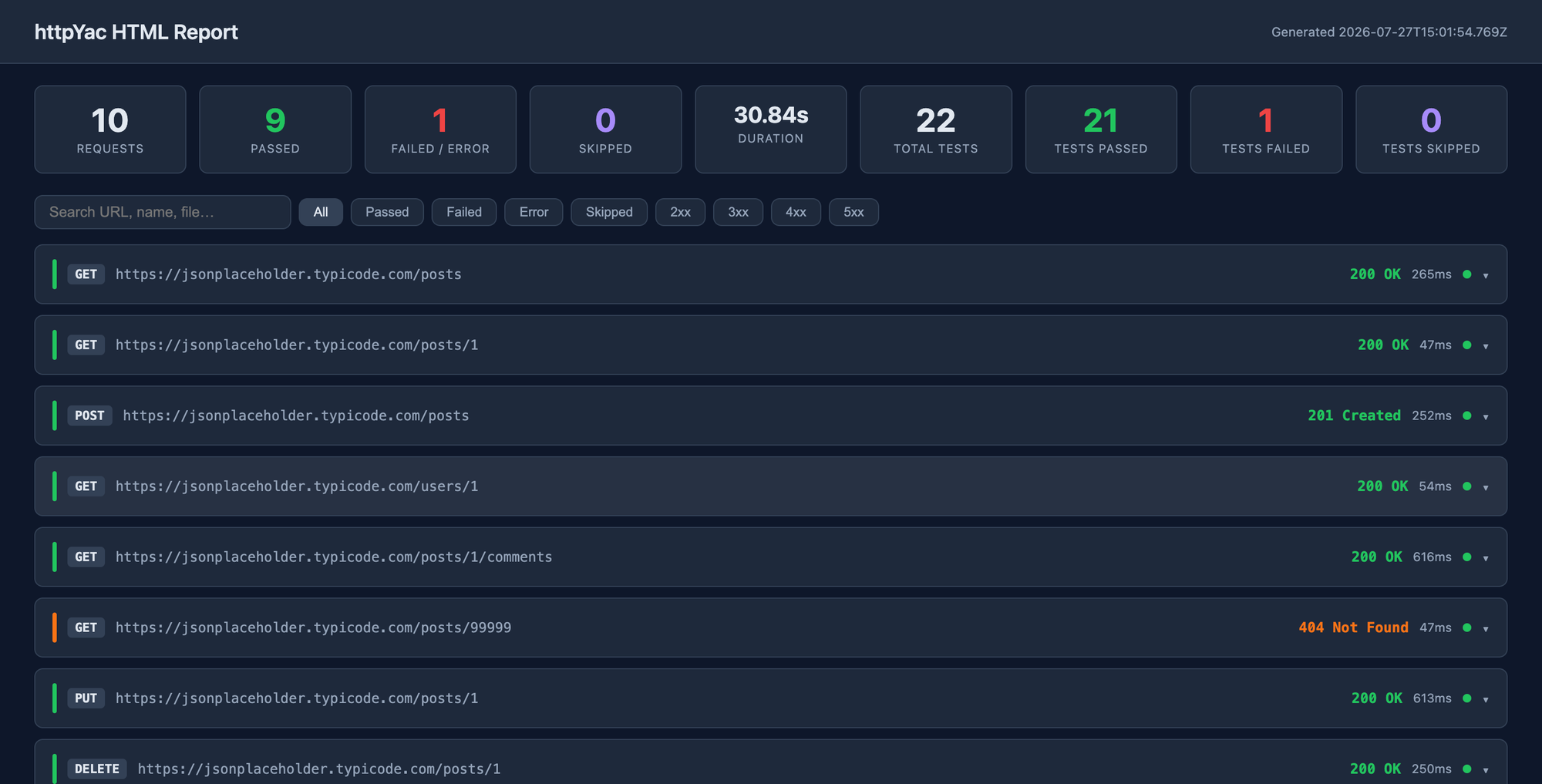
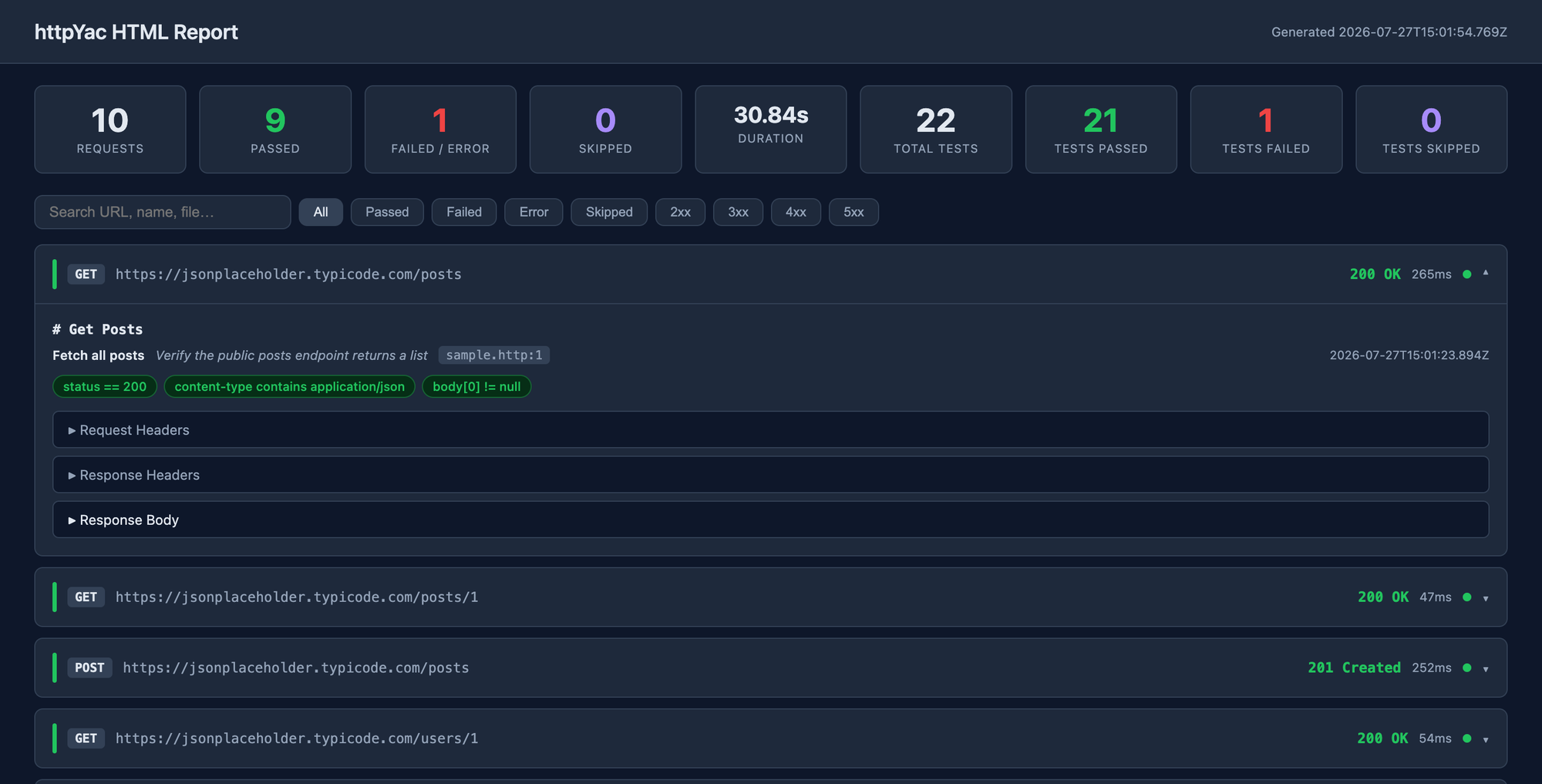
Preview
Features
- 9-stat summary hero — requests, passed, failed, skipped, duration + test-level totals
- Color-coded request cards — green (2xx), amber (3xx), orange (4xx), red (5xx)
- All 4 test statuses —
SUCCESSFAILEDERRORSKIPPEDbadges with full error detail - Collapsible panels — request headers, request body, response headers, response body (pretty-printed JSON)
- Metadata row — region name, title, description, source file + line, timestamp
- Filter & search — filter by outcome or HTTP status class, search by URL / name / file
- Single standalone file — all CSS and JS inlined, no internet required, share anywhere
- Auto-skips non-HTTP regions — AMQP, MQTT, gRPC, WebSocket regions are excluded
Requirements
| Dependency | Version | |---|---| | Node.js | >= 18 | | httpYac | >= 6.0.0 |
Installation
Global (CLI use)
npm install -g httpyac-plugin-reporter-htmlProject-local (recommended)
npm install --save-dev httpyac-plugin-reporter-htmlNo configuration needed. httpYac automatically discovers any installed package whose name matches
httpyac-plugin-*by scanning yourpackage.jsondependencies.
Usage
Run your .http files as normal:
httpyac send **/*.httpreport.html is written to your workspace root when the run finishes. Open it:
open report.html        # macOS
xdg-open report.html    # Linux
start report.html       # Windows
Configuration
Add an htmlReporter block to .httpyac.config.js at your project root:
module.exports = {
  htmlReporter: {
    title: 'My API Test Report',   // displayed in the report header
    outputFile: 'report.html',     // path relative to workspace root
  },
};
| Option | Type | Default | Description |
|---|---|---|---|
| title | string | "httpYac HTML Report" | Title shown in the report header |
| outputFile | string | "report.html" | Output file path relative to workspace root |
GitHub Actions
Use the official GitHub Action to run httpYac tests and generate the report in CI — no setup needed:
- uses: AbhilashBiradar/httpyac-html-report-action@v1
  with:
    files: '**/*.http'
    title: 'My API Test Report'
→ httpYac HTML Report on GitHub Marketplace
CI/CD Usage
The report is written progressively after each request — so even if a run is interrupted, you get a partial report.
GitHub Actions — complete example
Create .github/workflows/api-tests.yml in your project:
name: API Tests

on:
  push:
    branches: [main]
  pull_request:
    branches: [main]

jobs:
  api-tests:
    runs-on: ubuntu-latest

    steps:
      - name: Checkout code
        uses: actions/checkout@v4

      - name: Setup Node.js
        uses: actions/setup-node@v4
        with:
          node-version: 20
          cache: npm

      - name: Install dependencies
        run: npm ci

      - name: Install httpYac CLI
        run: npm install -g httpyac

      - name: Run HTTP tests
        run: httpyac send **/*.http --all
        # continues even if some assertions fail — we still want the report
        continue-on-error: true

      - name: Upload HTML report
        uses: actions/upload-artifact@v4
        if: always()   # upload even if tests failed
        with:
          name: http-test-report
          path: report.html
          retention-days: 30
After each run, the report is available under Actions → your run → Artifacts → http-test-report.
Tips
continue-on-error: trueensures the upload step always runs even when assertions failif: always()on the upload guarantees the report is saved regardless of job outcome- Increase
retention-days(max 90) if you want to keep reports longer for auditing
How it works
httpYac loads plugins automatically from dependencies / devDependencies matching httpyac-plugin-*. This plugin hooks into the responseLogging lifecycle event — which fires after all @assert / test blocks have run — so test results are always fully populated in the report.
Contributing
- Fork the repo
- Create a branch:
git checkout -b feat/my-feature - Commit and open a pull request
Bug reports and feature requests → GitHub Issues
💬 Questions, ideas, feedback → GitHub Discussions
License
MIT © Abhilash Biradar