
hyp-sprites-img
v0.1.4
Published
基于 Vue 3 + Vite 的雪碧图工具:构建期生成每帧坐标,支持远程图、网格与透明区检测,告别手写 background-position。

Maintainers
 rupiong
Readme
hyp-sprites-img



npm 包名:hyp-sprites-img。源码与示例 playground 见仓库 Rupiong/hyp-sprites-img-vue。
简体中文
目录
简介
基于 Vite 与 Vue 3 的雪碧图(精灵图)工具:构建期根据整图与布局规则生成静态的每帧 x / y / width / height,运行时通过 Vue 组件用 background-position / background-size 展示单帧。
快速开始
npm install hyp-sprites-img// vite.config.ts(需同时使用 @vitejs/plugin-vue)
import { defineConfig } from 'vite'
import vue from '@vitejs/plugin-vue'
import { hypSpritesImg } from 'hyp-sprites-img'
export default defineConfig({
plugins: [
vue(),
hypSpritesImg([{ url: 'src/assets/sprites.png', name: 'sprites1', spritesName: ['a', 'b'] }]),
],
})<script setup lang="ts">
import { hypSpritesImgCom } from 'hyp-sprites-img/vue'
</script>
<template>
<hypSpritesImgCom name="sprites1" sprites-name="a" width="100px" height="100px" />
</template>对等依赖:vite(5 或 6)、vue(3)。完整选项见下文 配置项。
功能概览
| 能力 | 说明 |
|------|------|
| 远程雪碧图 | url 支持 http(s)://:构建期下载并缓存以量尺寸/做检测;manifest 保留远程地址,整图不打进 bundle。 |
| 开发预览 | 第二参数 preview: true(或对象)在 vite dev 下提供「组 × 帧」预览与复制片段;仅开发态,不参与 build 产物。 |
| 连通域检测 | detect: true 时按透明区分小图;可选 detectMergeGap(Chebyshev 膨胀)合并被细缝拆开的块;不写 spritesName/count 时可自动导出全部区域,帧名 "0"…"n-1"。 |
| 组件展示 | width/height 支持 px、数字与百分比(百分比时按元素实际尺寸换算背景);positionX/positionY 可微调 background-position(px);支持透传 class 与合并 style。 |
能为项目带来什么
- 请求与缓存:多张小图合并为一张,浏览器只加载一次,便于控制请求数与整图长期缓存。
- 坐标构建期确定:manifest 写入每帧矩形,页面按名称取用,无需 Canvas 量图或手写大量
background-position。 - 声明式维护:
<hypSpritesImgCom>按name/spritesName切帧,改图或改布局主要动配置与资源。 - 布局灵活:横/竖等分、网格,以及基于透明背景的连通域检测(含缝隙合并与全量导出)。
- 开发体验:可选预览页核对组与帧并复制片段;与 Vite 虚拟模块、
hyp-sprites-img/virtual类型提示及 Vue 3 用法一致。
安装与对等依赖
npm install hyp-sprites-img对等依赖:vite(5 或 6)、vue(3)。
为何从 hyp-sprites-img/vue 导入组件
主入口 hyp-sprites-img 仅包含 Vite 插件与布局计算,避免在 vite.config.ts 中 import { hypSpritesImg } from 'hyp-sprites-img' 时 Node 去解析 virtual:hyp-sprites-img。Vue 组件依赖该虚拟模块,请从子路径导入:
import { hypSpritesImgCom } from 'hyp-sprites-img/vue'Vite 配置
在 Vue 项目中需同时使用 @vitejs/plugin-vue 与本插件。url 可为相对项目根的路径、path.resolve 的本地路径,或 http:// / https:// 远程地址(构建时下载并缓存;manifest 保留远程 URL,不把整图打进产物)。
import path from 'node:path'
import { defineConfig, type PluginOption } from 'vite'
import vue from '@vitejs/plugin-vue'
import { hypSpritesImg } from 'hyp-sprites-img'

export default defineConfig({
  plugins: [
    vue(),
    hypSpritesImg(
      [
        {
          url: path.resolve(__dirname, 'src/assets/css_sprites2.png'),
          name: 'sprites1',
          detect: true,
          alphaThreshold: 128,
          minRegionArea: 10,
          detectMergeGap: 5,
        },
        /** 不写 count / spritesName:detect 自动导出全部连通块,帧名为 "0"…"n-1"。 */
        {
          url: 'https://tdesign.gtimg.com/site/brand/wechat-pay.png',
          name: 'sprites2',
          detect: true,
          alphaThreshold: 128,
          minRegionArea: 4,
          detectMergeGap: 20,
        },
        {
          url: path.resolve(__dirname, 'src/assets/css_sprites_icon.png'),
          name: 'app_icon',
          detect: true,
          alphaThreshold: 128,
          minRegionArea: 4,
          detectMergeGap: 4,
        },
      ],
      {
        preview: true,
        // path: '/__hyp-sprites-img-preview',
        // port: 5180,
      },
    ) as PluginOption,
  ],
})
开发时雪碧图预览
仅在 vite dev 下生效。第二参数开启后,在开发服务器上提供「所有组 × 所有帧」缩略图预览(一级标题为配置中的 name,二级为帧名),并可复制 <hypSpritesImgCom … /> 或帧名。默认关闭,避免误暴露路由。
最小示例(仅开启预览):
import { defineConfig, type PluginOption } from 'vite'
import vue from '@vitejs/plugin-vue'
import { hypSpritesImg } from 'hyp-sprites-img'

export default defineConfig({
  plugins: [
    vue(),
    hypSpritesImg(
      [{ url: 'src/assets/sprites.png', name: 'sprites1', spritesName: ['a', 'b'] }],
      { preview: true },
    ) as PluginOption,
  ],
})
行为说明
- 终端会打印类似:
[hyp-sprites-img] 雪碧图预览: http://localhost:5173/__hyp-sprites-img-preview(若配置了server.base会带前缀)。 - 对象形式:
{ preview: { path: '/__hyp-sprites-img-preview', port: 5180 } }。path挂载在当前 dev;port为可选额外端口,仅该端口提供同一预览页,整图仍从主 dev 加载。 - 不适用于
vite build/vite preview产物。
界面示意
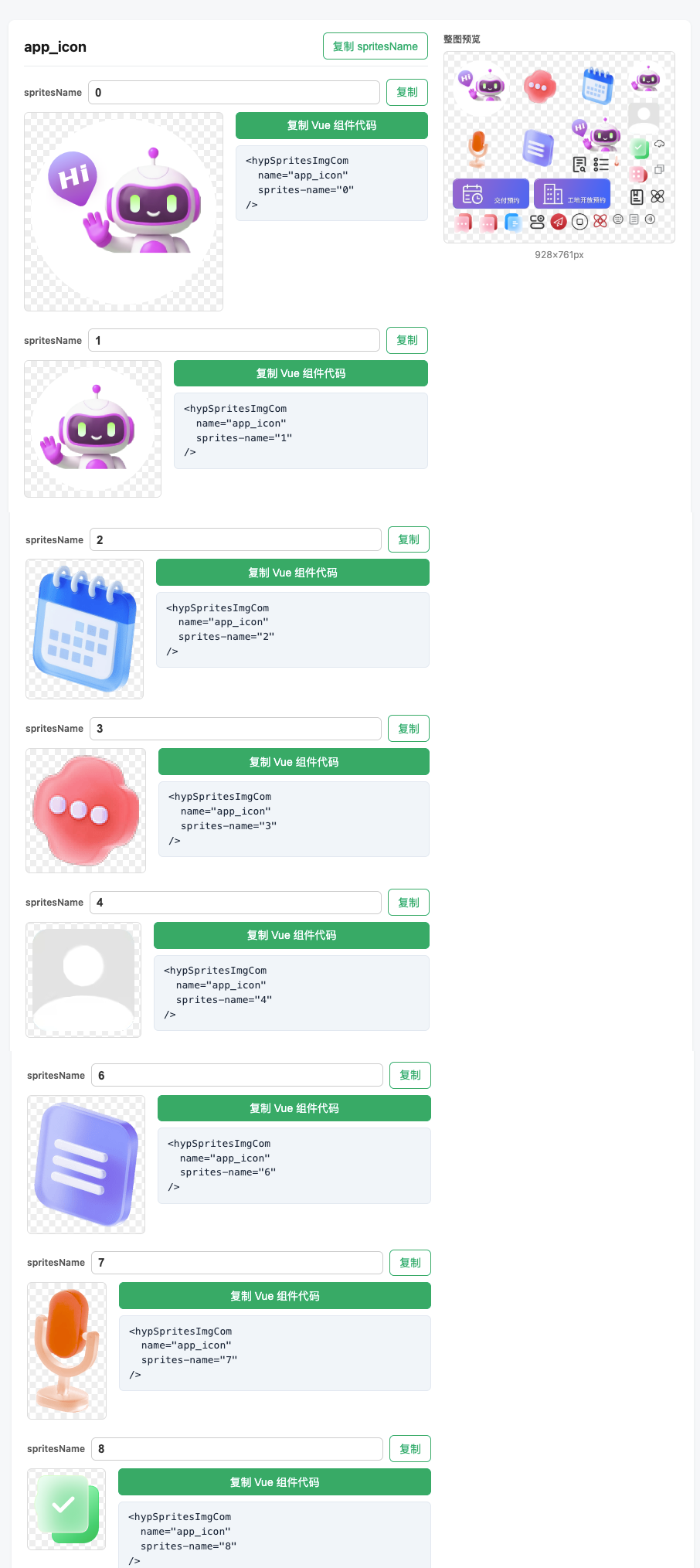
页面功能
| 功能 | 说明 |
|------|------|
| 整图预览 | 每组右侧展示原图与 宽×高,对照切分与美术稿。 |
| 每帧缩略图 | 与运行时相同的 background-position / background-size。 |
| 复制代码 | 生成 <hypSpritesImgCom … />,可贴入 .vue。 |
| 复制帧名 | 单帧名;组旁可复制整组 spritesName 数组(如 ["a","b"])。 |
| 帧名输入框 | 临时改名预览文案;仅当前页,不写磁盘或 manifest。 |
配置项说明
| 字段 | 说明 |
|------|------|
| url | 雪碧图:本地(相对项目根、Vite 可解析或绝对路径),或 http(s):// 远程 URL |
| name | 组 id,组件里 name 对应;全局唯一 |
| spritesName | 可选。每帧名称,顺序与切分一致;帧数 N = 数组长度 |
| count | 未提供 spritesName 时必填(detect: true 且两者都省略时除外)。帧名 "0", "1", … |
| layout | 可选。省略时按整图比例自动推断:宽 ≥ 高为 horizontal;高 > 宽为 vertical。或显式 horizontal / vertical / { type: 'grid', rows, cols }(网格先行后列) |
| detect | true 时启用连通域检测,不再使用 layout 等分 |
| alphaThreshold | 仅 detect:alpha > 阈值 为前景,默认 128 |
| minRegionArea | 仅 detect:小于该像素数的连通块忽略,默认 4 |
| detectMergeGap | 仅 detect:Chebyshev 膨胀半径(像素),合并同一帧内被细缝拆开的块;默认 0 |
连通域自动检测
当配置中 detect: true 时:
构建期用 sharp 解码为 RGBA(等价于浏览器 Image + Canvas + getImageData)。
- 对 alpha 阈值化 → 二值前景 mask。
- 四连通 flood fill 标记连通域。
- 每域取外接矩形(
x, y, width, height)。 - 按先上后下、再先左后右(左上角
(y, x))排序。 - 与
spritesName(或count的"0"…)顺序一一对应;有效连通块数须 ≥ 名称个数。 - 若
spritesName与count均未配置,自动包含全部区域,帧名"0"…"n-1"。
适用于小图间透明背景分隔;整图不透明或块相连会并成一大域,需改图或改用等分 layout。抗锯齿边缘碎块可调 alphaThreshold / minRegionArea / detectMergeGap。
布局规则(等分模式)
在未开启 detect 时,按 layout 或默认推断等分:
- 未写
layout:inferDefaultLayout— 横/方图默认从左到右切宽;竖图从上到下切高。方图若实际纵向叠放,请写layout: 'vertical'。 vertical:整宽为每帧宽,高度 N 等分,自上而下第i帧(从 0 起)。horizontal:整高为每帧高,宽度 N 等分,自左而右。grid:rows × cols等大格;帧先行后列,前 N 个名称对应前 N 格。
页面中使用
<script setup lang="ts">
import { hypSpritesImgCom } from 'hyp-sprites-img/vue'
</script>

<template>
  <hypSpritesImgCom name="sprites1" sprites-name="button" width="100px" height="100px" />
</template>
组件属性
| 属性 | 说明 |
|------|------|
| name | 对应配置 name;不传则用配置数组第一组 |
| spritesName | 小图名或 index 字符串(如 "0");不传默认 "0" |
| width / height | 可选。不传用 manifest 宽高;只传一边按比例;都传则拉伸;支持 px、数字、百分比(ResizeObserver 换算 background-size) |
| positionX / positionY | 可选。微调 background-position(px) |
根节点 inheritAttrs: false:可透传 class 等;style 与内部合并,后者在后便于覆盖。
TypeScript
在 env.d.ts 或 vite-env.d.ts 中:
/// <reference types="hyp-sprites-img/virtual" />限制与说明
- 等分模式:矩形来自
layout/ 默认推断。 detect:依赖透明与阈值;极端抗锯齿可能产生边缘碎块。- 本地
url:须在项目内可被 Vite 解析。远程url:构建时联网下载并缓存;manifest 保留远程地址,整图不随 bundle 输出。
开发本仓库
npm install
npm run build
cd playground && npm install && npm run dev
playground 通过 file:.. 依赖本地包,便于联调。
许可证
MIT,见 LICENSE。
English
Contents
- Overview
- Quick start
- At a glance
- Installation
- Why hyp-sprites-img/vue
- Vite configuration
- Dev sprite preview
- Options
- Detection
- Layout rules
- Using in the app
- TypeScript
- Limitations
- Developing this repo
Overview
A Vite + Vue 3 sprite sheet tool: at build time it emits static per-frame x / y / width / height; at runtime a Vue component renders each frame with background-position / background-size.
npm package: hyp-sprites-img. Source and playground live in Rupiong/hyp-sprites-img-vue.
Quick start
npm install hyp-sprites-img// vite.config.ts (use with @vitejs/plugin-vue)
import { defineConfig } from 'vite'
import vue from '@vitejs/plugin-vue'
import { hypSpritesImg } from 'hyp-sprites-img'
export default defineConfig({
plugins: [
vue(),
hypSpritesImg([{ url: 'src/assets/sprites.png', name: 'sprites1', spritesName: ['a', 'b'] }]),
],
})<script setup lang="ts">
import { hypSpritesImgCom } from 'hyp-sprites-img/vue'
</script>
<template>
<hypSpritesImgCom name="sprites1" sprites-name="a" width="100px" height="100px" />
</template>Peer dependencies: vite (5 or 6), vue (3). See Options for the full list.
At a glance
| Capability | Notes |
|------------|--------|
| Remote sprites | url may be http(s)://: downloaded and cached at build; manifest keeps the URL; the image is not bundled. |
| Dev preview | Second argument preview: true (or an object) serves a group × frame preview under vite dev; dev only, not in build output. |
| Detection | detect: true; optional detectMergeGap merges gap-split regions. Omit both spritesName and count to export all regions as "0"…"n-1". |
| Component | width/height: px, numbers, or percent; positionX/positionY in px; class passthrough and merged style. |
What it offers
- Requests & caching: One sprite load instead of many small assets; good for request count and long-lived caching.
- Build-time coordinates: Manifest holds rectangles; no Canvas probing or hand-written
background-position. - Declarative:
<hypSpritesImgCom>withname/spritesName; changes mostly go to config and assets. - Flexible layout: Equal splits, grid, and connected-component detection (gap merge, export-all).
- DX: Optional dev preview; Vite virtual module +
hyp-sprites-img/virtualtypes; Vue 3–friendly.
Installation
npm install hyp-sprites-imgPeer dependencies: vite (5 or 6), vue (3).
Why hyp-sprites-img/vue
The main entry only exposes the Vite plugin and layout helpers, so importing the plugin in vite.config.ts does not pull in virtual:hyp-sprites-img. The Vue component needs that virtual module:
import { hypSpritesImgCom } from 'hyp-sprites-img/vue'Vite configuration
Use @vitejs/plugin-vue with this plugin. url may be project-relative, path.resolve(…), or remote http:// / https:// (downloaded and cached at build; manifest keeps the URL; image not bundled).
import path from 'node:path'
import { defineConfig, type PluginOption } from 'vite'
import vue from '@vitejs/plugin-vue'
import { hypSpritesImg } from 'hyp-sprites-img'

export default defineConfig({
  plugins: [
    vue(),
    hypSpritesImg(
      [
        {
          url: path.resolve(__dirname, 'src/assets/css_sprites2.png'),
          name: 'sprites1',
          detect: true,
          alphaThreshold: 128,
          minRegionArea: 10,
          detectMergeGap: 5,
        },
        /** Omit both count and spritesName: detect exports every region as "0"…"n-1". */
        {
          url: 'https://tdesign.gtimg.com/site/brand/wechat-pay.png',
          name: 'sprites2',
          detect: true,
          alphaThreshold: 128,
          minRegionArea: 4,
          detectMergeGap: 20,
        },
        {
          url: path.resolve(__dirname, 'src/assets/css_sprites_icon.png'),
          name: 'app_icon',
          detect: true,
          alphaThreshold: 128,
          minRegionArea: 4,
          detectMergeGap: 4,
        },
      ],
      {
        preview: true,
        // path: '/__hyp-sprites-img-preview',
        // port: 5180,
      },
    ) as PluginOption,
  ],
})
Dev sprite preview
vite dev only. Optional second argument: thumbnails for every group × frame, plus copy actions for snippets and frame names. Off by default.
Minimal example (preview only):
import { defineConfig, type PluginOption } from 'vite'
import vue from '@vitejs/plugin-vue'
import { hypSpritesImg } from 'hyp-sprites-img'

export default defineConfig({
  plugins: [
    vue(),
    hypSpritesImg(
      [{ url: 'src/assets/sprites.png', name: 'sprites1', spritesName: ['a', 'b'] }],
      { preview: true },
    ) as PluginOption,
  ],
})
Behavior
- Terminal prints a line like:
[hyp-sprites-img] … http://localhost:5173/__hyp-sprites-img-preview(respectsserver.base). - Object form:
{ preview: { path: '/__hyp-sprites-img-preview', port: 5180 } }.pathis on the current dev server; optionalportserves the same UI on another port (assets still load from the main dev origin). - Not for
vite build/vite preview.
Screenshot
What’s on the page
| Feature | Description |
|---------|-------------|
| Full sheet | Original image and width×height per group. |
| Per-frame thumbs | Same background-position / background-size as runtime. |
| Copy snippet | <hypSpritesImgCom … /> for pasting into .vue files. |
| Copy names | Single frame key; group control copies the whole spritesName array. |
| Name inputs | Temporary renames for preview—in-memory only. |
Options
| Field | Description |
|-------|-------------|
| url | Local path (project-relative, Vite-resolvable, or absolute) or http(s):// remote URL |
| name | Group id for the name prop; must be unique |
| spritesName | Optional. Frame names in split order; N = array length |
| count | Required if spritesName is omitted (except detect: true with both omitted). Names "0", "1", … |
| layout | Optional. Omitted → inferred: width ≥ height → horizontal; height > width → vertical. Or horizontal / vertical / { type: 'grid', rows, cols } (row-major) |
| detect | true → connected-component detection; equal-split layout is not used |
| alphaThreshold | Only with detect: alpha > threshold = foreground; default 128 |
| minRegionArea | Only with detect: ignore smaller regions; default 4 |
| detectMergeGap | Only with detect: Chebyshev dilation radius to merge gap-split pieces; default 0 |
Connected-component detection
With detect: true, at build time sharp decodes the image to RGBA (same idea as browser Image + Canvas + getImageData).
- Threshold alpha → binary mask.
- 4-connected flood fill.
- Bounding box per region.
- Sort top-to-bottom, then left-to-right (
(y, x)). - Pair with
spritesName(or"0"…fromcount) in order; valid region count ≥ name count. - If neither
spritesNamenorcountis set, export all regions as"0"…"n-1".
Best with transparent gaps between sprites; opaque or touching art merges regions—fix the sheet or use equal-split layout. Tune alphaThreshold / minRegionArea / detectMergeGap for anti-aliasing edge fragments.
Layout rules (equal split)
When detect is not enabled, rectangles come from layout or default inference:
- Default:
inferDefaultLayout— wide/square → left-to-right; tall → top-to-bottom. Vertically stacked art on a square sheet → setlayout: 'vertical'. vertical: Full width per frame; height in N equal bands, top to bottom.horizontal: Full height per frame; width in N equal bands, left to right.grid:rows × colsequal cells; row-major; first N names → first N cells.
Using in the app
<script setup lang="ts">
import { hypSpritesImgCom } from 'hyp-sprites-img/vue'
</script>

<template>
  <hypSpritesImgCom name="sprites1" sprites-name="button" width="100px" height="100px" />
</template>
Component props
| Prop | Description |
|------|-------------|
| name | Matches config name; omitted → first group |
| spritesName | Frame key or index (e.g. "0"); defaults to "0" |
| width / height | Optional. Omitted → manifest size; one side → proportional; both → stretch; px, numbers, or percent (ResizeObserver for background-size) |
| positionX / positionY | Optional. Override background-position (px) |
inheritAttrs: false: class and native attrs on the root; style is merged (user last).
TypeScript
In env.d.ts or vite-env.d.ts:
/// <reference types="hyp-sprites-img/virtual" />Limitations
- Equal split: rectangles from
layout/ default inference. detect: transparency and thresholds; heavy anti-aliasing may leave edge fragments.- Local
url: must resolve for Vite. Remoteurl: fetched at build; manifest keeps URL; image not in the bundle.
Developing this repo
npm install
npm run build
cd playground && npm install && npm run dev
The playground uses file:.. for local integration testing.
License
MIT — see LICENSE.