
i18n-ai-diff
v1.3.0
Published
Local-first AI i18n CLI and panel for JSON locales, with multi-master routing, diff-only translation, caching, and table editing.

Maintainers
 juntong-wu
Readme
i18n-ai-diff
中文 | English
i18n-ai-diff is an incremental AI translation tool for application localization. You maintain the master-language JSON files; it detects added, modified, and deleted keys, sends only necessary text to an LLM, and synchronizes the results to target-language files.
It supports both single-master projects, where every target comes from one master, and multi-master projects such as Japanese and Korean from Chinese while German, Italian, French, and Spanish come from English. Existing target translations are treated as reviewed assets. Changing a route does not automatically retranslate them; they are refreshed only after a later master-text change or an explicit -f run.
Install
Requires Node.js 18.19 or newer.
Install it in your project:
npm install i18n-ai-diffYou can also run it directly with npx i18n-ai-diff without installing it globally.
Step 1: Prepare the locale directory
Create a locale directory in your project. Each language gets a subdirectory containing JSON files at any nesting depth.
Language directory names are project language identifiers, not a strict IETF BCP 47 whitelist. Standard tags such as zh-CN and project-specific names such as zh_CN are both valid. Keep each identifier as one safe directory segment: letters, numbers, ., _, and - are allowed; path separators, :, NUL bytes, and empty values are rejected.
The smallest single-master project only needs its master directory initially:
src/i18n/messages/
└── en/
    ├── common.json
    └── pages/
        └── home.json
For example, en/common.json:
{
  "common": {
    "confirm": "Confirm",
    "cancel": "Cancel"
  },
  "brandName": "DWARFLAB"
}
Target directories and JSON files do not need to exist. They are created during the first translation:
src/i18n/messages/
├── en/           # Master
├── ja/           # Created automatically
├── ko/           # Created automatically
└── fr/           # Created automatically
Locale JSON currently processes string values only. Nested objects are supported at any depth; numbers, booleans, arrays, and null are not translated.
Step 2: Create the configuration
Create i18n-translate.config.ts in the project root:
import { defineConfig } from 'i18n-ai-diff';

export default defineConfig({
  baseLang: 'en',
  targetLangs: ['ja', 'ko', 'fr'],
  localesDir: './src/i18n/messages',

  llm: {
    apiKey: process.env.OPENAI_API_KEY || '',
    model: 'gpt-4o-mini',
  },
});
Then set the API key:
export OPENAI_API_KEY="your-api-key"You can use baseURL to connect to any OpenAI Chat Completions-compatible service.
Single-master mode
Use baseLang + targetLangs when every target language comes from the same master:
export default defineConfig({
  baseLang: 'en',
  targetLangs: ['zh-CN', 'ja', 'ko', 'fr', 'de'],
  localesDir: './src/i18n/messages',
  llm: {
    apiKey: process.env.OPENAI_API_KEY || '',
    model: 'gpt-4o-mini',
  },
});
Translation route:
en → zh-CN, ja, ko, fr, deThis mode has the smallest configuration and is the easiest place to start.
Multi-master mode
Use routes when different target languages require different masters:
import { defineConfig } from 'i18n-ai-diff';

export default defineConfig({
  routes: [
    {
      sourceLang: 'zh-CN',
      targetLangs: ['ja', 'ko'],
    },
    {
      sourceLang: 'en',
      targetLangs: ['de', 'it', 'fr', 'es'],
    },
  ],
  localesDir: './src/i18n/messages',

  llm: {
    apiKey: process.env.OPENAI_API_KEY || '',
    model: 'gpt-4o-mini',
  },
});
Directory layout and routes:
src/i18n/messages/
├── zh-CN/        # Chinese master ─→ ja, ko
├── en/           # English master ─→ de, it, fr, es
├── ja/
├── ko/
├── de/
├── it/
├── fr/
└── es/
Multi-master rules:
- Each master language is configured in exactly one route
- Each target language belongs to exactly one master route
- A language cannot be both a master and a target, preventing chained writes in Watch mode
- Multi-master
routesusesourceLang + targetLangsand cannot be mixed with top-levelbaseLang + targetLangs - Reassigning a target to another master preserves its existing translations and establishes a new incremental baseline
Both modes are normalized to the same internal sourceLang → targetLang tasks, cache keys, and snapshot rules.
Legacy multi-master route entries using baseLang are still accepted for existing projects, but new configurations should use sourceLang.
Common configuration
A more complete configuration:
export default defineConfig({
  routes: [
    { sourceLang: 'zh-CN', targetLangs: ['ja', 'ko'] },
    { sourceLang: 'en', targetLangs: ['de', 'it', 'fr', 'es'] },
  ],
  localesDir: './src/i18n/messages',

  skipKeys: [
    'common.brandName',
    'footer.**',
  ],

  prompt: '"DWARF" and "DWARFLAB" are brand names and must NOT be translated. Use terminology appropriate for astrophotography.',

  llm: {
    apiKey: process.env.OPENAI_API_KEY || '',
    model: 'gpt-4o-mini',
    baseURL: 'https://api.openai.com/v1',
    maxTokens: 4096,
    temperature: 0.3,
    timeout: 60000,
    retries: 3,
  },

  concurrency: 3,
  batchSize: 20,
  watch: {
    debounceMs: 300,
    ignored: ['node_modules/**', '**/*.ts'],
  },
  cachePath: '.i18n-translate-cache.json',
});
skipKeys accepts glob-style dotted paths and JSON Pointer patterns. For example, footer.** keeps every string below footer equal to its master text, while /section/a.b can target a literal key that contains a dot.
watch only configures the CLI watch loop; it does not enable watch mode by itself.
Configuration reference:
| Field | Default | Notes |
| --- | --- | --- |
| baseLang + targetLangs | none | Single-master mode. Use when every target comes from one master. |
| routes | none | Multi-master mode. Each route is { sourceLang, targetLangs }; do not mix with top-level baseLang + targetLangs. |
| localesDir | required | Directory containing one subdirectory per language. Relative paths are resolved from the config file. |
| skipKeys | [] | Glob-style dotted paths or JSON Pointer patterns. Skipped keys are never sent to AI translation. |
| prompt | '' | Extra instruction appended to translation prompts. |
| llm.apiKey | required | OpenAI-compatible API key. You can also provide it through OPENAI_API_KEY. |
| llm.model | gpt-4o-mini | Any model supported by your OpenAI-compatible provider. |
| llm.baseURL | OpenAI default | Optional OpenAI Chat Completions-compatible endpoint. |
| llm.maxTokens | 4096 | Maximum model response tokens per batch. |
| llm.temperature | 0.3 | Lower values are usually safer for UI copy. |
| llm.timeout | 60000 | Request timeout in milliseconds. |
| llm.retries | 3 | Retry count for failed translation requests. |
| concurrency | 3 | Number of files processed in parallel. The visual settings editor accepts 1–10. |
| batchSize | 20 | Number of keys sent per LLM batch. The visual settings editor accepts 1–100. |
| watch.debounceMs | 300 | Debounce delay for explicit --watch mode. |
| watch.ignored | [] | Chokidar ignore patterns used only after --watch is enabled. |
| cachePath | .i18n-translate-cache.json | Translation cache path. The companion snapshot is stored next to it as *.snapshot.json. |
Inspect with the local panel
Open the project dashboard after creating the configuration:
npx i18n-ai-diff panelThe panel runs only on 127.0.0.1 and opens in your default browser. The project overview visualizes single-master or multi-master routes, scans source/target differences, and reports cache and snapshot state without calling the LLM or writing translation files.
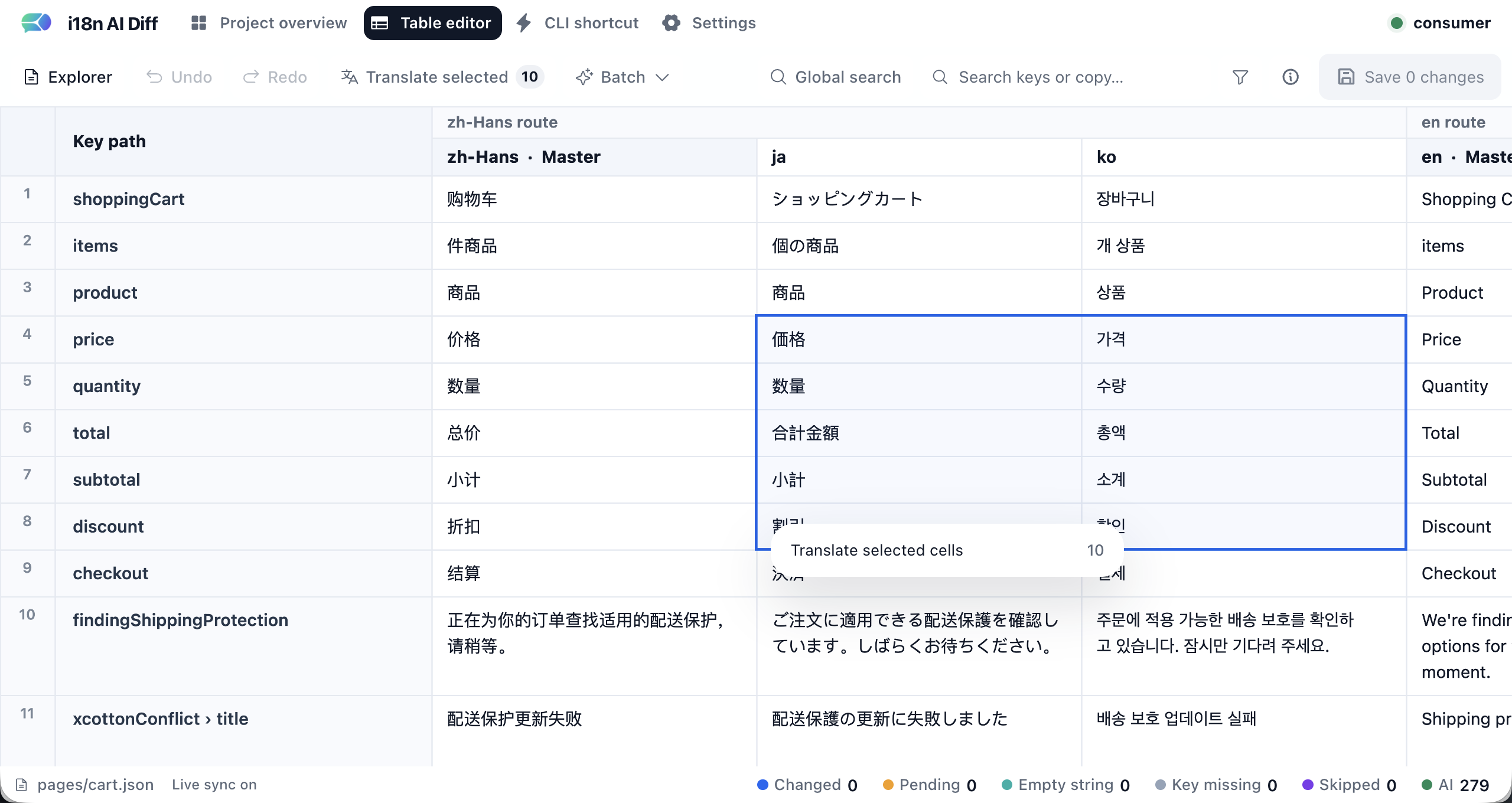
The Table editor aligns every existing string key across the configured languages.
Choose a logical JSON file, edit existing cells or fill missing languages, then use Save N changes. Each row uses a JSON Pointer internally, so nested keys and literal key names containing ., /, or ~ are preserved. Arrays, objects, numbers, booleans, and null stay visible only through their surrounding file and are never replaced by table edits.
Saving is deliberately bounded: it accepts only configured languages and existing logical JSON files, checks every file revision before writing, and uses same-directory atomic replacements. Manual target-language edits update that target's source snapshot as reviewed; master-language edits leave untouched targets pending.
The editor can also translate selected target cells into the browser draft. In multi-master projects, right-click a master-language column header to run a one-time translation from another master into that master. AI results still require Save N changes before any local file or cache is updated.
The CLI shortcut page is for cross-file operations that should behave like the command line. It can run the same project-wide flows directly: incremental pending translation, force refresh with optional language scope, and one-time master-to-master translation. Unlike Table editor AI drafts, CLI shortcut runs write local files, cache, and snapshots immediately after confirmation.
The Settings page visualizes i18n-translate.config.mjs as editable project structure, language routes, locale/cache paths, and AI behavior fields such as prompt, skip keys, concurrency, batch size, and CLI watch debounce/ignore patterns. A settings save patches managed fields inside the exported config object; it preserves custom imports, helper functions, comments outside changed managed properties, and the user-owned llm block. It does not touch locale JSON, cache, or snapshots. Panel style preferences such as the panel language are personal browser preferences stored in localStorage and are never written to project config. Restart the panel after saving config so the new routes, paths, prompt, batch behavior, or watcher settings become the active runtime configuration.
npx i18n-ai-diff panel --port 4180   # Choose a local port
npx i18n-ai-diff panel --port 0      # Ask the OS to choose an available loopback port
npx i18n-ai-diff panel --no-open     # Start without opening the browser
Step 3: Run the first translation
After creating the configuration, run this from the project root:
npx i18n-ai-diffThe tool will:
- Load and validate the configuration
- Scan JSON files in every master directory
- Match each file to its target-language routes
- Translate missing or outdated keys
- Create or update target-language JSON files
- Save the translation cache and source snapshots
If no master text changes, subsequent runs make no translation API calls.
Watch during development
Run one incremental translation and then watch every master directory:
npx i18n-ai-diff -wA master-file change updates only the target languages in that master's route. Press Ctrl+C to stop.
You can tune the watch loop in i18n-translate.config.mjs:
export default defineConfig({
  // ...
  watch: {
    debounceMs: 300, // wait after a burst of file changes before translating
    ignored: ['node_modules/**', '**/*.ts'], // chokidar ignore patterns
  },
});
The watch object only controls watch parameters. Starting watch mode is always explicit with -w / --watch.
Process selected languages
npx i18n-ai-diff -l fr ja koMulti-master mode preserves the configured routes. With zh-CN → ja, ko and en → de, it, fr, es, this command executes:
zh-CN → ja, ko
en    → fr
In multi-master mode, every selected language must already belong to a route. In single-master mode, the option preserves its original behavior and can temporarily override the configured targets. It affects only the current run and does not modify the configuration file.
Force a full refresh
When you explicitly want to refresh existing translations, run:
npx i18n-ai-diff -fThis clears the translation cache, ignores existing target translations, and retranslates every non-skipped key. Changing the model, prompt, or master routes does not by itself refresh reviewed translations.
Combine it with language selection to refresh only specific targets:
npx i18n-ai-diff -f -l fr ja koWhen --force is combined with --langs, only the selected target-language cache scope is cleared. Cache entries for unselected languages are preserved.
One-time master-to-master translation
Multi-master projects can occasionally need to bootstrap one master from another master, without making that pair part of the normal route graph:
npx i18n-ai-diff translate-master --from zh-CN --to enThis command is only available in multi-master mode, and both --from and --to must be configured sourceLang values. By default it translates only missing values or values that are still equal to the source master text, while preserving already-reviewed target-master copy and target-only keys.
Use --force only when you explicitly want to overwrite the target master with fresh LLM output and ignore cache hits:
npx i18n-ai-diff translate-master --from zh-CN --to en --forceYou can also scope the one-time run to specific logical JSON files:
npx i18n-ai-diff translate-master --from zh-CN --to en --file common.json pages/home.jsonOther CLI options
npx i18n-ai-diff -c ./path/to/config.ts   # Use a specific config file
npx i18n-ai-diff --verbose                # Print detailed logs
npx i18n-ai-diff -v                       # Print the version
How it works
- Every master route scans, compares, and generates its target files independently
- Source snapshots detect later master-text changes
- Translation cache entries are isolated by
sourceLang + sourceText + targetLang - Only new keys, changed source text, or values still equal to master text are translated
- Existing target translations are treated as reviewed assets by default
- Keys deleted from the master are removed from target files
- In Watch mode, deleting a master file removes the corresponding target files for that route
- Normal incremental runs do not prune old cache entries; explicit force refresh clears only the requested cache scope
Troubleshooting
Config file not found
Make sure i18n-translate.config.ts exists in the project root, or specify it with -c.
llm.apiKey is required
Set llm.apiKey in the configuration or provide the OPENAI_API_KEY environment variable.
Batch translation failed: Translation failed after N retries: Request was aborted.
The request did not finish before its timeout. Check:
- Whether your network proxy or VPN can reach the configured LLM service
- Whether the LLM service is rate-limited or unstable
- Whether
timeoutis too low - Whether
batchSizeis too large - Whether
concurrencyis too high
Try:
llm: {
  timeout: 120000,
  retries: 5,
},
batchSize: 10,
concurrency: 2,
LLM returned empty content
The model returned no content. Reduce the batch size or concurrency, or switch to another model.
Cache version mismatch, resetting
The cache format changed after an upgrade, so the old cache is reset automatically. Existing target translations are not retranslated; the tool preserves them and establishes new incremental snapshots.
N keys failed, see .i18n-translate-failures.md
Some keys failed to translate. Open .i18n-translate-failures.md in the project root and run the normal translation command again to retry them.
License
MIT