
iconmate
v1.2.1
Published
CLI to fetch icons and save them into your Vite, NextJS, or similar TypeScript project

Maintainers
 blankeos
Readme
Built from my blog post on Why you might not need an icon library, iconmate is a Rust-powered CLI for developers who want the speed and control of plain files without icon-package bloat.
Use icones.js.org, a direct SVG URL, or raw SVG markup. iconmate drops the icon straight into your project and keeps your exports tidy.
Why iconmate?
- Made with Rust🦀: Fast TUI that you can use on any IDE (powered by ratatui, nucleo).
- AI-ready automation 🤖: Let your coding agents get icons and add it to your project! A CLI is basically an MCP, just let AI use
iconmate --helpand it should be able to get everything running! - Zero dependencies 📦: No icon library runtime added to your app
- Framework-native output 🧩: Generate files for React, Vue, Svelte, Solid, or plain SVG
- Interactive by default 🎮: Run
iconmateand have a pleasant interactive TUI - Multiple sources 🌐: Pull icons from Iconify names, URLs, or even raw SVG (which means it works with your private icon packs i.e. Anron)
- Fast workflow ⚡: Generate file + export line in one step
- Prototype-friendly 🏗️: Create empty SVG placeholders when needed
Quick Start
# Install
brew install blankeos/tap/iconmate # Homebrew (macOS/Linux)
npm install -g iconmate

# Run the TUI in your project 🚀
iconmate
✨ That's it. The interactive TUI guides you through adding icons to your project.
// 👇 Then, you can just easily use any icon on your project like this!

import { IconHeart } from "@/assets/icons";

function MyApp() {
  return <IconHeart />;
}
Configuration
You can also add sensible defaults by passing flags as configs:
iconmate --folder src/components/Icons/ --folder src/components/icons
iconmate --folder src/components/Icons/ --icon heroicons:heart --name Heart
Iconmate now includes config schemas + TS type definitions in the repo:
- Local config schema (repo):
iconmatelocal.schema.json - Global config schema (repo):
iconmateglobal.schema.json - Local config schema (raw):
https://raw.githubusercontent.com/Blankeos/iconmate/main/iconmatelocal.schema.json - Global config schema (raw):
https://raw.githubusercontent.com/Blankeos/iconmate/main/iconmateglobal.schema.json - Schema source:
config-gen/src/schema.ts - TS type definitions:
config-gen/src/types.ts
Regenerate schemas from project root:
just config-schemajust config-schema installs config-gen deps and generates both schema files.
Local Config (iconmate.config.json)
{
  "$schema": "https://raw.githubusercontent.com/Blankeos/iconmate/main/iconmatelocal.schema.json",
  "folder": "src/assets/icons",
  "preset": "normal",
  "svg_view_cmd": "zed %filename%",
  "flutter_barrel_file": "lib/icons.dart",
  "flutter_barrel_class": "AppIcons"
}
Use the raw URL for $schema so editors can fetch JSON directly.
Local config keys:
folder(default:src/assets/icons, orassets/iconswhenpresetisflutter)preset(default:normal, meaning plain.svgmode; auto-switches toflutterin detected Flutter projects)svg_view_cmd(supports%filename%token)flutter_barrel_file(Flutter preset only; default:lib/icons.dart)flutter_barrel_class(Flutter preset only; default:AppIcons)
Allowed preset values:
normal(plain SVG mode)reactsveltesolidvueemptysvgflutter(SVGs + Dart barrel atlib/icons.dart)
Global Config (user-level)
Global config is for user-wide defaults and currently documents svg_view_cmd.
Suggested paths:
- macOS:
~/Library/Application Support/iconmate/config.json - Linux:
~/.config/iconmate/config.json - Windows:
%APPDATA%\\iconmate\\config.json
Example global config:
{
  "$schema": "https://raw.githubusercontent.com/Blankeos/iconmate/main/iconmatelocal.schema.json",
  "svg_view_cmd": "code %filename%"
}
[!NOTE] This release adds config schemas and generated docs/types. Runtime loading/precedence wiring in the CLI/TUI is tracked in
folder-system-plan.md.
Installation
brew install blankeos/tap/iconmate # Homebrew (macOS/Linux)
npm install -g iconmate            # or npm
bun install -g iconmate            # or bun
cargo binstall iconmate            # or cargo-binstall (prebuilt binary, faster)
cargo install iconmate             # or cargo (build from source)
curl -sSL https://raw.githubusercontent.com/Blankeos/iconmate/main/install.sh | sh # or linux/macos (via curl)
Framework Presets
Determines the output filetype and the contents inside that file type.
| Preset | File Type | Framework |
| ---------- | --------- | --------------------------------------------- |
| normal | .svg | Vanilla HTML/CSS |
| react | .tsx | React Components |
| svelte | .svelte | Svelte Components |
| solid | .tsx | Solid Components |
| vue | .vue | Vue Components |
| emptysvg | .svg | Placeholder |
| flutter | .svg | Dart barrel (lib/icons.dart / AppIcons.*) |
[!IMPORTANT] If you want to use
.svgfile types, make sure to setup svgr for your js apps. I covered how to do this in:
- SolidJS (Vite)
- React (Vite)
- React (NextJS)
- Vue - contribution welcome!
- Svelte - couldn't find an svgr integration. Just use the svg preset.
Flutter preset
Run iconmate add --preset flutter --icon heroicons:heart and you'll get:
assets/icons/heart.svgon disk (default folder for Flutter projects).lib/icons.dartcreated or updated, with a generatedAppIconsclass:
// GENERATED by iconmate — do not edit by hand.
class AppIcons {
  AppIcons._();

  static const String heart = 'assets/icons/heart.svg';
}
Use it at call sites:
import 'package:my_app/icons.dart';
import 'package:flutter_svg/flutter_svg.dart';

SvgPicture.asset(AppIcons.heart, width: 24);
One-time setup in pubspec.yaml:
dependencies:
  flutter_svg: ^2.0.0

flutter:
  assets:
    - assets/icons/
Notes:
- Dart identifiers are always lowerCamelCase (
constant_identifier_nameslint). iconmate normalizes whatever you pass. - iconmate fully owns
lib/icons.dart— don't hand-edit inside the class body; changes get overwritten on the next add/delete/rename.
Command Line
Interactive TUI Mode (Recommended)
iconmateThis section is helpful for AI:
Add Specific Icon
iconmate add --folder src/assets/icons --icon heroicons:heart --name HeartWith URL
iconmate add --folder src/assets/icons --icon https://api.iconify.design/mdi:heart.svg --name HeartRaw SVG Content
iconmate add --folder src/assets/icons --icon '<svg>...</svg>' --name HeartYou can also pull raw SVG directly from the Iconify API:
iconmate add --folder src/assets/icons --icon "$(curl -fsSL https://api.iconify.design/mdi:heart.svg)" --name HeartDelete icons
iconmate delete --folder src/assets/iconsRename icons
Rename an icon from the TUI (iconmate → select an icon → press r).
[!NOTE] iconmate only renames the SVG file on disk and updates the path reference in the export line / barrel. To rename the exported alias (e.g.
IconHeart→IconFavorite, orAppIcons.heart→AppIcons.favorite), use your IDE's LSP rename so every call site updates in one shot.
Sync icons
Reconciles the barrel (index.ts / lib/icons.dart) with the SVGs on disk — useful if someone dropped an SVG in manually or deleted one without iconmate.
iconmate sync                       # dry-run: print the plan
iconmate sync --apply               # add orphan files to the barrel
iconmate sync --apply --prune       # also remove entries whose SVG is gone
Dry-run by default. Never touches SVG files — only the barrel. From the TUI, press Shift+S for a read-only view of the current drift.
List current icons
iconmate list --folder src/assets/icons
# or use the default folder (src/assets/icons)
iconmate list
Iconify API Commands
# Search by keyword (text: one prefix:icon per line)
iconmate iconify search heart

# Search with pagination and JSON output
iconmate iconify search heart --limit 20 --start 0 --format json

# Include collection metadata in JSON search output
iconmate iconify search heart --format json --include-collections

# List all available collections
iconmate iconify collections

# List icons from one collection prefix
iconmate iconify collection mdi

# Get one icon as raw SVG (default)
iconmate iconify get mdi:heart

# Get one icon as raw Iconify JSON
iconmate iconify get mdi:heart --format json
iconmate iconify get <prefix:icon> --format json uses Iconify's JSON endpoint format,
for example https://api.iconify.design/mdi.json?icons=heart.
AI-Ready Workflows
iconmate is designed to be easy for AI agents and scripts to drive end-to-end.
# 1) Search in machine-readable JSON
iconmate iconify search heart --format json --limit 20 --include-collections

# 2) Add an icon non-interactively from prefix:name
iconmate add --folder src/assets/icons --icon mdi:heart --name Heart

# 3) Or fetch raw SVG from Iconify API and add directly
iconmate add --folder src/assets/icons --icon "$(curl -fsSL https://api.iconify.design/mdi:heart.svg)" --name Heart
This means an AI can search, choose, and add icons without opening a browser.
Agent Skill
For the best AI experience, install the iconmate skill so your agent knows all the commands automatically:
npx skills add Blankeos/iconmatePackage.json Scripts
Best practice: Add sensible defaults to your script runner.
"scripts": {
  // Usage: npm run iconmate (usually this is the only command you need)!
  "iconmate": "iconmate --folder src/assets/icons/"
}
Supported Platforms
- macOS (Intel & Apple Silicon) 🍎
- Linux (x64 & ARM64) 🐧
- Windows (x64) 🪟
How It Works
- Find your icon: Use https://icones.js.org or
iconmate iconify search <query>. - Pick the icon id: For example
heroicons:heart. - Add with iconmate: Interactive (
iconmate) or direct (iconmate add ...).
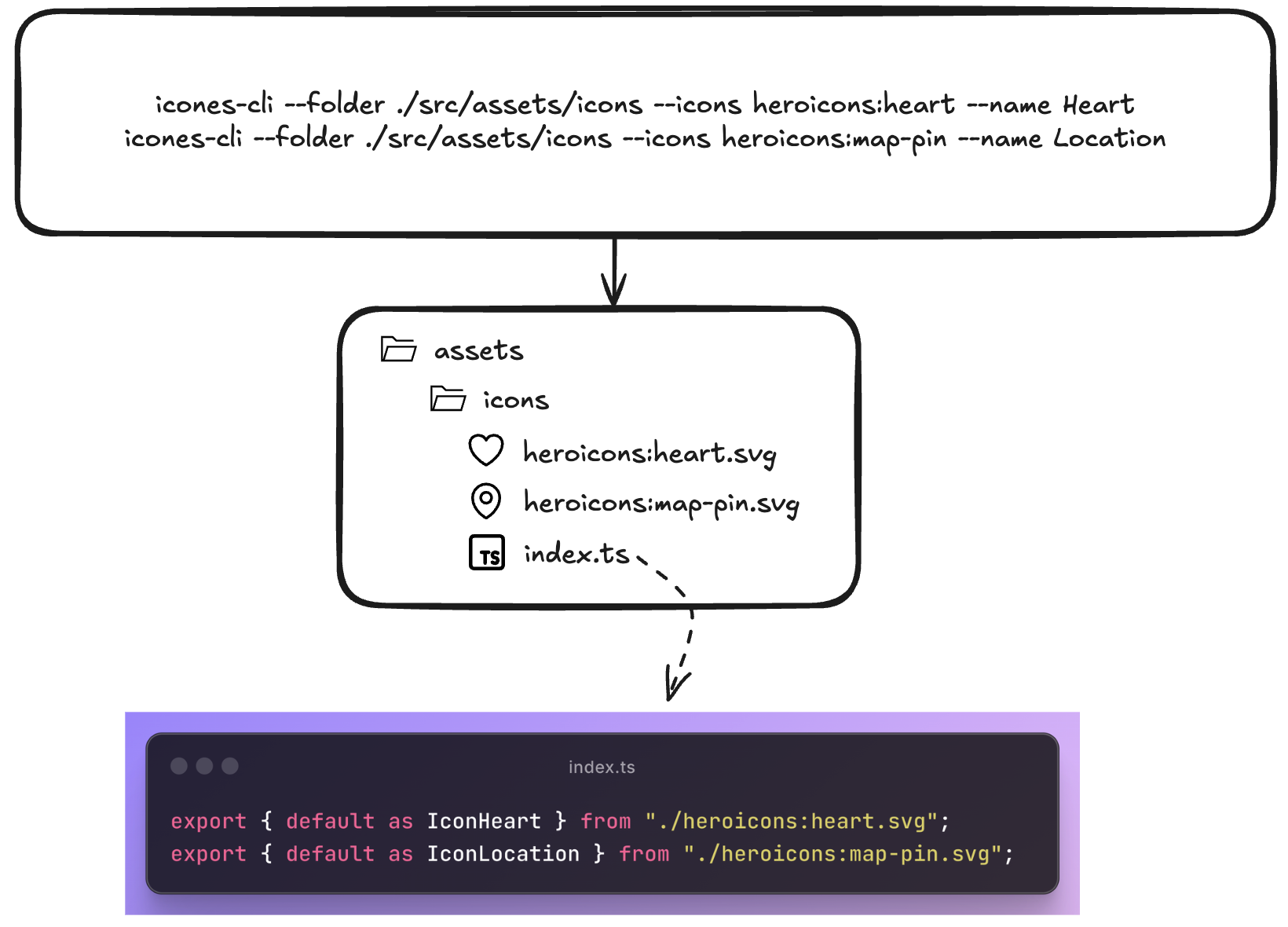
Why this structure?
- Copy-paste workflow: Find icon on icones.js.org → copy name → paste into iconmate
- Organized by default: Everything goes into
index.tsexports automatically and just typing<Iconwill autosuggest from your current collection. Just regular TS behavior. - TypeScript ready: Generated code is fully typed. Pass custom width, height, fills, you name it.
- Customizable 🎨: Want to add a default Tailwind class on every icon? custom props? Just add it to the file!
- Git-friendly: Plain SVG files, no binary assets
- Lightning fast: Native Rust binary, no Node.js startup time
Contributing
Contributions are welcome—pull requests for bug fixes, new framework presets, or improvements are appreciated.
🐱 Repo: github.com/Blankeos/iconmate - Star it if you love it ⭐
What's Completed from the Roadmap
- ✅ Interactive prompt mode
- ✅ Framework presets (React, Vue, Svelte, Solid)
- ✅ URL and raw SVG support
- ✅ Custom export templates
- ✅ Zero-config installation
Roadmap & Out-of-scoped
- [x] An empty command. Creates an .svg, adds it to the index.ts with a name you can specify.
- [x] Paste an actual svg instead of an icon
name. - [x] Presets (
normal,react,solid,svelte,vue,emptysvg) override output templates and file types. - [x] Prompt Mode via
iconmate- Interactive mode so you won't need to pass arguments. - [x] Delete an icon using
iconmate delete - [x] An interactive TUI instead of prompt-mode.
- [x] Rename in the TUI (but recommended for you to just use the LSP to do it)
- [x] A lot of TUI functionalities wokr
- [x]
iconmate iconify --helpcommands for AI to easily look for icons itself. - [x] Search and add Iconify icons directly inside the TUI (no need to open https://icones.js.org).
- [x]
--preset=flutter(SVGs + generated Dart barrel). - [ ] Other frameworks i.e. Go/Rust GUI apps? (Not sure how they work yet though).
- [ ] ~Zed or VSCode Extension~ (seems unnecessary now, it's just a CLI)
Near-Term Roadmap
Made with Rust 🦀 | Based on my blog post