
iconwright
v0.4.0
Published
An MCP server that restyles your Windows taskbar and desktop: app icons, pins and desktop layout, with undo. Also designs custom icons, previews them in place and exports .ico, .icns and favicons.

Maintainers
 jayxee
Readme
Say “make all my taskbar icons white”, “pin Spotify next to Chrome” or “tidy my desktop”. iconwright changes the shortcuts Windows reads its icons from, edits the pinned-apps list in one Explorer restart, and arranges desktop icons, and it can put every change back. When no existing icon fits, it designs one: it finds artwork among 200,000+ open-source icons, shows options side by side, and previews the winner on your own taskbar before applying it.
What it does
Your Windows taskbar and desktop
- Restyle app icons: one app or your whole taskbar in one call (for example, every icon white, each from its own logo), or any icon file you have.
- Pin, unpin and reorder taskbar apps in a single Explorer restart, with a dry run first if you like.
- Desktop: change icons, arrange, resize, show and hide system icons, save and restore layouts.
- Undo: original icons are recorded and the pinned-apps list is backed up before every change.
Custom icons (Windows, macOS, Linux)
- Search Iconify's open-source sets and brand logos; results come back as one numbered sheet.
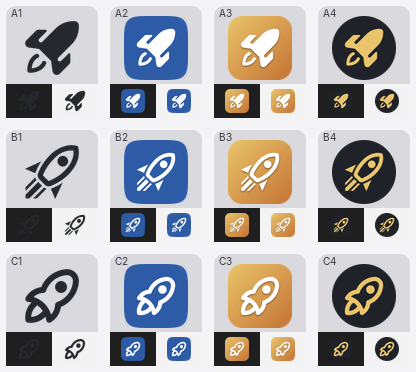
- Compare artwork × styles in one small grid; pick a cell like “B2”.
- Preview on a Windows taskbar, Start menu, desktop, File Explorer, a browser tab, the macOS Dock, iOS and Android, plus true pixel sizes.
- Export Windows
.ico, macOS.icns, a complete favicon and web-app set, or PNGs at every size. - Studio: the same, by hand, in your browser, online or locally.
Install
Claude Code: run inside Claude Code:
/plugin marketplace add JayceeGupta/iconwright
/plugin install iconwright@icon-playgroundCodex:
codex mcp add iconwright -- npx -y iconwright mcpCursor, VS Code and other MCP clients: add a stdio server to your client's MCP settings:
{ "mcpServers": { "iconwright": { "command": "npx", "args": ["-y", "iconwright", "mcp"] } } }Command line: npx -y iconwright --help.
Or let your agent do it: paste the setup prompt.
Requires Node.js 20+. Taskbar and desktop features need Windows 10 or 11 and no administrator rights.
Try it
Design me a calm, minimal icon for a notes app and show me some options.
Make all my taskbar icons white.
Pin Notepad, unpin Edge, and put Notepad first.
Undo all my icon changes.
Or from a terminal:
npx iconwright design ph:rocket-launch-fill tabler:rocket --styles "color=white bg=#2d5ba6 shape=squircle|color=#e9c46a bg=#1f2228 shape=circle" --out grid.png
npx iconwright make ph:rocket-launch-fill --style "color=white bg=#2d5ba6 shape=squircle" --formats ico,icns,web
npx iconwright studio
Docs
| | | | --- | --- | | Getting started | Install and a first icon in five minutes | | Design icons | The design loop, style strings, export formats, tips | | The studio | The visual editor | | Taskbar and apps / Desktop | What each Windows change does | | For agents | Setup prompt and how to drive the tools well | | MCP tools / Command line | Reference | | Safety and risks | What changes, how to undo it, what could go wrong | | Compatibility / How it works | Testing status and internals | | Test and contribute | Prompts that have your agent test iconwright on your computer |
Safety in one paragraph
Designing and exporting changes nothing but the files you ask for. App and desktop icon changes edit shortcut settings and are fully undoable. Pinning edits an undocumented Windows setting and restarts Explorer (open File Explorer windows close); iconwright backs it up first and rolls back on failure. Read Safety and risks before your first pin change.
Help test it
iconwright has been tested on one Windows 11 PC. If you use macOS, Linux, Windows 10 or the stock Windows 11 taskbar, the test prompts let your agent run a test plan, put everything back and write a report you can send as an issue or pull request.
License
MIT. Icons from Iconify keep their own licenses, which iconwright reports with every search. The bundled Inter font is under the SIL Open Font License, and the sample app logos in the scene mockups are listed in assets/neighbors; they are trademarks of their owners.
Contributions are welcome: see CONTRIBUTING.md, the code of conduct and SECURITY.md.