
ikagaka.shell.js
v4.3.5
Published
Ukagaka Shell Renderer for Web Browser


Readme
Shell.js


Ukagaka Shell Renderer for Web Browser
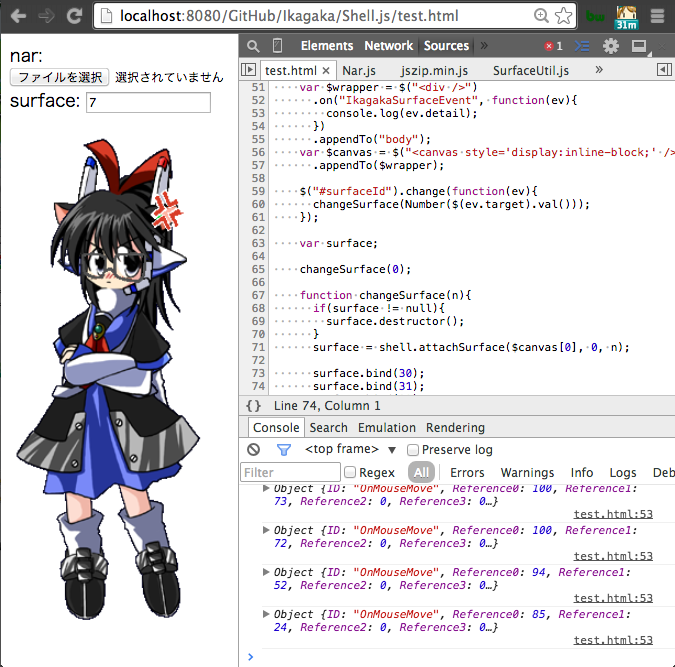
About
Shell.js is a Ukagaka compatible Shell renderer for HTML canvas.
Usage
<script src="../bower_components/encoding-japanese/encoding.js"></script>
<script src="../bower_components/jszip/dist/jszip.min.js"></script>
<script src="../bower_components/narloader/NarLoader.js"></script>
<script src="../dist/Shell.js"></script>
<script>
NarLoader
.loadFromURL("../nar/mobilemaster.nar")
.then(function(nanikaDir){
  var shellDir = nanikaDir.getDirectory("shell/master").asArrayBuffer();
  var shell = new Shell.Shell(shellDir);
  return shell.load();
}).then(function(shell){
  var div = document.createElement("div");
  var srf = shell.attachSurface(div, 0, 0);
  console.dir(srf);
  srf.on("mouseclick", function(ev){ console.log(ev); });
  document.body.appendChild(div);
}).catch(function(err){
  console.error(err, err.stack);
});
</script>
ChangeLog
Development
npm install -g bower dtsm gulp browserify watchify http-server
npm run init
npm run build
Document
- 型はTypeScriptで、サンプルコードはCoffeeScriptで書かれています。
Shell Class
Shell/***/以下のファイルを扱います。- surfaces.txtなどをパースして情報をまとめて保持します。
- canvas要素にSurfaceクラスを割り当てるためのクラスです。
constructor(directory: { [path: string]: ArrayBuffer; }): Shell
- コンストラクタです
load(): Promise
Shell/master/以下のファイル一覧とそのArrayBufferを持つObjectを渡してください。- ArrayBufferはnarファイルをzip解凍や、
ネットワーク更新用の
updates2.dauをXHRして入手してください。 - ディレクトリ区切りは UNIXと同じ
/を使ってください。 windowsの\は対応していません。 - このファイルパスと値のkey-value形式で渡す引数は、 メモリを多く消費するため、将来的に変更される可能性があります。
shellDir =
  "descript.txt": new ArrayBuffer()
  "surface0.png": new ArrayBuffer()
  "elements/element0.png": new ArrayBuffer()
  "surfaces.txt": new ArrayBuffer()

shell = new Shell(shellDir)
unload(): void
- Shellクラスが管理しているすべてのリソースを開放します。
- すべてのサーフェスがdetachSurfaceされます。
- すべてのイベントハンドラも解除されます。
- すべてのプロパティにnullが代入され、GCを促します
descript: { [key: string]: string; }
- descript.txtの中身をkey-value形式で持っています。
shell.load().then (shell)->
  console.log(shell.descript)
attatchSurface(div: HTMLDivElement, scopeId: number, surfaceId: number|string): Surface|null
- 指定したdivの中にcanvas要素を追加しscopeIdのsurfaceIdのサーフェスの描画を行います。
- SakuraScriptでなら
\0\s[0]に該当します。
- SakuraScriptでなら
- surfaceIdはサーフェスエイリアスが考慮されます。
- 該当するサーフェスが存在しなかった場合、nullが返ります。
cnv = document.createElement("canvas")
srf = shell.attachSurface(cnv, 0, 0) # \0\s[0]
document.body.appendChild(cnv)
cnv2 = document.createElement("canvas")
srf2 = shell.attachSurface(cnv, 0, "びっくり") # \0\s[びっくり]
document.body.appendChild(cnv2)
detachSurface(div: HTMLDivElement): void
- attachSurfaceしたdivを描画対象から外します。
- サーフェスを変更する前に必ず呼び出してください
bind(category: string, parts: string): void
\![bind,カテゴリ名,パーツ名,1]相当
bind(scopeId: number, bindgroupId: number): void
scopeId番目のキャラクターのbindgroupIdの着せ替えを着せます。
unbind(category: string, parts: string): void
\![bind,カテゴリ名,パーツ名,0]相当
unbind(scopeId: number, bindgroupId: number): void
scopeId番目のキャラクターのbindgroupIdの着せ替えを脱がせます。
showRegion(): void
- このシェルの当たり判定を表示します。
hideRegion(): void
- このシェルの当たり判定を非表示にします。
on("mouse", callback: (event: SurfaceMouseEvent)=> void): void
- マウスイベントのイベントリスナーです。
- 対応しているイベントは以下の通りです。
mouse- タッチイベントとマウスイベントの区別は現状していません。
- mousewheelまだ
- 透明領域のマウスイベントにも反応します。
ev.transparencyで判定してください、。- これはsurface canvasレイヤが重なった時のマウスイベントの透過処理のためのフラグです。
- 複数レイヤ間の重なりの上下順番を管理するNamedMgr.jsなどが使います。
- ShellクラスはEventEmitterを継承しているので
offやremoveAllListenerなどもあります
interface SurfaceMouseEvent {
  type: string; // mousedown|mousemove|mouseup|mouseclick|mousedblclick のどれか
  transparency: boolean; // 透明領域ならtrue
  button: number; // マウスのボタン。 https://developer.mozilla.org/ja/docs/Web/API/MouseEvent/button
  offsetX: number; // canvas左上からのx座標
  offsetY: number; // canvas左上からのy座標
  region: string; // collisionの名前,"Bust","Head","Face"など
  scopeId: number; // このサーフェスのスコープ番号
  wheel: number; // mousewheel実装したら使われるかも
  event: UIEvent // 生のDOMイベント。 https://developer.mozilla.org/ja/docs/Web/API/UIEvent
}
getBindGroups(scopeId: number): {category: string, parts: string, thumbnail: string}[]
- bindgroup[scopeId]: {category: string, parts: string, thumbnail: string};
Surface Class
- canvas要素にサーフェスを描画します。
- SERIKOアニメーションを再生します。
- マウスイベントを捕捉します。
render(): void
- サーフェスを再描画します。
play(animationId: number, callback?: () => void): void
- animationIdのアニメーションを再生します。
- アニメーション再生後にcallbackが1度だけ呼ばれます。
stop(animationId: number): void
- animationIdのアニメーションを停止します。
yenE(): void
- yen-eタイミングのアニメーションを再生します。
talk(): void
- talkタイミングのカウンタを進め、 指定回数呼び出されるとtalkタイミングのアニメーションを再生します。
getSurfaceSize(): {width: number, height: number}
- 現在のベースサーフェスの大きさを返します