
image-cache-pro
v0.7.0
Published
Advanced JavaScript library for image loading, pre-loading, caching, and detailed RAM & GPU memory management. (Beta)

Maintainers
 savanesoff
Readme

image-cache-pro
A frame-budgeted image scheduler for the web — decode, GPU-warm, cache and evict images a few per frame, off your app's critical path.





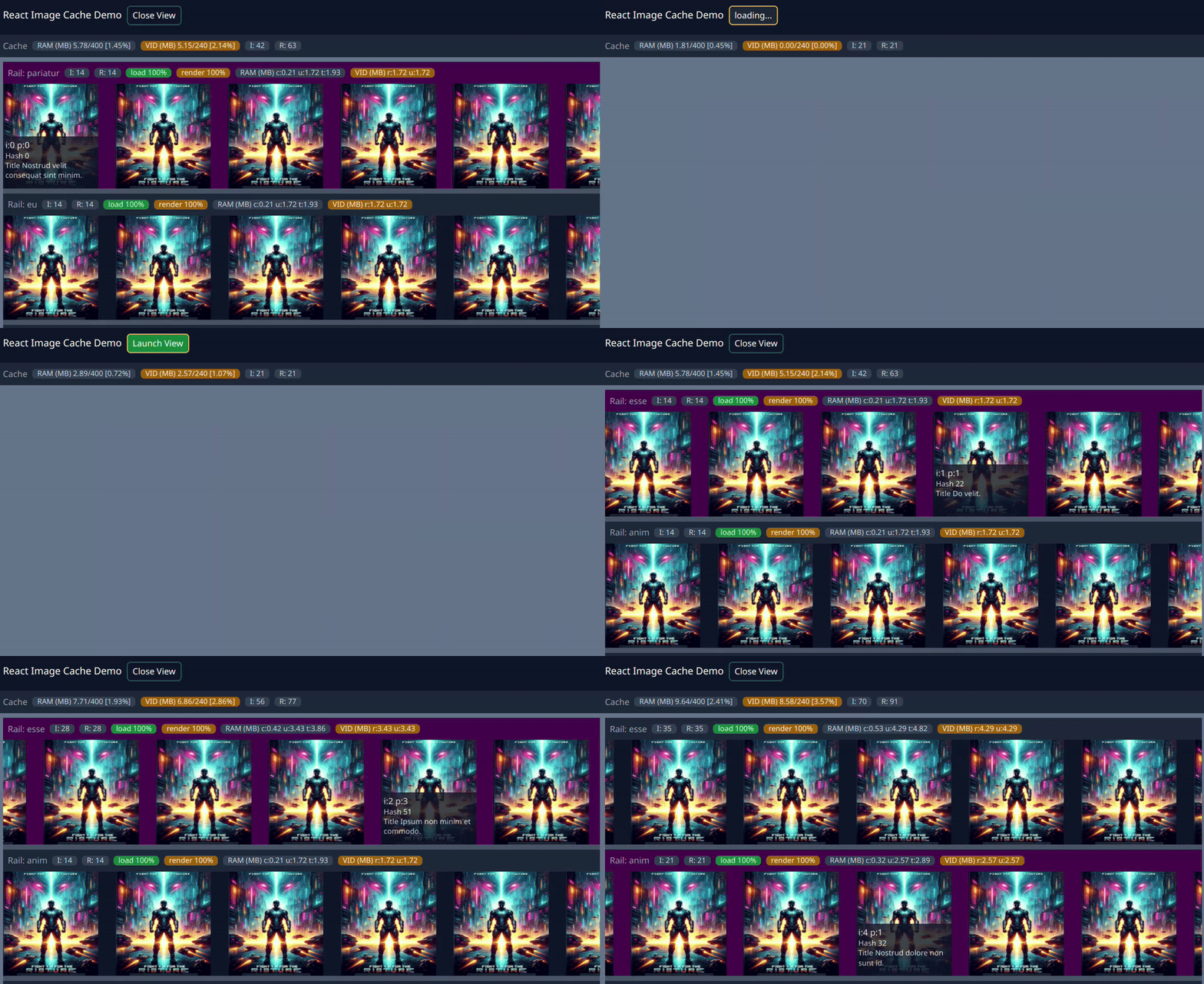
The problem
Paint a rail of 20 poster images at once and the browser must decode 20 images and upload 20 textures to the GPU in the same breath. On a desktop you might not notice. On constrained hardware — smart TVs, set-top boxes, low-end mobile — that stampede spikes the render thread and your navigation visibly janks. Measured on a real set-top box (Cobalt browser): a single rail scroll-in cost ~65% render-thread CPU, starving the focus animation.
The browser gives you no control here: <img> decode timing, texture upload
timing, cache residency and eviction are all opaque. When the browser evicts
an image you get a surprise re-fetch and a blank frame; when it doesn't, you
get creeping memory pressure you cannot see.
image-cache-pro takes that work off the platform's whims:
- Decode ahead — compressed bytes → RAM bitmap, before the image is needed.
- Warm the GPU a few images per frame — uploads are serialized on
requestAnimationFramewith a byte/time budget, so the hardware never sees a stampede. - Yield to input — warming pauses while your app is busy (a key is held, a scroll is animating) and resumes on idle.
- Budget and evict deterministically — you set RAM and GPU-memory budgets; the least-important work is evicted first, and anything visible or locked survives.
Framework-agnostic, dependency-free, ~10 kB gzipped, dual ESM+CJS, typed end to end. Built for and verified on Chrome-88-class embedded browsers (Cobalt / smart-TV class) — if it runs there, it runs anywhere.
Quick start
npm install image-cache-proimport { Controller, Bucket, RenderRequest } from 'image-cache-pro'
// One Controller per app: owns budgets, network queue and the frame queue.
const controller = new Controller({
ram: 200, // RAM budget (compressed + decoded bitmaps)
video: 60, // GPU-memory budget (uploaded textures)
units: 'MB',
loaders: 4, // parallel network loads
frameBudget: { bytes: 1_048_576 }, // ≈ one 512×512 RGBA texture per frame
canRender: () => !myApp.isNavigating, // yield gate: pause warming while busy
})
// One Bucket per UI region (a rail, a page, a virtual list).
const rail = new Bucket({ controller, name: 'top-picks', priority: 1 })
// One RenderRequest per image at one size.
const request = new RenderRequest({
bucket: rail,
url: 'https://cdn.example.com/poster.jpg',
size: { width: 320, height: 180 }, // known size → header decoders bypassed
})
request.on('rendered', () => {
// the decoded bitmap is in RAM and the texture is warm — paint for free:
cell.style.backgroundImage = `url("${request.image.element.src}")`
})That's the whole model. Everything else is tuning.
How it works
Controller ──── owns budgets (RAM / GPU), the network queue, the frame queue
   │
   ├── Bucket ───────── a UI region: groups requests, aggregates progress,
   │      │             carries a priority and an eviction lock
   │      │
   │      └── RenderRequest ── one image at one size:
   │             │             load → decode → queue → warm → rendered
   │             └── Img ───── shared per-URL image: XHR loader, RAM
   │                           accounting, texture charge tracking
   │
   ├── FrameQueue ───── drains requests on rAF ticks within a byte/ms budget,
   │                    highest priority first, gated by canRender()
└── Memory ×2 ────── RAM and GPU-memory ledgers with overflow events- Load — the image's compressed bytes are fetched via the network queue (bounded concurrency, retry with linear backoff, hard timeout).
- Decode (Stage A, off-screen safe) — bytes become a RAM bitmap ahead of time, so the eventual paint doesn't pay the decode stall.
- Warm (Stage B, paced) — the FrameQueue hands requests to a renderer a
few per frame. The default renderer paints a hidden, in-viewport,
opacity: 0.001div at the exact target size — which forces the GPU texture upload on browsers that only rasterize painted pixels. - Rendered — your
renderedhandler paints the real element; the decode and upload have already happened, so the paint is cheap. - Evict — when a budget overflows, unlocked/off-screen work is evicted
first (LRU-ish, oldest first). Anything
visible, in a locked bucket, or still loading is never touched. If nothing can be freed you get aram-overflow/video-overflowevent and the engine keeps going.
Priorities and virtual lists
Buckets and requests take a priority (higher renders first — FIFO within
equal priority), and priorities are live:
// the user focused a different rail: it jumps the queue on the next frame
focusedRail.setPriority(10)
previousRail.setPriority(0)
Requests can be added and removed on the go — a virtual list keeps one bucket for its whole life and churns requests through it as slots recycle:
// slot scrolled out of the window
oldRequest.clear() // releases listeners, queue slot, texture charge

// slot scrolled in — same bucket, immediately schedulable
const req = new RenderRequest({ bucket: listBucket, url, size })
Re-requesting a URL that is still cached costs no network and no decode —
only a (budgeted) re-warm. Teardown is deterministic: after
controller.clear() every listener, timer, in-flight request and byte of
accounting is released.
Input yield
Warming is background work and must never compete with interaction. Wire
canRender to your input state and/or drive it explicitly:
const controller = new Controller({
  canRender: () => !keyIsDown && !scrollAnimating,
})

// or imperatively:
controller.pause() // e.g. on route transition start
controller.resume() // on idle
While gated, the queue idles at one no-op check per frame and drains as soon as the gate opens.
The library never attaches input listeners itself — your input layer owns the
gate, and canRender is reassignable at runtime, which makes framework
wiring trivial:
// e.g. a React hook
useEffect(() => {
  controller.canRender = () => !isNavigatingRef.current
}, [controller])
Runtime budget changes
Budgets are live too — a common TV pattern is shrinking image memory while media playback needs the GPU:
player.on('play', () => controller.setVideoBudget(toBytes(64, 'MB')))
player.on('stop', () => controller.setVideoBudget(toBytes(240, 'MB')))
Shrinking a budget evicts unlocked work immediately (visible/locked work
survives; if the new budget still overflows you get the overflow event).
Growing a budget simply gives new work more headroom. The per-frame warm
budget is adjustable as well: controller.frameQueue.frameBudget.bytes = n.
API
new Controller(props)
| Option | Type | Default | Description |
| ------------- | --------------------------- | ------------------- | ------------------------------------------------------------------ |
| ram | number | 2 | RAM budget, in units (compressed bytes + decoded bitmaps) |
| video | number | 1 | GPU-memory budget, in units (uploaded textures) |
| units | 'BYTE'\|'KB'\|'MB'\|'GB'… | 'GB' | Unit for both budgets |
| loaders | number | 6 | Parallel network loads |
| frameBudget | { bytes?, ms? } | 1 MiB / 8 ms | Per-frame warm budget (at least one request per frame always runs) |
| hwRank | number 0–1 | 1 | Budget scalar for slower hardware (0.5 → half budget per frame) |
| canRender | () => boolean | — | Input-yield gate; false pauses warming for the frame |
| renderer | Renderer | hidden-div pre-warm | Injectable warm strategy (see below) |
| gpuDataFull | boolean | false | Textures are full-image-sized regardless of request size |
| logLevel | 'none'…'verbose' | 'error' | Console logging level |
Methods: getImage(props), pause(), resume(), clear(),
setRamBudget(size), setVideoBudget(size), canRender (get/set),
getRequestsStats(). Events: ram-overflow, video-overflow,
image-added, image-removed, render-request-added,
render-request-removed, update, clear.
new Bucket({ controller, name?, lock?, priority?, videoBudget? })
Groups requests for one UI region. lock: true exempts every request from
eviction. setPriority(n) re-prioritizes all of its requests live.
Buckets also gate and budget their own work:
pause()/resume()— pause warming for THIS bucket only (others keep rendering; its queued requests are skipped, never blocking). Loading continues — only the GPU work is deferred.videoBudget(+setVideoBudget(n)) — an optional per-bucket GPU cap in controller units: over the cap, the bucket evicts its own oldest unlocked warms (the global video budget still applies on top). Emitsvideo-overflowwhen the cap cannot be honored. There is deliberately no per-bucket RAM cap — images are shared across buckets by URL, so the global RAM budget owns that.
Aggregates: loaded, loading, rendered, loadProgress,
getRamBytes(), getVideoBytes() (+ …Units() variants).
Events: progress, loadend, rendered, render-progress,
request-rendered, error, update, clear, pause, resume,
video-overflow.
new RenderRequest({ bucket, url, size, priority? })
One image at one size. Pass size whenever you know it (your backend
usually does): it skips the header-sniffing decoders entirely — they're
lazily loaded and stay out of your bundle's hot path.
Fields/methods: rendered, visible (set it for on-screen requests — they
become unevictable), setPriority(n), isLocked(), clear(force?).
Events: rendered, rendering, loadstart, progress, loadend,
error, clear.
Renderer strategies
The warm mechanism is injectable — Controller({ renderer }) receives:
type Renderer = (context: { target: RenderRequest; done: () => void }) => voidTwo strategies matter in practice:
- Hidden-div pre-warm (default) — paints a hidden in-viewport div at the
target size, holds it for two frames, calls
done(). Warms textures for elements that aren't mounted yet (ahead-of-scroll). Relies on the browser reusing the decoded texture across nodes for the same URL+size. - Reveal-gate (bring your own) — for frameworks: keep the real element
unpainted (no
background-imageyet), and flip it on in your renderer, callingdone()on the next frame. The upload happens on the real node — no cross-node cache assumption. This is the natural strategy for a React binding.
Typed events
Every class is a strict typed emitter — event names and payloads are checked end to end:
controller.on('ram-overflow', ({ bytes }) => telemetry.count('ram_oom', bytes))
bucket.on('render-progress', ({ progress }) => setSpinner(progress < 1))
request.on('error', ({ statusText, status }) => showFallback())
Embedded browsers (smart TV / STB / Cobalt)
This library was built to fix a measured problem on Cobalt (the Chrome-88 class browser powering many TV devices), and its scheduling model is designed around that platform's constraints:
- Pacing is rAF-based —
setTimeout(0)floors at ~41 ms on Cobalt, which makes timer-based pacing useless there. - The default renderer keeps its warm layer in-viewport with non-zero
opacity — Cobalt only rasterizes painted pixels; off-screen or
opacity: 0warming silently does nothing. - No
queueMicrotask,URLSearchParams,Element.remove()or ES-module assumptions in the library code.
Shipping your app to such a device? The demo is a working
reference: it ships a nomodule/SystemJS legacy bundle
(@vitejs/plugin-legacy, no core-js), an iterator shim, and an on-screen
error overlay — see demo/index.html and
vite.config.demo.ts.
Demo
Live: https://savanesoff.github.io/image-cache-pro/
The demo drives the real engine over rails of posters with every stat on
screen (budgets, per-rail progress, queue depth, fps), keyboard/RCU
navigation, and a ?mode=stampede baseline so you can feel the difference.
Live knobs: 1/2 halve/double the RAM budget, 3/4 the video budget,
5/6 the per-frame warm budget, and A adds a whole rail on the fly —
watch evicted cards dim out as budgets shrink. Useful query params:
rails, cards, ram, video, budget, hwrank, img, mode.
pnpm dev            # serve the demo locally
pnpm run test:e2e   # Playwright suite over the demo
Development
pnpm install
pnpm test           # unit tests (Vitest, 339 tests)
pnpm run test:e2e   # end-to-end (Playwright over the demo)
pnpm lint           # prettier + eslint (type-checked)
pnpm run type-check # tsc --noEmit
pnpm run build      # ESM + CJS + .d.ts into dist/
The engine is fully unit-tested with deterministic fake frames — including memory-pressure suites that verify eviction order, locked-work survival and post-OOM recovery, and a virtual-scroll lifecycle suite that churns requests through a live bucket and asserts zero leaked bytes.
License
MIT — © Samvel Avanesov
Sponsored by Oregan Networks. Built with love for every device that ever dropped a frame painting a poster wall. 🎬