
import-service
v0.2.5
Published
import-service

Maintainers
 minhduc140583
Readme
import-service
A lightweight, streaming, extensible TypeScript data-import-library for building data import pipelines.
Unlike traditional CSV libraries that only parse files, Import Service provides a complete import pipeline:
  Reader
     │
     ▼
Transformer
     │
     ▼
 Validator (optional)
     │
     ▼
   Writer
     │
     ▼
 Destination
It is designed for importing data from CSV, fixed-length files, delimited text, Excel, databases, queues, or any custom data source.
Detailed Flow

Features
- Streaming import using
AsyncIterable - Generic type-safe pipeline
- CSV transformer
- Fixed-length record transformer
- Custom delimiter support
- Optional validation
- Pluggable writers
- Configurable exception handling
- Configurable validation error handling
- Automatic type conversion
- Customizable primitive parsers
- Large file friendly
- Zero framework dependency
Installation
npm install import-serviceor
yarn add import-serviceArchitecture
                AsyncIterable
                      │
                      ▼
                ImportService
                      │
         ┌────────────┼────────────┐
         ▼            ▼            ▼
   Transformer     Validator     Writer
         │            │            │
         └────────────┴────────────┘
                      │
                 Error Handler
Every component is independent.
Ports and adapters architecture
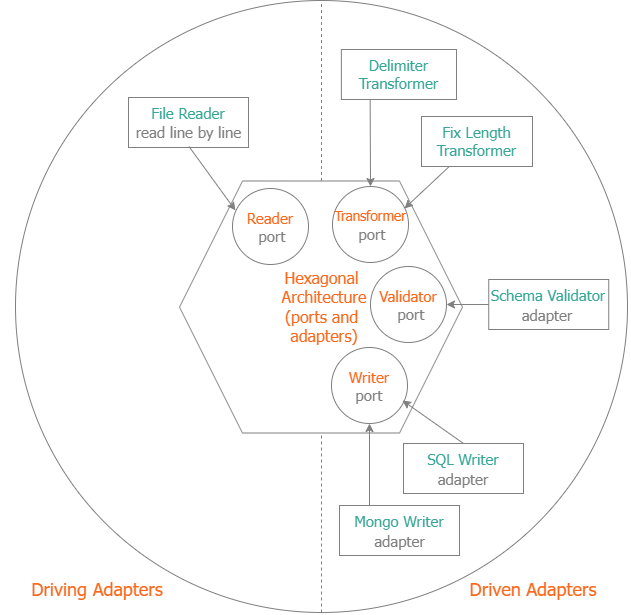
Quick Example
const reader = await createReader("customers.csv")

const importer = new Importer(
    1,
    "customers.csv",
    reader,
    transformer.transform,
    writer.write
)

const result = await importer.import()

console.log(result)
Result
{
    total: 1200,
    success: 1198
}
Examples:
- import-sample: import a fix-length file to MySql.
- import-csv-sample: import a CSV file to MySql.
Architecture
The library consists of several independent building blocks.
  Reader

     ↓

Transformer

     ↓

 Validator

     ↓

  Writer

     ↓

   Flush
Each component has a single responsibility.
Readers
The framework consumes data from any AsyncIterable.
Examples include
- CSV reader
- Fixed-length reader
- Database cursor
- HTTP stream
- Kafka
- RabbitMQ
- Azure Blob Storage
- AWS S3
- Custom readers
Example
const reader = await createReader("customers.csv")Importer
The lightweight functional API.
new Importer(
    skip,
    filename,
    reader,
    transform,
    write,
    flush,
    handleException,
    validate,
    handleError
)
Ideal for
- scripts
- scheduled jobs
- serverless
- small applications
ImportService
The object-oriented API.
new ImportService(
    skip,
    filename,
    reader,
    transformer,
    writer,
    exceptionHandler,
    validator,
    errorHandler
)
Uses strategy interfaces for better dependency injection and testing.
Ideal for enterprise applications.
Strategy Interfaces for ImportService
Transformer
interface Transformer<T,S> {
    transform(data:S): Promise<T>
}
Validator
interface Validator<T> {
    validate(data:T): Promise<ErrorMessage[]>
}
Writer
interface Writer<T> {
    write(data:T): Promise<number>
    flush?(): Promise<number>
}
Attributes
CSV attributes
const attributes: Attributes = {
    id: {
        type: "string"
    },
    age: {
        type: "integer"
    },
    active: {
        type: "boolean"
    }
}
FixedLengthAttributes
Fixed-length parsing uses a dedicated attribute definition.
const attributes: FixedLengthAttributes = {
    id: {
        type: "string",
        length: 10
    },
    balance: {
        type: "number",
        length: 15
    }
}
Unlike CSV attributes, every field length is required, providing better compile-time safety.
CSV Transformer
Create strongly-typed objects from CSV rows, by schema:
const attributes: Attributes = {
    id: {
        type: "number"
    },
    name: {
        type: "string"
    },
    birthday: {
        type: "date"
    },
    active: {
        type: "boolean"
    }
}
Create a transformer.
const transformer = new CSVTransformer<Customer>(attributes)Each row becomes
{
    id: 1,
    name: "John",
    birthday: Date("..."),
    active: true
}
The library automatically converts
- number
- integer
- boolean
- date
- datetime
according to the attribute definitions.
FixedLengthTransformer
Fixed-Length Files
000001John Smith 19880101YEach field specifies its own length.
const attributes: FixedLengthAttributes = {
    id: {
        type: "number",
        length: 6
    },
    name: {
        type: "string",
        length: 20
    },
    birthday: {
        type: "date",
        length: 8
    },
    active: {
        type: "boolean",
        length: 1
    }
}
Then
const transformer = new FixedLengthTransformer<Customer>(attributes)Each row becomes
{
    id: 1,
    name: "John",
    birthday: new Date("..."),
    active: true
}
The library automatically converts
- number
- integer
- boolean
- date
- datetime
according to the attribute definitions.
Custom Primitive Parsers
For CSVTransformer and FixedLengthTransformer, this library provides default parsers for:
- number
- date
- boolean
These parsers are replaceable.
Boolean
Default values:
1
Y
T
become
trueYou can replace the parser globally.
resources.parseBool = (res, key, value) => {
    res[key] = value === "true" || value === "TRUE"
}
Number
resources.parseNumber = (res, key, value) => {
    res[key] = Number(value.replace(",", "."))
}
Date
resources.parseDate = (res, key, value) => {
    res[key] = dayjs(value, "DD/MM/YYYY").toDate()
}
No framework modification is required.
Validation
Validation is optional.
class CustomerValidator implements Validator<Customer> {
    async validate(customer) {
        const errors = []
        if (!customer.name) {
            errors.push({
                field: "name",
                code: "required"
            })
        }
        return errors
    }

}
Only valid records are written.
ErrorHandler
Validation errors are separated from exceptions.
Validation flow
Transformer

     ↓

 Validator

     ↓

ErrorHandler
This library provides the default ErrorHandler
class ErrorHandler<T> {

    handleError(res: T, err: ErrorMessage[], i?: number, filename?: string): void {

    }

}
User can define a custom ErrorHandler as below
class ValidationHandler implements ErrHandler<Customer> {

    handleError(customer: Customer, errors: ErrorMessage[], i?: number, filename?: string) {
        console.log(errors)
    }

}
Exception Handling
Exceptions are separated from validation errors.
Exception flow
 Transformer

      ↓

    Writer

      ↓

ExceptionHandler
This distinction makes it easier to process business validation separately from unexpected runtime failures.
This library provides the default ExceptionHandler<string | string[]>
class ExceptionHandler {

    handleException(res: string | string[], err: any, i?: number, filename?: string): void {

    }

}
User can define a custom ExceptionHandler as below
class ImportExceptionHandler implements ExHandler<string[]> {
    handleException(res: string[], err: any, i?: number, filename?: string): void {
        console.error(err)
    }
}
Writer
class CustomerWriter implements Writer<Customer> {
    async write(customer) {
        await repository.save(customer)
        return 1
    }
}
Logging
The library includes a buffered log writer.
const writer = new LogWriter("error.log", "./logs")Useful for recording
- validation failures
- import exceptions
- rejected records
Utilities
The package includes a collection of utilities for import applications.
File
- createReader()
- createWriteStream()
- mkdirSync()
Filename
- getDate()
- getPrefix()
- NameChecker
Date
- dateToString()
- timeToString()
- toISOString()
- addDays()
Parsing
- parseDate()
- parseNumber()
- parseNum()
Object
- handleNullable()
- reformatDates()
Async Streaming
The library processes records one at a time.
  File

    ↓

  Reader

    ↓

Transformer

    ↓

  Writer
No need to load the entire file into memory.
Suitable for very large datasets.
Enterprise Design
The library follows several enterprise design principles.
- Single Responsibility Principle
- Strategy Pattern
- Pipeline Architecture
- Streaming Processing
- Dependency Injection
- Separation of Validation and Exceptions
Each component can be replaced independently.
Performance
Designed for high-throughput imports.
Features include
- AsyncIterable streaming
- Buffered log writing
- Minimal object allocation
- Zero runtime dependencies
- No unnecessary buffering
Ecosystem
import-service works well with other libraries.
CSV / Fixed-Length

       ↓

 import-service

       ↓

   sql-core

       ↓

  mysql2-core
or
      CSV

       ↓

 import-service

       ↓

mongodb-extension
or
     CSV

      ↓

import-service

      ↓

   REST API
The writer can target any destination.
Why Import Service?
Most Node.js libraries only parse CSV files.
 CSV
  │
  ▼
Object
Unlike many Node.js CSV libraries, import-service focuses on the complete import workflow instead of just parsing files.
  File
    │
    ▼
  Reader
    │
    ▼
Transformer
    │
    ▼
 Validator
    │
    ▼
  Writer
    │
    ▼
 Database
It separates responsibilities, making every stage reusable and independently testable:
- Streaming readers
- Typed transformation
- Validation
- Error handling
- Exception handling
- Pluggable writers
- CSV support
- Fixed-length support
- Enterprise architecture
Design Goals
- Streaming first
- Generic
- Type-safe
- Framework independent
- High performance
- Easily testable
- Extensible
- Familiar to both Java and JavaScript developers
Contributing
Contributions, issues, and feature requests are welcome.
License
MIT