
init-antigravity-workflow
v1.4.0
Published
Universal AI Workflow Bootstrapper — Scaffold the 4-Round Interactive Wizard for any project with Jira, Confluence & NotebookLM MCP integration.
Downloads
1,129

Maintainers
 ngocbaongo
Readme
🚀 init-antigravity-workflow
Scaffold an AI Workflow for your project — with Jira, Confluence & NotebookLM MCP integration.
Supports Multi-Repo: one shared knowledge base, each repo runs its own AI agent.
Quick Start
npx init-antigravity-workflowThe CLI will guide you through the setup. Just answer the prompts.
Architecture Overview
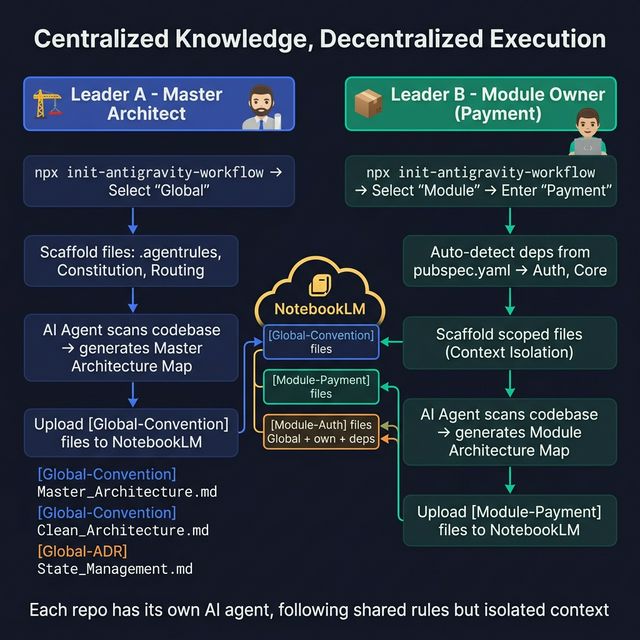
Who Are You?
This tool supports two roles. Pick the one that matches your situation:
🏗️ I'm setting up the Main Project
You are the Lead / Architect. You define system-wide rules that all teams must follow.
When to pick this: You're the one creating the central repository or the master standards for the project (architecture rules, coding conventions, git flow, etc.).
What to do:
# 1. Go to your main project root
cd ~/projects/my-main-project

# 2. Run the CLI
npx init-antigravity-workflow

# 3. Select: Global (Master Architect)
# 4. Answer the remaining prompts (framework, prefix, Jira key, agent)
What you get:
my-main-project/
├── .aiignore                                    # AI agent ignore patterns
├── .agentrules                                  # Pre-flight rules for AI agent
└── .antigravity/
    ├── 00_MYAPP_Agent_Workflow.md                # "Constitution" — 4-Round Wizard
    └── 00_Core_Routing.md                        # Full access to all knowledge files
Your responsibilities:
- Write
[Global-Convention]files (architecture rules, coding standards, git flow) - Upload them to the shared NotebookLM workspace
- All module teams will inherit your rules automatically
💡 Important Note for Master Architects: As the Master Architect, beyond generating the Architecture Map, you should also create supplementary convention files (e.g.,
[Global-Convention] Clean_Architecture_Rules.mdor[Global-Convention] UI_Theme_Standards.md) and upload them to NotebookLM. This establishes the complete "Global Knowledge Pool" that all subsequent tasks and module agents will rely on for automated execution.
Next step after setup: The CLI will print a prompt — paste it into your AI agent to auto-generate a Master Architecture Map, then upload it to NotebookLM as [Global-Convention] Master_Architecture.md.
📦 I'm setting up a Sub-Module
You are a Module Owner / Team Lead. You own one specific part of the system (e.g. Payment, Auth, Booking).
When to pick this: You're setting up a sub-package / microservice / feature repo that should follow the global rules but also has its own conventions.
What to do:
# 1. Go to your module repo root
cd ~/projects/payment-service

# 2. Run the CLI
npx init-antigravity-workflow

# 3. Select: Module (Module Owner)
# 4. Enter your module name: Payment
# 5. Answer the remaining prompts (framework, prefix, Jira key, agent)
What you get:
payment-service/
├── .aiignore                                    # AI agent ignore patterns
├── .agentrules                                  # Pre-flight rules (scoped to your module)
└── .antigravity/
    ├── 00_MYAPP_Agent_Workflow.md                # "Constitution" — scoped 4-Round Wizard
    └── 00_Core_Routing.md                        # ⚠️ Restricted: Global + your module ONLY
Key difference — Context Isolation: Your AI agent can only read:
- ✅
[Global-Convention]files — system-wide rules (from the Main Project) - ✅
[Module-Payment]files — your own module's docs - ✅
[Module-Auth],[Module-Core]— declared dependencies (READ-ONLY) - ❌ Other modules' files — blocked to prevent confusion and hallucination
How dependencies work: If your module imports/uses other sub-packages (e.g. Payment uses Auth for token verification), declare them as dependencies. The CLI:
- Flutter projects: auto-detects from
pubspec.yamlpath dependencies - Other frameworks: asks you to enter them manually
Dependency modules are added as READ-ONLY — your agent can read their docs to understand interfaces, but cannot modify their knowledge files.
Your responsibilities:
- Write
[Module-Payment]files (your module's conventions, ADRs, troubleshooting) - Upload them to the same shared NotebookLM workspace everyone uses
- Your AI agent automatically sees Global rules + your module docs only
Next step after setup: The CLI will print a prompt — paste it into your AI agent to auto-generate a Module Architecture Map, then upload it to NotebookLM as [Module-Payment] Architecture_Map.md.
How Multi-Repo Knowledge Works
Everyone uses one shared NotebookLM workspace. Files are organized by prefix:
NotebookLM (shared workspace)
│
├── [Global-Convention] Master_Architecture.md       ← Main Project writes these
├── [Global-Convention] Clean_Architecture_Rules.md   ← Everyone must follow
├── [Global-ADR] ADR-001_State_Management.md          ← System-wide decisions
│
├── [Module-Payment] Convention_API_Design.md         ← Payment team writes these
├── [Module-Payment] ADR-001_Gateway_Choice.md        ← Only Payment team reads
│
├── [Module-Auth] Convention_JWT_Flow.md               ← Auth team writes these
├── [Module-Auth] Troubleshooting_Token_Expiry.md     ← Only Auth team reads
│
└── [Module-Booking] ...                               ← Booking team writes these
The rule: Each module agent reads Global + its own prefix. No cross-reading.
What the AI Agent Does (4-Round Wizard)
After setup, your AI agent follows a strict 4-round process for every task:
| Round | What Happens | |-------|-------------| | 0 | No Jira ticket? Agent interviews you and creates one automatically. | | 1 | Agent gathers context from Jira, Confluence, NotebookLM → builds a Context Manifest. | | 2 | Agent generates an Execution Plan from the manifest → you approve it. | | 3 | Agent writes code, runs linters, updates Jira, and optionally writes knowledge back to NotebookLM. |
The agent also supports slash commands: /pause, /resume, /handover.
Generated Files Explained
| File | What it does |
|------|-------------|
| .aiignore | Like .gitignore but for AI agents — hides build artifacts, node_modules, etc. |
| .agentrules | Forces the AI to read the Constitution + Routing before doing anything. |
| 00_[PREFIX]_Agent_Workflow.md | The full "Constitution" — 4-Round Wizard, Context Manifest template, status tracking, sub-agents. |
| 00_Core_Routing.md | Controls which NotebookLM files the AI can access (full access for Global, scoped for Module). |
Requirements
- Node.js ≥ 18
- An AI agent with MCP support (Jira, Confluence, NotebookLM)
Version History
| Version | Changes | |---------|--------| | 1.3.3 | Add Important Note for Master Architects about convention files | | 1.2.0 | Module Dependencies — auto-detect from pubspec.yaml, READ-ONLY access | | 1.1.0 | Multi-Repo: Global/Module modes, Context Isolation, Lego Architecture | | 1.0.0 | Initial release — 4-Round Wizard, Context Manifest, Sub-Agents |
License
MIT