
insomnia-plugin-response-search-counter
v1.0.1
Published
An Insomnia plugin that shows the count of search term matches in the response viewer

Maintainers
 manisha.singh.hyd
Readme
Insomnia Response Search Counter Plugin
A plugin for Insomnia that shows the count of search term matches in the response viewer.
Features
- Shows number of matches for search terms in response content
- Works with all response types (JSON, XML, Text, etc.)
- Real-time count updates as you type
- Supports multiple tabs - updates when switching between tabs
- Case-insensitive search
Installation
From Insomnia Plugin Hub
- Open Insomnia
- Go to Application > Preferences > Plugins
- Type "insomnia-plugin-response-search-counter"
- Click "Install Plugin"
Using npm
npm install -g insomnia-plugin-response-search-counterLocal Development
- Clone this repository:
git clone https://github.com/manisha-singh-hyd/insomnia-plugin-response-search-counter.git
cd insomnia-plugin-response-search-counter- Install dependencies:
npm install- Build the plugin:
npm run build- Link the plugin to Insomnia:
- Insomnia only loads plugins from its plugins directory
- Instead of copying files manually, we create a symbolic link
- This lets you develop in your preferred location while Insomnia sees the plugin in its directory
- Any changes you make will be immediately available to Insomnia after rebuilding
# macOS: Create symbolic link in Insomnia's plugins directory
ln -s "$(pwd)" ~/Library/Application\ Support/Insomnia/plugins/insomnia-plugin-response-search-counter

# Windows: Create symbolic link in Insomnia's plugins directory
mklink /D "%APPDATA%\Insomnia\plugins\insomnia-plugin-response-search-counter" "%CD%"
Usage
- Send a request in Insomnia
- In the response viewer, use either:
- The search box in the response viewer
- Keyboard shortcut (Cmd+F on macOS, Ctrl+F on Windows/Linux)
- The count of matches will appear next to the search box
- When switching between tabs, the counter automatically updates for the current response
Search Results Display
When searching in the response viewer, the match count is displayed in a clear format:
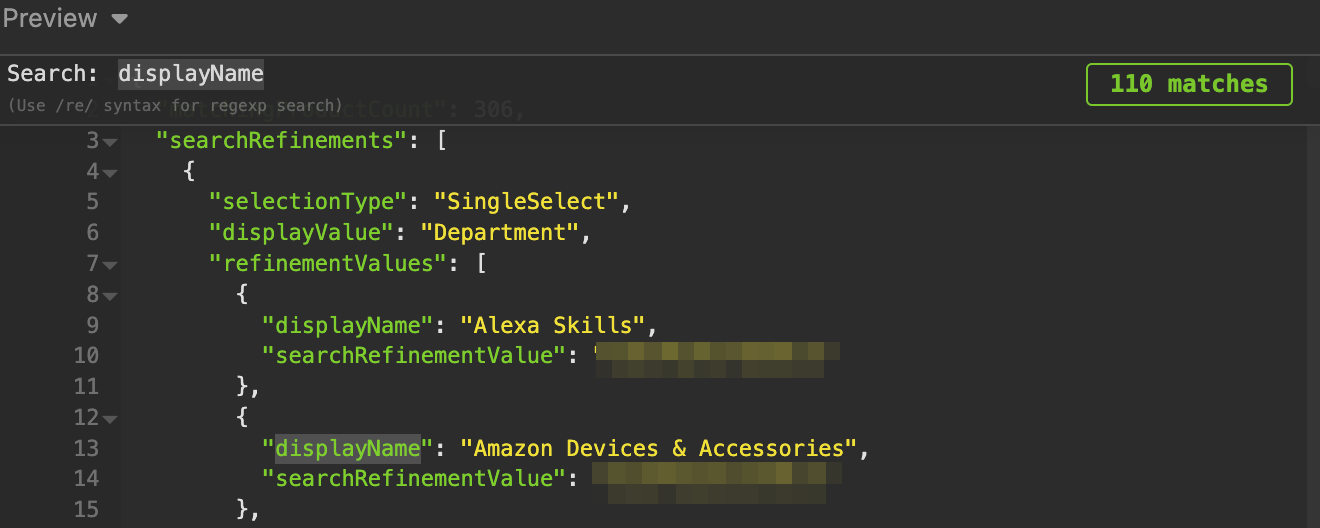
As shown in the screenshot above, the plugin displays the total number of matches (110 matches) for the search term "displayName". The count updates in real-time as you type, making it easy to see how many occurrences of your search term exist in the response.
How It Works
- Maintains a single cached response that updates when:
- New API responses are received
- Switching between tabs
- Uses MutationObserver to detect tab changes
- Cleans up properly when:
- Closing search
- Switching tabs
- Unloading plugin
Development
- Make changes to the source code
- Run
npm run buildto rebuild the plugin - Restart Insomnia to load the changes
Testing
To test the plugin:
- Follow the Local Development installation steps
- Restart Insomnia to load the plugin
- Test the following scenarios:
- Search in a single response
- Switch between tabs with different responses
- Close and reopen search
- Make new requests and verify counter updates
- After making code changes:
- Run
npm run build - Restart Insomnia
- Test your changes
- Run
Publishing
To publish a new version to npm:
- Update version in package.json
- Build the plugin:
npm run build- Publish to npm:
npm publishThe plugin will be available in the Insomnia Plugin Hub after publication.
License
MIT