
intentio
v0.1.2
Published
Focus-scoped command dispatch for React — one intent, dispatched by keyboard shortcuts, command palette, and buttons alike, resolved by where focus is. Flutter's Actions/Intents/Shortcuts, for the web.

Maintainers
 redhotsixbull
Readme
intentio



Focus-scoped command dispatch for React. One command (an intent) is dispatched by keyboard shortcuts, buttons, and (soon) a command palette alike — resolved by where focus is, not by a flat global keymap.
It's Flutter's Actions / Intents / Shortcuts system, brought to the web.
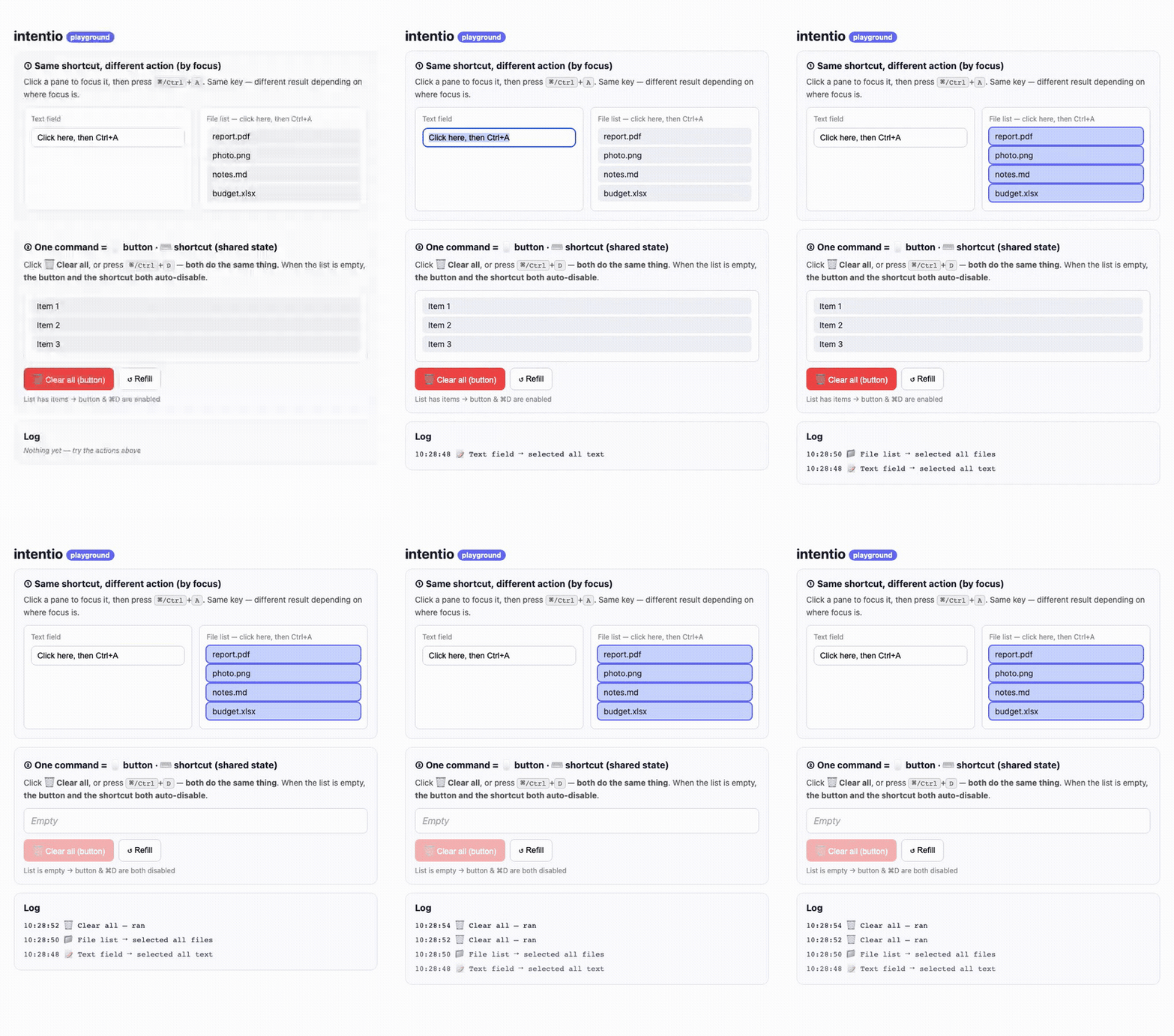
The same
⌘/Ctrl+Aselects text in the field and files in the list — resolved by focus. And one "Clear all" command is driven by both a button and⌘/Ctrl+D, sharing a single enabled state.
Why
A flat hotkey library answers "when key X is pressed, run function F." Real keyboard-driven apps — editors, design tools, data grids, Linear/Superhuman-style apps — need more:
- The same key means different things depending on what's focused
(
Ctrl+A= select text in a field, select rows in a grid, select shapes in a canvas). - One command should be reachable from a shortcut, a button, and a Cmd-K palette, sharing one enabled state — instead of wiring three libraries that drift apart.
With flat hotkeys you write an if (where am I?) ladder that rots as the app
grows. intentio resolves commands by the focus tree instead.
How it works — three decoupled layers
key press ─▶ Shortcuts (keymap)  ─▶  Intent (abstract command)
─▶ Actions (nearest focused scope decides what it does)Shortcutsmaps keys → intents. Written once, high in the tree.Intentis an abstract command (SelectAll), not a function.Actionsbinds an intent → a handler, scoped to its subtree. The nearest enclosingActionswith focus wins; inner scopes override outer ones; a disabled handler is skipped so an enabled ancestor can take over.
Install
npm i intentio # or: pnpm add intentio / yarn add intentioReact 17+ (peer dependency). ~2 KB min+gzip, zero runtime deps.
Quick start
The same shortcut, resolved to a different action by focus:
import { defineIntent, Shortcuts, Actions, handle } from 'intentio';

const SelectAll = defineIntent('select-all');

function App() {
  const inputRef = useRef<HTMLInputElement>(null);
  return (
    // 1. One keymap for the whole app. `Mod` = ⌘ on macOS, Ctrl elsewhere.
    <Shortcuts map={{ 'Mod+a': SelectAll }}>
      {/* 2. The text field's meaning of "select all". */}
      <Actions handlers={[handle(SelectAll, () => inputRef.current?.select())]}>
        <input ref={inputRef} />
      </Actions>

      {/* 3. The list's meaning of the SAME command — no new keybinding. */}
      <Actions handlers={[handle(SelectAll, () => selectAllFiles())]}>
        <div tabIndex={0}>…file list…</div>
      </Actions>
    </Shortcuts>
  );
}
One command shared by a button + a shortcut + one enabled state
import { defineIntent, Actions, handle, useIntent } from 'intentio';

const Delete = defineIntent<{ soft?: boolean }>('delete');

function DeleteButton() {
  const { invoke, isEnabled } = useIntent(Delete);
  // Same source of truth as the shortcut → greys out together.
  return <button disabled={!isEnabled} onClick={() => invoke({ soft: true })}>Delete</button>;
}

<Actions handlers={[handle(Delete, ({ soft }) => trash(soft), { enabled: hasSelection })]}>
  <DeleteButton />
  <FileGrid />
</Actions>
A shortcut can carry a value (payload)
<Shortcuts map={{ 'Mod+Backspace': [Delete, { soft: true }] }}>
  ...
</Shortcuts>
API
| Export | What it is |
|---|---|
| defineIntent<Payload>(name?) | Creates an Intent. Identity-based; name is for debugging / palette labels. |
| <Shortcuts map={{ 'Mod+a': SelectAll }}> | Binds keys → intents for its subtree (deepest focused scope wins). Use [intent, payload] to carry a value. |
| handle(intent, run, { enabled? }) | Builds one binding; run is typed on the intent's payload. |
| <Actions handlers={[handle(...)]}> | Provides handlers to the focus subtree; nearest enabled handler wins. |
| useIntent(intent) | { invoke(payload), isEnabled } for buttons / palette items. |
Keybinding syntax: Mod (⌘ on macOS, Ctrl elsewhere), Ctrl, Meta/Cmd,
Alt/Option, Shift, plus a key (a, Enter, Escape/Esc, Delete/Del,
Backspace, Up/Down/Left/Right, Space). Example: 'Mod+Shift+p'.
When to use it
Reach for intentio when your app is keyboard-driven and multi-paned: code/rich-text editors, design/canvas tools, data grids & spreadsheets, and keyboard-first productivity apps — anywhere the same key must adapt to focus, or a command is invoked from a shortcut and a button and a menu.
When not to: a simple app with one or two global hotkeys — a flat library like
react-hotkeys-hook is lighter and enough.
Status & roadmap
Shipped: core dispatch — shortcuts, actions, focus scoping, and buttons sharing one enabled state.
Planned: a first-class command-palette adapter (derive a Cmd-K palette
from the reachable + enabled intents), key sequences/chords, aria-keyshortcuts
wiring, and an override-with-call-through helper.
This README describes the library as it is now and carries no version numbers — the npm badge above is the current version.
Development
pnpm install
pnpm test        # vitest
pnpm play        # the playground at http://localhost:8093
pnpm build       # tsup → dist (ESM + CJS + d.ts)
License
MIT © kim dong joo