
interactive-batch
v1.0.3
Published
> An interactive batch runner


Readme
Interactive Batch
An interactive batch runner
Install
npm i [-g] interactive-batch
Use
interactive-batch --help
ib --help
ib --file deploy.js
Features
- Very flexible and natural to use
- Ask user to provide input
- Question type [text, list]
- Help text
- Required label
- Built in answer validation on
- required
- wrong list item picking
- Execute commands of different types
- Plain text command
- Array of commands
- Custom functions
- Execute commands conditionally based on
- User responses
- Custom functions
- Powerful logs
- Colorful logs based on the log type
- Nice misconfiguration feedback handling
- Indentation to visually represent the batch workflow
Options
Option | Description ------------ | ------------- --file/-f | The batch file to execute --dry/-d | Only go through the batch, but don't really execute the commands, important for testing while writing the batch file
Example
const GitHelper = require('./GitHelper');

module.exports = ({Args, Logger, Question, Command}) => {
  return [
    // Git section
    Question({
      arg: 'git',
      question: 'Do you want to `add`, `commit`, and `push` current working files?',
      defaultAnswer: 'Y',

      // 'then' can be function, string, or array
      then() {
        Logger.info('You just said', Args.get('git'));

        // all functions can recursively return something to execute
        // which can be string, array, Question, Command or just another function
      },

      // built in evaluation to the user answer to see if it's no
      onNo() { // 'onNo' can be function, string, or array
        Logger.warn('Okay, as you wish...');

        // if you return here something it'll be executed
      },

      // 'onYes' can be function, string, or array
      onYes: [
        // text question
        Question({
          arg: 'commitMessage',
          question: 'Enter a commit message:',
          helpText: 'Leave it empty to use text editor mode',
          required: false
        }),
        // list question
        Question({
          arg: 'branch',
          question: 'Enter the local branch name:',
          helpText: `Current branch is ${GitHelper.getCurrentBranch().bold()}`,
          choices: GitHelper.getAllBranches(),
          defaultAnswer: GitHelper.getCurrentBranch(),
        }),
        Question({
          arg: 'remote',
          question: 'Enter the remote name:',
          defaultAnswer: 'origin',
        }),
        // a command object
        Command({
          title: 'Staging files',
          command: 'git add -A',
        }),
        // a fork command
        Command({
          condition: () => Args.get('commitMessage').length,
          onTrue: 'git commit -m "{{commitMessage}}"',
          onFalse: 'git commit',
        }),
        // you can also directly add text command, as following
        'git push {{remote}} {{branch}}',
      ],
    }),

    // add here other tasks ...
  ];
};
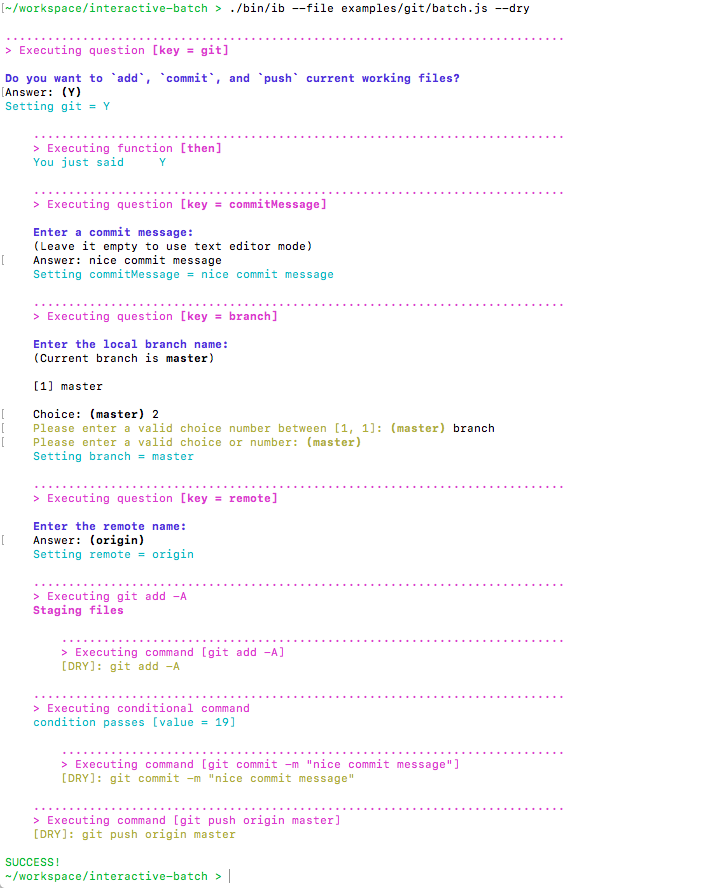
Here's the output when we run this example:
ib --file examples/git/batch.js --dry
License
Do whatever you want with this