
intervengine-rn-sdk
v0.4.0
Published
Intervengine Mobile SDK for React Native - provides integration with Intervengine services using Kotlin Multiplatform shared library

Maintainers
 intervengine
Readme
Intervengine React Native SDK
React Native wrapper for the Intervengine Mobile SDK, built with Expo Modules and Kotlin Multiplatform (KMP).
Overview
This SDK provides a React Native interface to the Intervengine platform, enabling mobile apps to:
- Authenticate users and manage sessions
- Listen to real-time updates via Server-Sent Events (SSE)
- Manage user context and state
- Fetch and display embeddable cards
- Fetch contents
Architecture
The SDK consists of three main layers:
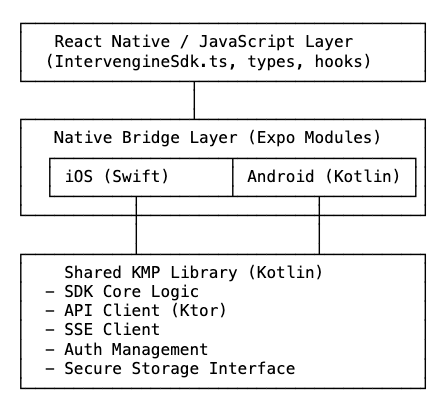
How It Works
- TypeScript SDK (
IntervengineSdk.ts): High-level API that React Native apps use - Native Modules: Platform-specific bridge code (Swift for iOS, Kotlin for Android)
- KMP Shared Library: Cross-platform business logic written in Kotlin
The native modules use Expo Modules API, which provides:
- Automatic type conversion between native and JavaScript
- Promise-based async functions
- Event emitters for native to JavaScript communication
- No need to write JSI/JNI code manually
Installation
NPM Install:
npm install intervengine-rn-sdkUsage
Basic Setup
// SDK Config
export type SDKConfig = {
  apiUrl: string; // Intervengine API URL
  apiKey: string; // Intervegine API key
  appId: string; // Intervengine application connector ID
  appSecret: string; // Intervengine application connector secret
  userType: UserType; // 'external' or 'participant'
  userId: string; // user identifier
  enableLogging?: boolean;
};
import { IntervengineSdk } from 'intervengine-rn-sdk';
// Initialize the SDK with a sdkConfig object
const sdk = await IntervengineSdk.initialize({
apiUrl: 'https://your-api-url.com',
apiKey: 'your-api-key',
appId: 'your-app-id',
appSecret: 'your-app-secret',
userType: 'external|participant',
enableLogging: true,
});
// Start listening for server events
await sdk.start();Listening to Auth State Changes
import { useEffect, useState } from 'react';

function MyComponent() {
  const [authState, setAuthState] = useState('loading');

  useEffect(() => {
    if (!sdk) return;

    // Get current auth state
    sdk.getCurrentAuthState().then((state) => {
      setAuthState(state.state);
    });

    // Listen for auth state changes
    const subscription = sdk.addAuthStateListener((state) => {
      console.log('Auth state:', state.state);
      console.log('Access token:', state.accessToken);
      setAuthState(state.state);
    });

    return () => subscription.remove();
  }, [sdk]);

  return <Text>Auth State: {authState}</Text>;
}
Fetching Cards
// Card search parameters
type CardSearchParam = {
  healthAreaId?: string; // Filter by health area ID
  fromDate?: string;  // ISO 8601 date string, default value: today
  toDate?: string;  // ISO 8601 date string, default value: today
  page?: number; // default value: 1
  perPage?: number; // default value: 10
  isActive?: boolean; // default value: true
  isOneOff?: boolean; // default value: null
  isReported?: boolean; // default value: null
};
// Fetch embeddable cards with search param
const cards = await sdk.getEmbeddableCards({
healthAreaId: 'health-area-123', // Optional: filter by health area
fromDate: '2025-11-11',
toDate: '2025-11-11',
page: 1,
perPage: 20,
isActive: true,
});
cards.forEach(card => {
console.log('Card:', card.title, card.url);
if (card.healthArea) {
console.log('Health Area:', card.healthArea.healthAreaName);
}
});Listening to Card Updates
useEffect(() => {
  if (!sdk) return;

  const subscription = sdk.addCardsUpdateListener((update) => {
    console.log('New cards received:', update.newCards);
    // Refresh your cards list
  });

  return () => subscription.remove();
}, [sdk]);
Getting User Context
const context = await sdk.getUserContext();
console.log('User ID:', context.userId);
console.log('Access Token:', context.accessToken);
Complete Example
import React, { useEffect, useState } from 'react';
import { View, Text, FlatList } from 'react-native';
import { IntervengineSdk } from 'intervengine-rn-sdk';

function App() {
  const [sdk, setSdk] = useState(null);
  const [authState, setAuthState] = useState('loading');
  const [cards, setCards] = useState([]);

  useEffect(() => {
    // Initialize SDK
    IntervengineSdk.initialize({
      apiUrl: 'https://api.example.com',
      apiKey: 'your-key',
      appId: 'your-app-id',
      appSecret: 'your-secret',
    }).then(async (sdkInstance) => {
      setSdk(sdkInstance);

      // Start listening for events
      await sdkInstance.start();

      // Fetch initial cards
      const initialCards = await sdkInstance.getEmbeddableCards({
        page: 1,
        perPage: 20,
        isActive: true
      });
      setCards(initialCards);
    });
  }, []);

  useEffect(() => {
    if (!sdk) return;

    // Listen for auth state changes
    const authSub = sdk.addAuthStateListener((state) => {
      setAuthState(state.state);
    });

    // Listen for new cards
    const cardsSub = sdk.addCardsUpdateListener(async () => {
      const updatedCards = await sdk.getEmbeddableCards({
        page: 1,
        perPage: 20,
        isActive: true
      });
      setCards(updatedCards);
    });

    return () => {
      authSub.remove();
      cardsSub.remove();
    };
  }, [sdk]);

  return (
    <View>
      <Text>Status: {authState}</Text>
      <FlatList
        data={cards}
        renderItem={({ item }) => (
          <View>
            <Text>{item.title}</Text>
            <Text>{item.descriptionText}</Text>
          </View>
        )}
        keyExtractor={(item) => item.id}
      />
    </View>
  );
}
API Reference
IntervengineSdk.initialize(config)
Initialize the SDK with configuration.
Parameters:
config.apiUrl: API endpoint URLconfig.apiKey: API keyconfig.appId: Application IDconfig.appSecret: Application secretconfig.initialPageSize: Initial page size for cards (default: 10)config.enableLogging: Enable debug logging (default: false)
Returns: Promise<IntervengineSdk>
sdk.start()
Start listening for Server-Sent Events (SSE). The userType and userId are provided during SDK initialization.
Returns: Promise<void>
sdk.stop()
Stop listening for SSE events.
Returns: Promise<void>
sdk.signOut()
Sign out and clear SDK state.
Returns: Promise<void>
sdk.getEmbeddableCards(cardSearchParam?)
Fetch embeddable cards with optional search parameters.
Parameters:
cardSearchParam: OptionalCardSearchParamobject with filters:healthAreaId: Filter by health area IDfromDate: Start date (ISO 8601 format, default: today)toDate: End date (ISO 8601 format, default: today)page: Page number (default: 1)perPage: Items per page (default: 10)isActive: Filter by active status (default: true)isOneOff: Filter by one-off cardsisReported: Filter by reported status
Returns: Promise<EmbeddableCard[]>
sdk.getUserContext()
Get current user context.
Returns: Promise<{ userId: string, accessToken: string }>
sdk.getCurrentAuthState()
Get current authentication state.
Returns: Promise<AuthStatePayload>
sdk.addAuthStateListener(callback)
Listen for authentication state changes.
Parameters:
callback:(state: AuthStatePayload) => void
Returns: { remove: () => void }
sdk.addCardsUpdateListener(callback)
Listen for card updates.
Parameters:
callback:(update: CardsUpdatePayload) => void
Returns: { remove: () => void }
sdk.searchContents(params)
Search for contents with various filters.
Parameters:
params:ContentSearchParamobject with filters:keyword: Search keywordcontentTypeId: Filter by content type IDtitle: Filter by titletagIds: Filter by tag IDs (array)groupIds: Filter by group IDs (array)isExternal: Filter by external contentisActive: Filter by active status
Returns: Promise<SearchResult<Content>>
sdk.getContent(contentId)
Get a specific content by ID.
Parameters:
contentId: Content ID (string)
Returns: Promise<Content>
Types
AuthStatePayload
type AuthStatePayload = {
  state: 'authenticated' | 'unauthenticated' | 'loading' | 'error';
  accessToken?: string;  // Present when state is 'authenticated'
  error?: string;        // Present when state is 'error'
}
EmbeddableCard
type EmbeddableCard = {
  id: string;
  url: string;
  activityPlanType: string;
  title: string;
  descriptionText?: string;
  imageUrl?: string;
  isOneOff: boolean;
  scheduledAt: string;
  reportedAt?: string;
  data: CardData | null;
  associatedJourney: AssociatedJourney | null;
  healthArea: HealthArea | null;
}
CardsUpdatePayload
type CardsUpdatePayload = {
  newCards: EmbeddableCard[];
}
HealthArea
type HealthArea = {
  id: string;
  healthAreaCode: string;
  healthAreaName: string;
  descriptionText?: string;
}
AssociatedJourney
type AssociatedJourney = {
  id: string;
  name: string;
}
CardData
type CardData = {
  id: string;
  activityPlanType: string;
  activityValues: ActivityValue[];
}
ActivityValue
type ActivityValue = {
  id: string;
  measureTypeId: string;
  measureTypeName: string;
  measureDataType: string;
  measureTypeOptions: MeasureTypeOption[];
  reportedValue: string;
}
MeasureTypeOption
type MeasureTypeOption = {
  id: string;
  label: string;
  descriptionText?: string;
  score?: number;
}
ContentSearchParam
type ContentSearchParam = {
  keyword?: string;
  contentTypeId?: string;
  title?: string;
  tagIds?: string[];
  groupIds?: string[];
  isExternal?: boolean;
  isActive?: boolean;
}
SearchResult<T>
type SearchResult<T> = {
  results: T[];
  total: number;
}
Content
type Content = {
  id: string;
  uuid?: string;
  publishedVersionId?: string;
  currentVersionId?: string;
  contentTypeId: string;
  contentType?: ContentType;
  externalReference?: string;
  title: string;
  body?: ContentPage[] | null;
  descriptionText?: string;
  tagIds: string[];
  tags: ContentTag[];
  groupIds: string[];
  groups: ContentGroup[];
  uiConfigs?: Record<string, any> | null;
  isActive: boolean;
  createdAt: string;
  createdBy: string;
  updatedAt: string;
  updatedBy: string;
}
ContentType
type ContentType = {
  id: string;
  contentTypeCode: string;
  contentTypeName: string;
  contentTypeDescription?: string;
  isActive: boolean;
  createdAt: string;
  createdBy: string;
  updatedAt: string;
  updatedBy: string;
}
ContentPage
type ContentPage = {
  id: string;
  contentId: string;
  title: string;
  descriptionText?: string;
  contentElements: ContentElement[];
  uiConfigs?: Record<string, any> | null;
  displayOrder: number;
}
ContentElement
type ContentElement = {
  id: string;
  assetId?: string;
  asset?: Asset;
  text?: string;
  displayOrder: number;
}
ContentTag
type ContentTag = {
  id: string;
  tagCode: string;
  tagName: string;
  tagTypeId?: string;
  tagType?: TagType;
}
ContentGroup
type ContentGroup = {
  id: string;
  groupType: string;
  groupCode: string;
  groupName: string;
}
TagType
type TagType = {
  id: string;
  tagTypeCode: string;
  tagTypeName: string;
  description?: string;
}
Asset
type Asset = {
  id: string;
  uuid?: string;
  assetMimeType: string;
  assetName: string;
  resourceName: string;
  resourceType: string;
  resourceURL: string;
  resourceThumbnailURL?: string;
  resourceSize: number;
  tagIds: string[];
  isActive: boolean;
  createdAt: string;
  createdBy: string;
  updatedAt: string;
  updatedBy: string;
}
TODO
- Add more functions that wraps Intervengine Application API API Reference
- Support for Content Library, Message Inbox, Enrolled Journeys
- Support Basic UI components
Running the Example
cd example
npm install
npm run ios     # Run on iOS
npm run android # Run on Android
License
MIT