
iobroker.alias-workbench
v0.10.0
Published
Creates aliases the comfortable way — devices that vis, Alexa and the device adapter understand. Templates do the work: shipped ones for HomeMatic and Tasmota, your own for everything else. Live values while you build, dry run before anything is written.


Readme
ioBroker.alias-workbench
Creates aliases the comfortable way — devices that vis, Alexa and the device adapter understand. Templates do the work: shipped ones for HomeMatic and Tasmota, your own for everything else. For Tasmota it also checks the path to the device: missing command points, publishing switched off, delayed feedback.
(Diese Anleitung auf Deutsch: README_de.md.)
Why
An alias is quickly created and always looks fine afterwards. Whether it is any good is decided by things you cannot see:
- whether the roles are chosen so that the type-detector recognises a device
- whether the source exists at all and carries a value
- whether the read function returns a number or
undefined - whether the write path works
A tool that only links datapoints helps with none of that. This adapter shows all four while you are building, not hours later in the log.
Why an admin tab, not a settings page
The workbench is an admin tab (adminTab in io-package.json) and runs
without an adapter process (mode: none). That is deliberate: it is an
interactive editor — an object tree on the left, the draft with live values on
the right, a dry run before anything is written, a source swap, a template
sheet. None of that fits into a jsonConfig page, which is built for settings.
The instance's actual settings do live in a normal jsonConfig page
(adminUI.config: "json", four switches, translated into all eleven
languages). Without a process the adapter uses no memory while nobody has the
tab open.
What it does
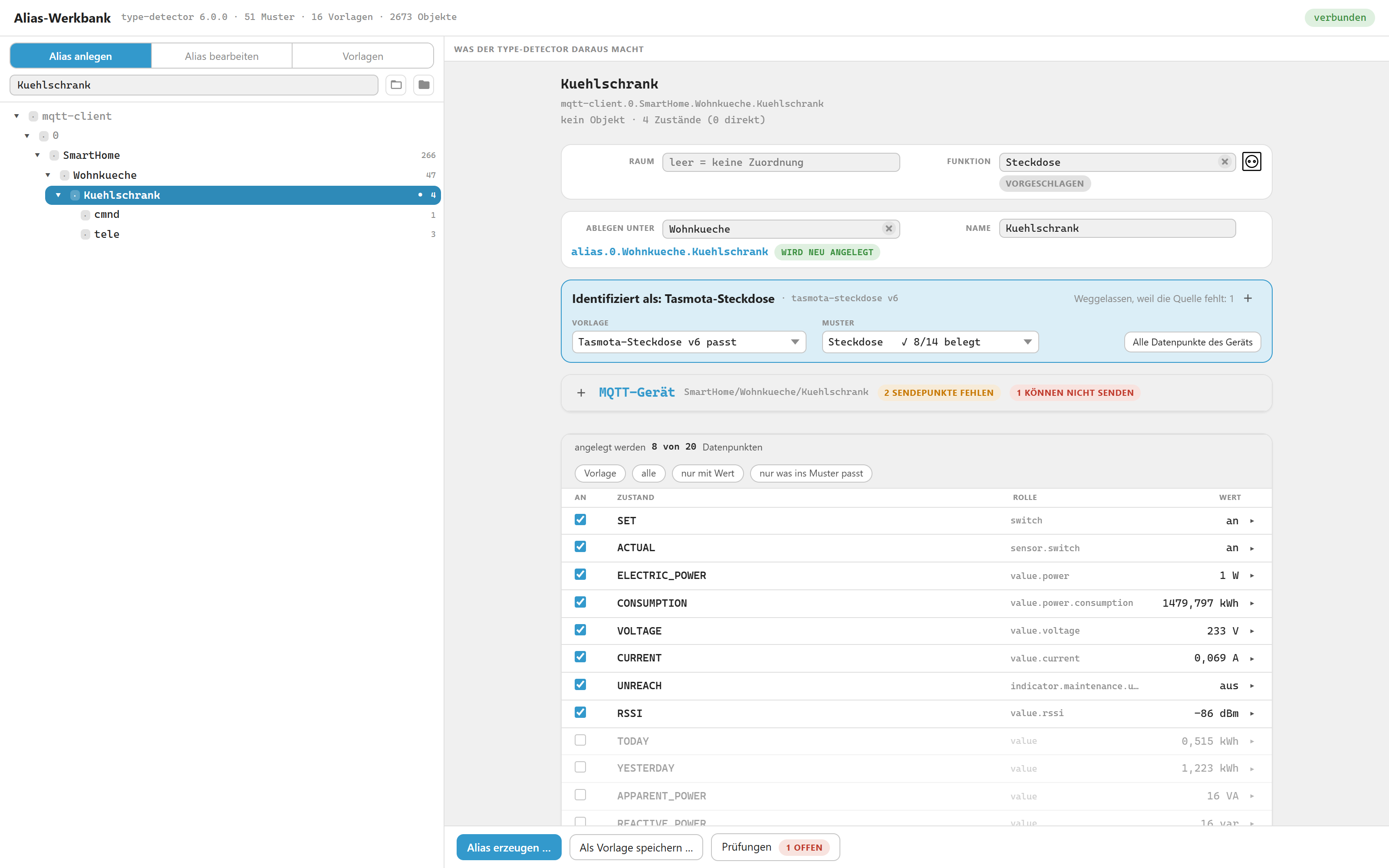
A Tasmota socket picked in the tree: what the detector makes of it, which template won, and every datapoint with the value it returns right now.
Live detector report. The real @iobroker/type-detector runs against a
draft of your alias while you edit it. Change a role and the report changes with
it — you see immediately whether you built a device or a pile of loose values,
which pattern slots are filled and which are still free.
Live value preview. Every datapoint shows what its read function returns
right now, next to the raw value of the source. A formula that yields
undefined or throws is visible before anything is written.
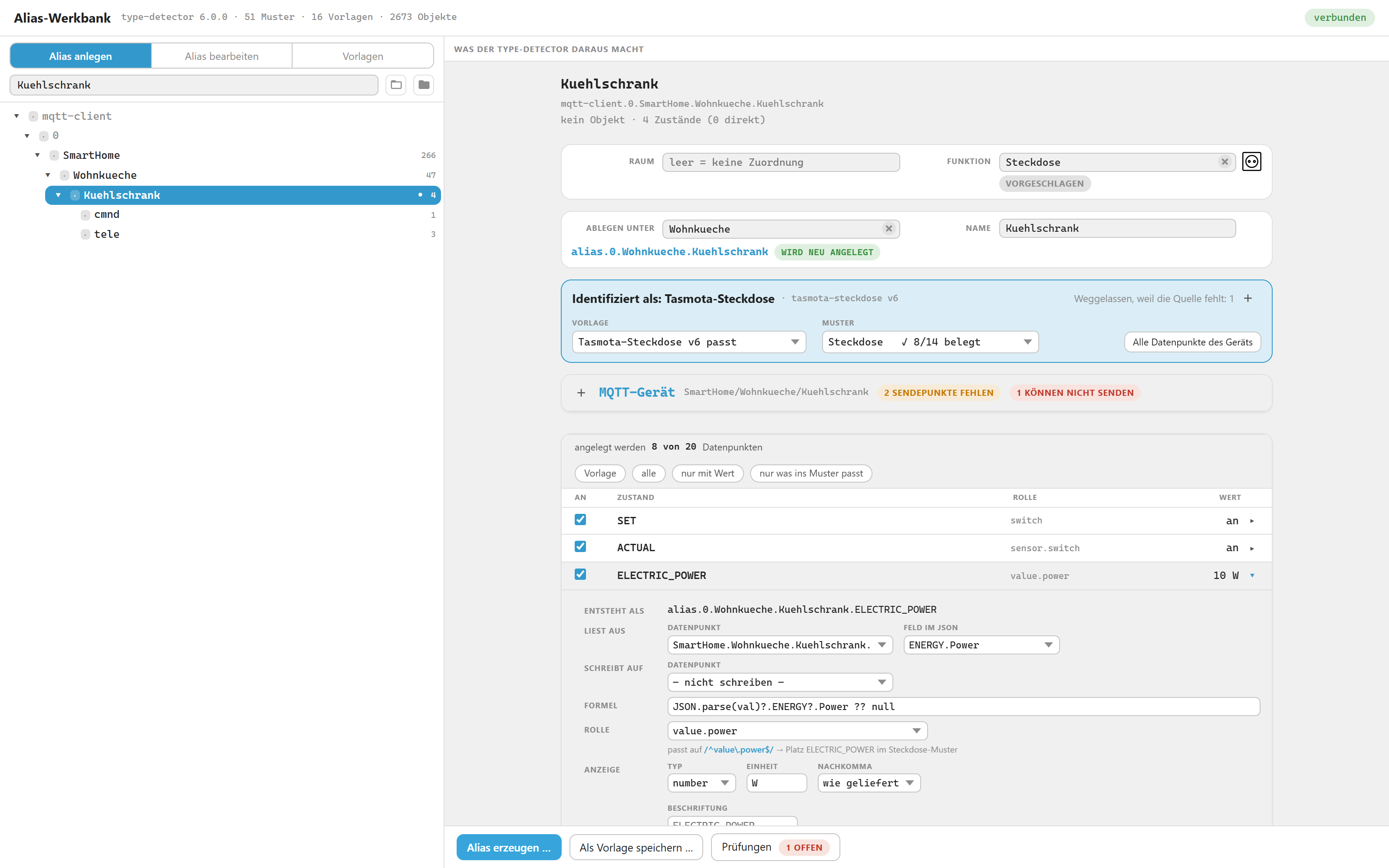
One row opened: where it reads from, which JSON field, the read function, the role — and the pattern slot that role fills.
JSON is unpacked without you writing a formula. Many devices do not deliver
their readings as separate datapoints but as a single JSON — a Tasmota puts
everything into tele/SENSOR. Where the workbench finds valid JSON in a
source, it takes it apart and offers its fields in a drop-down:
ENERGY.Power, ENERGY.Total, Wifi.Signal. One click is enough, the
matching formula appears by itself — and in the guarded form:
JSON.parse(val)?.ENERGY?.Power ?? nullThe ?. is not decoration. tele/SENSOR is a catch-all whose contents differ
from device to device and from message to message; the bare
JSON.parse(val).ENERGY.Power fails the moment ENERGY is absent — the alias
then delivers nothing at all and the controller writes a warning to the log.
With ?. the result is simply null. And if the field is 0, 0 is what
you get, not "no value": ?? only steps in for null and undefined.
It works in both directions. Where a row already carries a formula, the
workbench reads it back and shows the field it means instead of "custom
formula" — including the bare spelling without ?.. Only something that
really does more than access a field (JSON.parse(val)?.POWER === "ON") stays
a custom formula and is left alone. And what you wrote yourself stays: if your
formula differs from the one the template proposes, the row says so — it is
changed only when you ask for it.
Role, room and function are kept in order too. An alias is more than a bundle of datapoints, and the workbench maintains the three things that make a device recognisable as a device in ioBroker:
- The roles of the points come from the template or the pattern, and they
follow along when you switch the pattern —
switch.lightdoes not fit asocketSET. The role picker is grouped by pattern slot and shows which slot a role would fill and whether it is still free. Where a slot accepts several spellings, all of them are offered:LOWBATtakesindicator.lowbatjust as well asindicator.maintenance.lowbat— so whatever your own hardware writes is among them. Deprecated spellings stay out. - The role of the channel is the device type itself (
light,blind,thermostat), the way the admin's device adapter keeps it — that is what other adapters recognise it by. - Room and function do not live on the object but in
enum.rooms.*andenum.functions.*. The workbench proposes both — the room from the source, its name or the target folder, the function from the template or the detected device type — enters the alias there when writing, and takes it out again when you change the assignment. Move the alias and the assignment moves with it; other members of the same enumeration are left untouched. - And their pictures. The admin ships ready-made room and function templates with icons. Where an existing enumeration has none — ones mirrored from a Homematic CCU never do — the workbench fills it in. Next to the field you see beforehand what is going to happen. See Room and function.
None of this happens out of sight: every one of these changes appears in the dry run before anything is written — including the ones to enumerations, which are, after all, other people's objects.
Templates. A template describes how a device source becomes a finished alias device. Templates are plain JSON files, one per template — see Template format. Sixteen ship with the adapter: four for Tasmota, one plain measuring point, and eleven for Homematic — see What the shipped templates cover.
Your own templates. Build a device — by hand or by adapting a shipped template — and save it as a template of your own. What can be derived is derived; what cannot be derived is asked. Before anything is stored, a try-out runs the new template against every device in the system and shows which ones it matches, which template wins there, and which devices would change hands. See Saving your own templates.
Tasmota and MQTT. A Tasmota device arrives through the MQTT adapter as a set
of raw topics: cmnd/, stat/, tele/ — no device, just datapoints. The
workbench does not only build the alias from them, it also checks the path to the
device:
- Missing command points. A
cmnd.POWERthat does not exist is created at the press of a button — with the right topic and a fitting role. - Mute points. They exist, but they are not allowed to send:
publishis off. An alias switching through them does nothing, and nothing about it shows. The workbench points that out and enables it on request. - Delayed feedback. Without
SetOption59, Tasmota reports a change only with the next telemetry — the alias shows the old value for minutes. The workbench asks the device and turns the setting on. - Asking for commands. When the command list of a device is unknown, it asks the device (Status 11). A plain query that switches nothing and changes nothing.
Bind your Tasmota devices this way and you need no separate adapter for the device structure: MQTT delivers the data, the workbench turns it into devices.
Devices with several outputs. A power strip or valve manifold has
POWER1, POWER2, … Since a socket pattern has exactly one SET, each
output becomes its own channel, grouped under one folder. The output numbers are
read from what actually exists — gaps are allowed.
Move, rename, swap the source. An id cannot be changed in the object store, so moving is always: create new, move the enum memberships, delete old — in that order, so a failure leaves you with two aliases rather than none. Swapping the source keeps the alias untouched and only re-points it, which is what you want when a device dies. See Swapping a source.
Filling free slots. A device that matches no pattern is often not an unknown device — a role is simply missing. Suggest free slots sets roles in the draft and lets the detector decide again. It only ever runs on that button, never during normal detection, every guessed row is marked, and while any guess is undecided the write buttons stay locked. Not deciding is no longer a silent yes.
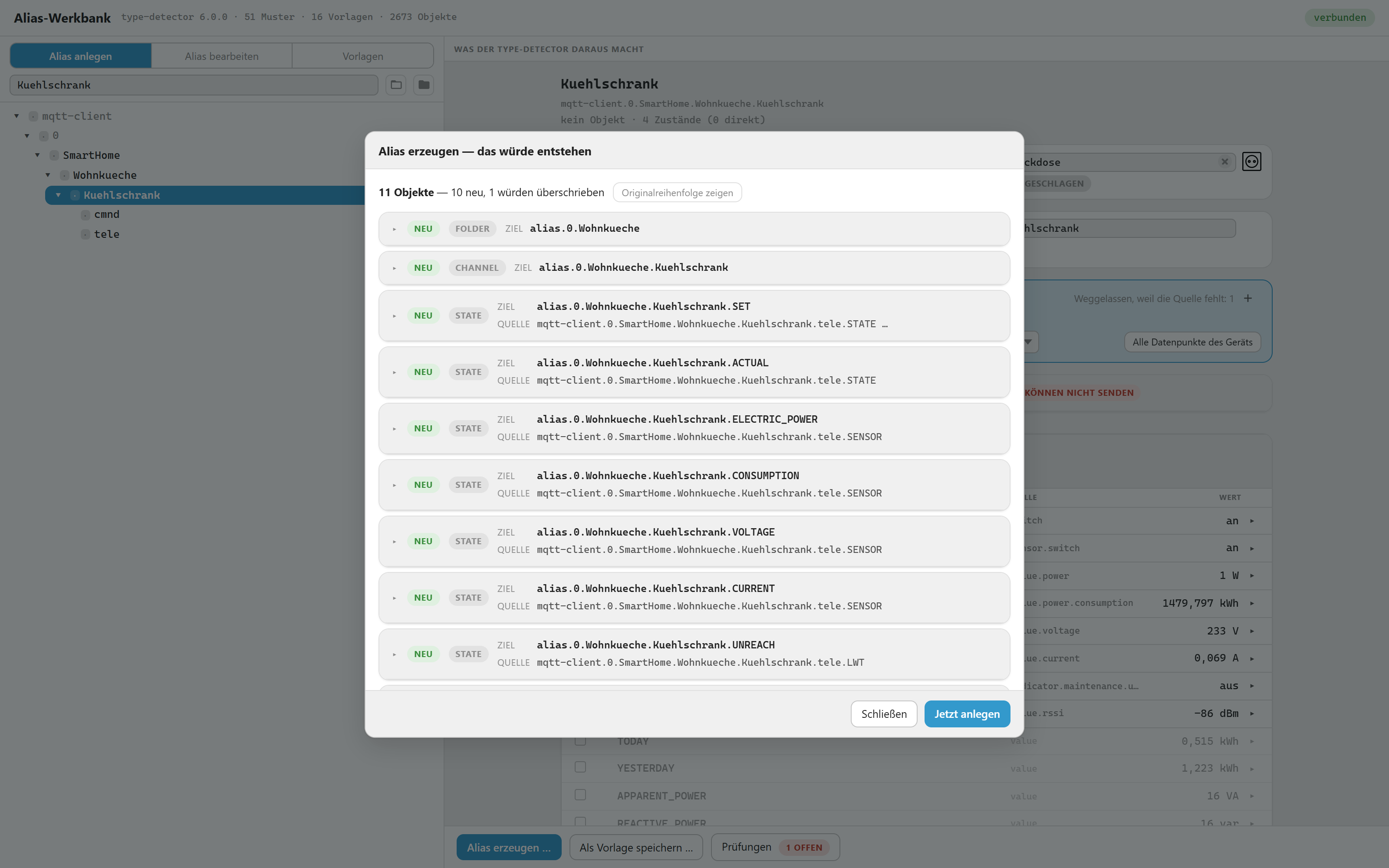
The dry run before anything is written: eleven objects, ten new, one would be overwritten — each with its target and its source.
Nothing is written without a dry run. The dry run lists every object that would be created, changed or removed, as full JSON. For anything that changes it puts before and after side by side, line against line, so you can see what changes instead of only that it changes. Field order and trailing commas are normalised first — otherwise half the lines light up for no reason. Only from there can you write. If a source does not exist, writing is blocked: the js-controller remembers a missing source permanently, and only deleting and recreating the object fixes it.
Status
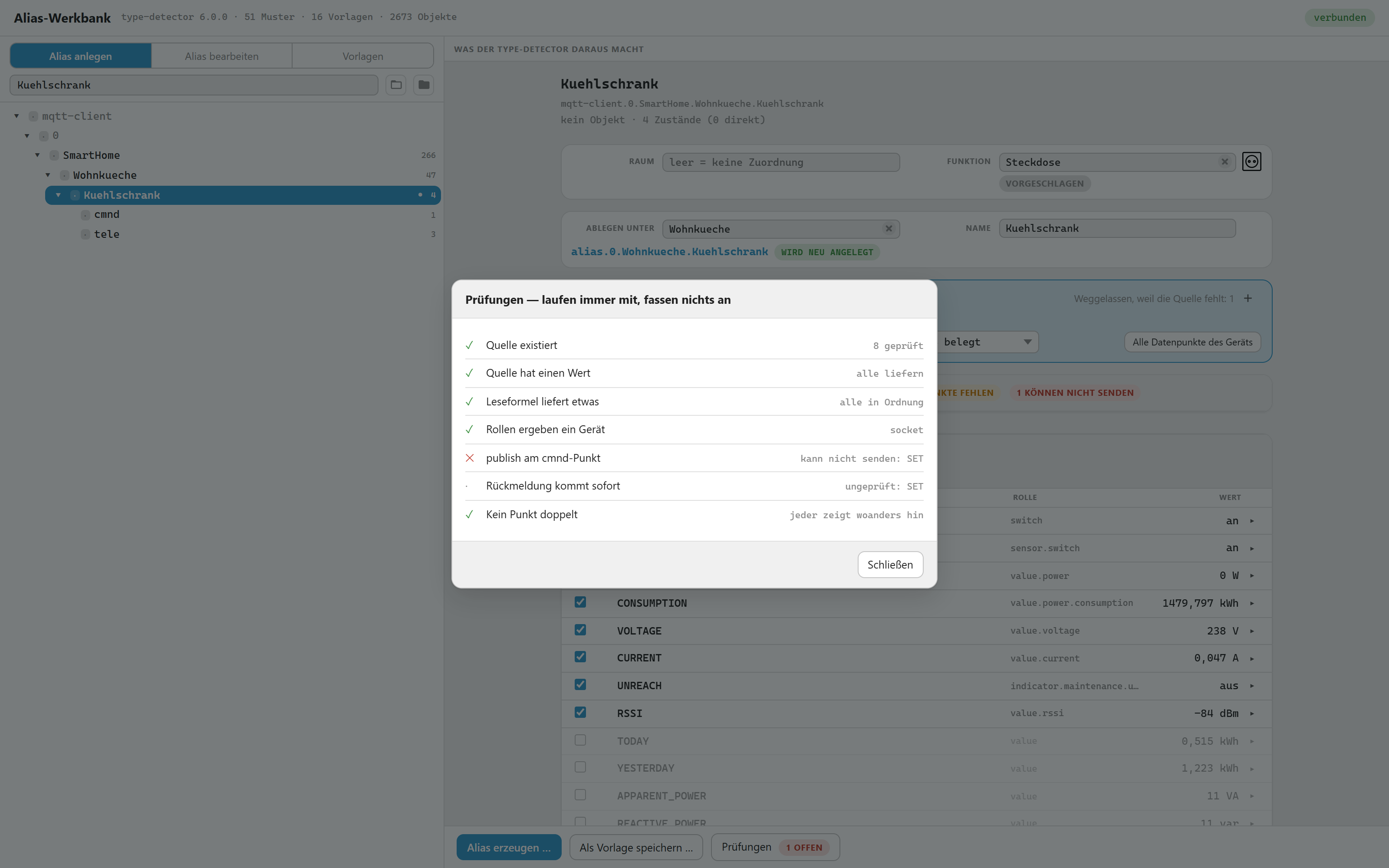
The checks run alongside and touch nothing. Here one of them fails: the alias would look finished, but its switch could not send — publishing is off on the MQTT command point.
Early. Usable, but not finished.
- Works as an admin tab; the adapter itself runs no process (
mode: none). The instance exists only to carry the settings. - Interface in German and English, 550 keys each; the settings page in eleven languages
- 16 bundled templates: eleven Homematic, four Tasmota, one plain measuring point
- Missing: "who uses this alias" — vis views, Alexa and Google names cannot be searched from here, so a rename warns you instead of pretending to be complete. Exporting a template to a file and reading it back works but is the least tested path.
Installation
Open the ioBroker admin, go to Adapters, look for Alias Workbench and create an instance. Then reload the admin and pick Alias Workbench in the left menu.
Why the tree shows devices that do not exist
With MQTT, ioBroker only creates objects for the datapoints themselves. A topic
like SmartHome/Bastelzimmer/Gartenpumpe/stat/POWER produces one object for
stat.POWER — the level Gartenpumpe is only part of a name, not an object.
The type-detector, however, looks for a channel or device to group
datapoints under. It finds none, so it recognises no device, and Alexa, Matter
and Material have nothing to attach to.
That gap is what the alias fills: alias.0.…Gartenpumpe is a real channel with
proper roles beneath it. The workbench therefore lets you pick such a
non-existent node in the tree and build a device out of it.
What an existing alias contributes
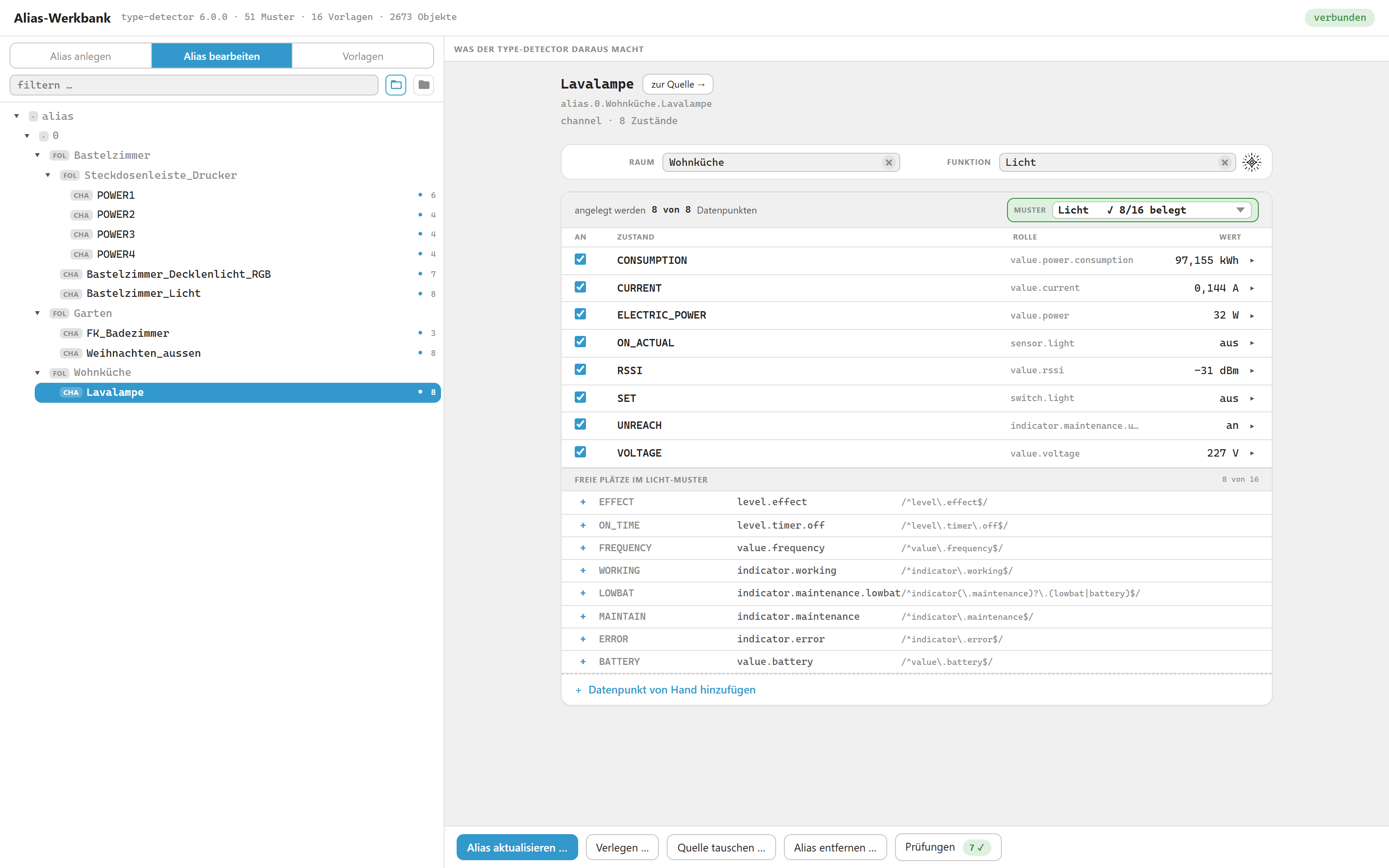
An alias that already exists. Its own roles and formulas win over the template, the free slots of the light pattern are listed below, and the three management buttons appear only in this mode.
Pick a source that already has an alias, and the alias wins. Role, type, unit, value list, caption, formulas, both sources and the ticks come from what is stored — in both views, "create alias" and "edit alias".
Before that, the same row carried a different role depending on which tab you were in, and refreshing did something different in each. Now refreshing changes nothing by itself.
Where the template wants something else, the row says so — "Template: sensor.window" — and a button above the list offers to apply it. That is a click, never a side effect. The caption is exempt: the display name belongs to whoever typed it.
Swapping a source
A device breaks and gets replaced. The alias should stay exactly as it is —
same id, same recording, same room and function — and only point somewhere
else. Swap source… does that, and it changes only common.alias.id per
datapoint plus native.quelle on the channel.
Each datapoint is matched in three steps, and the dialog says which one was used:
- same relative path below the new device —
…ABC.1.STATE→…XYZ.1.STATE - through the template row — finds
LOWBATon a device that spells itLOWBATwhere the old one saidLOW_BAT - guessed from name or role — deliberately weak, and marked guessed so you check it
Rows with no match at all turn red and offer a checkbox: remove this point when swapping. Leave it unticked and the point stays, still pointing at the old source — allowed, but visible.
Two things the dialog is careful about. It names the old source even when the device is gone — that is the normal case for "device broken". And it warns where the new source measures differently: "Watch out: ACTUAL: value range 0..100 → 0..255". The alias keeps its formulas; if the new device counts differently, the numbers are wrong afterwards and nothing else would tell you.
Room and function
Both live in enum.rooms.* / enum.functions.*, not on the object — so this
is the one place where the workbench writes outside alias.. Nothing else
outside that namespace is ever touched.
The proposal comes from, in order: the room already on the source or one of its
channels, the device name (FK_Max_Spielzimmer → Max_Spielzimmer), the
target folder. The function comes from the template's funktion field, or from
the detected type when the template has none.
The admin ships 62 function and 58 room templates, each with a picture. The workbench does not copy them; it reads them out of the admin's own bundle at runtime, so there are never two lists ageing apart. If that fails, the field quietly shows only what exists — and says so in the last row, rather than looking empty for no reason.
The picture is shown before it is written. Next to each of the two fields stands the picture of the chosen enum: solid when one is already stored, faded with a small new corner when the workbench would add one on writing, and nothing at all when the catalogue does not know the name or the switch is off. So the settings page is visible in the row itself, instead of having to be guessed from a dry run.
Settings
The instance has no process; its settings only decide how the workbench writes.
Four switches, all on by default — and if native is missing entirely, the same
defaults apply rather than everything counting as off:
| Switch | What it does |
|---|---|
| ikonRaeume | add a missing picture to a room |
| ikonFunktionen | the same for a function |
| ikonErsetzen | also replace an entry that is not a picture. ioBroker's default rooms carry icon: "Bedroom" — a bare word that renders as a broken box |
| vorlagenVomAdmin | offer the admin's room and function templates at all |
The tab reads them once on load. After saving, reload the tab.
What the shipped templates cover
Sixteen templates come with the adapter. Four Tasmota, one plain measuring point — and eleven for Homematic, where the interesting part is not that a template matches but that the right one does. The devices look alike in the data; what separates them is one datapoint each:
| Told apart by | Which is which |
|---|---|
| 1.WORKING | switch actuator, not a window contact — both have 1.STATE |
| 2.STATE | multi-channel actuator; the single-channel template refuses when it is present |
| 1.LEVEL_REAL vs 1.STOP | dimmer vs shutter — both have 1.LEVEL |
| 1.ERROR | classic window contact vs HmIP, which computes a boolean from a number |
| 0.SABOTAGE | required for the HmIP contact. Without it, 1.STATE + 0.LOW_BAT matched twelve devices, eight of them actuators |
| 1.LEVEL / 1.HUMIDITY / 4.SECTION | radiator valve vs wall thermostat vs heating group |
| 1.TEMPERATURE vs 1.ACTUAL_TEMPERATURE | a plain sensor vs something that also sets a value |
The CCU's own receivers — HM-RCV-50, HmIP-RCV-50, RPI-RF-MOD — match
nothing on purpose. Fifty bare LEVEL channels are not a device.
When a template is rejected, the picker says why: "1.LEVEL missing", not "does not fit". A reason you cannot act on is not a reason.
About the role value.power.consumption. Four templates (messpunkt,
tasmota-lampe, tasmota-mehrfach, tasmota-steckdose) give the row
CONSUMPTION the role value.power.consumption, which is struck through in
the ioBroker state roles list.
It stays on purpose: @iobroker/type-detector 6.0.x recognises CONSUMPTION
only with exactly this role (typePatterns.js, pattern consumption,
defaultRole: 'value.power.consumption'). With value.energy.consumed the
point would drop out of the detected device, and vis, Alexa and the device
manager would no longer show any consumption. Each of the four rows carries
this reason in a field _rolle. The role will change once the type-detector
does.
Role knowledge beside the rows
A template can carry weiterePunkte: roles for datapoints that get no row of
their own. Without it, "all datapoints of the device" showed no role on most
lines, because hm-rpc simply leaves the field empty. A *.NAME wildcard applies
per channel, so 2.LEVEL and 3.RAMP_TIME are covered without listing every
channel. It changes nothing about which template wins — only raw rows are
enriched.
Saving your own templates
The Save as template … button turns the device you are looking at back into
a template. Paths become relative to the device, JSON.parse(val).ENERGY.Power
becomes feld: "ENERGY.Power" again, and roles, units and formulas are kept.
What a template cannot know by itself is which datapoints make a device this kind of device. That is a statement about all future devices, so the dialog asks:
- required datapoints — proposed (anything with a write path is required by default), decided by you with a tick per row. Every extra required point makes the template more precise and more brittle at the same time.
- content checks — proposed wherever a JSON field is read. This is what separates "socket" from "socket with metering", so it is offered but not ticked.
- name hint — never derived. It only breaks ties between templates that fit equally well; MQTT cannot tell a lamp from a PC.
- several outputs — a tick plus the number that identifies this output.
stat.POWER1then becomesstat.POWER%N%, replaced only at the end of a path segment soENERGY.Powerstays intact. If the draft still refers to the other outputs, the dialog says so: such a template would only ever fit this one device. - must not exist — datapoints whose presence rules the template out.
Then the try-out shows what the detection actually catches, before anything is saved.
Managing them
The third view next to Sources and Aliases is Templates: every template with its detection, its datapoints, a permanent try-out and the raw JSON. Everything about a template of yours can be changed there: name, rank, name hint, the required and forbidden datapoints, and every datapoint itself — click a row to open its role, type, unit, paths, formulas and flags. Datapoints can be added and removed. The try-out below reacts to every change, so you see what an edit does to the detection before you save.
Shipped templates cannot be edited — that way they always stay the state they were delivered in. Make an editable copy gives you a copy under the same id that shadows the original; delete that copy and the shipped one reappears. Duplicate on a template of your own gives it a new id, for a variant that stands next to the original rather than replacing it.
Import accepts one template per file, in exactly the format under
admin/vorlagen/. Nothing is stored on import: the file appears as a preview
first, with a line saying what saving would do — create, replace your own
version, or shadow a shipped one.
Your templates live in native.vorlagen of the instance object, so they survive
iobroker upload and adapter updates and are part of a Backitup backup. A
template of yours with the same id as a shipped one shadows it. Storage and
exchange format are the same JSON, so a template that turned out well can move
into the package unchanged.
How a template is picked
When several templates fit, the winner is decided in this order:
- how many datapoints the template actually verified — required points, per output for multi-output devices, plus content checks that came out true
- the name hint, if it matches
- your own template over a shipped one
rang, so the same device is always detected the same way
Order matters. Counting evidence first is what keeps a template you built on purpose from losing to a shipped one whose word happens to appear in the device name.
Note what step 3 means for updates: a template of yours cannot be outranked by
a shipped one on rang — that step sits above rang in the order, so no
future version of this adapter can quietly take a device away from a template
you built. rang only ever breaks ties between templates of the same origin,
which is also why a new template of yours is numbered from your own templates
and ignores the shipped numbers entirely.
A shipped template can still win on step 1 by verifying strictly more datapoints. That is deliberate — more evidence should win — and it only affects devices you have not built yet: a finished alias records the template it came from and keeps it.
What a template ticks by default
Whether a datapoint has a slot in the type-detector pattern is not the
criterion. That only decides where the point ends up — inside the device or
in a separate info device. It says nothing about whether anyone needs it. The
thermostat pattern has 24 slots, socket has 14; everything that could ever
sit in such a device is listed there, down to frequency and apparent power.
The criterion is purpose: tick what you need to operate the device and to
notice when something is wrong. Setpoint, actual value, and the signals that
announce a failure — LOWBAT, UNREACH.
Left unticked: diagnostics. Signal strength, uptime, ramp times, inhibit flags. You tick those when you are chasing a problem.
Battery voltage looks like it belongs in the first group — it falls
visibly over weeks while LOW_BAT only flips once the change is already due.
It stays unticked anyway, because the detector has nowhere to put it. Patterns
are assembled from two shared groups:
maintenance  WORKING UNREACH LOWBAT MAINTAIN ERROR DIRECTION
             CONNECTED RSSI ON_TIME BATTERY   value.battery   unit %
metering     ELECTRIC_POWER CURRENT VOLTAGE CONSUMPTION
             FREQUENCY SPEED POWER            value.voltage   unit V
VOLTAGE sits between current and consumption: it is the mains voltage of a
metering device, not a sensor's cell voltage. A window contact has no
metering group at all, which is why it has no voltage slot — and BATTERY,
the slot it does have, means a percentage. Writing volts into either is
wrong, so the point is offered and left off.
Two things override that:
- A point that reads the same source as an already-ticked one is never
ticked. Otherwise the same value sits in the alias twice and the seventh
check reports it, rightly. Homematic switch actuators have no separate
feedback value —
1.STATEis both — so theirON_ACTUALstays off. - Where the purpose says tick but the pattern has no slot, weigh it: the
point lands in an info device next to the real one. For a single value that
is rarely worth it, and the template's
hinweishas to say so. And check what a slot means before using it — a matching name is not a matching purpose, as the voltage case above shows.
Template format
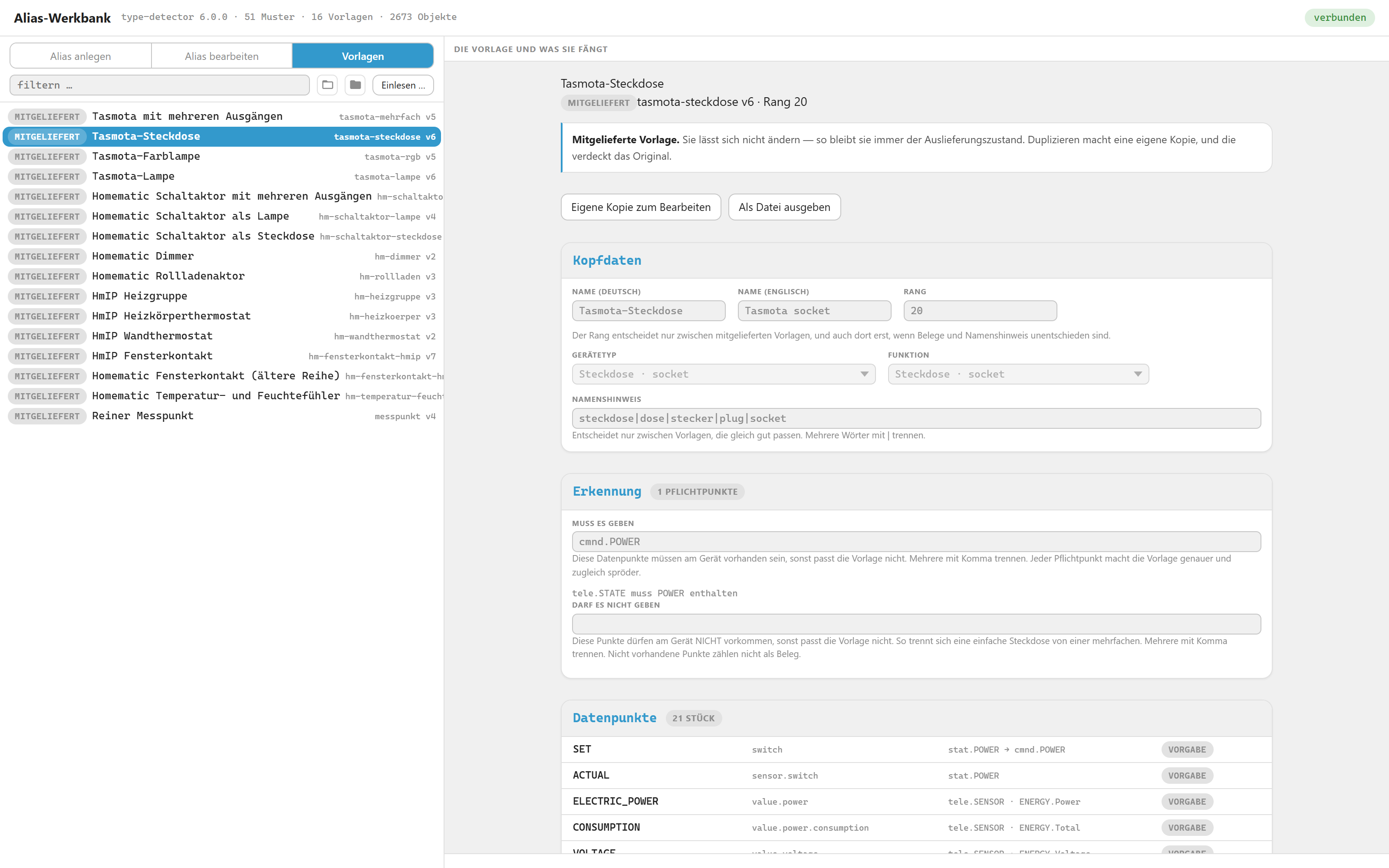
A shipped template, read-only: header, what must and must not exist for it to match, and its datapoints. "Own copy" makes it editable.
One JSON file per template under admin/vorlagen/. Example:
{
  "id": "tasmota-steckdose",
  "version": 1,
  "rang": 20,
  "name": { "en": "Tasmota socket", "de": "Tasmota-Steckdose" },
  "geraetetyp": "socket",

  "erkennung": {
    "erforderlich": ["stat.POWER", "cmnd.POWER"],
    "inhalt": { "tele.SENSOR": "ENERGY" },
    "namenshinweis": "steckdose|dose|plug|socket"
  },

  "zustaende": [
    { "name": "SET", "rolle": "switch", "typ": "boolean",
      "lesen": "stat.POWER", "schreiben": "cmnd.POWER",
      "schreibformel": "val ? \"ON\" : \"OFF\"" },

    { "name": "ELECTRIC_POWER", "rolle": "value.power", "einheit": "W",
      "lesen": "tele.SENSOR", "feld": "ENERGY.Power", "optional": true },

    { "name": "TODAY", "rolle": "value", "einheit": "kWh",
      "lesen": "tele.SENSOR", "feld": "ENERGY.Today",
      "optional": true, "vorgabeAus": true }
  ]
}
| Key | Meaning |
|---|---|
| erkennung.erforderlich | these datapoints must exist, otherwise the template does not match |
| erkennung.inhalt | the named datapoint must contain this field in its JSON |
| erkennung.verboten | these datapoints must not exist, otherwise the template does not match |
| erkennung.namenshinweis | only breaks ties between templates that fit equally well |
| rang | last tie-breaker, so the same device is always detected the same way |
| optional | the state is skipped when its source or JSON field is missing |
| vorgabeAus | proposed but unchecked — see What a template ticks by default below |
| feld | builds the read function JSON.parse(val).<field> |
| mehrfach + %N% | one device per output; the numbers are read from what exists |
| werteliste | value list for the datapoint — slots like EFFECT are not detected without one |
| absolut | lesen is a full object id, not relative to the device — the same object for every device |
| beschriftung | the datapoint's display name, if it should differ from its slot name |
| nachkommastellen | decimals for the value display |
verboten is what genuinely separates a single socket from a multi-output one:
the single one has no stat.POWER2. An absent datapoint deliberately does not
count as evidence — otherwise a list of invented exclusions could inflate a
template's score.
Datapoint names are matched case-insensitively as a fallback, because MQTT keeps
whatever casing was published — the same device family sends cmnd.POWER on one
unit and cmnd.power on the next.
Under the hood
source (e.g. mqtt-client.0.…)
   ↓  a template is matched and applied
draft in memory  →  object image  →  type-detector  →  report
   ↓  dry run
alias.0.<folder>.<device>          channel + states with common.alias
The draft never touches the object database. The detector runs against an image of the draft, which is why the report reacts instantly and why nothing can break while you experiment.
The type-detector is a real npm dependency, bundled for the browser with esbuild. It is never copied into the source tree — a frozen copy that drifts from the library was the main weakness of the existing alias manager.
Development
After cloning, fetch the dependencies the usual way for a Node project, then run the build script:
npm run build # bundles @iobroker/type-detector into admin/detector.jsnpm run build touches only the detector bundle. The tab's own modules are
served as they are; editing one and reloading the tab is the whole cycle. On a
running installation the admin caches adapter files, so iobroker upload
alias-workbench after copying is what makes the browser see the change.
There are two dictionaries. admin/i18n/ belongs to the settings page
(jsonConfig with "i18n": true, all eleven languages, loaded by the admin
itself). admin/sprachen/ belongs to the tab (German and English, loaded by
admin/js/sprache.js; any other language falls back to English). A new tab
language is a new file in admin/sprachen/ and an entry in SPRACHEN in
admin/js/sprache.js — nothing else. Watch for strings
written straight into admin/tab.html: they are replaced at runtime, and one
that nobody wired up stays English in every language without anyone noticing.
The tab is 30 ES modules under admin/js/, loaded by the browser as
modules — there is no build step for them, and styling lives in one file,
admin/css/werkbank.css. Because a module boundary can be crossed wrongly in
ways the browser only notices while running, npm test checks before every
commit that everything still bundles, that every identifier is declared or
imported, and that both language files carry the same keys.
Background
- @iobroker/type-detector — decides what counts as a device, by roles rather than names
- Tasmota — the device family the shipped templates cover
- ioBroker aliases — aliases are a core feature of the js-controller, not of any adapter
Changelog
0.10.0 (2026-09-20)
Detection and patterns
- Picking another pattern re-ticks the rows and leaves them alone while the new pattern does not apply yet.
- Guessing gives every datapoint one slot only, and a contradicting unit rules a slot out — a start delay in seconds does not become an actual temperature.
- The pattern field names what is really missing, groups included (“SET / SET_HEATING / SET_COOLING”). The legend says why a pattern does not apply and offers the matching button.
- The hint “might fit better” only suggests patterns that apply afterwards.
- For “Information” the field reads “✓ 24 points” instead of “24/31 filled” — that pattern takes any number of points.
- The message “No remaining datapoint fits” no longer sits above the orange legend and names the rows decided by hand.
Free slots
- A slot can be created once, and every slot is listed once.
- “Suggest free slots” now sits in the blue box next to the pattern; the button for the whole device is called “Load all datapoints of the device” and sits above the list.
The detail row of a point
- New: “Name” and “Slot in the pattern” — the slot fills in role, type, unit and value list.
- “reads from” and “writes to” are wider, the formula is called “read formula” and sits below.
- If the slot already belongs to another row, the workbench says so instead of blaming the type. A pure measured value no longer gets a write target.
Templates
- “Apply template values” no longer deletes a value list.
- A template without a name can be imported and then named.
- A skipped row gives the reason: point missing, no JSON, or field missing.
- “Update template” leaves the detection as it was; an exported template can be imported again.
Source swap
- If one point fails, the note on the alias stays on the old source — the swap can be finished afterwards.
- The greyed-out button gives its own reason.
- The hint “one level up” only appears where it helps.
Deleting and moving
- The delete dialog only warns about channels that really lie below the alias.
- After a move the source knows its alias again right away; “to the source →” no longer jumps somewhere vague.
Room and function
- A room is found in the middle of a device name too (“Heizung_Badezimmer INT0000001”).
- Picking with the keyboard works like the mouse, and the offer “file it under … as well?” no longer opens a row of its own.
- If rooms and functions cannot be loaded, the fields say so themselves.
Tasmota and MQTT
- The IP is found on older firmware too (
tele.INFO2in both forms). - The card no longer claims a switched-off point sends; “allow sending” switches the link back on as well.
- Creating several send points at once yields the same objects as creating them one by one —
POWER,FadeandLedTableasmixed, so the write formula takes effect. - A HomeMatic actuator without a template no longer drags maintenance points along.
- “Ask” for SetOption59 only counts what arrived after sending; if no answer comes, “No answer …” is shown and the button stays for a re-check.
- The “MQTT device” card opens again on devices without a row from
tele/….
Display
- The number on a tree node counts what lies below it.
- A node without an object of its own is marked “VIR”, the device card sorts like the tree.
- A button reads along and stays a button; the misleading “never changes” badge is gone.
- JSON fields with a dot in their name can be selected.
All changes in detail, with cause and measurement: docs/aenderungen-ausfuehrlich.md.
0.9.12 (2026-09-18)
- The small type badges in the tree (DEV, CHA, FOL …) now all have the same width. A node without an object of its own shows just a dot there, and its badge was narrower — its name fell out of line.
- “Move …” did nothing on some aliases. Creating alias points by hand in the admin often yields an alias without its own channel object — the node shows in the tree but is not an object itself. The workbench displayed the “Move …” button there, but clicking it opened no dialog and said nothing. Such an alias is now moved exactly like one with a channel; a missing channel is not created along the way.
- No German left in the English interface. Three places were hard-wired German: the type badge in the detail row (“Zahl”), the “Datenpunkt” field next to “writes to” and the screen-reader label of the tick boxes (“SET anlegen”). The fixed default texts in
tab.htmlare now English — before, 44 German texts were only translated at runtime. The two browser-console messages are English now as well. - The tab's menu entry now has the adapter's name in all eleven admin languages. Before, it existed in German and English only, and every other language showed “Alias Workbench”.
- Why
value.power.consumption— four shipped templates give consumption this role, which the ioBroker roles list marks as deprecated. That is deliberate: the type-detector 6.0.x recognises consumption only with exactly this role. The reason is now written into every affected template (field_rolle) and into the README. The README also explains why the workbench is an admin tab rather than a settings page. - The object count in the header grew the longer the tab stayed open. Only devices, channels, folders and states are meant to be counted — and only those are loaded. When following changes, however, the workbench took in every changed object type: after switching the system language,
system.configsat in its store and the count read 3146 instead of 3145, likewise after every saved instance setting or adapter update. Following changes now applies the same rule as loading. - Values from another node did not update at a source. When you select a source that already has an alias, the list also shows that alias’s rows — and they often read from somewhere else. The electricity meter shows three rows “from Solar.Netz”: import, smoothed import and house consumption. Their value was fetched once on selection and then froze; it stayed at 428 W for hours while the system reported 22 W. Only the selected node was subscribed; the rows’ sources were only added in “Edit alias” mode. The workbench now subscribes to everything it displays — including a source you point a row to by hand in the detail view. The header accordingly shows two subscriptions instead of one on the electricity meter.
- The legend above the list claimed “The light pattern does not apply right now: SET requires boolean, number is set. That is why no row has a place.” — on a device whose SET row carries
switch.light/booleanand is perfectly fine. The culprit was0_AES_KEY: hm-rpc gives it the rolestateand the typenumber, andstateis allowed on the light pattern’s SET place. The check asks per row “your role would fit a place, your type does not” — it never looks at who ended up holding the place, and the message then printed the PLACE instead of the row it was about. The sentence was wrong at the end too: five rows did have a place. The type reason now only applies when the named place really did stay empty; otherwise the ordinary legend is back, and every placeless row is tinted instead of just one. The case the message was built for — SET itself in the wrong type, place stays empty — is unchanged. - Rows carried “differs from the template” where no template was in force at all — and flagged the better value while doing so. What was really compared was the raw draft, that is the bare role of the source point: on a switch actuator, after “— no template —”,
SETshowed the badge and below it “The template wants: switch”, while the alias holdsswitch.light, which even fits thelightpattern. Same onUNREACH, whereindicator.maintenance.unreachcounted as the deviation andindicator.unreachas the target. And it was not only the dismissed case: on a device for which a template is never found, the same badge appeared. The rule now: with no template in force — dismissed or never found — no template value is recorded, so the badge, the detail line, the←button and the template filter button all drop out. Rows keep what the alias holds; that is the stock rule and has nothing to do with templates. With a template everything stays as it was — a real deviation is still shown. - With “— no template —” the output picker stayed on screen if you came from the multi-output template — coming via any other template it was gone. Two routes, two answers on the same device. Worse: using the leftover picker brought the dismissed template silently back (measured: after switching to
Licht_Esstischthe field read “HomeMatic switch actuator with several outputs” again). An output does not belong to the device but to the template’smehrfachblock — without it there is no placeholder and so nothing to choose; of 17 bundled templates exactly two carry such a block. The raw draft no longer inherits it, and the channels go through “one sub-folder per channel” instead. And everything is ticked now. The raw draft used to tick whatever had a place in the detected pattern; on two identical channels the detector picked one of them — the second — soLicht_Esstischstood ticked andLicht_Barempty. Which one it picks is chance, and guessing is not the job of a draft without a template: dropping the template means picking the points yourself. - The expander in the template box read “Why this template +” and always wanted the right-hand edge. With a long name and two badges — “HomeMatic roller shutter actuator”, chosen by hand, forced — it no longer found room there and took a line of its own; the box grew without anything having been added. It is now a question mark, with the sentence in the tooltip. What was left out stays visible as a short badge (
4 WITHOUT SOURCE) — nobody should have to go looking for the fact that points are missing — and the sentence behind it now reads “4 left out because the source is missing” instead of “Left out because the source is missing: 4”. The header no longer wraps at all: room is made by the template name, which is shortened and shown in full in its tooltip; the id stays put, becausehm-rollladen…is no longer an id. Expanded, the question mark is filled. - A push-button is not simply any write-only point. The workbench left the read source empty on every row whose source carried
read: false. But HomeMatic uses that flag for two different things, counted across every device in the house: for a button press (PRESS_SHORT100 points,RAMP_STOP3,STOP1,OLD_LEVEL3 — all withnative.TYPE: ACTION) and for a setting that stays put (ON_TIME20 points,RAMP_TIME3 —TYPE: FLOAT). That is why the living-room dimmer showed “never changes” onON_TIMEwith an empty “reads from” field — on a value in seconds that one does set at the source now and then. Measured: an alias put on1.ON_TIME, the source set to 30 directly, and the alias showed 30. Soread: falsedoes not block reading. The read source is now left empty only where a button press is really meant:native.TYPE: ACTION, or a role starting withbutton.OLD_LEVELis the case where the role is not enough — it is calledvalue.dimmer. - “— no template —” is now in the template picker. Once the workbench had detected a template it could only be swapped for another one, never dropped: the first entry of the list was a mere heading with an empty value, and the branch bailed out on an empty value. Anyone wanting to create all points of a device without a template’s defaults had no way to get there. The choice now rebuilds the draft without any template — ticked is whatever has a place in the detected pattern — and target, folder, name, room and function stay as they were.
- The mark on a row whose source only writes read “reports nothing”. That sounded like a fault — as if the device were mute. What is meant is different: the value stays where it was written and never reports back by itself. It now reads “never changes”, and the same in the “target does not read” check.
- “One sub-folder per channel” — the button next to “create as one device” serves a different purpose, and nothing said so: it mirrors the folder structure of the source. A container for the device, one channel each below it, the states below those. The ticks now decide what appears: one sub-folder for every channel that contributes at least one ticked row, holding exactly those rows. Before, the path built a fresh draft per channel and ticked whatever that channel’s pattern offered — things appeared that nobody had chosen (on the test device the maintenance channel got three points instead of the two ticked ones), and channels with nothing chosen were created all the same. Edits made by hand on a row — role, type, unit, formula, caption — now travel with it. Information channels count too: they used to be dropped, so the button said “3 of them” while six channels stood in the tree next to it — and clicking
generalon its own has long given a draft (“Information ✓ 7/14 filled”) that could be created. The maintenance channel gets its own folder instead of being copied into every output:UNREACHexists only in channel 0 of the dimmer, so that is where it belongs; whoever wants it with the light takes “create as one device”. The copying had produced nonsense — 206 raw data points of a lawn mower in each of four drafts, the three meter phases of a Shelly SHEM-3 counted as “shared” instead of as channels of their own. Virtual channels drop out by themselves: on a HomeMatic dimmer nothing is ticked in the twoVIRTUAL_DIMMERchannels, so nothing is created there. States directly on the device stay in the container, which is then created as a channel instead of a folder. And the hint is right again: it computedtargetFolder + channelwhile writing usestargetFolder + device + channel— on the dishwasher it promisedalias.0.Commandsand createdalias.0.Dishwasher.Commands, on the living-room dimmer it readalias.0.1,alias.0.2,alias.0.3. It now names the id, the number of ticked points and the detected type. The label says so too: “one sub-folder per channel, N of them …” instead of “one device per channel” - On a multi-output device the draft adopted the ticks of a foreign alias. The workbench asked "is there already an alias for this device?" and answered with the one that reads most often from it. On Ricardo's power strip that is the consumption alias with six points from
tele.SENSOR— it beatRF1000with two points fromstat.POWER1. Output 1 then showed ELECTRIC_POWER and CONSUMPTION ticked, SET unticked, and the pattern field reported "✕ SET missing" on a device with a working SET. The majority rule is right for a single-output device and the wrong question for a multi-output one. The right question is: does this alias belong to the output currently selected? That is not guessed from names but asked of the template — which of its paths carry the placeholder? Exactly those tell the outputs apart (stat.POWER%N%,cmnd.POWER%N%); everything else (tele.SENSOR,tele.LWT) is shared. This also removes the trap from I31:tele.INFO2does carry a two, but no placeholder. For output 1 the barecmnd.POWERcounts as well — with Tasmota, POWER without a number is a second name for POWER1, measured at the device: a query tocmnd/POWERis answered with{"POWER1":"ON"}, and a topicstat/POWERdoes not exist. The bug only hit the first glance: coming through the tree brought the wrong stock, switching the output asked nothing at all and the template defaults won — the same output looked different depending on how you got there. All three paths now ask the same question. Single-output devices never enter the new branch by construction; without the new argumentaliasFuerbehaves line for line as before. - The target line now follows the same alias. On a multi-output device it always showed the output number —
alias.0.Bastelzimmer.Steckdosenleiste.POWER1, an ID that does not exist — and reported "will be created", whileRF1000stood right next to it. Clicking would have put a second alias beside the existing ones. The source said: "the workbench cannot know what the individual output is called." That held as long as it could only ask about the device. The target line now points at…Steckdosenleiste.RF1000with the badge "already exists", and "update alias" hits it. Where no alias exists for the output yet — the garden valve island — the proposal from the output number stays, and so does "will be created". - The SetOption59 note appeared on every Tasmota device, including where it has no effect. It claimed an alias would show "the old value for minutes after switching" — but on the power strip not a single row reads from
tele/STATE; they all read fromstat.POWERn, which the device sends immediately on every command (measured: 1.07 s). "For minutes" also assumed the Tasmota default of 300 seconds; on that strip it is ten (measured:tele/STATEevery ten seconds). The block now only appears when a row really reads fromtele/…and writes tocmnd/…, names those rows, and reads the interval fromTelePeriod; if it is not in the telegram the text says "on the telemetry cycle" instead of inventing a number. The same applies to the chip in the header. And the check "feedback is immediate" no longer reports "all fine" where there was nothing to check, but "no row affected — all read from stat/…" with a grey dot instead of a tick. Card and check ask the same function and can no longer drift apart.
0.9.11 (2026-09-16)
- After saving, the next click in the tree asked “unsaved changes” — about an alias that had just been written. The “something unwritten is here” mark was only ever set, never cleared; it went away solely when the draft itself was dropped, i.e. on delete and on move. It now falls after every successful write — and only then: if something went wrong, the change really is not in yet, and the question stays justified. There is a second effect that had been missing for a long time: while the mark stood, the workbench deliberately did not rebuild the draft. After a write the old one therefore stayed, instead of rebuilding from the freshly written alias.
- A second press of “Suggest free slots” bent back a row you had set yourself. On the air conditioner: guess nine slots, set the role of the SPEED row to
level.speedby hand, discard — and the next suggestion put the guessedlevel.mode.fanback. The pattern slot looked free, so the same row was guessed a second time; it then carried both marks, “changed” and “guessed”, which exclude each other — what was just guessed cannot have been changed before. Guessing now leaves any row marked “changed” alone. The slot stays free, and the note below says why. Putting a second row next to it was the alternative — the same source point would then hold two slots, and the eighth check would rightly report it. - As soon as guesses were pending, the button in the pattern bar renamed itself to “Discard suggestions” — and a second one with the same word and the same effect stood in the blue bar below it. Two buttons, one handle. The bar now always says “Suggest free slots”, and only while something is left to guess; once everything is guessed it disappears. Discarding happens where it belongs: in the blue bar, next to “keep all”.
- Instead of „either every slot is taken, or no remaining datapoint fits" the note now states the case that actually applies — with the names of the slots that stay free: “SPEED, SWING … stays free. Every remaining datapoint already serves as a read or write source in a filled row”, or “… No remaining datapoint fits”. If a hand decision holds a slot open, a sentence is appended: “1 rows were decided by hand and are left untouched.” The “every slot taken” case stays silent unless asked — it says “nothing to do”, and would otherwise appear on nearly every device.
- Ricardo’s air conditioner is detected as a thermostat and fills 3 of 24 slots. airCondition fails because its only required slot, MODE, does not carry the role — and that settles it, since “does not fit” has the last word. With automatic suggestions it would reach 9 of 29 against 8 of 24. That now stands next to the pattern field: “· airCondition might fit better” — a single line, both numbers in the tooltip. One pattern is named — the best one — and only when it really is better; measured in filled slots, not in ratio. Next to it sits a small → button that does both in one go: switch to that pattern and press “Suggest free slots” right away — otherwise the note would be an announcement without an action. In the pattern list every affected row carries “with suggestions: fits” behind its reason. It is computed once when the device is selected and after that only on a row change — suggesting reads names, value lists, units and types, no measured values.
- In the template sheet and in the „save as template" dialog the device type showed its pattern key instead of its name: a blind read „blinds", a media player „mediaPlayer", a slider „levelSlider" — words that appear nowhere else in the interface. The stored value was right all along (the type, since 11.09.2026); only the label came from the wrong field, and since the Admin does not know those three keys, the translated name fell away with them. It now says the same as the pattern picker next to it: „Jalousien · blind".
- A button can now be created.
STOPon a blind only writes — a key press has no state to read — and that used to defeat the whole alias: the dry run said “STOP: no source chosen”, “create now” stayed greyed out, and not a single blind alias ever got a STOP. The first diagnosis was wrong, and that deserves saying: it was not the write check being too strict. ioBroker rejects an alias without a read source —{ id: { write: … } }yields “Alias id is invalid: The id is empty!”. The correct shape is the one Ricardo has long been using on his ten hand-built STOPs:alias.idas plain text pointing at the command point, pluscommon.read: falseon the alias point. That tells vis, Alexa and matter to draw a button rather than a toggle stuck at “off” forever. What decides is the target, not the role:read: falseis written by the adapter itself (measured on a realhm-rpcSTOP). If the target is readable the block stays — then the missing read source really is a defect. The button also survives being read back: all three places that reconstruct an alias now know it, otherwisereadwould quietly flip totrueon the next update. The same question grew into a new check: “target can do what is asked”. The workbench writes to foreign points and reads from foreign points without ever checking whether they can do that. Three ways it silently falls apart — the write formula produces text and the target takes none; the target carrieswrite: false(ioBroker stores the value anyway but the adapter passes nothing on: a silent dud); the read source carriesread: falseand never reports anything. All three now appear in the checks panel and as a chip on the ID in the detail view, right where the formula is typed - The workbench creates MQTT send points itself — a
cmndpoint only comes into existence in ioBroker once something has been published to its topic; before that the alias would have nothing to write to. It took the type from the command knowledge, andPOWERis listed there asboolean— right next to the write formulaval ? "ON" : "OFF". The two do not add up: the js-controller converts the formula result back to the type of the target on write, the"ON"becomestrueagain, and the formula sits in the alias without effect. Switching still works — Tasmota takesonas well astrue— but the point looked different from every point mqtt-client creates, and the formula claimed something it did not do. On the production system it was one of 196 alias points with an MQTT write target, and it came from us. The rule now is: where a write formula exists, the point is created asmixed— no exception forPOWERbut a rule that also coversFadeandLedTable. Without a formula the exact type stays, because the admin derives min, max and unit fromnumber. Plus two places where it becomes visible: the target point's type now shows as a chip behind its ID in the detail view — right where the formula is typed — in warning colour when the two do not match. And the checks panel has an eighth check, "write formula takes effect", that names it instead of keeping quiet - A template now counts as fitting only where its mandatory rows actually find their source. Until now detection alone decided, and detection asks a different question than application:
pruefeVorlagechecks whether the named points exist, the rows need particular fields inside them. A hand-built power-meter template whose mandatory row readstele.SENSOR · SML.Total_Summethus won on 17 ordinary Tasmota devices and delivered exactly one — and unchecked — row there, where the socket template would have built eleven. The device said "identified as: Tasmota power meter", and the draft was empty. Now it does not even enter the race there and the next best one takes the place; what was skipped is stated in the "why". Optional rows do not count, that is what optional means — measured against the stock, none of the fifteen other templates loses any of its 51 wins. And the try-out in the template sheet: it now also fetches the values of the points the rows read. Without them it judged fields it could not see, and the same template reported different numbers depending on what had been clicked before. It now shows per device how many rows would really come out, and on "does not fit" which mandatory row is missing — turning "22 devices matched, 17 of them won" into the honest "22 matched, 1 won · 21× does not fit". And the try-out now computes like the creation does: at first it compared only against the single highest-scoring other template — if that one did not fit the device, the template under test declared itself the winner. "Plain measuring point" thus reported a win on a Tasmota although the socket template sits in between and really fits there. It now walks the match list likevorschlagdoes; measured afterwards, all 150 pairs of template and device agree - An alias whose source has vanished from the system is now visible without clicking it. Until now it was only said in the expanded detail and in the checks panel — the row in the list stayed quiet because it asked whether a source was entered, not whether it exists. The row now carries the red
!with the note "source does not exist", the header a chip "1 point points nowhere" with the list in its tooltip, and the alias tree a red!on the affected channel. This is not cosmetic: the js-controller remembers "source missing" permanently and never corrects it — only deleting and recreating helps. It is computed once when the objects load, not on every redraw; on the production system 531 alias points in 5.2 ms. Two were found straight away: a window contact still pointing at the long-replacedzigbeeadapter, and an NSPanel point with a missing0_userdatasource for both reading and writing. A row with no source at all keeps its own note — it is unfinished, not broken - New: "Referenced in" on an existing alias. The box below the change comparison searches on click for whatever else mentions the ID — the scripts of the javascript adapter with folder, name, state and line numbers, the files of the instance folders (that is, the vis and vis-2 views), every loaded object (where the matter bridges keep their members, for instance), the enumerations and the entries on the point itself (
SET → influxdb.0) — and the same again for the source, including further aliases on it. That answers the question of what was left behind when moving to the alias. Measured on the production system with 24,706 objects and 66 files: the first look takes 1.3 seconds, every further alias after that 0.17. The web interfaces of the adapters are not searched — 160 of the 177 MB of text in the file tree, identical on every ioBroker, and they carry examples likealias.0.Floor.Room.MotionSensor; without that boundary the workbench would find its own source files as users of itself. Deliberately without a verdict: a source that is still mentioned is not a fault — a script that feeds it belongs exactly there (of 376 aliases with a source, 61 still had the source mentioned directly, a good share of them rightly so). And the delete dialog now searches the scripts too — that only existed when moving, although deleting is the irreversible one - The field picker on a JSON point now copes with every key. Until now the workbench glued the field name onto the access with dots — which only works as long as every part is a valid JavaScript name.
gpu_usages.amd-vaapi.gputurned into an arithmetic expression (?.amd - vaapi?.gpu),service.storage./dev/shm.freeandcpu_usages.1111740.meminto a syntax error. Measured on a Frigate telegram: of 233 offered fields 27 were usable, the other 206 ended in the red "formula broken" message.feldFormelnow uses brackets where the key is not a name —JSON.parse(val)?.gpu_usages?.['amd-vaapi']?.gpu ?? null— and reads them back again, so the picker stays on the chosen field instead of falling back to "own formula". For ordinary names not a single character changes, so the shipped templates are untouched. A dot inside the key itself (frigate.full_system) remains unresolvable and still shows "own formula"
0.9.10 (2026-09-13)
- Four things from the full test run. A channel identifier was not sanitised in the multi-output path: from the channel name “Licht, Bar” the js-controller quietly made
Licht_ Bar, while the workbench displayed “Licht, Bar” and wrote it into the enumerations — an identifier that never existed, and after deleting the alias it stayed there as a leftover.ausgangNamenow sanitises itself, and where two channels produce the same name the second gets a_2. The caption differed between the two views: where the point's name equals the row name, “Edit alias” showed it and “Create alias” an empty field. The row list now counts like the tree —POWER2beforePOWER10. And an enumeration the workbench created itself now also disappears when it becomes empty through a change of function, not only when the alias is deleted - Tidying: "turn an alias object into a draft row" was written out five times — each with the same write-source rule and slightly different surroundings. Four bugs in this version came from exactly that: the lost write source on the roller shutter, a switching point that became a read-only one, the missing caption on
alias.0.Solar.Netz, and a deviation the workbench had produced itself. The reading now lives in one place; what the four callers do with it — compare, create, overwrite — stays with them. Behaviour is unchanged - Three small things spotted during the run. RSSI was pre-ticked in the five Tasmota and measuring-point templates but not in the eleven Homematic ones — the same device property, two answers depending on the vendor; it is now unticked everywhere, like the rest of the diagnostics. The
MAP_URLslot in the vacuum pattern got no role because its expression starts without^and the derivation demanded both anchors; a missing start anchor no longer counts against a slot. And the "guessed" tag in the swap dialog looked like text stuck to the point name — its styling hung on three parent levels that do not exist there. It is now a pill like in the state list and says in its tooltip whether the guess came from the point name or from the role - The save button in the template dialog now also checks when pressed, not only when drawn. It is re-evaluated when a field is left — typing an open bracket into the name hint and clicking "Save template" without leaving the field left you with a blue button and saved a template with a broken expression. The five lock reasons now live in one place that drawing and saving share
- Three places now say why they cannot. The save button in the template dialog was greyed out and silent — five reasons can lock it and none of them was shown; every applicable one now appears on the button and as a box in the dialog. The error dialog when deleting only gave a count ("1 operations failed") and not which id is stuck; writing has had that list all along. And the reason a send point could not be created hung on a button that the same callback threw away 120 ms later — it now sits at the top of the dry run and survives the rebuild
- If a point's type does not match its pattern slot, all three places now say so — not just the expanded row. If the slot was required, the pattern stops applying altogether, and the whole list showed up tinted: on the Bastelzimmer_Licht, switching SET from
booleantomixedwas enough for eight of eight rows to count as "no slot", while the pattern field reported "✕ SET missing" — SET was right there. It now reads "✕ SET: type mixed instead of boolean", and above the list: "The light pattern does not apply right now: SET requires boolean, but mixed is set. That is why no row has a slot." Only the row that causes it is tinted now — the whole list used to light up, which showed the consequence instead of the cause. - A late answer to
system.confignow really does carry the expert mode over. The tab gives up after 2.5 seconds and continues with the browser language; if the answer arrives later, the language stays as it is (switching after the labels are drawn would be worse), the expert mode is adopted and the tree is redrawn once. That had long been built — but above it sat a guard from the time before, which bailed out in exactly this case. Without the mode, every node undersystem.*andenum.*was missing, with nothing saying why - The swap dialog notices when one level up fits better. The picker lets you choose any node with data points underneath — it has to, because on a flat adapter the channel is the device. With MQTT, though,
stat,teleandcmndare topic folders: landing there finds fewer points, and the lock would ask you to remove some. The workbench now also computes the parent level and says so — "One level up (…) finds a target for 7 of 7 points, here only 5" — with a button that switches the selection. Nothing is forbidden - The device list in the swap dialog keeps its position. Scrolling down a long list and picking a device used to jump back to the top, with the freshly picked entry out of sight — picking rebuilds the dialog, and the tree is a different element afterwards. If the selected row still ends up outside, it is brought into view. A new search and a freshly opened dialog still start at the top
- When swapping the source, a write target no longer counts if it coincides with the read source.