
iobroker.idm-modbus
v0.1.13
Published
Connects IDM heat pumps with Navigator control to ioBroker locally via Modbus TCP: read, control and feed room, PV and building-automation values


Readme

ioBroker.idm-modbus





Tests: 
idm-modbus adapter for ioBroker
Connects IDM heat pumps (iDM Energiesysteme) with Navigator control to ioBroker locally via Modbus TCP: read, control and feed room, PV and building-automation values. No cloud, one adapter instance per heat pump.
Status: early development. The Navigator 2.0 (Pro) is verified at a real device for reading and for a few writes. Navigator 1.7 and 10 are built from the IDM documents only and untested. Control, PV, room-temperature and building-automation feeding and the web interface part are off by default.
Features
- Reads about 650 documented registers (temperatures, status, pumps, valves, energy, solar, ISC, cascade, bivalence, PV values, heating circuits A–G, zone modules with up to 8 rooms each) in four polling groups, with one serial connection, a pause between requests and a keepalive: the Navigator stalls under hard polling and closes idle connections after about 10 s.
- Device scan and detection: Test connection shows the outdoor temperature and detects the Navigator generation; Scan device reads every register once (read requests only, about 3 minutes, with progress) and Apply suggestion fills in the installation (heating circuits, zone modules, blocks).
- Clean object tree: states appear when the Navigator reports a real value, no empty states for hardware you do not have; names in 11 languages; temperatures and counters with one decimal; fault numbers as text.
- Statistics: COP and annual performance factor, energy per operating mode, cost and CO₂ (fixed or from a state), operating hours, starts and defrosts, optional external electricity and heat meters; plus runtime, heat and electricity statistics from the Navigator's web pages.
- Control (off by default, per group): system mode, hot water, heating circuits, room setpoints and modes (Navigator Pro), solar, bivalence and cascade, and a one-time hot water charge. Every value is checked, limited, read back and counted, with EEPROM protection.
- Feeding from ioBroker (off by default): PV values, room temperatures and building-automation values, with scaling, limits, age checks and second-writer detection.
- Web interface (optional, PIN): the inputs and outputs of the Navigator (Navigator 2.0 / Pro through its PHP pages, Navigator 10 through its WebSocket) and, on the Navigator 2.0 / Pro, room names, heating circuit names and room data. Modbus values win; the Navigator 1.0/1.7 has no web interface.
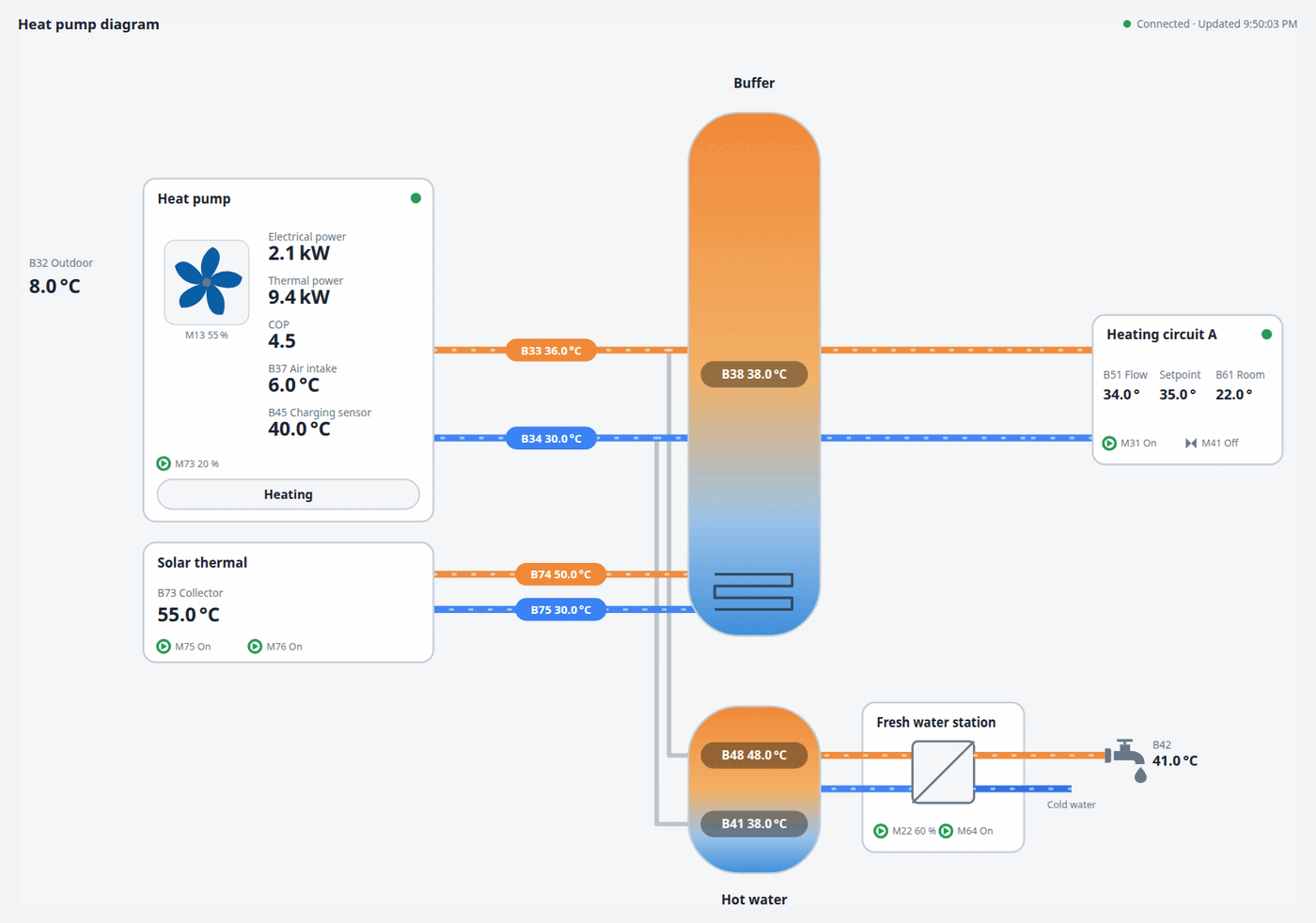
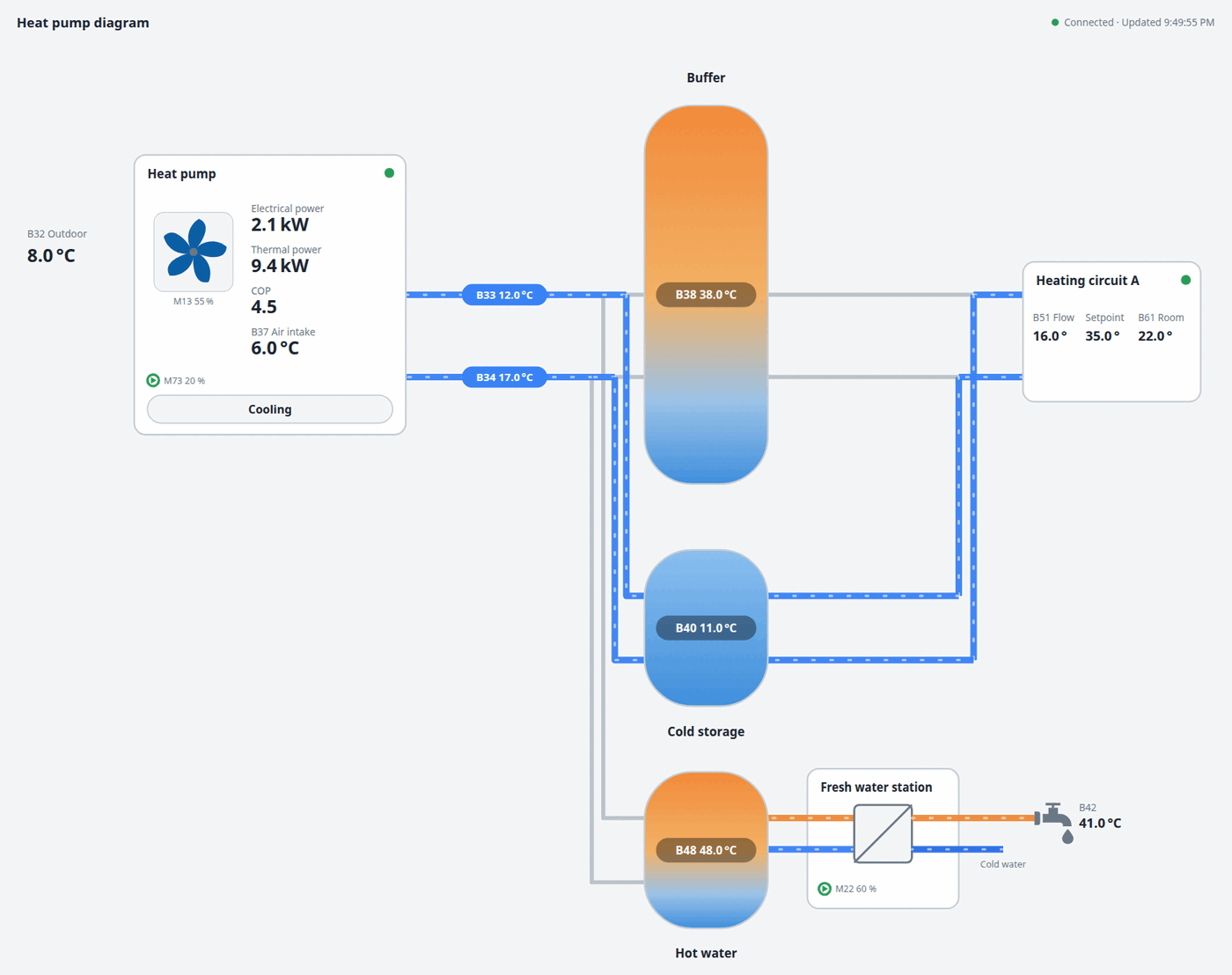
- Heat pump diagram: a read-only web page (a link next to the instance, served by the web adapter) with a live picture of your plant: heat pump (air or ground source), storage, fresh water station, heating circuits with their rooms, solar, photovoltaics. It assembles itself from the values the adapter has and shows the IDM measuring points (B33, B48, ...).
- Support file with one click, without host, PIN or addresses.
Requirements
Two things have to be set up on the Navigator once, usually at installer/service level, so ask your installer if you cannot reach them:
- Modbus TCP is switched off by default: main menu Settings → Building management (Gebäudeleittechnik) → set Modbus TCP to On, and give the Navigator a fixed IP address. Without it nothing works.
- Network PIN – only for the optional web interface part. The adapter works without it.
The adapter does not try to unlock installer functions or change these settings itself.
The heat pump diagram is served by the ioBroker web adapter, so it needs one web adapter instance. Everything else works without it.
Acknowledgements
Big thanks to Xerolux for his extensive work on IDM Modbus, the idm-heatpump-api and idm-heatpump-hass projects (MIT). They are this adapter's secondary reference for register definitions, batching and EEPROM protection, and the best second opinion where the IDM documents leave questions open.
Disclaimer
This is an independent community project. IDM and Navigator are trademarks of their respective owner; the project is not affiliated with or endorsed by IDM Energiesysteme GmbH.
Heat pump diagram
A live picture of your plant on a web page, drawn from the values the adapter reads (sample values below). Pipes are coloured and move only where water flows in the current operating mode: orange is the hot flow, blue the return and, while cooling, the cold water; a thin grey pipe carries nothing. Hover over a label to see the name of the IDM measuring point. See the manual for the settings and every part.
Changelog
0.1.13 (2026-10-16)
- (SeaSpotter) diagram: the heating circuits keep drawing from the heating buffer while the heat pump is off or defrosting, so their pipes show the flow while the circuit pump runs
- (SeaSpotter) diagram: the pipes along the heating circuits flow only as far as the lowest running circuit; the dot on a circuit card is green while the circuit pump runs (not merely while the circuit is in heating mode)
- (SeaSpotter) diagram: the fresh water station box is taller, has its title on top like the other cards and its heat exchanger stands in the middle; the actor M22 is named "Pump hot water station" (Pumpe Warmwasserstation) instead of "Fresh water station"
0.1.12 (2026-10-16)
- (SeaSpotter) diagram: a pipe and the label on it are coloured only while water really flows through it; a pipe whose pump is off, or that the operating mode does not use, stays grey
0.1.11 (2026-10-16)
- (SeaSpotter) diagram: the flow in a heating circuit follows its pump (M31, M32, ...) instead of its operating mode; the white flow dashes show only while a pipe actually flows
0.1.10 (2026-10-16)
- (SeaSpotter) new adapter logo; the fan in the diagram has five blades
- (SeaSpotter) diagram: the pipes of an idle fresh water station, boiler, stove and cascade stay grey; a mixer that reports "Zu" is no longer shown as driven; hot water charging colours the pipes of a combined vessel; the solar labels follow the solar pumps; a cascade that appears later shows without reloading; the size field falls back to the default when empty; the accessibility label of the page follows the language
- (SeaSpotter) manuals: screenshots and a "how to read it" guide for the diagram; integration tests run against the released js-controller
0.1.9 (2026-10-16)
- (SeaSpotter) diagram: the plant is drawn by its operating mode: pipes are coloured and move while the heat pump heats, charges hot water or cools, and rest (grey) where they carry nothing; cold water is blue in both flow and return
- (SeaSpotter) diagram: two vessels for a separate heating buffer, a cold storage for cooling, hot water without a heating buffer, a storage layout setting and an adjustable size
- (SeaSpotter) diagram: pump and mixer of every heating circuit, direct circuits, heating rod stages, circulation pump, solar pumps, one dot per compressor
- (SeaSpotter) diagram: oil or gas boiler, tiled stove and cascade of heat pumps with their pipes; names appear when the mouse is over a value label
- (SeaSpotter) the plant description (heat source, hot gas line, storage, cooling, circuits, additions) is worked out from the values the Navigator reports
0.1.8 (2026-10-13)
- (SeaSpotter) states are never deleted any more (only switching a register off removes them); the web copy of a part appears whenever Modbus reports no value for it, fixing the missing charging pump M73
0.1.7 (2026-10-13)
- (SeaSpotter) diagram: new setting for the source of power and COP (Navigator or external meters, falling back to the Navigator where no external value exists), COP rows setting, thermal power shown, fan label under the icon; external electrical and thermal power as states; translations reviewed in all languages
0.1.6 (2026-10-13)
- (SeaSpotter) diagram: the circle of a pump symbol turns green while the pump runs, the hot gas mixer M71 and the fan M13 show as 0-100 % in the heat pump box, the hot gas line moves only while M71 is open and the water moves, the drawing is shown larger
0.1.5 (2026-10-13)
- (SeaSpotter) diagram: pumps (M73, M22, M31, source pumps) as a small pump symbol, green while running and grey while off
- (SeaSpotter) diagram: status of the hot gas mixer M71 and of the mixer M41 of heating circuit A; the hot gas line moves while M71 is open
0.1.4 (2026-10-13)
- (SeaSpotter) diagram: long labels fit instead of being cut off, wider heat pump box and heating circuit card, the dashes of the circuit pipes run through the junction, a value that appears after the page was opened (the COP) shows without reloading
- (SeaSpotter) diagram: choose the COP in the heat pump box (Navigator, external meters, both or none)
0.1.3 (2026-10-12)
- (SeaSpotter) diagram: the return pipe flows from the storage to the heat pump, the water pipes move with the charging pump M73 or the flow sensor B2, heat pump power with one decimal, fresh water station moved right and up
0.1.2 (2026-10-11)
- (SeaSpotter) fix: texts the adapter writes into states (scan status, fault texts, operating modes) now follow the system language instead of always being English
- (SeaSpotter) the unit of the price (currency or cent per kWh) and of the CO₂ factor (g or kg per kWh) can be chosen, for the fixed value and for the state
- (SeaSpotter) the scan status text stands next to the progress
0.1.1 (2026-10-11)
- (SeaSpotter) maintenance: the web adapter is listed as a requirement of the heat pump diagram, consistent German name of the diagram, safer translation tooling
0.1.0 (2026-10-11)
- (SeaSpotter) initial release: reads the IDM Navigator over Modbus TCP (Navigator 2.0 / Pro verified on a device; Navigator 10 and 1.0/1.7 from the IDM documents, untested), with device scan, statistics, optional control, PV and room feeding, optional web interface values and a live heat pump diagram, texts in 11 languages
Older changes are in CHANGELOG_OLD.md.
License
MIT License
Copyright (c) 2026 SeaSpotter [email protected]
Permission is hereby granted, free of charge, to any person obtaining a copy of this software and associated documentation files (the "Software"), to deal in the Software without restriction, including without limitation the rights to use, copy, modify, merge, publish, distribute, sublicense, and/or sell copies of the Software, and to permit persons to whom the Software is furnished to do so, subject to the following conditions:
The above copyright notice and this permission notice shall be included in all copies or substantial portions of the Software.
THE SOFTWARE IS PROVIDED "AS IS", WITHOUT WARRANTY OF ANY KIND, EXPRESS OR IMPLIED, INCLUDING BUT NOT LIMITED TO THE WARRANTIES OF MERCHANTABILITY, FITNESS FOR A PARTICULAR PURPOSE AND NONINFRINGEMENT. IN NO EVENT SHALL THE AUTHORS OR COPYRIGHT HOLDERS BE LIABLE FOR ANY CLAIM, DAMAGES OR OTHER LIABILITY, WHETHER IN AN ACTION OF CONTRACT, TORT OR OTHERWISE, ARISING FROM, OUT OF OR IN CONNECTION WITH THE SOFTWARE OR THE USE OR OTHER DEALINGS IN THE SOFTWARE.