
iris-simple-website-bot
v0.1.3
Published
Floating Iris assistant component for React apps.


Readme
Iris Simple Website Bot
Floating Iris assistant component for React apps.
Iris is a lightweight, animated website chatbot that can be dropped into a React site as a single component. It gives teams a friendly floating assistant for visitor questions, event support, product FAQs, and content-aware answers backed by public markdown files.
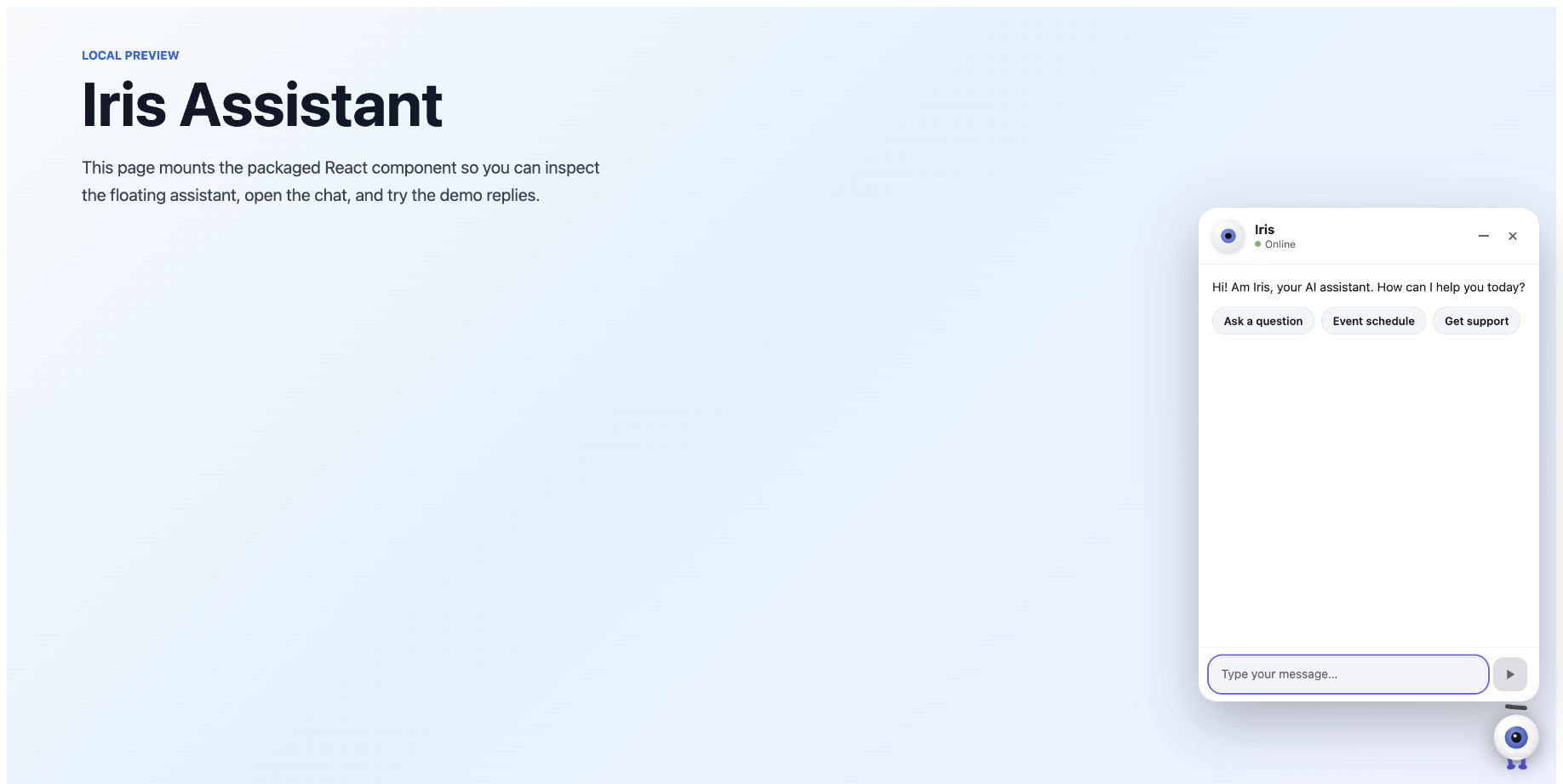
Table of Contents
- Who This README Is For
- Links
- Product Summary
- Key Capabilities
- Marketing Guide
- Developer Guide
- Configuration Reference
- Provider Setup
- Markdown RAG
- Security and Privacy
- Local Development
- Testing and Build
- Project Structure
- Release Checklist
- Known Limitations
- Support Notes
Who This README Is For
This project has two audiences:
- Developers integrating, customizing, testing, and publishing the React package.
- Marketing, product, and event teams deciding how Iris should be positioned, configured, and launched on a public website.
Links
Product Summary
Iris is a branded, front-end website assistant. It appears as a floating animated eye in the lower corner of a page, opens into a compact chat panel, and can answer visitor questions through a configured AI provider.
The package is designed for sites that need a visible, approachable assistant without committing to a large customer-support platform. It works well for campaign landing pages, event websites, product microsites, documentation pages, and internal demos.
Key Capabilities
- Floating animated assistant with hover, click, idle, typing, success, error, and reduced-motion-aware states.
- React component API with one exported component:
IrisAssistant. - Configurable assistant name, intro message, provider, model, temperature, token cap, and starter tiles.
- Provider support for OpenAI-compatible APIs, OpenRouter, Anthropic Claude, and self-hosted OpenAI-compatible endpoints.
- Optional markdown retrieval mode that answers only from configured
.mdcontent served by the website. - Built-in guardrails for markdown file type, file count, file size, context size, evidence checking, and unsupported-answer fallback.
- Keyboard-friendly chat dialog with accessible labels, live message region, Escape close support, and focused input when opened.
- Package CSS export so consuming apps can import the component styles directly.
Marketing Guide
Positioning
Use Iris as a visible website concierge: a small, memorable assistant that helps visitors get answers without leaving the page.
Strong positioning themes:
- "Instant answers from your website content."
- "A friendly AI guide for event, product, and support pages."
- "A lightweight assistant that adds personality without taking over the page."
- "A content-aware chatbot for high-intent visitors."
Avoid claiming that Iris replaces a full helpdesk, CRM, human support workflow, or enterprise knowledge platform. This package is a front-end assistant component. Production deployments should pair it with a secure backend proxy and clear ownership of the content it answers from.
Ideal Use Cases
- Event sites: schedule questions, venue guidance, speaker information, support desk details, registration help, and contact routes.
- Product pages: product summaries, plan comparisons, feature explanations, onboarding prompts, and lead-routing guidance.
- Marketing microsites: campaign FAQs, launch details, sales prompts, and next best actions.
- Documentation hubs: content discovery, short answers from markdown pages, and navigation help.
- Internal demos: quickly showing how a branded assistant can feel on a site.
Audience Value
For visitors:
- Answers are available in context, without forcing a page search or contact form.
- Suggested starter tiles reduce blank-chat friction.
- The animated assistant makes the interaction feel approachable and discoverable.
For marketing teams:
- Iris can reinforce brand personality on campaign or event pages.
- Public markdown files can become the source of truth for grounded answers.
- Teams can tune the assistant name, welcome copy, prompts, and provider model without changing the component internals.
For developers:
- Integration is a small React mount plus one stylesheet import.
- Provider requests follow OpenAI-compatible chat completion patterns for most providers.
- The markdown mode has deterministic retrieval tests and bounded browser-side loading behavior.
Suggested Launch Copy
Short website blurb:
Meet Iris, our AI website assistant. Ask about schedules, pages, support, or event details and Iris will point you in the right direction.
Event-site blurb:
Iris helps attendees find practical answers faster: session details, support contacts, venue information, and other event guidance.
Product-site blurb:
Iris gives visitors quick answers from our product content, so they can compare features, understand next steps, and keep moving.
Content Strategy
For the best answers, marketing and product teams should prepare concise markdown files that contain approved, current information. Recommended source files:
about.mdfor organization, event, product, or campaign overview.faq.mdfor common questions and short approved answers.schedule.mdoragenda.mdfor event timing and room details.contact.mdfor support, sales, media, or operations contacts.pricing.mdorplans.mdfor public commercial information.
Write content in direct Q&A-friendly language. Iris retrieves sections by token matches, so headings and repeated visitor-facing terms matter. For example, include both "registration" and "check-in" if visitors use both phrases.
Marketing Launch Checklist
- Define the assistant name and tone.
- Approve the intro message shown when the chat opens.
- Choose three starter tiles that map to high-value visitor questions.
- Publish the markdown files Iris is allowed to answer from.
- Confirm the assistant does not answer from outdated or draft content.
- Decide what fallback copy means operationally: when Iris cannot answer, where should the visitor go next?
- Coordinate with developers on provider, proxy, analytics, logging, and privacy requirements.
Developer Guide
Installation
Install from npm:
npm install iris-simple-website-botFor local development from a neighboring workspace:
npm install ../irisThe consuming app must provide React 18 or newer.
Quick Start
Import the component and stylesheet, then mount IrisAssistant once near the root
of the app:
import { IrisAssistant } from "iris-simple-website-bot";
import "iris-simple-website-bot/style.css";

export function App() {
  return <IrisAssistant />;
}
With Configuration
Create a config file in the consuming app:
// iris.config.js
const irisConfig = {
  provider: "openai",
  apiKey: "",
  baseUrl: "/api/iris/v1",
  model: "gpt-4.1-mini",
  temperature: 0.7,
  maxTokens: 1024,
  name: "Iris",
  introText: "Hi! I am Iris, your AI assistant. How can I help you today?",
  markdownFiles: "",
  tiles: [
    { label: "Ask a question", message: "I have a question about the event." },
    { label: "Event schedule", message: "What's on the schedule today?" },
    { label: "Get support", message: "I need some support, please." }
  ]
};

export default irisConfig;
Pass it into the component:
import { IrisAssistant } from "iris-simple-website-bot";
import "iris-simple-website-bot/style.css";
import irisConfig from "./iris.config.js";

export function App() {
  return <IrisAssistant config={irisConfig} />;
}
Iris reads this config when the component initializes. It does not render an
admin settings panel and does not store credentials in localStorage.
Configuration Reference
| Field | Type | Default | Description |
| --- | --- | --- | --- |
| provider | string | "openai" | One of "claude", "openai", "openrouter", or "selfhosted". Unknown values fall back to "openai". |
| apiKey | string | "" | Provider API key. Do not expose real production keys in browser bundles. |
| baseUrl | string | Provider default | Provider base URL or same-origin proxy URL. |
| model | string | Provider default | Model identifier sent to the provider. |
| temperature | number | 0.7 | Sampling temperature sent to the provider. |
| maxTokens | number | 1024 | Response token cap sent as max_tokens or max_tokens equivalent. |
| name | string | "Iris" | Assistant display name in the chat header and prompts. |
| introText | string | Default Iris greeting | Empty-state welcome copy. |
| markdownFiles | string or string[] | [] | Comma-separated or array list of public .md URLs for grounded markdown answers. |
| tiles | array | Three defaults | Starter buttons with { label, message }. Invalid or empty tiles are removed. |
Provider defaults:
| Provider | Default base URL | Default model |
| --- | --- | --- |
| openai | https://api.openai.com/v1 | gpt-4.1-mini |
| claude | https://api.anthropic.com/v1 | claude-sonnet-4-20250514 |
| openrouter | https://openrouter.ai/api/v1 | openai/gpt-4.1-mini |
| selfhosted | http://localhost:11434/v1 | llama3.1 |
Provider Setup
Recommended Production Proxy
For production, keep the provider key on your server and point Iris at a same-origin OpenAI-compatible endpoint:
const irisConfig = {
  provider: "openai",
  apiKey: "",
  baseUrl: "/api/iris/v1",
  model: "gpt-4.1-mini"
};
Your backend should receive /api/iris/v1/chat/completions, add the provider
Authorization header from a server-only environment variable, and forward the
request to the selected provider.
Do not expose a raw unauthenticated proxy. Validate the request, enforce allowed
models, cap max_tokens, add rate limits, and log only abuse-safe metadata.
OpenRouter Demo Setup
For local demos only, you can point Iris directly at OpenRouter:
const irisConfig = {
  provider: "openrouter",
  apiKey: import.meta.env.VITE_IRIS_API_KEY,
  baseUrl: "https://openrouter.ai/api/v1",
  model: "openai/gpt-4.1-mini"
};
Any key bundled into client code is visible to site visitors. Use this only for controlled local demos or throwaway keys.
Claude Setup
Claude uses the Anthropic Messages API shape. Iris sends the system message as
system, maps chat turns into Anthropic messages, and adds the required
anthropic-version header when an API key is provided.
const irisConfig = {
  provider: "claude",
  apiKey: "",
  baseUrl: "/api/iris/v1",
  model: "claude-sonnet-4-20250514"
};
If you proxy Claude through your server, make sure your route translates or
forwards requests to /messages as expected.
Self-Hosted Setup
Use provider: "selfhosted" for local or private OpenAI-compatible APIs:
const irisConfig = {
  provider: "selfhosted",
  apiKey: "",
  baseUrl: "http://localhost:11434/v1",
  model: "llama3.1"
};
The self-hosted endpoint must expose a chat completions-compatible route at
/chat/completions.
Markdown RAG
Iris can answer from public markdown files served by the website.
const irisConfig = {
  provider: "openai",
  apiKey: "",
  baseUrl: "/api/iris/v1",
  model: "gpt-4.1-mini",
  markdownFiles: "/demo/about-us.md, /demo/contact-us.md"
};
When markdownFiles is empty, Iris skips markdown retrieval and sends the user
message directly to the configured provider.
When markdownFiles is set:
- Iris accepts only relative,
http:, orhttps:URLs whose path ends in.md. - URLs with usernames, passwords, unsupported schemes, or non-markdown paths are ignored.
- Iris loads up to 10 markdown files.
- Each file is capped at 80,000 characters.
- Total loaded markdown is capped at 200,000 characters.
- Markdown is split into sections and smaller chunks for retrieval.
- For each user question, Iris retrieves the most relevant chunks and sends only bounded context to the provider.
- The model must return a compact JSON object with
answerandevidence. evidencemust exactly match text found in the retrieved markdown context.- If there is no relevant markdown, no evidence, or unsupported output, Iris
returns:
I don't have that information available right now.
Markdown Authoring Tips
- Use descriptive headings, because headings define useful sections.
- Keep each section focused on one topic.
- Use the same words visitors are likely to type.
- Put factual, approved answers in plain text, not images.
- Avoid draft, stale, or confidential content in public markdown files.
- Include support paths for questions Iris should not answer fully.
Security and Privacy
Iris is a browser-side component. Treat browser code and public markdown as public.
Important security rules:
- Do not ship production provider secrets in client-side code.
- Use a same-origin backend proxy for production AI calls.
- Validate and rate-limit proxy requests.
- Restrict allowed models and token limits on the server.
- Avoid logging full user conversations unless your privacy policy and retention rules allow it.
- Review markdown content before publishing because it can be sent to the AI provider as context.
- Treat markdown as untrusted reference text. Iris prompts the model to use it as quoted context, not as instructions.
Local Development
Install dependencies:
npm installRun the local Vite demo:
npm run devThe demo entry is demo/demo.jsx, and the demo config is demo/iris.config.js.
The demo mounts IrisAssistant over a simple preview page and loads sample
markdown files from demo/*.md.
For local provider testing, set a demo API key through your app environment only when you understand that Vite-exposed variables are visible in the browser.
Testing and Build
Run tests:
npm testThe test suite uses Node's built-in test runner and currently covers:
- Config normalization and provider defaults.
- Markdown URL filtering.
- Markdown document loading bounds.
- Retrieval and evidence requirements.
- Provider request shapes for OpenAI-compatible APIs and Claude.
- Idle action catalog integrity.
- Package metadata expectations.
Build the library:
npm run buildThe Vite library build uses src/index.js as the entry point. The package export
maps:
iris-simple-website-botto./dist/iris.js.iris-simple-website-bot/style.cssto./dist/iris-simple-website-bot.css.
Project Structure
.
|-- demo/
|   |-- demo.jsx
|   |-- iris.config.js
|   `-- *.md
|-- src/
|   |-- IrisAssistant.jsx
|   |-- IrisAssistant.css
|   |-- config.js
|   |-- idleActions.js
|   |-- rag.js
|   `-- *.test.js
|-- index.html
|-- package.json
|-- package-lock.json
|-- vite.config.js
`-- README.md
Main files:
src/IrisAssistant.jsxcontains the React UI, animation state, chat lifecycle, popup behavior, and message sending.src/IrisAssistant.csscontains the assistant visual system and animations.src/config.jsnormalizes provider, model, markdown, and tile settings.src/rag.jsloads markdown, chunks content, retrieves relevant context, builds provider requests, and validates grounded replies.src/idleActions.jsdefines the idle animation catalog.src/index.jsimports the stylesheet and exportsIrisAssistant.
Release Checklist
Before publishing a new package version:
- Update
versioninpackage.jsonas needed. - Run
npm test. - Run
npm run build. - Inspect the generated
distfiles. - Confirm
README.mdstill matches the public API. - Confirm no real API keys are present in demo config or committed files.
- Publish with the intended npm account and public access.
Known Limitations
- Iris does not include a server, provider proxy, database, CRM integration, or analytics pipeline.
- Chat history is component state only and is not persisted across reloads.
- Browser-side provider calls expose client-bundled API keys.
- Markdown RAG only retrieves from configured public markdown files; it does not crawl arbitrary pages.
- Retrieval is keyword-based, not vector-based.
- The assistant cannot guarantee content freshness beyond the markdown and provider responses it is configured to use.
Support Notes
For production support workflows, pair Iris with clear escalation copy and a human-owned destination such as a contact page, support email, ticket form, event desk, or sales route. Iris should help visitors move faster, not hide the path to human help when the answer is unavailable.