
ironcal
v1.0.0
Published
[](https://www.npmjs.com/package/ironcal)


Readme

Generates a list of dates for an Ironhack cohort.
bin
Generates an ICS calendar of the cohort's dates.
Usage
$ npx ironcal --helpExample
$ npx ironcal pt Europe/Paris --start=2020-06-02 --hollidays=2020-06-20,2020-07-04,2020-07-14,2020-08-11,2020-08-13,2020-08-15,2020-08-18,2020-08-20,2020-08-22,2020-09-19,2020-10-17,2020-11-10,2020-11-21 >wdpt202006par.ics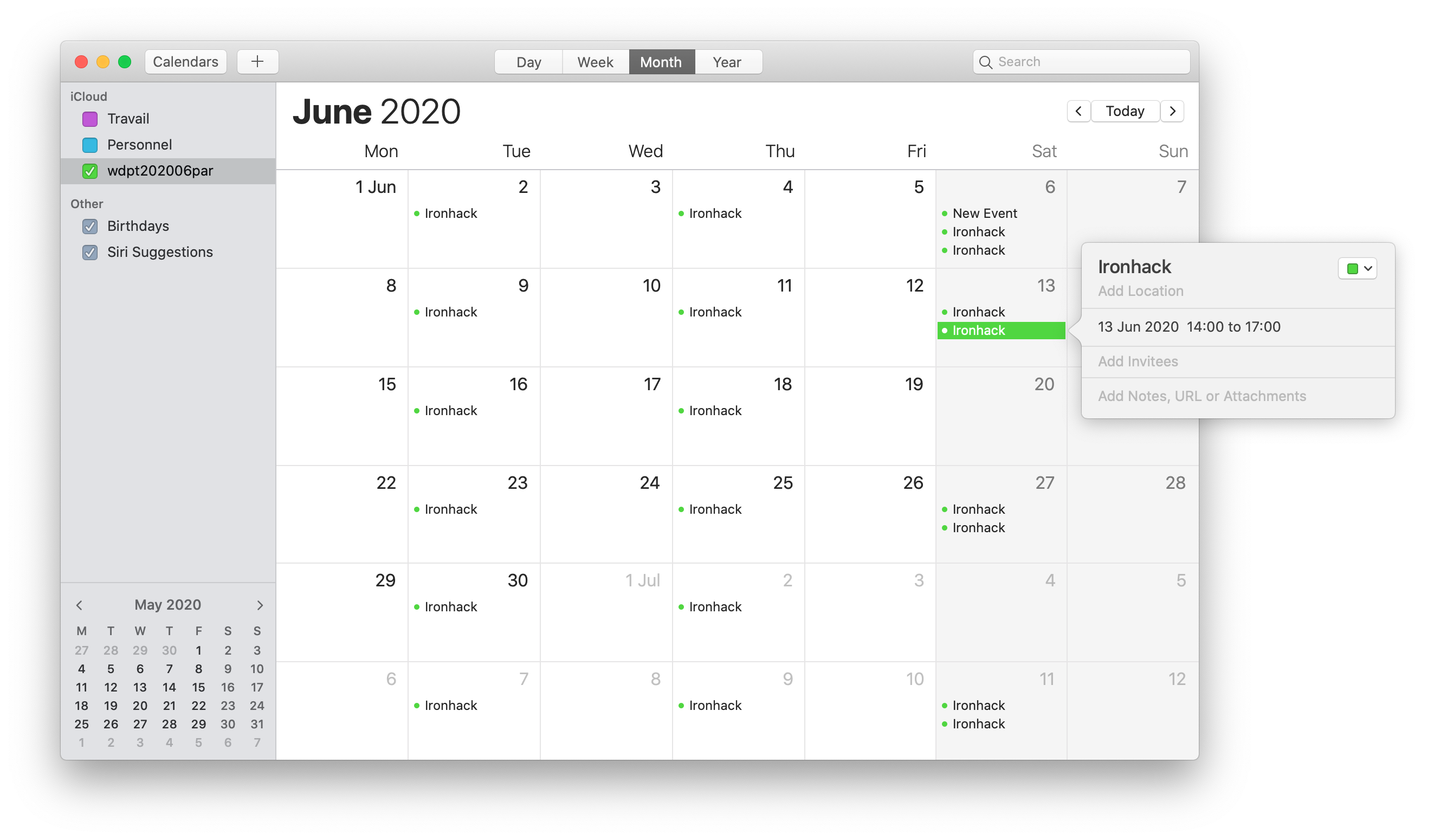
- NB: The
icsfile is directly printed tostdout: to save it to disk, remember to redirect > towdpt202006par.ics. - NB: Find your timezone ID here
JS API
const {dayslist} = require('ironcal')

const days = dayslist('pt', 'Europe/Paris', '2020-06-02', ['2020-06-20','2020-07-04','2020-07-14','2020-08-11','2020-08-13','2020-08-15','2020-08-18','2020-08-20','2020-08-22','2020-09-19','2020-10-17','2020-11-10','2020-11-21'])
console.log(days)
outputs a list of UTC dates (45 days (9*5) for FT / 96 halfdays (24*4) for PT)
[
  "2020-06-02T16:30:00.000Z",
  "2020-06-04T16:30:00.000Z",
  "2020-06-06T08:00:00.000Z",
  "2020-06-06T12:00:00.000Z",
  "2020-06-09T16:30:00.000Z",
  "2020-06-11T16:30:00.000Z",
  "2020-06-13T08:00:00.000Z",
  "2020-06-13T12:00:00.000Z",
  "2020-06-16T16:30:00.000Z",
  "2020-06-18T16:30:00.000Z",
  "2020-06-23T16:30:00.000Z",
  "2020-06-25T16:30:00.000Z",
  "2020-06-27T08:00:00.000Z",
  "2020-06-27T12:00:00.000Z",
  "2020-06-30T16:30:00.000Z",
  "2020-07-02T16:30:00.000Z",
  "2020-07-07T16:30:00.000Z",
  "2020-07-09T16:30:00.000Z",
  "2020-07-11T08:00:00.000Z",
  "2020-07-11T12:00:00.000Z",
  "2020-07-16T16:30:00.000Z",
  "2020-07-18T08:00:00.000Z",
  "2020-07-18T12:00:00.000Z",
  "2020-07-21T16:30:00.000Z",
  "2020-07-23T16:30:00.000Z",
  "2020-07-25T08:00:00.000Z",
  "2020-07-25T12:00:00.000Z",
  "2020-07-28T16:30:00.000Z",
  "2020-07-30T16:30:00.000Z",
  "2020-08-01T08:00:00.000Z",
  "2020-08-01T12:00:00.000Z",
  "2020-08-04T16:30:00.000Z",
  "2020-08-06T16:30:00.000Z",
  "2020-08-08T08:00:00.000Z",
  "2020-08-08T12:00:00.000Z",
  "2020-08-25T16:30:00.000Z",
  "2020-08-27T16:30:00.000Z",
  "2020-08-29T08:00:00.000Z",
  "2020-08-29T12:00:00.000Z",
  "2020-09-01T16:30:00.000Z",
  "2020-09-03T16:30:00.000Z",
  "2020-09-05T08:00:00.000Z",
  "2020-09-05T12:00:00.000Z",
  "2020-09-08T16:30:00.000Z",
  "2020-09-10T16:30:00.000Z",
  "2020-09-12T08:00:00.000Z",
  "2020-09-12T12:00:00.000Z",
  "2020-09-15T16:30:00.000Z",
  "2020-09-17T16:30:00.000Z",
  "2020-09-22T16:30:00.000Z",
  "2020-09-24T16:30:00.000Z",
  "2020-09-26T08:00:00.000Z",
  "2020-09-26T12:00:00.000Z",
  "2020-09-29T16:30:00.000Z",
  "2020-10-01T16:30:00.000Z",
  "2020-10-03T08:00:00.000Z",
  "2020-10-03T12:00:00.000Z",
  "2020-10-06T16:30:00.000Z",
  "2020-10-08T16:30:00.000Z",
  "2020-10-10T08:00:00.000Z",
  "2020-10-10T12:00:00.000Z",
  "2020-10-13T16:30:00.000Z",
  "2020-10-15T16:30:00.000Z",
  "2020-10-20T16:30:00.000Z",
  "2020-10-22T16:30:00.000Z",
  "2020-10-24T08:00:00.000Z",
  "2020-10-24T12:00:00.000Z", // timesaving change during 24th-25th night +2 -> +1
  "2020-10-27T17:30:00.000Z",
  "2020-10-29T17:30:00.000Z",
  "2020-10-31T09:00:00.000Z",
  "2020-10-31T13:00:00.000Z",
  "2020-11-03T17:30:00.000Z",
  "2020-11-05T17:30:00.000Z",
  "2020-11-07T09:00:00.000Z",
  "2020-11-07T13:00:00.000Z",
  "2020-11-12T17:30:00.000Z",
  "2020-11-14T09:00:00.000Z",
  "2020-11-14T13:00:00.000Z",
  "2020-11-17T17:30:00.000Z",
  "2020-11-19T17:30:00.000Z",
  "2020-11-24T17:30:00.000Z",
  "2020-11-26T17:30:00.000Z",
  "2020-11-28T09:00:00.000Z",
  "2020-11-28T13:00:00.000Z",
  "2020-12-01T17:30:00.000Z",
  "2020-12-03T17:30:00.000Z",
  "2020-12-05T09:00:00.000Z",
  "2020-12-05T13:00:00.000Z",
  "2020-12-08T17:30:00.000Z",
  "2020-12-10T17:30:00.000Z",
  "2020-12-12T09:00:00.000Z",
  "2020-12-12T13:00:00.000Z",
  "2020-12-15T17:30:00.000Z",
  "2020-12-17T17:30:00.000Z",
  "2020-12-19T09:00:00.000Z",
  "2020-12-19T13:00:00.000Z"
]
You can also transform this list into an ICS string:
const {dayslist2ics} = require('ironcal')

const ics = dayslist2ics(days)
console.log(ics)
outputs:
BEGIN:VCALENDAR
VERSION:2.0
CALSCALE:GREGORIAN
PRODID:adamgibbons/ics
METHOD:PUBLISH
X-PUBLISHED-TTL:PT1H
BEGIN:VEVENT
UID:1eb7041f-99c8-4439-98af-bb8ef3c13bda
SUMMARY:Ironhack
DTSTAMP:20200803T143013Z
DTSTART:20200602T163000Z
DURATION:PT180M
END:VEVENT
...
BEGIN:VEVENT
UID:125168f8-f4d1-4177-a3c4-4f011995e37e
SUMMARY:Ironhack
DTSTAMP:20200803T143013Z
DTSTART:20201219T130000Z
DURATION:PT180M
END:VEVENT
END:VCALENDAR
Docker
Build
$ docker build -t ironcal .Deploy
NB: automatic deploy is enabled on this master branch for ironcal app.
Create a Heroku ironcal-abernier app if not exist yet:
$ heroku login
$ heroku apps:create ironcal-abernier --stack=container
$ docker login --username=_ --password=$(heroku auth:token) registry.heroku.com
Once, push your ironcal image to Heroku:
$ docker tag ironcal registry.heroku.com/ironcal-abernier/web
$ docker push registry.heroku.com/ironcal-abernier/web
$ heroku container:release web
HTTP API
Start the web server: node server.js or docker run -p 3000:3000 ironcal, then:
curl http://localhost:3000/?ftpt=pt&tzid=Europe%2FParis&start=2020-06-02&hollidays=2020-06-20,2020-07-04,2020-07-14,2020-08-11,2020-08-13,2020-08-15,2020-08-18,2020-08-20,2020-08-22,2020-09-19,2020-10-17,2020-11-10,2020-11-21&calname=wdpt202006par- NB: you need to
encodeURIComponentyourtzidvalue, eg:Europe%2FParisforEurope/Paris - NB: there is also a running instance on https://ironcal.herokuapp.com.