
jarvis-ai-web-animation
v0.1.2
Published
Jarvis-style AI orb — React component with Three.js orbital animation, themeable palettes, and state-driven moods.

Maintainers
 cyber1443
Readme
jarvis-ai-orb-web-animation
Published to npm as
jarvis-ai-web-animation. Repo and project title use the longer, more descriptivejarvis-ai-orb-web-animation.
A Jarvis-style AI orb for React, powered by Three.js. Drop it into any React app to render a glowing, orbital, state-driven mascot — useful for AI assistants, voice interfaces, status indicators, and hero sections.
→ Live demo — see all built-in palettes, custom palettes, custom states, and pointer interaction in action.
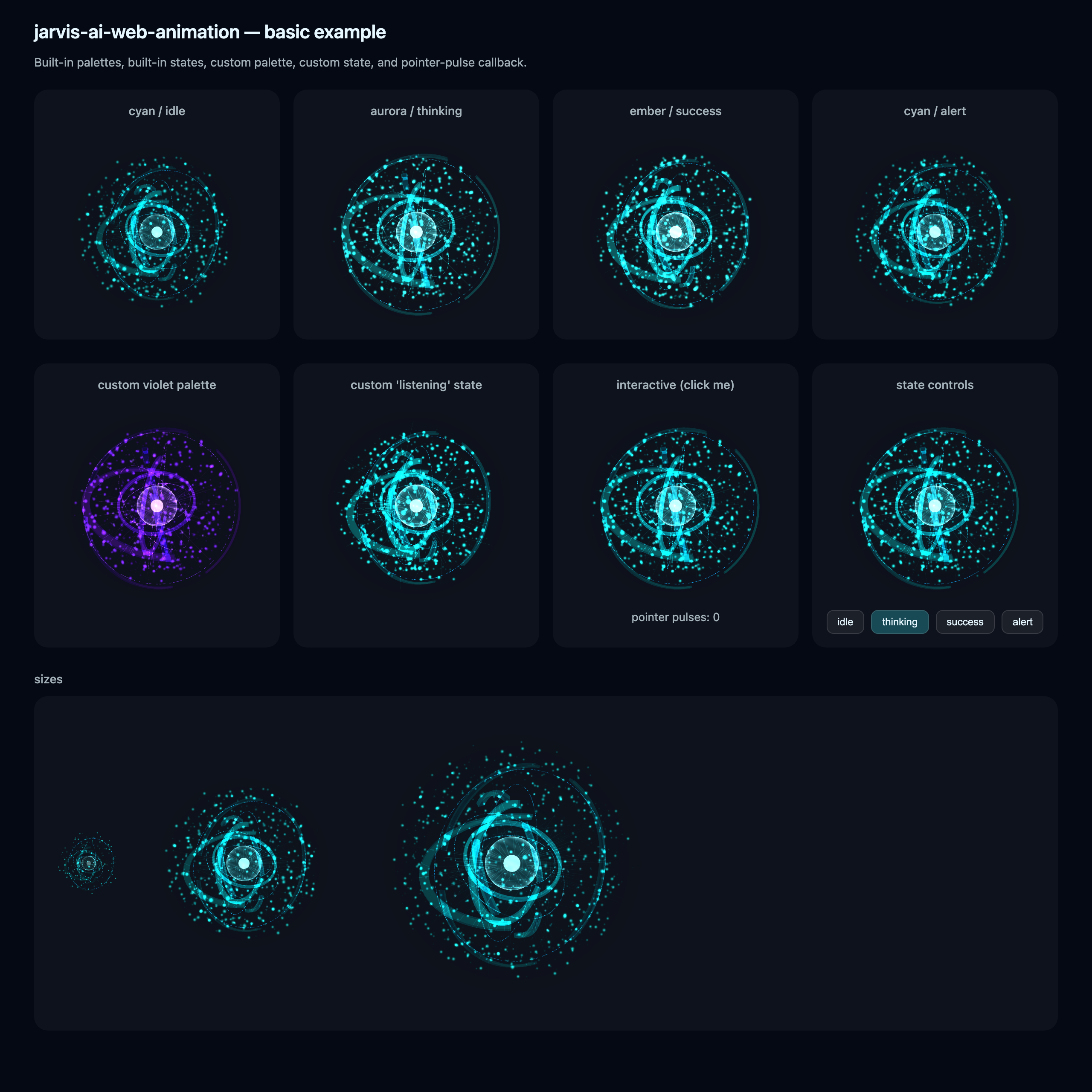
- State-driven: switch between built-in moods (
idle,thinking,success,alert) or supply your own state target. - Themeable: use a built-in palette (
cyan,aurora,ember) or pass an arbitrary 5-color palette object. - Adaptive quality:
quality="auto"profiles the device (cores, memory, DPR, save-data) and tunes particle counts, DPR cap, and frame stride. - Reduced-motion safe: respects
prefers-reduced-motionwith a static CSS-only fallback. - Pause-when-hidden: built-in
IntersectionObserverandvisibilitychangehooks stop the render loop when off-screen or in background tabs. - SSR-friendly: Next.js App Router compatible (
"use client"is bundled into the output).
Install
npm i jarvis-ai-web-animation
# react and react-dom are peer deps
three is bundled into the package — no separate install required.
Usage
import { JarvisOrb } from "jarvis-ai-web-animation";

export default function Demo() {
  return (
    <div style={{ width: 320, height: 320 }}>
      <JarvisOrb size="panel" state="thinking" palette="cyan" />
    </div>
  );
}
The orb fills its parent at aspect-ratio: 1 / 1, so set the parent's width/height to control its size.
Props
| Prop | Type | Default | Description |
|---|---|---|---|
| size | "hero" \| "panel" \| "avatar" | "panel" | Geometry density / DPR preset. |
| state | JarvisStateName \| JarvisStateTarget | "idle" | Built-in mood name or a custom target object. |
| palette | JarvisPaletteName \| JarvisPaletteValues | "cyan" | Built-in palette name or a custom palette object. |
| quality | "auto" \| "ultra" \| "high" \| "balanced" \| "performance" | "auto" | Render quality. auto profiles the device. |
| intensity | number | — | Override the energy intensity (0–1+). |
| paused | boolean | — | Force-pause the render loop. |
| interactive | boolean | size === "hero" | Enable pointer interaction (parallax + pulse-on-press). |
| draggableSpin | boolean | false | Allow click-drag to spin the orb. |
| breathing | boolean | false | Subtle inhale/exhale modulation. |
| breathingIntensity | number | 1 | Scale for the breathing effect (0.2–2.4). |
| onPointerPulse | () => void | — | Fires on pointer-down (alongside the visual pulse). |
| className | string | — | Forwarded to the wrapping <div>. |
| style | CSSProperties | — | Forwarded to the wrapping <div>. |
| ariaLabel | string | "Jarvis AI" | aria-label on the orb container. |
Custom palette
Each palette is 5 hex numbers + a CSS gradient string used for the reduced-motion fallback:
import { JarvisOrb, type JarvisPaletteValues } from "jarvis-ai-web-animation";

const violetPalette: JarvisPaletteValues = {
  core:      0xf5e8ff,
  primary:   0xa855f7,
  secondary: 0x7c3aed,
  tertiary:  0xc084fc,
  deep:      0x2e1065,
  fallback:  "radial-gradient(circle at 50% 50%, #f5e8ff 0%, #a855f7 30%, #2e1065 75%, transparent)",
};

<JarvisOrb palette={violetPalette} />;
Custom state
A state is a target for the renderer to ease toward. Useful for moods the built-ins don't cover (e.g. listening, error):
import { JarvisOrb, type JarvisStateTarget } from "jarvis-ai-web-animation";

const listening: JarvisStateTarget = {
  energy: 1.4,
  rotationSpeed: 0.6,
  particleSpeed: 1.6,
  shellRadius: 1.08,
  ringSpread: 1.0,
  filamentOpacity: 0.7,
  coreScale: 1.1,
  bloom: 0.9,
};

<JarvisOrb state={listening} />;
Note: the auto-revert-to-idle behavior (used by success and alert after ~1.2s) only fires for the built-in state names — custom state objects stay until you change them.
Performance notes
- The render loop is paused automatically while the orb is off-screen or the tab is hidden.
quality="auto"is recommended unless you have specific needs.size="avatar"is tuned for ~64–128 px containers and uses higher DPR with fewer particles;size="hero"for 400+ px.- Bundle size: ~210 KB gzipped (most of which is
three's core).
License
MIT