
jarvis-crew
v0.1.8
Published
A multi-agent coding CLI — talk to Atlas, who orchestrates a crew (Iris, Volt, Edith, Friday) that edits your code in parallel, right in your terminal. Runs on your Claude Code login.

Maintainers
 vaishakh3627
Readme
Jarvis
A multi-agent coding CLI for your terminal. You talk to Atlas, the orchestrator, who delegates to a crew of specialists — Iris (UI/UX), Volt (frontend), Edith (backend), and Friday (QA) — and you watch them work, in parallel, each in their own color.
Jarvis runs on your own Claude Code login (Pro/Max) under the hood — there's no API key to manage and no per-token billing.
See the crew work in parallel
When a task fans out, Atlas delegates to the specialists and they run at the same time — each in their own color, with a live spinner and progress:
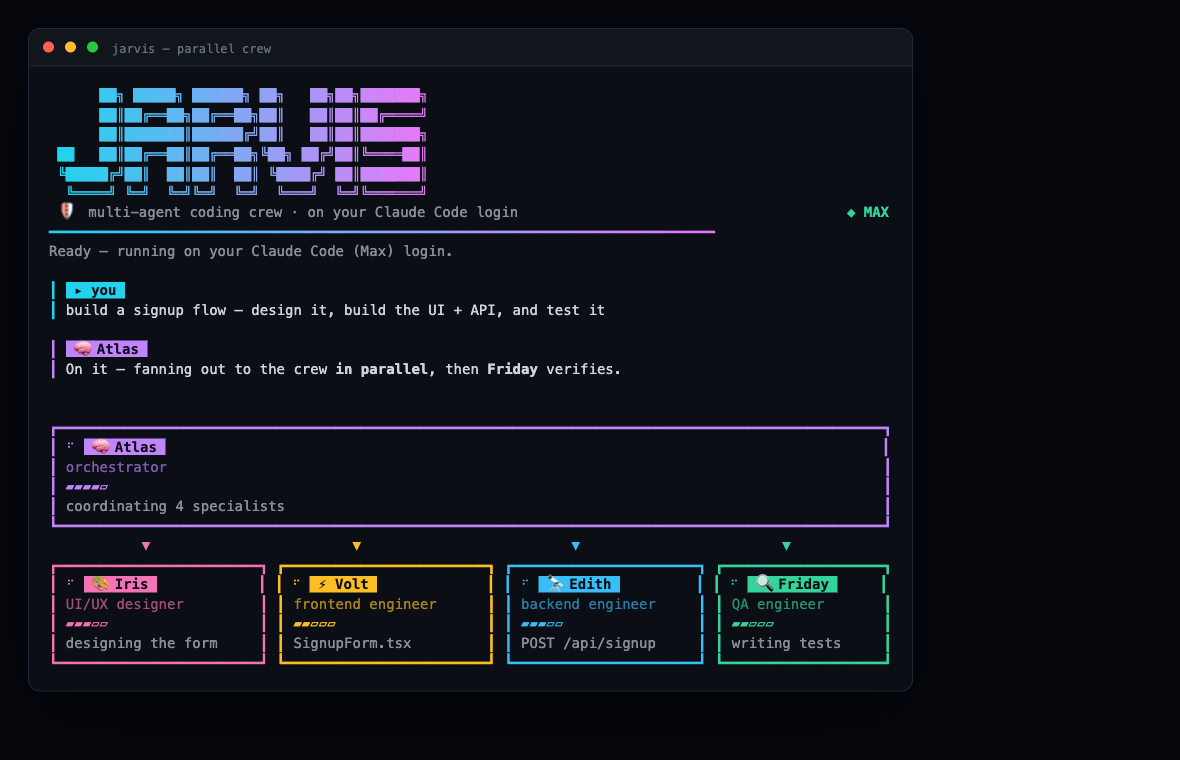
Requirements
- Node.js 20+
- Claude Code installed and signed in (
claudeon your PATH). Check withclaude --versionandclaude auth status. If you're not signed in, Jarvis will prompt you — just type/login. - (optional)
pngpastefor pasting clipboard images:brew install pngpaste
Install
npm install -g jarvis-crewUse
From inside any project you want to work on:
cd ~/path/to/your-project
jarvis
Jarvis edits files in the current directory. Describe what you want and the crew gets to work.
In the prompt
- ↑ / ↓ — recall previous inputs
- Cmd+V — paste text · drag a file in — attach it by path
- Ctrl+V — paste a clipboard image (needs
pngpaste) - Ctrl+C — interrupt the current run, or quit when idle
Commands
/login— sign in to Claude Code/help— list commands/clear— clear the transcript
How it works
Jarvis drives Claude Code headless (claude -p --output-format stream-json) and
renders its stream — thinking, tool calls, and per-agent activity — as a live
crew UI. The specialists are Claude Code subagents; Atlas coordinates them. Each
run is self-contained — it ignores the host project's CLAUDE.md, settings,
skills, plugins, and MCP servers, so only the crew and their charters apply.
Model
The whole crew runs on the latest Opus — Anthropic's top model — for the
best possible output. It uses the opus alias, so it tracks the newest Opus
(4.8 today) automatically, with no code change. Multi-agent runs use more of your
Max quota than a single chat — that's the trade for top-tier results. Prefer a
lighter model? Set JARVIS_MODEL=sonnet jarvis (or any Claude model alias).
Develop
git clone https://github.com/vaishakh3627/jarvis-crew.git
cd jarvis-crew
npm install
npm run dev     # tsx src/cli.tsx (uses your Claude Code login)
npm test        # vitest
License
MIT © Vaishakh K