
javdict
v1.3.5
Published
AV番号命令行查询工具


Readme
English | 中文 | 日本語 | 한국어 | Deutsch
AvDict 🎬
A command-line tool to look up JAV metadata by title ID — cast, release date, studio, and more




Type a title ID, get back the full details — cast, release date, studio, duration, tags, and more. Multiple data sources are queried automatically by default, and you can optionally force a single source.
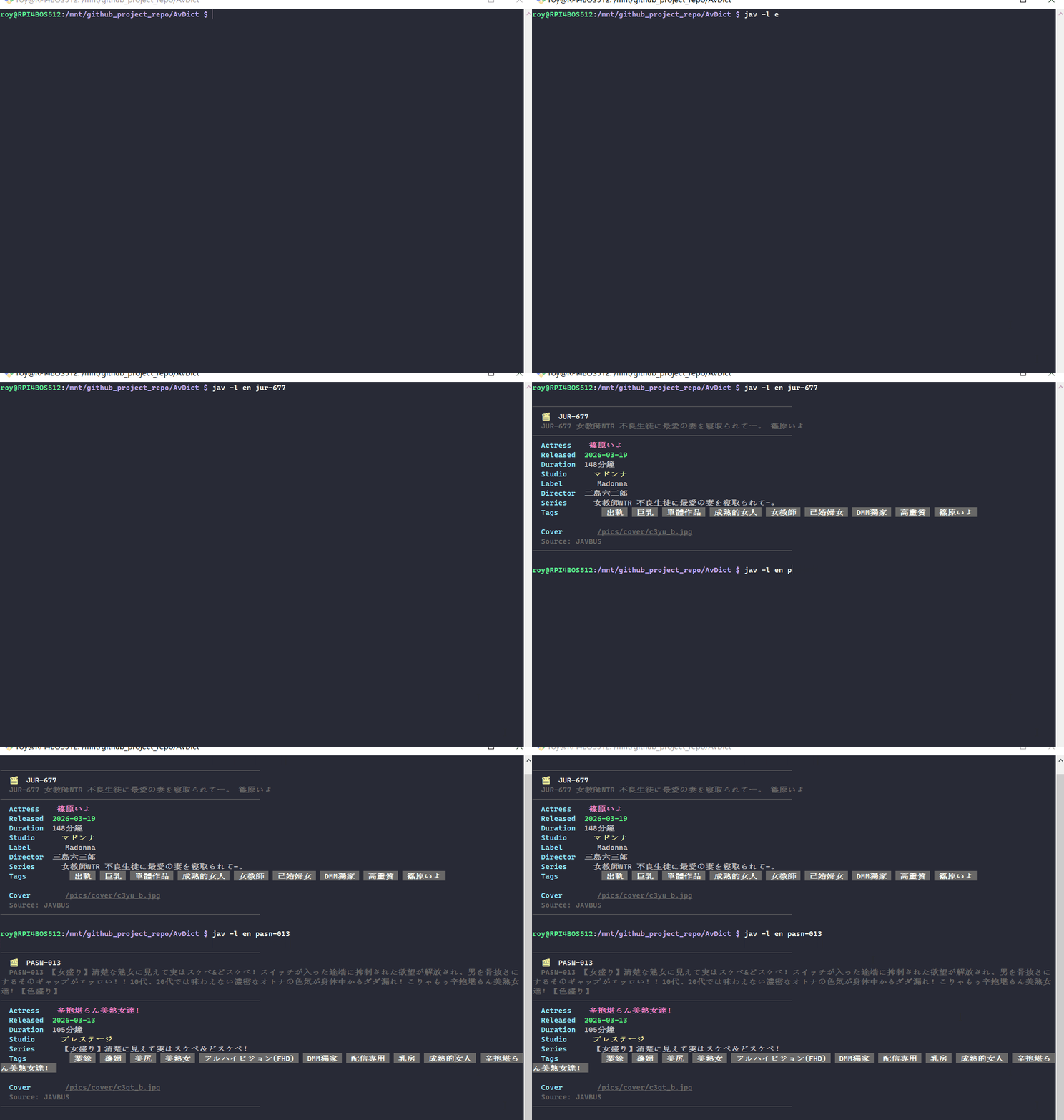
Features
- 🔍 Multi-source fallback — By default it queries JAVBUS → NJAV → JavLibrary → JAVDB in order and returns on first hit; you can also force a single source manually
- 📋 Rich metadata — Cast, release date, duration, studio, label, director, series, tags, cover image, rating
- 💾 Local cache — Results cached for 7 days to reduce repeat requests
- 🖥️ Cross-platform — Linux, Windows, and macOS supported
- 🎨 Color output — Terminal-formatted display with field-level color coding
- ⚡ Fast lookups — Direct URL construction by title ID; no login required for most sources
Requirements
- Node.js >= 18.0.0
- npm >= 6.0.0
- curl (built into Linux/macOS; ensure it's available in your Git Bash environment on Windows)
Platform Support
| Platform | JAVBUS | NJAV | JavLibrary | JAVDB | |----------|--------|------|------------|-------| | Linux / macOS | ✅ | ✅ | ✅ | ✅ | | Windows | ✅ | ✅ | ✅ | ❌ |
JAVDB is unavailable on Windows due to Cloudflare TLS fingerprint restrictions. The other three sources work fully on Windows.
Installation
Option 1: Install via npm (recommended)
npm install -g javdictOption 2: Clone from GitHub (for developers)
git clone https://github.com/gdjdkid/AvDict.git
cd AvDict
npm install
npm install -g .
Verify the installation:
jav -vUpdating
Option 1: Update via npm (recommended)
sudo npm install -g javdict@latestOption 2: Update from GitHub (for developers)
cd AvDict
git pull
sudo npm install -g .
Usage
Look up a title ID:
jav SSIS-001
jav ABF-331
jav JUR-067
Query with specific language output:
jav --lang en SSIS-001   # English
jav --lang zh SSIS-001   # 中文
jav --lang jp SSIS-001   # 日本語
jav --lang kr SSIS-001   # 한국어
jav --lang de SSIS-001   # Deutsch
jav -l en SSIS-001       # shorthand
Output raw JSON:
jav -r SSIS-001Force a specific data source:
jav --source javbus SSIS-001
jav -s njav SSIS-001
Clear local cache:
jav --clear-cacheConfigure JAVDB Cookie (optional):
jav --setupShow help:
jav -hCLI Options
Usage: jav [options] [id]

Arguments:
  id                    Title ID to look up, e.g. SSIS-001

Options:
  -v, --version         Print version number
  -l, --lang <lang>     Output language: zh/en/jp/kr/de (default: zh)
  -s, --source <source> Select source: auto/javbus/njav/javlibrary/javdb (default: auto)
  -r, --raw             Output raw JSON instead of formatted display
  --setup               Configure JAVDB Cookie (optional, improves coverage)
  --clear-cache         Clear local result cache
  -h, --help            Show help
Configuration
JAVDB Cookie (optional)
The tool works without any configuration. Adding a JAVDB Cookie improves coverage for niche titles that only exist in JAVDB's database. This only takes effect on Linux/macOS.
How to get your Cookie:
- Open https://javdb.com in Chrome and sign in
- Install the Chrome extension Get cookies.txt LOCALLY
- Click the extension icon on the JAVDB page and export your cookies
- Find the
_jdb_sessionrow and copy the value in the last column - Run the setup command and paste it in:
jav --setupYour Cookie is saved locally at ~/.config/javinfo/config.json and never sent anywhere.
Cookies typically expire in about 2 weeks. When niche titles start returning "not found", just run jav --setup again to refresh.
Caching
Query results are automatically cached to ~/.config/javinfo/cache.json with a 7-day TTL. This speeds up repeat lookups and reduces load on the source sites.
To force a fresh fetch:
jav --clear-cacheFAQ
Q: I get "title not found" — what's wrong?
A: There are three likely causes:
- The title isn't indexed by any of the four sources (extremely niche content)
- Your JAVDB Cookie has expired — run
jav --setupto refresh it - Your network can't reach the source sites — check your proxy settings
Q: Some titles don't show up on Windows?
A: JAVDB is unavailable on Windows due to Cloudflare restrictions. A small number of titles that only exist in JAVDB can't be found on Windows. For full coverage, use a Linux environment (e.g. a Raspberry Pi).
Q: I get Permission denied when installing?
A: Global installation requires elevated permissions:
sudo npm install -g .Q: How often do I need to update my Cookie?
A: Roughly every 2 weeks. If niche titles that previously worked start returning "not found", your Cookie has likely expired — run jav --setup to update it.
Q: Does it support FC2 amateur titles?
A: Yes. Enter the title in hyphen format, e.g. 031926-100. The tool auto-detects FC2 format and handles the conversion internally.
Q: Does it work in mainland China?
A: All data sources are hosted outside mainland China and require a proxy to access. If queries consistently fail, run the following commands to check your network connectivity:
curl -sL --connect-timeout 5 "https://www.javbus.com" -o /dev/null -w "JAVBUS: %{http_code}\n"
curl -sL --connect-timeout 5 "https://www.njav.com" -o /dev/null -w "NJAV: %{http_code}\n"
curl -sL --connect-timeout 5 "https://www.google.com" -o /dev/null -w "Google: %{http_code}\n"
A response of 200 means the site is reachable. A response of 000 means the connection failed — check your proxy settings.
Data Sources
| Source | Website | Notes | |--------|---------|-------| | JAVBUS | javbus.com | Fast, broad coverage | | NJAV | njav.com | High coverage, no Cookie needed | | JavLibrary | javlibrary.com | Detailed metadata, includes ratings | | JAVDB | javdb.com | Most comprehensive, requires Cookie |
License
This project is open source under the MIT License. You're free to use, modify, and distribute it.
Contributing
PRs and Issues are welcome!
- Fork this repository
- Create your branch:
git checkout -b feat/your-feature - Commit your changes:
git commit -m "feat: describe your change" - Push the branch:
git push origin feat/your-feature - Open a Pull Request
Commit message conventions:
feat:— new featurefix:— bug fixdocs:— documentation updatechore:— maintenance / housekeeping
Buy Me a Coffee ☕
If this tool saves you time, consider supporting development:
| WeChat Pay | Alipay | PayPal |
|------------|--------|--------|
|  |
|  |
|  |
|
Changelog
- v1.2.1 — Minor fixes and stability improvements
- v1.2.0 — Added NJAV as fourth data source; reordered source priority
- v1.1.x — Three-source fallback; JAVDB Cookie made optional; cross-platform compatibility fixes
- v1.0.0 — Initial release