
jev-agent-browser
v0.1.7
Published
Configurable Jev browser research and classification CLI

Maintainers
 forvela
Readme
jev-agent-browser


Fast, bounded browser execution for parent agents — powered by Jev and
agent-browser.
Give a parent agent a bounded browser task. Jev chooses the next typed action. agent-browser executes it. Ambiguity, repetition, or a stuck state becomes a structured handoff back to the parent.
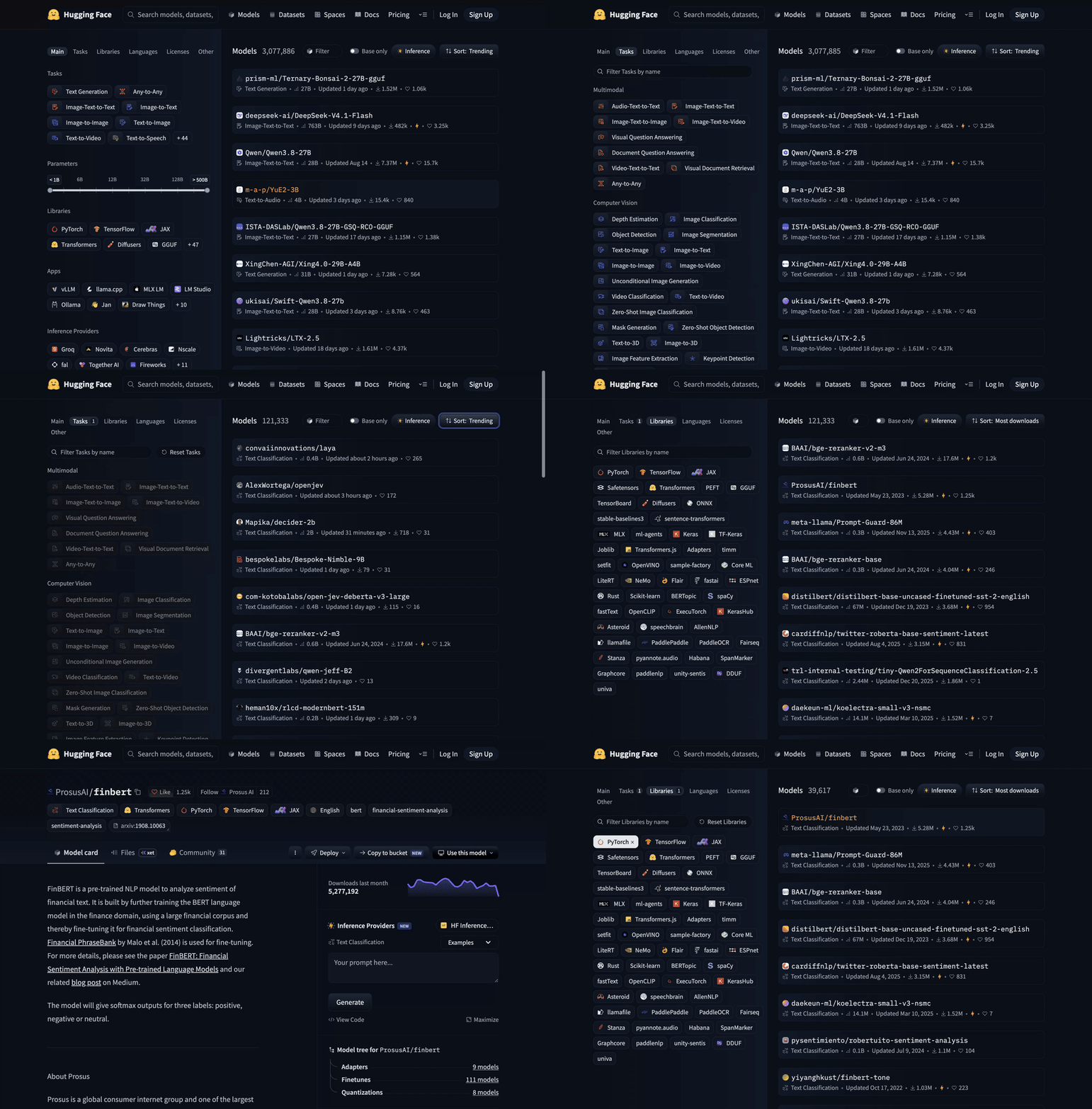
A real 17-second, read-only walkthrough: Tasks → Text Classification → Most downloads → PyTorch → ProsusAI/finbert → back.
Watch the full MP4 demo · Open the original WebM recording
Quick start
npm install -g agent-browser
npm install -g jev-agent-browser
export TYPESAFE_API_KEY=...

jev \
  --url https://huggingface.co/models \
  --goal 'Open Tasks and select Text Classification' \
  --max-steps 6
Or run the CLI without a global Jev install:
npx --package jev-agent-browser jev --helpagent-browser is an external peer tool; this package owns the decision loop and research tools, not the browser engine. API keys stay in environment variables; they are never part of the browser page or decision state.
Persistent decision config
Jev loads ~/.config/jev/config.json automatically for the normal browser loop. Keep routing defaults there, never the secret itself:
{
  "decision": {
    "endpoint": "https://openrouter.ai/api/alpha/decisions",
    "apiKeyEnv": "OPENROUTER_API_KEY",
    "model": "~typesafe/jev-latest"
  },
  "pacing": {
    "actionDelayMs": 700
  },
  "maxSteps": 12
}
actionDelayMs is optional and defaults to 0; it delays only between successful browser actions. Use --action-delay 0 to override it for a single run. Configured tools are exposed to Jev as bounded RUN_TOOL choices; tool paths are resolved relative to the config file.
{
  "tools": {
    "scroll_to_bottom": {
      "path": "/path/to/browser-strategies/linkedin/scroll-to-bottom.js",
      "description": "On a LinkedIn page, jump to the current feed bottom without opening links"
    }
  }
}
Use another file with --config ./jev.config.json, or set JEV_CONFIG. Inject the key separately, for example with op run:
op run --env-file=<(printf 'OPENROUTER_API_KEY=op://Private/ITEM/credential\\n') -- \
  jev --url https://example.com --goal 'Open the pricing page'
What it does
- Browser tasks — navigate, click, type explicit values, select, scroll, wait, and stop safely.
- Research — collect bounded raw evidence from configured pages and browser tools.
- Classification — send one typed, profile-driven batch to Jev.
- Agent orchestration — stream JSONL events or return a structured handoff to the parent agent.
Why this wrapper
- Typed actions, not generated browser code. Jev chooses from a small validated action set.
- Real browser control. Built on
agent-browser, with CDP attach, auto-connect, sessions, pinning, and native browser options preserved. - Research-ready. Raw evidence is collected before classification; enrichment happens only after keep rules.
- Provider-flexible. Uses the official TypeSafe SDK by default and can target compatible Decisions endpoints, including OpenRouter.
- CLI and Node.js API. Use it from a shell, or embed the same loop in another agent.
Where it fits
jev-agent-browser is a delegated executor, not another full browser-planning agent:
- A parent agent owns intent, permissions, and the bounded task.
- Jev selects one typed operation and target from the current snapshot.
agent-browserperforms the native browser action.- The loop returns success or escalates a structured state to the parent when the task is ambiguous, repetitive, or blocked.
flowchart LR
  P[Parent agent] -->|bounded task| L[Jev run loop]
  L -->|snapshot + typed decision| B[agent-browser]
  B -->|page state + action result| L
  L -->|success or escalation| P
This keeps Jev fast and local to execution while the parent remains responsible for reasoning and side effects.
Common use cases
Real-site walkthrough
jev --url https://huggingface.co/models \
  --goal 'Select Text Classification, sort by Most downloads, choose PyTorch, inspect ProsusAI/finbert, then go back and stop.' \
  --max-steps 12
Attach to an existing Chrome tab
jev --attach --auto-connect --pin-tab \
  --goal 'Inspect the current page and report what is visible'
Use a known CDP endpoint with --attach --cdp 9222. Native agent-browser arguments pass through with repeatable --browser-arg flags.
Run bounded research
jev --mode research \
  --config ./research.json \
  --attach --auto-connect --pin-tab \
  --jsonl --summary
Profiles define the classification dimensions, keep rules, follow-ups, and allowed tools. The core stays domain-neutral.
Use it from Node.js
import { runLoop } from 'jev-agent-browser';

// Pass an adapter for the externally installed agent-browser or another engine.
export async function run(browser) {
  const result = await runLoop({
    browser,
    apiKey: process.env.TYPESAFE_API_KEY,
    goal: 'Open the pricing page',
    maxSteps: 5,
  });
  console.log(result.status, result.reason);
}
runLoop accepts injected browser and decision seams, so tests and other Node agents can provide their own adapters.
Compatible Decisions endpoints
TypeSafe AI is the default:
https://api.typesafe.ai/v1/systemoneA compatible endpoint can be selected without changing the browser loop:
{
  "decision": {
    "endpoint": "https://openrouter.ai/api/alpha/decisions",
    "apiKeyEnv": "OPENROUTER_API_KEY"
  }
}
Use decision.transport: "fetch" only when intentionally bypassing the SDK for a custom transport. The SDK's fetch implementation remains injectable for library callers.
Performance
Fast by construction: Jev makes typed decisions, while agent-browser executes native browser commands directly. This wrapper adds orchestration, not a second browser engine or a generated-JavaScript layer.
See Jev's own benchmark and performance claims for model-level results. This project will publish reproducible wrapper benchmarks separately rather than mixing network latency, model latency, and browser time into one number.
Safety boundaries
- Browser work is sequential and bounded by
--max-steps. - Stale refs, repeated actions, malformed decisions, and stuck states stop safely.
- Input values are supplied by the parent and resolved locally.
- Submit, register, apply, and similar commitment actions should remain behind parent or user confirmation.
- Classification requests omit contact fields from collected candidates; bounded browser observations may still contain page content and URLs sent to the Decisions API.