
jira-md-sync
v0.1.0
Published
A tool to sync Jira issues with local markdown files

Maintainers
 nzlouis
Readme
Jira MD Sync



Bidirectional sync between Jira Cloud and Markdown files. Manage Jira issues as text files with full format support.
How It Works
Markdown → Jira (Import)
┌─────────────────┐         ┌──────────────────┐         ┌─────────────────┐
│  Markdown File  │  ────>  │    npm run       │  ────>  │   Jira Issues   │
│                 │         │   md-to-jira     │         │                 │
│  - Story A      │         │                  │         │  ✓ PROJ-1       │
│  - Story B      │         │  ✓ Created 5     │         │  ✓ PROJ-2       │
│  - Story C      │         │  ✓ Skipped 2     │         │  ✓ PROJ-3       │
└─────────────────┘         └──────────────────┘         └─────────────────┘
Jira → Markdown (Export)
┌─────────────────┐         ┌──────────────────┐         ┌─────────────────┐
│   Jira Issues   │  ────>  │    npm run       │  ────>  │ Markdown Files  │
│                 │         │   jira-to-md     │         │                 │
│  ✓ PROJ-1       │         │                  │         │  PROJ-1.md      │
│  ✓ PROJ-2       │         │  ✓ Exported 5    │         │  PROJ-2.md      │
│  ✓ PROJ-3       │         │                  │         │  PROJ-3.md      │
└─────────────────┘         └──────────────────┘         └─────────────────┘
See It In Action
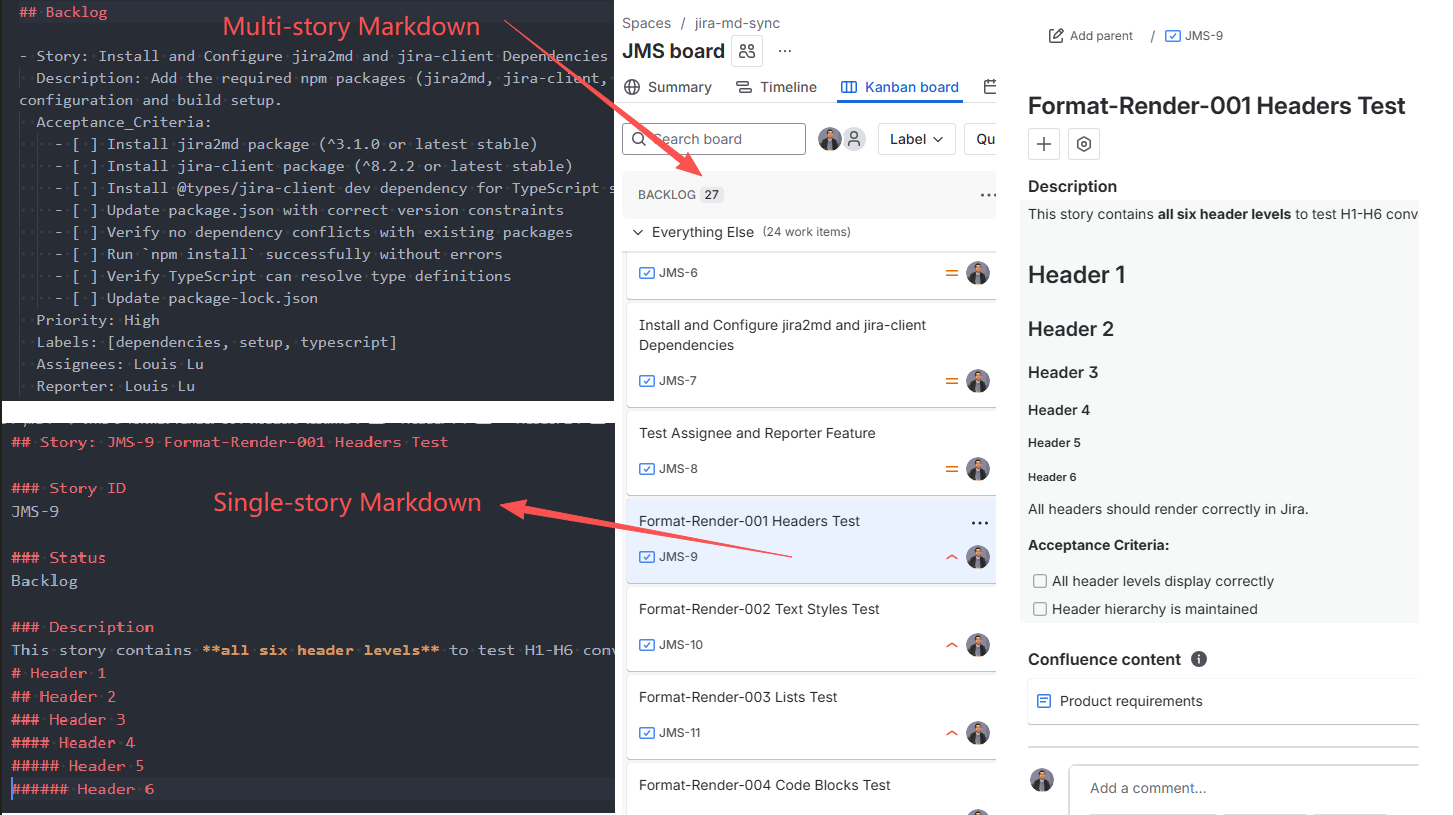 Left: Write stories in Markdown | Right: See them in Jira
Features
✅ Batch Story Management
- Input: Multiple stories in one markdown file
- Output: One file per Jira issue
- Organize stories by feature, sprint, or category
✅ One-Way Sync
- Import: Markdown → Jira (create-only, safe)
- Export: Jira → Markdown (backup/documentation)
✅ Rich Format Support
- Headers, bold, italic, code blocks, tables
- Interactive checkboxes for Acceptance Criteria
- Priority, labels, assignees, status
✅ Developer Friendly
- TypeScript API
- CLI commands
- Dry-run mode
- Unlimited pagination
Requirements
- Node.js 18+
- Jira Cloud account with API access
Installation
npm install jira-md-sync jira2md dotenv
npm install -D typescript ts-node @types/node
Note: The jira2md package is required for proper Markdown ↔ Jira format conversion. It ensures correct rendering of:
- Text formatting (bold, italic, strikethrough)
- Code blocks and inline code
- Lists and checkboxes
- Links and tables
Quick Start
1. Project Structure
your-project/
├── jiramd/                    # Input: Source markdown files (edit here)
│   └── multi-story.md        # ⭐ One file with MULTIPLE stories
├── jira/                      # Output: Synced from Jira (auto-generated)
│   ├── PROJ-1-story.md        # One file per issue
│   ├── PROJ-2-story.md
│   └── PROJ-3-story.md
├── src/
│   └── jira/
│       ├── md-to-jira.ts     # Import script
│       └── jira-to-md.ts     # Export script
├── .env                       # Jira credentials
├── .env.example              # Template
├── .gitignore                # Ignore jira/ directory
├── package.json
└── tsconfig.json
Directory Explanation:
📝 jiramd/multi-story.md - Your source file (manually edited)
- One file contains MULTIPLE stories organized by status sections
- Example: 10 stories in Backlog, 5 in Progress → all in one file
- Commit to Git for version control
- This is your "source of truth" for local edits
- You can create multiple files if needed (e.g.,
features.md,bugs.md)
📦 jira/ - Synced cache from Jira (auto-generated)
- One file per Jira issue (split from your multi-story file)
- Example:
multi-story.mdwith 15 stories → creates 15 separate files - Add to
.gitignore(regenerated from Jira) - Used for comparison and verification
Input vs Output:
| Input (jiramd/multi-story.md) | Output (jira/) |
|----------------------------------|------------------|
| 1 file = Multiple stories | 1 file = 1 issue |
| Organized by status sections | Organized by Jira key |
| ## Backlog- Story: A- Story: B- Story: C | PROJ-1-story-a.mdPROJ-2-story-b.mdPROJ-3-story-c.md |
Why Separate Directories?
- ✅ Safety: Source files never get overwritten
- ✅ Clarity: Easy to see what's local vs. synced
- ✅ Flexibility: Compare differences before merging
- ✅ Git-friendly: Only commit source files
- ✅ Batch editing: Edit multiple stories in one file, upload all at once
2. Environment Setup
Create .env:
# Jira Connection
JIRA_URL=https://your-domain.atlassian.net
[email protected]
JIRA_API_TOKEN=your-api-token
JIRA_PROJECT_KEY=PROJ
JIRA_ISSUE_TYPE_ID=10001

# Directory Configuration (Optional)
# Input: Where you edit markdown files (default: jiramd)
JIRA_MD_INPUT_DIR=jiramd

# Output: Where Jira exports go (default: jira)
JIRA_MD_OUTPUT_DIR=jira

# Optional: Custom status mapping (JSON format)
# Maps your markdown status names to Jira status names
# If not set, uses default mapping: Backlog→Backlog, In Progress→In Progress, etc.
# STATUS_MAP={"To Do":"Backlog","Code Review":"In Review","Closed":"Done"}
Directory Configuration:
- If not set, uses defaults:
jiramd/(input),jira/(output) - Can be overridden via environment variables or command line
Get API token: https://id.atlassian.com/manage-profile/security/api-tokens
3. Package Configuration
Add to package.json:
{
  "scripts": {
    "md-to-jira": "ts-node src/jira/md-to-jira.ts",
    "jira-to-md": "ts-node src/jira/jira-to-md.ts"
  },
  "dependencies": {
    "jira-md-sync": "^0.1.1",
    "jira2md": "^3.0.1",
    "dotenv": "^16.0.0"
  },
  "devDependencies": {
    "@types/node": "^20.0.0",
    "ts-node": "^10.0.0",
    "typescript": "^5.0.0"
  }
}
Important: The jira2md package is required for proper format conversion between Markdown and Jira formats. Without it, you may experience:
- Incorrect rendering of bold, italic, and strikethrough text
- Broken code blocks and lists
- Malformed links and tables
- Checkbox formatting issues
Make sure to install all dependencies:
npm install jira-md-sync jira2md dotenv
npm install -D typescript ts-node @types/node
Usage
Import Script (src/jira/md-to-jira.ts)
Create a script to import markdown files to Jira:
import dotenv from 'dotenv';
import path from 'path';
import { mdToJira } from 'jira-md-sync';

dotenv.config();

async function main() {
  // Input directory: where you edit markdown files
  // Priority: JIRA_MD_INPUT_DIR > default (jiramd)
  const inputDirEnv = process.env.JIRA_MD_INPUT_DIR || 'jiramd';
  const inputDir = path.isAbsolute(inputDirEnv)
    ? inputDirEnv
    : path.resolve(process.cwd(), inputDirEnv);

  const result = await mdToJira({
    jiraConfig: {
      jiraUrl: process.env.JIRA_URL!,
      email: process.env.JIRA_EMAIL!,
      apiToken: process.env.JIRA_API_TOKEN!,
      projectKey: process.env.JIRA_PROJECT_KEY!,
      issueTypeId: process.env.JIRA_ISSUE_TYPE_ID
    },
    inputDir,
    dryRun: false,  // Set to true to preview without creating issues
    logger: console
  });

  console.log(`✅ Created: ${result.created}`);
  console.log(`⏭️  Skipped: ${result.skipped}`);

  if (result.errors.length > 0) {
    console.error('❌ Errors:', result.errors);
    process.exit(1);
  }
}

main().catch(console.error);
Run:
# Create issues in Jira
npm run md-to-jira
Use Custom Directory:
Set in .env file (recommended, works on all platforms):
JIRA_MD_INPUT_DIR=custom/pathOr use environment variable:
# Linux/macOS
JIRA_MD_INPUT_DIR=custom/path npm run md-to-jira

# Windows PowerShell
$env:JIRA_MD_INPUT_DIR='custom/path'; npm run md-to-jira

# Windows CMD
set JIRA_MD_INPUT_DIR=custom/path&& npm run md-to-jira
Dry Run Mode:
Set in .env file (recommended):
DRY_RUN=trueOr use environment variable:
# Linux/macOS
DRY_RUN=true npm run md-to-jira

# Windows PowerShell
$env:DRY_RUN='true'; npm run md-to-jira

# Windows CMD
set DRY_RUN=true&& npm run md-to-jira
Export Script (src/jira/jira-to-md.ts)
Create a script to export Jira issues to markdown:
import dotenv from 'dotenv';
import path from 'path';
import { jiraToMd } from 'jira-md-sync';

dotenv.config();

async function main() {
  const args = process.argv.slice(2);
  const issueKey = args[0];

  // Output directory: where Jira exports go
  // Priority: JIRA_MD_OUTPUT_DIR > default (jira)
  const outputDirEnv = process.env.JIRA_MD_OUTPUT_DIR || 'jira';
  const outputDir = path.isAbsolute(outputDirEnv)
    ? outputDirEnv
    : path.resolve(process.cwd(), outputDirEnv);

  // Input directory: for preserving labels order
  const inputDirEnv = process.env.JIRA_MD_INPUT_DIR || 'jiramd';
  const inputDir = path.isAbsolute(inputDirEnv)
    ? inputDirEnv
    : path.resolve(process.cwd(), inputDirEnv);

  let jql = process.env.JIRA_JQL;

  // Export single issue if key provided
  if (issueKey && /^[A-Z]+-\d+$/.test(issueKey)) {
    jql = `key = ${issueKey}`;
    console.log(`📄 Exporting single issue: ${issueKey}`);
  } else {
    console.log(`📦 Exporting all issues from project`);
  }

  const result = await jiraToMd({
    jiraConfig: {
      jiraUrl: process.env.JIRA_URL!,
      email: process.env.JIRA_EMAIL!,
      apiToken: process.env.JIRA_API_TOKEN!,
      projectKey: process.env.JIRA_PROJECT_KEY!
    },
    outputDir,
    inputDir,  // For preserving labels order
    jql,
    logger: console
  });

  console.log(`✅ Exported ${result.written} files from ${result.totalIssues} issues`);
}

main().catch(console.error);
Run:
# Export all issues (to jira/ directory)
npm run jira-to-md

# Export single issue
npm run jira-to-md -- PROJ-123
Use Custom Output Directory:
Set in .env file (recommended, works on all platforms):
JIRA_MD_OUTPUT_DIR=exportsOr use environment variable:
# Linux/macOS
JIRA_MD_OUTPUT_DIR=exports npm run jira-to-md

# Windows PowerShell
$env:JIRA_MD_OUTPUT_DIR='exports'; npm run jira-to-md

# Windows CMD
set JIRA_MD_OUTPUT_DIR=exports&& npm run jira-to-md
Configuration
Directory Configuration
The tool uses separate directories for input (source) and output (cache):
Default Directories:
- Input:
jiramd/- Your markdown source files - Output:
jira/- Synced from Jira (cache)
Configuration Methods:
- Environment Variables in .env File (Recommended - works on all platforms)
JIRA_MD_INPUT_DIR=jiramd
JIRA_MD_OUTPUT_DIR=jira- Command Line Environment Variables
Linux/macOS:
JIRA_MD_INPUT_DIR=custom/input npm run md-to-jira
JIRA_MD_OUTPUT_DIR=custom/output npm run jira-to-md
Windows PowerShell:
$env:JIRA_MD_INPUT_DIR='custom/input'; npm run md-to-jira
$env:JIRA_MD_OUTPUT_DIR='custom/output'; npm run jira-to-md
Windows CMD:
set JIRA_MD_INPUT_DIR=custom/input&& npm run md-to-jira
set JIRA_MD_OUTPUT_DIR=custom/output&& npm run jira-to-md- Programmatic
await mdToJira({
  jiraConfig: { /* ... */ },
  inputDir: './custom/input',
  // ...
});

await jiraToMd({
  jiraConfig: { /* ... */ },
  outputDir: './custom/output',
  inputDir: './custom/input',  // For preserving labels order
  // ...
});
Priority Order:
- Command line argument (highest)
- Environment variable (
JIRA_MD_INPUT_DIR,JIRA_MD_OUTPUT_DIR) - Default value (
jiramd,jira)
Environment Variables
| Variable | Required | Description | Default |
|----------|----------|-------------|---------|
| JIRA_URL | Yes | Jira instance URL | - |
| JIRA_EMAIL | Yes | Email for Jira authentication | - |
| JIRA_API_TOKEN | Yes | API token for authentication | - |
| JIRA_PROJECT_KEY | Yes | Jira project key (e.g., PROJ) | - |
| JIRA_ISSUE_TYPE_ID | No | Issue type ID for creating issues | 10001 |
| JIRA_MD_INPUT_DIR | No | Input directory (source markdown files) | jiramd |
| JIRA_MD_OUTPUT_DIR | No | Output directory (Jira exports) | jira |
| STATUS_MAP | No | Custom status mapping (JSON format) | See below |
| DRY_RUN | No | Set to "true" for dry run mode | false |
Default Status Mapping:
If STATUS_MAP is not set, the following default mapping is used:
Backlog,To Do,Ready→BacklogIn Progress→In ProgressIn Review→In ReviewDone→Done
Custom Status Mapping Example:
STATUS_MAP={"To Do":"Backlog","Code Review":"In Review","Closed":"Done"}Format Support
| Element | Markdown | Jira Display | Status |
|---------|----------|--------------|--------|
| Headers | # H1 to ###### H6 | H1-H6 headings | ✅ |
| Bold | **text** | text | ✅ |
| Italic | *text* | text | ✅ |
| Bold+Italic | ***text*** | text | ✅ |
| Strikethrough | ~~text~~ | ~~text~~ | ✅ |
| Inline Code | `code` | code | ✅ |
| Code Blocks | ```lang | Syntax-highlighted | ✅ |
| Unordered Lists | - item | • item | ✅ |
| Ordered Lists | 1. item | 1. item | ✅ |
| Nested Lists | Indented items | Hierarchical | ✅ |
| Checkboxes | - [ ] task | ☐ Interactive checkbox | ✅ |
| Links | [text](url) | Clickable link | ✅ |
| Blockquotes | > quote | Quoted block | ✅ |
| Tables | Markdown tables | Jira tables | ✅ |
| Emoji | :emoji: or Unicode | Rendered emoji | ✅ |
| Priority | Priority: High | Jira priority field | ✅ |
Interactive Checklists
Acceptance Criteria are converted to interactive checkboxes in Jira. Users can click checkboxes directly in Jira to track progress!
Markdown:
Acceptance_Criteria:
- [ ] Implement login endpoint
- [x] Add unit tests
- [ ] Update documentation
Jira Display:
- ☐ Implement login endpoint (clickable)
- ☑ Add unit tests (checked)
- ☐ Update documentation (clickable)
Input vs Output Files
Key Differences
| Aspect | Input Files (jiramd/) | Output Files (jira/) |
|--------|------------------------|------------------------|
| Purpose | Source files for editing | Sync cache from Jira |
| File Structure | Multiple stories per file | One file per issue |
| Naming | Your choice (e.g., features.md) | Auto-generated (JMS-1-title.md) |
| Story ID | No Story ID needed | Includes Jira key (JMS-1) |
| Git | ✅ Commit to version control | ❌ Add to .gitignore |
| Editing | ✅ Edit freely | ❌ Read-only (regenerated) |
| Organization | By feature/sprint/category | By Jira issue |
Example Workflow
# 1. Create/edit ONE source file with MULTIPLE stories
$ cat jiramd/multi-story.md
## Backlog
- Story: Feature A
  Description: ...
- Story: Feature B
  Description: ...
- Story: Feature C
  Description: ...

## In Progress
- Story: Feature D
  Description: ...
- Story: Feature E
  Description: ...

# Total: 5 stories in 1 file

# 2. Upload to Jira (creates 5 separate issues)
$ npm run md-to-jira
md-to-jira: Created "Feature A" as JMS-1
md-to-jira: Created "Feature B" as JMS-2
md-to-jira: Created "Feature C" as JMS-3
md-to-jira: Created "Feature D" as JMS-4
md-to-jira: Created "Feature E" as JMS-5
✅ Created: 5 issues from 1 file

# 3. Export from Jira (creates 5 separate files)
$ npm run jira-to-md
✅ Exported 5 files

# 4. Check output (one file per issue)
$ ls jira/
JMS-1-feature-a.md
JMS-2-feature-b.md
JMS-3-feature-c.md
JMS-4-feature-d.md
JMS-5-feature-e.md

# 5. Compare if needed
$ diff jiramd/multi-story.md jira/JMS-1-feature-a.md
# Shows differences between your source and Jira's version
Markdown Format
Input Format (jiramd/multi-story.md)
⭐ Key Concept: Input files contain MULTIPLE stories in a SINGLE file. This is the main difference from output files.
Example: One multi-story.md file can contain:
- 10 stories in Backlog section
- 5 stories in In Progress section
- 3 stories in Done section
- Total: 18 stories in 1 file → Creates 18 separate Jira issues
Create a markdown file with multiple stories organized by status sections:
## Backlog

- Story: Add User Profile Page
  Description:
    Create a user profile page with editable fields.

    Acceptance_Criteria:
    - [ ] Design profile layout
    - [ ] Implement edit functionality
    - [ ] Add avatar upload
  Priority: High
  Labels: [frontend, ui]
  Assignees: Alice Chen
  Reporter: Bob Wilson

- Story: Database Migration
  Description:
    Migrate from MySQL to PostgreSQL.

    Acceptance_Criteria:
    - [ ] Export existing data
    - [ ] Create PostgreSQL schema
  Priority: Medium
  Labels: [backend, database]
  Assignees: David Lee

## In Progress

- Story: API Authentication
  Description: Implement JWT-based authentication
  Priority: High
  Labels: [backend, security]
Important Notes:
- ⚠️ Do not include Story ID (e.g.,
PROJ-123) in markdown - Jira automatically generates Story IDs sequentially (PROJ-1, PROJ-2, etc.)
- This tool is create-only - use Jira UI for updates and refinements
- 📝 Multiple stories per file - Organize stories by feature, sprint, or category
- 📁 File organization - Create multiple files in
jiramd/directory:jiramd/features.md- Feature storiesjiramd/bugs.md- Bug fixesjiramd/sprint-1.md- Sprint-specific stories
Status Sections:
Backlog,To Do,Ready→ BacklogIn Progress→ In ProgressIn Review→ In ReviewDone→ Done
Output Format (Exported from Jira)
Important: Output files are one file per Jira issue. Each issue is exported to a separate file in the jira/ directory with the format {KEY}-{title}.md.
Each issue exports to a separate file:
## Story: PROJ-123 Implement User Authentication

### Story ID
PROJ-123

### Status
In Progress

### Description
Implement JWT-based authentication for the API.

Acceptance_Criteria:
- [x] Create login endpoint
- [ ] Implement token refresh

### Priority
High

### Labels
backend, security, authentication

### Assignees
Alice Chen

### Reporter
Bob Wilson
Dry Run Mode
Preview changes before executing.
Method 1: Set in .env file (recommended)
DRY_RUN=trueThen run:
npm run md-to-jiraMethod 2: Command line environment variable
# Linux/macOS
DRY_RUN=true npm run md-to-jira

# Windows PowerShell
$env:DRY_RUN='true'; npm run md-to-jira

# Windows CMD
set DRY_RUN=true&& npm run md-to-jira
Method 3: Set in code
const result = await mdToJira({
  jiraConfig,
  inputDir: './md',
  dryRun: true,
  logger: console
});
Workflow & Limitations
Recommended Workflow
Markdown → Jira (Create Only)
- Write stories in markdown for quick bulk creation
- Run
npm run md-to-jirato create issues in Jira - Refine and update stories in Jira UI (use Jira's AI tools)
- Jira becomes the single source of truth
Jira → Markdown (Export Only)
- Export for backup, documentation, or sharing
- Exported files are read-only references
Behavior
- Create-only: Tool only creates new issues, never updates
- Duplicate detection: Existing issues (by title) are automatically skipped
- Auto-generated IDs: Jira assigns Story IDs sequentially (PROJ-1, PROJ-2, etc.)
- Rate limits: Large operations may hit Jira API limits
Format Conversion
Some formats may not survive round-trip perfectly:
- Bold+Italic combination:
***text*** - Strikethrough:
~~text~~ - Template strings in code blocks
- Complex nested tables
Workaround: Verify complex formatting in Jira UI after import.
Troubleshooting
Authentication:
401 Unauthorized: Check JIRA_URL, JIRA_EMAIL, JIRA_API_TOKEN403 Forbidden: Verify project permissions- Get API token: https://id.atlassian.com/manage-profile/security/api-tokens
Common Issues:
- "No stories found": Check markdown format (
- Story:prefix required) - "Issue already exists": Expected (create-only mode)
- "Input directory not found": Check
JIRA_MD_INPUT_DIRor createjiramd/directory - Checkboxes not interactive: Use
- [ ]format with spaces - Labels order changed: Tool now preserves original order from input files
Format Issues:
- Incorrect text formatting in Jira (showing
~~text~~instead of strikethrough,**text**instead of bold):- Cause: Missing
jira2mddependency - Solution: Install it:
npm install jira2md - Why needed:
jira2mdconverts between Markdown and Jira Wiki markup formats
- Cause: Missing
- Broken code blocks or lists: Ensure
jira2mdis installed - Malformed links or tables: Verify
jira2mdversion is^3.0.1or higher
Directory Issues:
# Check current configuration
$ node -e "console.log('Input:', process.env.JIRA_MD_INPUT_DIR || 'jiramd'); console.log('Output:', process.env.JIRA_MD_OUTPUT_DIR || 'jira')"

# Create default directories
$ mkdir -p jiramd jira

# Verify directory structure
$ ls -la
drwxr-xr-x  jiramd/    # Your source files
drwxr-xr-x  jira/      # Jira sync cache
Debug:
Set in .env file:
DRY_RUN=trueOr use command line:
# Linux/macOS
DRY_RUN=true npm run md-to-jira

# Windows PowerShell
$env:DRY_RUN='true'; npm run md-to-jira

# Windows CMD
set DRY_RUN=true&& npm run md-to-jira
Feedback
If you encounter any problems during use, or have suggestions for improvement, feel free to contact me:
- 🌐 Personal Website: https://nzlouis.com
- 📝 Blog: https://blog.nzlouis.com
- 💼 LinkedIn: https://www.linkedin.com/in/ailouis
- 📧 Email: [email protected]
You are also welcome to submit feedback directly in GitHub Issues 🙌
If you find this tool helpful, please consider giving it a ⭐️ Star on GitHub to support the project, or connect with me on LinkedIn.