
jira-pull-tickets
v3.0.0
Published
Pull tickets from jira


Readme
CLI app to display jira issues
Note: Mac OS only
1. Description:
Pull issues and display from jira using terminal.
2. Installation:
Need global installation to work correctly.
$ npm install -g jira-pull-tickets3. Usage:
After installation run init:
$ jira initYou will be asked to prompt
server - ex. https://jira.servername.com
project name - ex. CCLC, CMHM or any other project name - it will be used as default (current) project to display issues (tickets)
[username] - jira's username, if left blank process.env.USER will be used
password - user's password for jira's server.
Password will be safely stored in Keychain under the service jiraCLIuser.
After init jiraCLI creates jiraCLI.json file at /Users/username/Library/JiraCLI that contains basic info required to form requests to Jira's server.
4. Commands
4.1 Get
Basic command that displays all issues with status different from "Complete" or "Done" for project. First it will search current directory for jiraCLI.json to get project information, else it will use default project data stored at /Users/username/Library/JiraCLI/jiraCLI.json (set during initialization)
$ jira get [project name] [flag] | Command | Description | |---|---| | jira get | Display open tickets for default project | | jira get -u | Open tickets for default project assigned to current user | | jira get -a | Display all tickets for default project | | jira get CCLC | Display open tickets for specified project, ex. CCLC |
Flags can be combined, ex. display all tickets for CCLC project assigned to current user:
$ jira get CCLC -ua 4.2 Set
When in current project directory run
$ jira setYou'll be asked to promt new project name. It will create jiraCLI.json file in that directory, storing the project name. Since now whenever runnning $ jira get in this directory it will use project name from jiraCLI.json instead of default one.
4.3 Project
Used to change default project.
$ jira projectAnother option to change default project(s) is to update it manually at /Users/username/Library/JiraCLI/jiraCLI.json.
To add multiple projects input its keys with space as separator
$ jira project
$ project: CNHM CDTR CMNM
4.4 test
Test notifications.
4.5 --help
Show available commands.
4.6 track
Used to track default project(s).
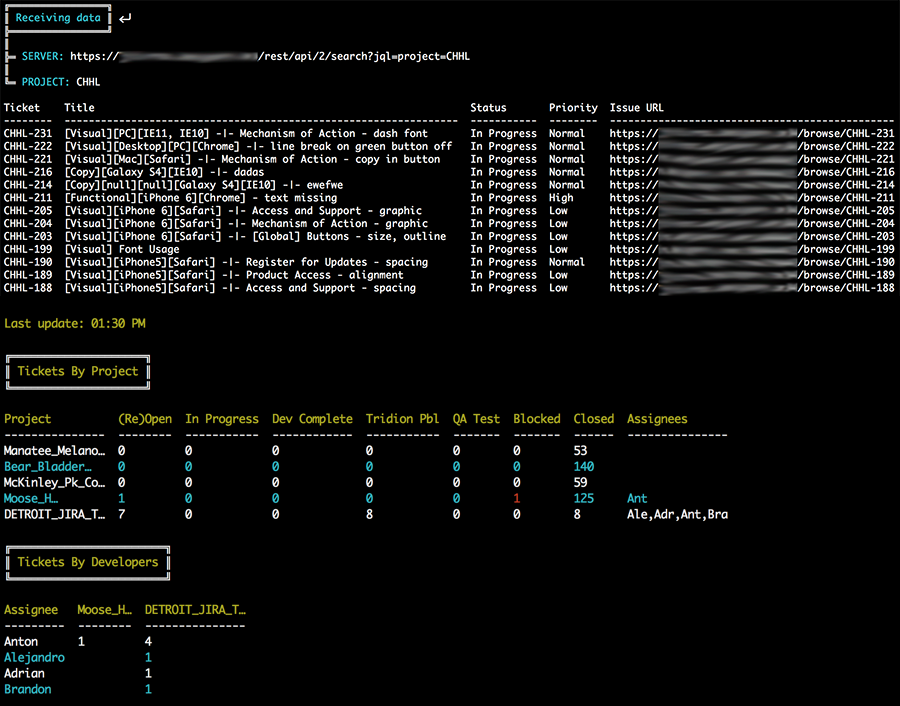
$ jira trackOutputs 2 tables in terminal: issues by project/status and issues by developers/project. Recursively send request every 30 seconds untill cancelled.
4.6 post
Used to sent object with data on current project(s) (created via track module) to http://localhost:7700/requests via post request.
$ jira postRecursively send request every 5 seconds untill cancelled.