
jl-react-virtual-signature-canvas
v1.0.1
Published
A lightweight, customizable and mobile-friendly React signature canvas component with stroke stabilization and auto-crop.

Maintainers
 jcvidal
Readme
jl-react-virtual-signature-canvas ✍️




The best electronic signature component for React & TypeScript (React Signature Pad / Canvas).
A lightweight, high-performance, and responsive React library for capturing digital signatures (e-signatures). Ideal for contract signing, invoice forms, legal agreements, or any web app needing drawing capabilities.
🌐 Live Links & Interactive Demo
- 📚 Official Interactive Documentation (ES / EN): https://jl-react-virtual-signature-canvas.vercel.app/
- 🎮 Live Interactive Playground: https://jl-react-virtual-signature-canvas.vercel.app/?mode=playground
🖼️ Component Visual Preview
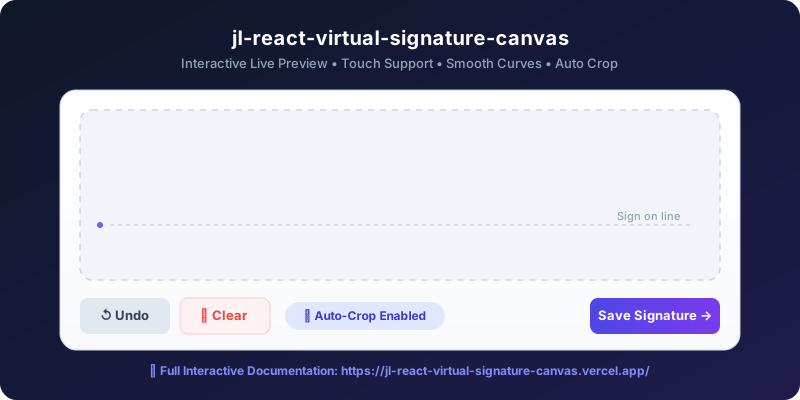
If you are looking for how to implement an electronic signature in React, a React signature pad, or a React signature canvas with touch support, auto-cropping, and curve smoothing, jl-react-virtual-signature-canvas is the simplest, most complete solution.
📦 Installation
Install the package using npm, yarn, or pnpm:
npm install jl-react-virtual-signature-canvas
# or
yarn add jl-react-virtual-signature-canvas
# or
pnpm add jl-react-virtual-signature-canvas
✨ Key Features
- 📱 Touch & Mouse Support: Smooth and optimized drawing events for mobile, tablet, and desktop (
touchstart,touchmove,mousedown). - 🎨 Fully Customizable: Easily adjust ink color, stroke width, canvas dimensions, or add Tailwind CSS and inline styles.
- ✨ Stroke Stabilization (Curve Smoothing): Built-in smart algorithm to smooth drawing for clean, realistic digital signatures.
- ✂️ Auto-Cropping: Automatically trims whitespace margins on
toDataURL('image/png')export, saving lightweight, cropped signature images. - ⏪ Undo & Clear History: Imperative ref methods (
clear(),undo(),isEmpty()) to manage stroke history with ease. - 🛡️ TypeScript Ready: Built natively with TypeScript, offering full autocompletion and strict typing (
SignatureCanvasRef,SignatureCanvasProps). - 🌍 Bilingual Interactive Documentation: Includes comprehensive documentation and live sandbox in both English and Spanish.
🚀 Real Example: Contract Agreement Form in React
Below is a complete, production-ready example of a contract signing form:
import React, { useRef, useState } from 'react';
import { SignatureCanvas, SignatureCanvasRef } from 'jl-react-virtual-signature-canvas';

export default function ContractForm() {
  const signatureRef = useRef<SignatureCanvasRef>(null);
  const [name, setName] = useState('');
  const [error, setError] = useState('');

  const handleSubmit = (e: React.FormEvent) => {
    e.preventDefault();
    setError('');

    if (!name.trim()) {
      setError("Please enter your full name.");
      return;
    }

    if (signatureRef.current?.isEmpty()) {
      setError("Please provide a signature in the box.");
      return;
    }

    // Get automatically cropped signature as Base64 transparent PNG
    const signatureImage = signatureRef.current?.toDataURL('image/png');

    console.log("Name:", name);
    console.log("Base64 Signature PNG:", signatureImage);

    alert("Contract successfully signed and submitted!");
  };

  const handleClear = () => {
    signatureRef.current?.clear();
    setError('');
  };

  const handleUndo = () => {
    signatureRef.current?.undo();
    setError('');
  };

  return (
    <div style={{ maxWidth: '500px', margin: '0 auto', fontFamily: 'system-ui, sans-serif' }}>
      <h2>Contract Agreement</h2>
      <p>Please enter your name and sign below to accept the terms.</p>

      <form onSubmit={handleSubmit}>
        <div style={{ marginBottom: '15px' }}>
          <label style={{ display: 'block', marginBottom: '5px', fontWeight: 'bold' }}>Full Name:</label>
          <input
            type="text"
            value={name}
            onChange={(e) => setName(e.target.value)}
            style={{ width: '100%', padding: '10px', boxSizing: 'border-box', borderRadius: '6px', border: '1px solid #ccc' }}
            placeholder="e.g. John Doe"
          />
        </div>

        <div style={{ marginBottom: '20px' }}>
          <label style={{ display: 'block', marginBottom: '5px', fontWeight: 'bold' }}>Signature:</label>
          {/* Canvas Wrapper */}
          <div style={{ border: '2px solid #e2e8f0', borderRadius: '8px', overflow: 'hidden', backgroundColor: '#f8fafc' }}>
            <SignatureCanvas
              ref={signatureRef}
              width="100%"
              height={200}
              strokeColor="#0f172a"
              strokeWidth={3}
              stabilization={true}
              autoCrop={true}
            />
          </div>

          <div style={{ display: 'flex', gap: '10px', marginTop: '10px' }}>
            <button type="button" onClick={handleUndo} style={{ padding: '8px 12px', borderRadius: '6px', border: '1px solid #cbd5e1', backgroundColor: '#f1f5f9', cursor: 'pointer' }}>Undo last stroke</button>
            <button type="button" onClick={handleClear} style={{ padding: '8px 12px', borderRadius: '6px', border: '1px solid #fecaca', backgroundColor: '#fef2f2', color: '#ef4444', cursor: 'pointer' }}>Clear canvas</button>
          </div>
        </div>

        {error && <p style={{ color: '#ef4444', fontSize: '14px', marginBottom: '15px', fontWeight: '500' }}>{error}</p>}

        <button
          type="submit"
          style={{ width: '100%', padding: '12px', backgroundColor: '#2563eb', color: 'white', border: 'none', borderRadius: '6px', fontSize: '16px', fontWeight: 'bold', cursor: 'pointer' }}
        >
          Sign and Submit
        </button>
      </form>
    </div>
  );
}
📖 API Reference (Props)
| Property | Type | Default | Description |
| :--- | :--- | :--- | :--- |
| width | number \| string | '100%' | Main container width (e.g., 500 or '100%'). |
| height | number \| string | '100%' | Main container height (e.g., 300 or '100%'). |
| strokeColor | string | '#000000' | Ink stroke color (hex, rgb, rgba). |
| strokeWidth | number | 3 | Pen stroke thickness in pixels. |
| stabilization| boolean | true | Enables curve stabilization algorithm for smooth strokes. |
| autoCrop | boolean | false | If true, toDataURL automatically trims surrounding whitespace margins. |
| style | React.CSSProperties | {...} | Inline styles applied to the outer container div. |
| className | string | '' | Class names for outer container (useful with Tailwind CSS). |
| canvasStyle | React.CSSProperties | undefined | Inline styles applied directly to the HTML <canvas> element. |
| canvasClassName| string | '' | Class names applied directly to the HTML <canvas> element. |
| onDrawStart | () => void | undefined | Callback fired when user starts drawing stroke. |
| onDrawEnd | () => void | undefined | Callback fired when user completes drawing stroke. |
| onUndoStateChange| (canUndo: boolean) => void| undefined | Triggered when history changes, passing true if strokes can be undone. |
🛠️ Imperative Ref Methods
Pass a ref to <SignatureCanvas ref={ref} /> to access these methods:
clear(): Clears canvas drawing area and resets stroke history.undo(): Reverts the last drawn stroke.isEmpty(): Returnstrueif no user drawings exist on the canvas.toDataURL(type?: string, quality?: any): Returns Base64 Data URL string (default format:'image/png'). Auto-crops image margins ifautoCrop={true}.getTrimmedCanvas(): Returns the nativeHTMLCanvasElementcontaining the trimmed signature image for binary Blob conversions.
🌐 Full Documentation & Playground
Visit the official documentation site for interactive controls, live code editors, and multilingual guides: 👉 https://jl-react-virtual-signature-canvas.vercel.app/
📄 License
MIT © cjorgeluis122333