
jodit-plugin-code
v1.3.0
Published
Jodit editor plugin that inserts code blocks with syntax highlighting: language choice, live preview, line numbers, inline styles with CSS variables, and a copy button runtime for the site

Maintainers
 timurseiidov
Readme
CodeBlock Jodit plugin





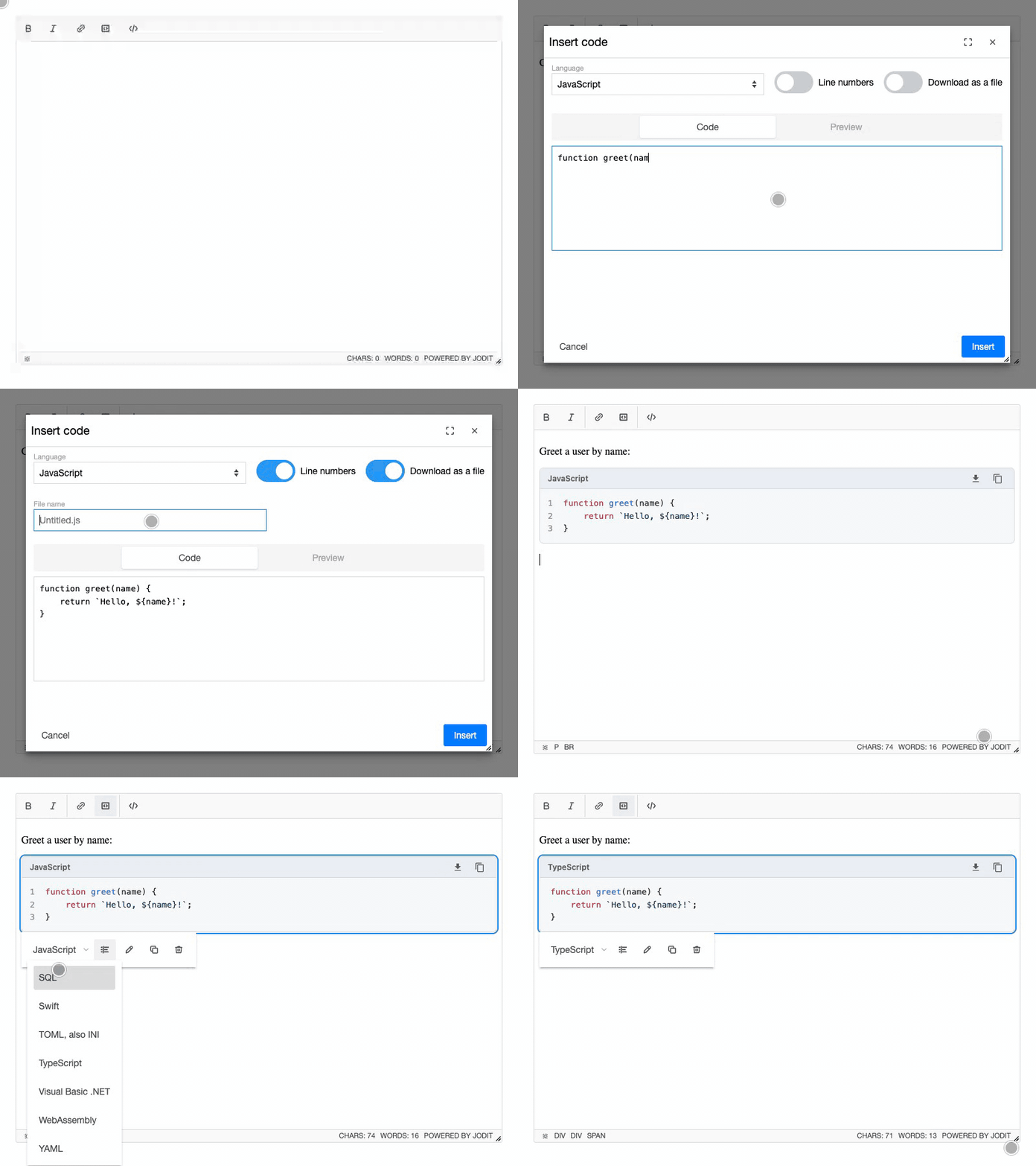
Code blocks with syntax highlighting for the Jodit editor: choose a language, paste the code, check the preview and insert. Blocks carry inline styles written as CSS variables, so they look right on any site without CSS and can be recolored with variables. Line numbers and "download as a file" are optional; copy and download buttons work in the editor, and a 2 KB runtime adds them on the site. A "Site highlighting" switch saves the code of a block as plain <code class="language-*"> inside the same frame and header instead, for highlight.js, Prism or another highlighter of the site.
Install
npm install jodit jodit-plugin-codeimport { Jodit } from 'jodit';
import 'jodit/es2021/jodit.min.css';
import 'jodit-plugin-code';
Jodit.make('#editor', {
code: { lineNumbers: true }
});On the pages that show the content:
import { enhance } from 'jodit-plugin-code/runtime';

enhance();
CDN
<link rel="stylesheet" href="https://cdn.jsdelivr.net/npm/jodit@4/es2021/jodit.min.css">
<script src="https://cdn.jsdelivr.net/npm/jodit@4/es2021/jodit.min.js"></script>
<script src="https://cdn.jsdelivr.net/npm/jodit-plugin-code@1/dist/es2021/plugins/code/code.min.js"></script>

<!-- on the pages that show the content -->
<script src="https://cdn.jsdelivr.net/npm/jodit-plugin-code@1/dist/es2021/plugins/code/code-runtime.min.js" defer></script>
The browser build already contains highlight.js with the common languages.
Options
| Option | Default | Description |
| --- | --- | --- |
| languages | [] (all) | Languages offered in the dialog, as highlight.js names |
| defaultLanguage | 'auto' | Language of a new block, 'auto' to detect it |
| lineNumbers | false | Line numbers in a new block |
| header | true | Header with the language and the copy and download buttons in a new block |
| download | false | Offer the code of a new block as a file (Untitled.<ext> or a given name) |
| native | false | Save the code of a new block as plain <code class="language-*"> for the highlighter of the site, under the same header; switched per block in the dialog and its toolbar |
| indent | '\t' | What Tab inserts in the code field |
| tabSize | 4 | Width of a tab in the block |
| className | '' | CSS classes for inserted blocks |
Details: Options, Styling, Runtime.
Changelog
See CHANGELOG.md or the releases.