
jovo-client-web-vue
v3.6.2
Published
> To view this page on the Jovo website, visit https://v3.jovo.tech/marketplace/jovo-client-web-vue


Readme
Jovo Web Client - Vue
To view this page on the Jovo website, visit https://v3.jovo.tech/marketplace/jovo-client-web-vue
Build voice and conversational experiences for the web with Vue.js and Jovo. You can find the vanilla JavaScript web client here: Jovo Web Client.
Introduction
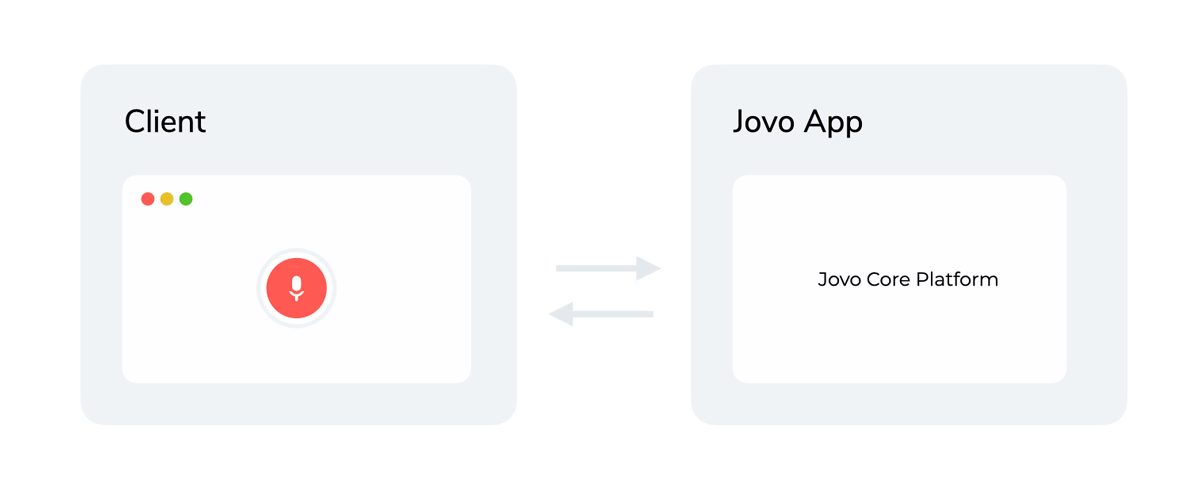
Jovo Clients are used as a frontend that collects user input. This input (e.g. speech or text) is then passed to the Jovo Web Platform that handles the conversational logic.
The "Jovo for Web" client can be used on websites and web apps built with Vue.js. It comes with helpful features that make it easier to capture speech input, detect when a user stops speaking, and display information that is returned from the Jovo app. The client is open source and fully customizable.
You can check out one of these starter templates to get a first impression of how it looks like:
Installation
This package is a plugin for Vue.js and does not work without it.
vue is a peer-dependency of this package and therefore needs to be installed as well.
$ npm install jovo-client-web-vue vueConfiguration
You can configure the client like this:
Vue.use(JovoClientWebVue, {
  url: WEBHOOK_URL,
  client: {
    debugMode: true,
    locale: 'en-US',
    defaultInputType: 'voice',
  },
});
Sending a Request to the Jovo App
To send a request to the Jovo app, you can use the $client object:
this.$client.createRequest({ type: RequestType.Text, body: { 'Hello World' } }).send();Recording Voice Input
To record the user's voice input and automatically send it to the Jovo app, you can use the startInputRecording() and stopInputRecording() methods. Here's a sample implementation of a microphone button that will record the audio as long as the button is pushed down and send the audio as soon as it's released:
<button @mousedown="onMouseDown" @touchstart="onMouseDown"></button>async onMouseDown(event: MouseEvent | TouchEvent) {
if (!this.$client.isInitialized) {
await this.$client.initialize();
}
if (this.$client.isRecordingInput) {
return;
}
if (event instanceof MouseEvent) {
window.addEventListener('mouseup', this.onMouseUp);
} else {
window.addEventListener('touchend', this.onMouseUp);
}
await this.$client.startInputRecording();
}
private onMouseUp(event: MouseEvent | TouchEvent) {
window.removeEventListener('mouseup', this.onMouseUp);
this.$client.stopInputRecording();
}Event Listeners
You can use listeners to react to events of the Jovo app from within your Vue component
import { ClientEvent } from 'jovo-client-web-vue';
import { Component, Vue } from 'vue-property-decorator';

@Component({
  name: 'overlay'
})
export default class Overlay extends Vue {
  mounted() {
    this.$client.on(ClientEvent.Request, this.onRequest);
    this.$client.on(ClientEvent.Response, this.onResponse);
    this.$client.on(ClientEvent.Action, this.onAction);
  }

  beforeDestroy() {
    this.$client.off(ClientEvent.Request, this.onRequest);
    this.$client.off(ClientEvent.Response, this.onResponse);
    this.$client.off(ClientEvent.Action, this.onAction);
  }
The following event types are supported:
| Name | Description | Parsed Parameters |
| :--------- | :--------------------------------------------------------------------------- | :---------------------------- |
| Request | triggered when the request is received by the Jovo app. Parses the request | (req: WebRequest) |
| Response | triggered when the Jovo app sends out the response. Parses the response | (res: WebResponse) |
| Action | triggered when the Jovo app's response contains an action. Parses the action | (action: Action) |
| Reprompt | triggered when a reprompt is triggered. Parses the reprompt actions | (repromptActions: Action[]) |
SpeechRecognizer
The SpeechRecognizer uses Google Chrome's ASR and has its own set of listeners:
import { SpeechRecognizerEvent } from 'jovo-client-web-vue';
import { Component, Vue } from 'vue-property-decorator';

@Component({
  name: 'overlay'
})
export default class Overlay extends Vue {
  mounted() {
    this.$client.$speechRecognizer.on(
      SpeechRecognizerEvent.SpeechRecognized,
      this.onSpeechRecognized,
    );
  }

  beforeDestroy() {
    this.$client.$speechRecognizer.off(
      SpeechRecognizerEvent.SpeechRecognized,
      this.onSpeechRecognized,
    );
  }
| Name | Description | Parsed Parameters |
| :----------------- | :----------------------------------------------------------------------- | :-------------------------------- |
| StartDetected | triggered when the speech input has started | () |
| SpeechRecognized | triggered when the speech input has been collected | (event: SpeechRecognitionEvent) |
| End | triggered when the SpeechRecognizer has ended (after SpeechRecognized) | (event: SpeechRecognitionEvent) |
| Timeout | triggered when the SpeechRecognizer has timed out | () |
| SilenceDetected | triggered when the SpeechRecognizer detected silence | () |
| Error | triggered when the SpeechRecognizer encountered an error | (error: Error) |
The AudioHelper class can be used to get the transcript from the SpeechRecognizerEvent:
import { AudioHelper } from 'jovo-client-web-vue';

//...
onSpeechRecognized(event: SpeechRecognitionEvent) {
  this.inputText = AudioHelper.textFromSpeechRecognition(event);
}