
jp-pref-icons
v1.0.2
Published
Generate beautiful icon images for Japanese prefectures with official government data

Maintainers
 champierre
Readme
jp-pref-icons
Generate beautiful icon images for Japanese prefectures with official government data. This tool automatically downloads the latest boundary data from official sources and creates high-quality PNG icons with optional SVG output.
📖 日本語ドキュメント: README_JP.md
Features
- 🗾 Official Data: Automatically downloads prefecture boundaries from national land information sources
- 🎨 Customizable: Adjustable colors, sizes, and border styles
- 🌍 Smart Filtering: Tokyo shows mainland only (excludes distant islands for better visibility)
- 🔤 Flexible Text: Show or hide prefecture names on icons
- 📁 Multiple Formats: PNG and SVG output with transparent backgrounds
- 🎯 Selective Generation: Generate specific prefectures by name or code
- 🖥️ Easy CLI: Simple command-line interface
Sample Icons
Here are some examples of generated prefecture icons:
Default Style
| Prefecture | Icon | Features |
|------------|------|----------|
| Tokyo (東京都) | 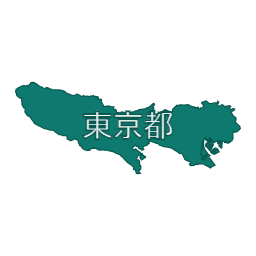 | Mainland filtering (excludes distant islands) |
| Osaka (大阪府) |
| Mainland filtering (excludes distant islands) |
| Osaka (大阪府) | 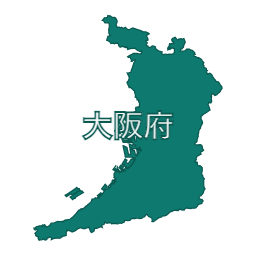 | Compact urban prefecture shape |
| Hokkaido (北海道) |
| Compact urban prefecture shape |
| Hokkaido (北海道) | 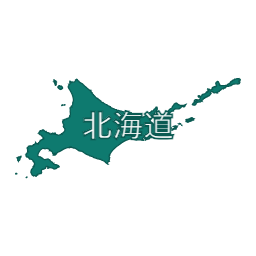 | Japan's largest prefecture |
Text-Free Versions
| Prefecture | Icon | Command |
|------------|------|---------|
| Tokyo | 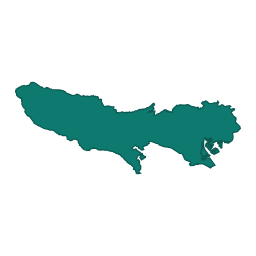 |
| --prefecture "東京都" --hide-text |
Custom Color Schemes
| Prefecture | Icon | Command |
|------------|------|---------|
| Osaka (Red) | 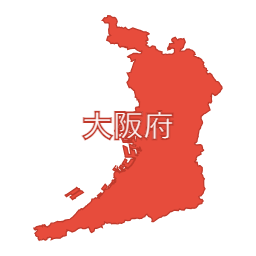 |
| --prefecture "大阪府" --face "#FF6B6B" --edge "#D63031" |
| Hokkaido (Blue) | 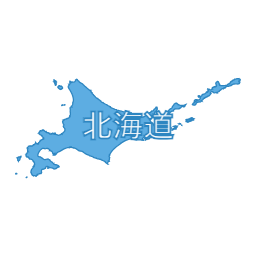 |
| --prefecture "北海道" --face "#74B9FF" --edge "#0984E3" |
All icons feature:
- Clean, professional appearance with subtle text stroke outline
- Transparent backgrounds for versatile use
- Customizable color schemes and text options
- High-quality anti-aliased rendering
Installation
NPX (Recommended - No installation required)
# Generate all prefecture icons in current directory
npx jp-pref-icons

# Generate specific prefecture
npx jp-pref-icons --prefecture "東京都"

# Generate without text labels
npx jp-pref-icons --prefecture "東京都" --hide-text

# Custom styling
npx jp-pref-icons --prefecture "東京都" --lw 0.5 --face "#0E7A6F" --size 2048
Local Installation
npm install jp-pref-iconsQuick Start
Using NPX (No installation required)
# Generate all prefectures (downloads official data automatically)
npx jp-pref-icons

# Generate specific prefecture
npx jp-pref-icons --prefecture "東京都"

# Generate without text labels
npx jp-pref-icons --prefecture "東京都" --hide-text

# Custom styling
npx jp-pref-icons --prefecture "東京都" --lw 0.5 --face "#0E7A6F" --size 2048
Using Local Installation
# Generate all prefectures (downloads official data automatically)
node bin/cli.js

# Generate specific prefecture
node bin/cli.js --prefecture "東京都"

# Generate without text labels
node bin/cli.js --prefecture "東京都" --hide-text

# Custom styling
node bin/cli.js --prefecture "東京都" --lw 0.5 --face "#0E7A6F" --size 2048
Usage Examples
Basic Usage
# Generate all 47 prefectures
npx jp-pref-icons

# Use custom GeoJSON file
npx jp-pref-icons --geojson custom-prefectures.geojson
Generate Specific Prefectures
# Single prefecture by name
npx jp-pref-icons --prefecture "東京都"

# Multiple prefectures by name
npx jp-pref-icons --prefecture "東京都,大阪府,神奈川県"

# By prefecture codes
npx jp-pref-icons --prefecture "13,27,14"

# Mixed names and codes
npx jp-pref-icons --prefecture "13,大阪府,Tokyo"
Styling Options
# Thin borders
npx jp-pref-icons --prefecture "東京都" --lw 0.5

# No text labels
npx jp-pref-icons --prefecture "東京都" --hide-text

# Custom colors
npx jp-pref-icons --prefecture "東京都" --face "#2E8B57" --edge "#1C5F3F" --text "#FFFFFF"

# Large size with SVG
npx jp-pref-icons --prefecture "東京都" --size 2048 --svg
Programmatic Usage
const PrefectureIconGenerator = require('./src/index');

const generator = new PrefectureIconGenerator({
  size: 256,                     // Icon size in pixels
  lineWidth: 0.5,               // Border line width
  faceColor: '#0E7A6F',         // Fill color
  edgeColor: '#0A5A52',         // Border color
  textColor: '#FFFFFF',         // Text color
  outputDir: 'icons',           // Output directory
  generateSVG: false,           // Also generate SVG files
  showText: true,               // Show prefecture names
  targetPrefectures: '東京都,大阪府' // Specific prefectures
});

// Generate icons (downloads official data automatically)
generator.generate()
  .then(() => console.log('Icons generated successfully!'))
  .catch(err => console.error('Error:', err));

// Or use custom GeoJSON
generator.generate('custom-prefectures.geojson')
  .then(() => console.log('Icons generated!'));
CLI Options
| Option | Description | Default |
|--------|-------------|---------|
| --geojson <path> | Path to custom GeoJSON file (optional) | Auto-download |
| --out <dir> | Output directory | icons |
| --size <number> | Icon size in pixels (square) | 256 |
| --lw <number> | Line width | 0.5 |
| --face <color> | Face/fill color | #0E7A6F |
| --edge <color> | Edge/border color | #0A5A52 |
| --text <color> | Text color | #FFFFFF |
| --svg | Also generate SVG files | false |
| --prefecture <names> | Generate only specified prefectures | All |
| --hide-text | Generate icons without text labels | false |
| -h, --help | Display help for command | - |
| -V, --version | Output the version number | - |
Output Format
Icons are saved with the following naming convention:
{prefecture_code}_{romanized_name}.png(e.g.,13_Tokyo.png,27_Osaka.png)
Data Sources
The tool automatically downloads official Japanese prefecture boundary data from:
- Primary:
dataofjapan/landrepository (based on 国土地理院 data) - Fallback:
smartnews-smri/japan-topography(alternative high-quality source)
Data is processed in memory without local caching, ensuring always up-to-date official boundary information.
Special Features
Tokyo Mainland Filtering
Tokyo Prefecture includes many distant islands (Izu Islands, Ogasawara Islands). The tool automatically filters these out to show only the mainland Tokyo area for better icon visibility.
Kagoshima Mainland Filtering
Kagoshima Prefecture includes numerous islands (Tanegashima, Yakushima, Amami Islands, etc.). The tool automatically filters these out to show only the mainland areas (Satsuma and Osumi peninsulas) for better icon visibility.
Text Stroke Outline
All prefecture name text includes a subtle stroke outline using the border color, ensuring optimal readability against any background while maintaining clean visual appearance.
Transparent Backgrounds
All generated icons have transparent backgrounds, making them suitable for use on any background color or design.
High-Quality Rendering
Icons are generated via SVG-to-PNG conversion using Puppeteer, ensuring high-quality anti-aliased output at any size.
Prefecture Codes
Standard JIS prefecture codes (1-47):
- 1: Hokkaido (北海道) - 13: Tokyo (東京都) - 27: Osaka (大阪府) - 47: Okinawa (沖縄県)
Dependencies
@turf/turf- Geospatial analysis and geometry operationscanvas- Server-side canvas renderingcommander- CLI argument parsingfs-extra- Enhanced file system operationspuppeteer- SVG to PNG conversion
Development
# Clone repository
git clone https://github.com/champierre/jp-pref-icons.git
cd jp-pref-icons

# Install dependencies
npm install

# Generate icons for testing
npx jp-pref-icons --prefecture "東京都" --lw 0.5

# Generate all prefectures
npx jp-pref-icons
License
MIT
Credits
Built with official Japanese government boundary data from the Geospatial Information Authority of Japan (国土地理院).