
jqueryflexitable
v1.2.7
Published
flexiTable is a professional jQuery plugin that convert JSON array list into HTML table. It supports nested object and it can retrieve data from url. It's successor of jqueryjsontotable which is deprecated

Maintainers
 mosy_shaeri
Readme


FlexiTable
FlexiTable is a jQuery plugin that converts JSON array containing nested JSON object into HTML table
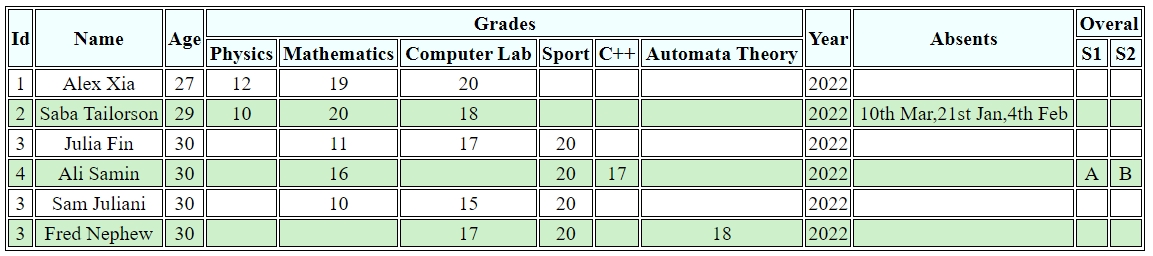
Features
- Accepts Json data
- Accepts url to fetch json data
- Supports nested object up to 1 level
- Refeshs data and structure in custom priods
- Custom header titles
- Supports both vertical and horizontal orientation of records
- Supports CSS classes
- Supports LTR and RTL directions
- supports arrays as a multi-values cell
How to use
This plugin works with jquery-2.2.4 and later versions (Earlier versions are not tested). Import the plugin as following code :
<script src="https://code.jquery.com/jquery-2.2.4.min.js" integrity="sha256-BbhdlvQf/xTY9gja0Dq3HiwQF8LaCRTXxZKRutelT44=" crossorigin="anonymous"></script>
<script src="jquery.flexitable.js" ></script>
Then the plugin function can be called on any container element such as Div. Function parameters are :
{
  data : Json array (Json Array) , or url to retrieve json array (String) *Required
  tableCssClass : Css classes to be set for table (String)
  tableId : id attribute of the table tag (Strig)
  rtl : Indicates right to left direction. (Boolean, Default : false)
  verticalHeaders : changes the orientation of the headers to vertical (Boolean, Default : false)
  arraySeparator : Indicates the character(s) between array items in cells (Strig, Default : ', ')
  refreshPriod : Time interval to re-fetch data from source. it is in millisecond. (Integer, Default : it is disabled by default. Only applicable for calling the function on a container with selector )
  columnsTitle : a dictionary to set optional title for json path
}
Calling the function on a container with jquery selector :
<div id="mydiv"></div>

<script>
var data = [
{
    "Id" : 1,
    "Name" : "Alex Xia",
    "Age" : 27,
    "Grades" : {
        "Physics" : 12,
        "Mathematics" : 19,
        "Computer Lab" : 20
    },
    "Year" : 2022
},
{
    "Id" : 2,
    "Name" : "Saba Tailorson",
    "Age" : 29,
    "Grades" : {
        "Physics" : 10,
        "Mathematics" : 20,
        "Computer Lab" : 18
    },
    "Year" : 2022,
    "Absents" : ['10th Mar','21st Jan','4th Feb']
}
];

$("#mydiv").flexiTable({
    data : data,
    tableCssClass : 'mytable',
    tableId : 'studentsTable',
    columnsTitle : {'Id' : 'Student ID', 'Grades.Mathematics' : 'Math'}
});
</script>
Output for sampleData :
Calling the stand alon function to get the table DOM object :
<div id="mydiv"></div>

<script>
var data = [
{
    "Id" : 1,
    "Name" : "Alex Xia",
    "Age" : 27,
    "Grades" : {
        "Physics" : 12,
        "Mathematics" : 19,
        "Computer Lab" : 20
    },
    "Year" : 2022
},
{
    "Id" : 2,
    "Name" : "Saba Tailorson",
    "Age" : 29,
    "Grades" : {
        "Physics" : 10,
        "Mathematics" : 20,
        "Computer Lab" : 18
    },
    "Year" : 2022,
    "Absents" : ['10th Mar','21st Jan','4th Feb']
}
];


var dataTable  ;
$.flexiTable({
    data : data,
    tableCssClass : 'mytable',
    tableId : 'studentsTable'
}).then((data) => { dataTable = data;});

</script>
For detailed plugin explanation go to FlexiTable- A jQuery Plugin Converting Dynamic JSON with Nested Objects To HTML Table
To Do List
- ⬜️ CSS themes
- ⬜️ Unlimited nested objects
- ✅ Customized Titles (v1.1.0)
- ⬜️ Aggregation function (Sum, Count, Avg) in footer