
jscad-fiber
v0.0.89
Published
[View examples](https://tscircuit.github.io/jscad-fiber/) · [jscad](https://github.com/jscad/OpenJSCAD.org) · [tscircuit](https://github.com/tscircuit/tscircuit) · [jscad-electronics](https://github.com/tscircuit/jscad-electronics)


Readme
jscad-fiber
View examples · jscad · tscircuit · jscad-electronics
This package allows you to create 3D CAD objects with React and JSCAD.
Table of Contents
Installation
npm install jscad-fiber @jscad/modeling three @react-three/fiberUsage
Create JSCAD components with React:
import { JsCadView } from "jscad-fiber"
import { Cube, Sphere, Subtract } from "jscad-fiber"

export default () => (
  <JsCadView>
    <Subtract>
      <Cube size={10} />
      <Sphere radius={6.8} />
    </Subtract>
  </JsCadView>
)
Common Props
All components support these common props:
| Prop | Type | Description |
|------|------|-------------|
| color | string \| [number,number,number] | CSS color string or RGB array |
| center | [number,number,number] \| {x,y,z} | Position in 3D space |
| offset | [number,number,number] \| {x,y,z} | Alternative to center |
Components
Basic Shapes
Cube
| Prop | Type | Description |
|------|------|-------------|
| size | number \| [number,number,number] | Single number for all dimensions or [width, height, depth] |
<Cube size={10} /> // Single number for all dimensions
<Cube size={[width, height, depth]} /> // Array for different dimensions
Sphere
| Prop | Type | Description |
|------|------|-------------|
| radius | number | Sphere radius |
| segments | number | Optional detail level (default: 32) |
<Sphere radius={10} segments={32} />Cylinder
| Prop | Type | Description |
|------|------|-------------|
| radius | number | Cylinder radius |
| height | number | Cylinder height |
<Cylinder radius={5} height={10} />Torus
| Prop | Type | Description |
|------|------|-------------|
| innerRadius | number | Inner ring radius |
| outerRadius | number | Outer ring radius |
| innerSegments | number | Optional inner detail level (default: 32) |
| outerSegments | number | Optional outer detail level (default: 32) |
<Torus
  innerRadius={10}
  outerRadius={15}
  innerSegments={32}
  outerSegments={32}
/>
Boolean Operations
Subtract
| Prop | Type | Description |
|------|------|-------------|
| children | React.ReactNode[] | First child is base shape, others are subtracted |
<Subtract>
  <Cube size={10} /> {/* Base shape */}
  <Sphere radius={6} /> {/* Subtracted from base */}
</Subtract>
Union
| Prop | Type | Description |
|------|------|-------------|
| children | React.ReactNode[] | Shapes to combine |
<Union>
  <Cube size={10} />
  <Sphere radius={6} center={[0,0,10]} />
</Union>
Hull
| Prop | Type | Description |
|------|------|-------------|
| children | React.ReactNode[] | Shapes to create hull from |
<Hull>
  <Cube size={10} />
  <Sphere radius={6} center={[0,0,10]} />
</Hull>
Transformations
Translate
| Prop | Type | Description |
|------|------|-------------|
| offset | [number,number,number] | Translation in [x,y,z] |
<Translate offset={[x,y,z]}>
  <Cube size={10} />
</Translate>
Rotate
| Prop | Type | Description |
|------|------|-------------|
| angles | [number,number,number] | Rotation angles in radians [x,y,z] |
<Rotate angles={[x,y,z]}>
  <Cube size={10} />
</Rotate>
Extrusions
ExtrudeLinear
| Prop | Type | Description |
|------|------|-------------|
| height | number | Extrusion height |
| twistAngle | number | Optional twist during extrusion |
<ExtrudeLinear height={10}>
  <Polygon points={[[0,0], [10,0], [5,10]]} />
</ExtrudeLinear>
ExtrudeRotate
| Prop | Type | Description |
|------|------|-------------|
| angle | number | Rotation angle in radians |
| segments | number | Optional number of segments |
<ExtrudeRotate angle={Math.PI * 2}>
  <Polygon points={[[0,0], [10,0], [5,10]]} />
</ExtrudeRotate>
Component Props Reference
| Component | Props | Description |
|-----------|-------|-------------|
| Cube | size: number \| [number,number,number] | Size in each dimension |
| Sphere | radius: number, segments?: number | Radius and detail level |
| Cylinder | radius: number, height: number | Basic cylinder dimensions |
| Torus | innerRadius: number, outerRadius: number, segments?: number | Ring dimensions |
| ExtrudeLinear | height: number, twistAngle?: number | Linear extrusion with optional twist |
| ExtrudeRotate | angle: number, segments?: number | Rotational sweep |
| Polygon | points: [number,number][] | 2D points array |
| Translate | offset: [number,number,number] | 3D translation |
| Rotate | angles: [number,number,number] | Rotation angles in radians |
| Hull | children: React.ReactNode | Convex hull of children |
| Union | children: React.ReactNode | Boolean union of children |
| Subtract | children: React.ReactNode | Boolean subtraction |
Why?
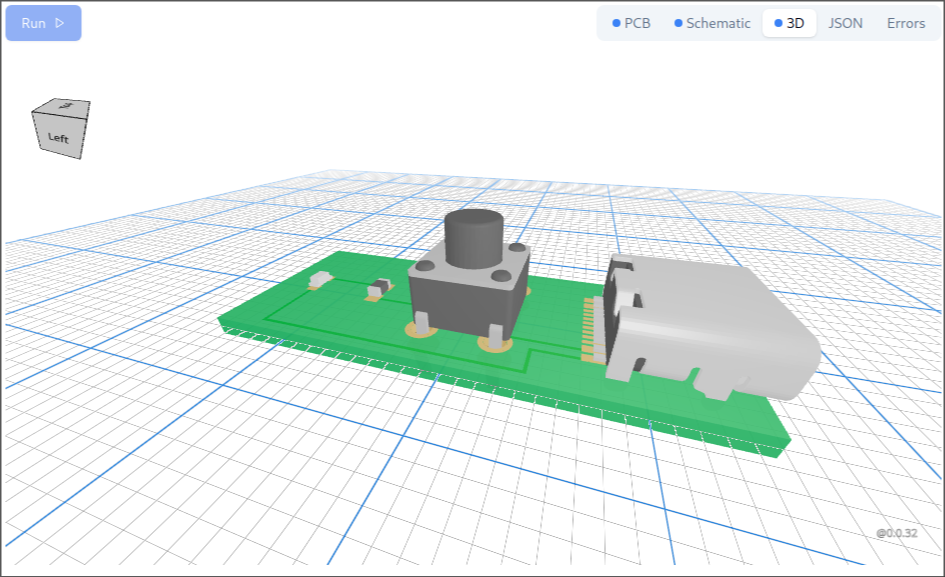
JSCAD allows you to create detailed 3D objects using boolean operations. This is how modern CAD tools create precise 3D models. jscad-fiber is used to create the 3D electronics library for tscircuit called jscad-electronics
Example Wrapper
The library includes an ExampleWrapper component that provides a convenient way to display both the rendered 3D object and its source code:
import { ExampleWrapper } from "jscad-fiber"

export default () => (
  <ExampleWrapper fileName={import.meta.url}>
    <JsCadView>
      <Sphere radius={10} color="orange" />
    </JsCadView>
  </ExampleWrapper>
)
This wrapper:
- Shows the rendered 3D object
- Provides a "Show Code" button that reveals the source code
- Automatically syntax highlights the code
- Makes examples more interactive and educational
Contributing
See the examples directory for more usage examples.
Pull requests welcome! Please check existing issues or create a new one to discuss major changes.
Headless plans and named reference rectangles
jscad-fiber/headless compiles pure JSX components to serializable JSCAD operation
JSON without importing the viewer, Three.js, or the modeling kernel. It supports
synchronous function components, fragments, arrays, and null children. Hooks,
async components, and raw Custom geometry are not supported by this compiler.
The lowercase jscad namespace exposes the planner-supported component subset;
the existing capitalized components remain available.
import { jscad, renderToJscadPlan } from "jscad-fiber/headless"

function Spacer() {
  return <>
    <jscad.extrudeLinear height={4}>
      <jscad.rectangle size={[42, 42]} />
    </jscad.extrudeLinear>
    <jscad.rotate angles={[0, Math.PI, 0]}>
      <jscad.rectangle name="motor" size={[42, 42]} reference />
    </jscad.rotate>
    <jscad.translate offset={[0, 0, 4]}>
      <jscad.rectangle name="board" size={[42, 42]} reference />
    </jscad.translate>
  </>
}

const plan = renderToJscadPlan(<Spacer />)
const json = JSON.stringify(plan)
A reference rectangle describes an attachment plane. It starts in local XY with
normal +Z and in-plane X direction +X; its center is the attachment point.
Ordinary transforms position and orient it alongside the solid. name must be
nonblank and unique within the part. reference excludes the rectangle from
native geometry rendering, so it cannot add material to a print.
The compiler preserves reference rectangles as standard polygon operations with
name and reference metadata. Consumers must extract references before sending
a plan to a geometry interpreter or exporter. Use resolveReferencePlanes from
a version of jscad-planner that provides named-reference extraction; older
interpreters do not understand the metadata. The returned geometry plan can be
executed by existing interpreters, while referencePlanes provides each name,
origin, normal, and in-plane X axis. Metadata lives in the planner/fiber layer;
no changes to @jscad/modeling are needed.
See the motor spacer example for a 4 mm plate,
four hollow posts on 31 mm centers, 3.2 mm M3 clearance holes, a 30 mm center
opening, and named motor and board reference planes. Dimensions in that
example are millimeters.