
jscriptor
v0.0.6
Published
A lightweight typed superset for JavaScript that catches type mismatches before runtime

Maintainers
 hareesh108
Readme
🛠️ JScriptor — Lightweight Typed Superset for JavaScript
JScriptor is a lightweight, typed superset 🚀 of JavaScript that catches type errors early and keeps your codebase clean and maintainable—without any heavy setup.
✨ Features
- 🔍 Type Inference: Automatic type detection using Hindley-Milner type system
- 🧠 Polymorphic Functions: Supports functions that work with multiple types
- 📦 Zero Configuration: Works out of the box with sensible defaults
- 💡 Clear Error Reporting: Detailed type error messages with file locations
- ⚙️ Configurable: Customize type checking behavior via
jscriptor.config.js - 🚀 Fast: Lightweight implementation with minimal overhead
- 🔧 CLI Tools: Command-line interface for easy integration
Supported JavaScript Features
- ✅ Variable declarations (
const,let) - ✅ Arrow functions and function calls
- ✅ Binary expressions (
+,-,*,/,==,!=, etc.) - ✅ Conditional expressions (ternary operator)
- ✅ Array and object literals
- ✅ String, number, and boolean literals
- ✅ Return statements
- ✅ Block statements with scope management
📦 Installation
npm install --save-dev jscriptor⚡ Quick Start
- Create your program:
// myProgram.js
const double = (x) => { return x + x; };
const num = 5;
const str = "hello";

const doubledNum = double(num);
const mixed = double(num) + double(str); // ❌ Type error- Initialize configuration (optional):
jscriptor init- Add to
package.jsonscripts:
{
  "scripts": {
    "typecheck": "jscriptor check-all",
    "typecheck:file": "jscriptor check"
  }
}- Run type checking:
# Check all files based on config
npm run typecheck

# Check a specific file
npm run typecheck:file src/app.js
📦 NPM Registry Example
We've created a complete example project that demonstrates using JScriptor from the npm registry:
Quick Setup
# Clone the example
git clone https://github.com/Hareesh108/jscriptor.git
cd jscriptor/npm-example

# Install JScriptor from npm registry
npm install --save-dev jscriptor

# Initialize configuration
npm run init

# Run type checking
npm run typecheck
Example Project Structure
npm-example/
├── package.json              # Dependencies and scripts
├── jscriptor.config.js       # JScriptor configuration
├── src/
│   ├── simple-valid.js       # Valid code (no errors)
│   ├── simple-errors.js      # Code with type errors
│   └── utils.js              # Utility functions
└── README.md                 # Example documentation
Available Scripts
npm run typecheck- Check all files based on confignpm run typecheck:file- Check a specific filenpm run init- Initialize JScriptor configuration
Test Results
The example demonstrates:
- ✅ Valid code:
simple-valid.jspasses type checking - ❌ Type errors:
simple-errors.jsshows clear error messages - 🔧 Configuration: Customizable via
jscriptor.config.js
🖥️ Example Output
JScriptor provides clear, detailed error messages:
📄 Checking src/simple-errors.js...

❌ 1 error(s) found

1. [E_TERNARY_TEST_NOT_BOOL] Type mismatch in ternary: condition must be Boolean, got Number
   at src/simple-errors.js:15:20

 13 |
 14 | // Type error: ternary with non-boolean condition
 15 | const badTernary = num ? "yes" : "no";
    |                    ^
 16 |
 17 | console.log("This file has type errors!");
   💡 Hint: The condition in a ternary operator must evaluate to a boolean

📊 Summary: Found 1 type error(s) in src/simple-errors.js
🧪 More Examples
✅ Valid Code (No Type Errors)
// Function with type inference
const identity = (x) => { return x; };
const result = identity(42); // ✅ Number type inferred

// Binary operations with matching types
const sum = 5 + 10; // ✅ Number + Number
const message = "Hello" + " World"; // ✅ String + String

// Conditional expressions
const max = a > b ? a : b; // ✅ Boolean condition
❌ Type Errors
// Type mismatch in binary operation
const badMath = 5 + "hello"; // ❌ Number + String

// Wrong argument type for function
const add = (x, y) => { return x + y; };
const res = add(5, "hello"); // ❌ String passed to function expecting Number

// Non-boolean condition in ternary
const num = 5;
const result = num ? "yes" : "no"; // ❌ Number used as condition
🛠 How It Works
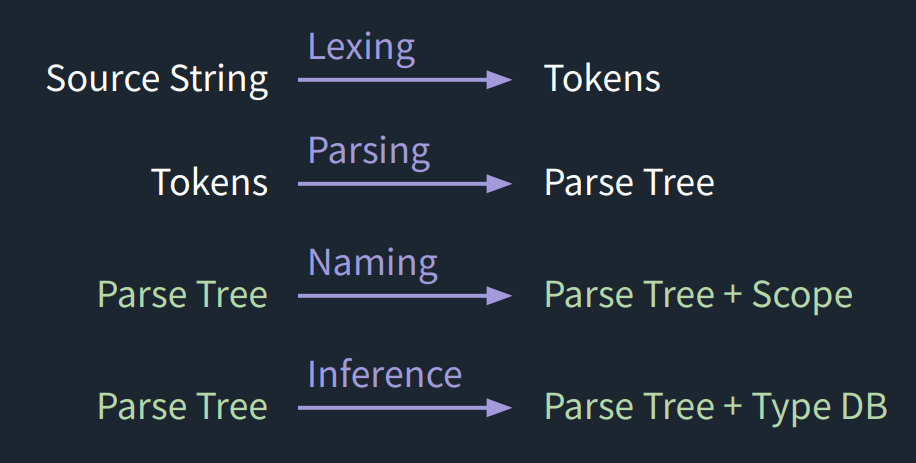
- compile → Parses JavaScript into an AST
- typeCheck → Infers and validates types
- nameCheck → Checks naming and scope rules
🖥️ CLI Commands
JScriptor provides a comprehensive command-line interface:
# Initialize a new project with default configuration
jscriptor init

# Type check a single file
jscriptor check src/app.js

# Type check all files based on jscriptor.config.js
jscriptor check-all

# Show help and usage information
jscriptor help
Command Details
jscriptor init: Creates ajscriptor.config.jsfile with sensible defaultsjscriptor check <file>: Type checks a single JavaScript filejscriptor check-all: Type checks all files matching patterns in your configjscriptor help: Displays usage information and available commands
⚙️ Configuration
JScriptor uses a jscriptor.config.js file to configure type checking behavior. Run jscriptor init to create a default configuration file.
Configuration Options
module.exports = {
  // Entry points - files or directories to type-check
  include: [
    "src/**/*.js",
    "lib/**/*.js"
  ],

  // Files to exclude from type checking
  exclude: [
    "node_modules/**/*",
    "dist/**/*",
    "build/**/*",
    "**/*.test.js",
    "**/*.spec.js"
  ],

  // Output directory for compiled files (optional)
  outDir: null,

  // Whether to watch for file changes
  watch: false,

  // Strict mode settings
  strict: {
    // Require explicit type annotations
    explicitTypes: false,
    // Check for unused variables
    unusedVars: false,
    // Check for unreachable code
    unreachableCode: false,
  },

  // Type checking options
  typeCheck: {
    // Whether to infer types from usage
    inferTypes: true,
    // Whether to check function return types
    checkReturnTypes: true,
    // Whether to check parameter types
    checkParameterTypes: true,
  },

  // Compiler options
  compiler: {
    // Whether to preserve comments
    preserveComments: true,
    // Whether to generate source maps
    sourceMaps: false,
    // Target JavaScript version
    target: "es2020",
  }
};
Configuration Sections
include: Glob patterns for files to type checkexclude: Glob patterns for files to skipstrict: Strict mode settings for additional checkstypeCheck: Core type checking behaviorcompiler: Compilation and output options
📋 Roadmap
Current Version (v0.0.6)
- ✅ Basic type inference and checking
- ✅ CLI interface with configuration support
- ✅ Error reporting with file locations
- ✅ Support for common JavaScript constructs
Upcoming Features
- 🌐 Enhanced CLI output with syntax highlighting
- 🧩 Plugin system for custom type rules
- 🖍 VS Code extension for real-time type checking
- 📚 Type annotations support (optional)
- 🔄 Watch mode for continuous type checking
- 📊 Performance optimizations for large codebases
- 🧪 More comprehensive test coverage
- 📖 Detailed documentation and tutorials
🔧 Local Development Setup
If you want to contribute or test JS Scriptor locally instead of installing from npm:
Clone the repo
git clone https://github.com/Hareesh108/jscriptor.git
cd jscriptor
Install dependencies
npm installLink the CLI locally This makes the
jscriptorcommand available on your system:npm linkTest it on an example file
echo 'const x = 5; const y = "hi"; const z = x + y;' > examples/test.js
jscriptor examples/test.js
✅ You should see a type error reported for mixing
NumberandString.Unlink when done If you no longer want the global link:
npm unlink -g jscriptor
🛠 Development Workflow
- Source code lives in
src/ - CLI entrypoint →
src/cli.js - Tokenization →
src/01-tokenize/ - Parsing →
src/02-parse/ - Type checking →
src/03-typecheck/ - Compiler →
src/compile.js - Configuration →
src/config.js
Project Structure
src/
├── cli.js                 # Command-line interface
├── compile.js             # Main compilation entry point
├── config.js              # Configuration loading and processing
├── 01-tokenize/           # Lexical analysis
│   ├── tokenize.js        # Tokenizer implementation
│   └── utils.js           # Token utilities
├── 02-parse/              # Syntax analysis
│   └── parse.js           # Parser implementation
├── 03-typecheck/          # Type checking and inference
│   ├── typecheck.js       # Main type checker
│   ├── db.js              # Type database
│   ├── errors.js          # Error reporting
│   ├── scope.js           # Scope management
│   ├── unification.js     # Type unification
│   ├── type-utils.js      # Type utilities
│   ├── utils.js           # General utilities
│   └── visitors/          # AST visitors
│       ├── index.js       # Visitor dispatcher
│       ├── declarations.js # Declaration visitors
│       ├── expressions.js  # Expression visitors
│       ├── functions.js    # Function visitors
│       ├── identifiers.js  # Identifier visitors
│       └── literals.js     # Literal visitors
└── test/                  # Test files
    ├── check.js           # Test runner
    ├── test.js            # Test utilities
    └── typecheck.spec.js  # Type checker tests
You can run your local changes directly with:
# Test the CLI
jscriptor check ./src/test/check.js

# Test with example project
jscriptor check-all
📜 License
MIT © 2025 Hareesh Bhittam