
jsdomiot
v1.2.1
Published
Document Object Model for IoT. Node.js library that extends the popular `jsdom` library to support Internet of Things systems. The DOM for IoT (DOMIoT) fully preserves the original DOM API, exposing exactly the same methods as those used in web developmen

Maintainers
 lvroz
lvrozReadme
jsDOMIoT: Document Object Model for IoT, a Node.js implementation.
jsdomiot is a Node.js library that extends the popular jsdom library to support Internet of Things (IoT) elements and hardware bindings. It creates a virtual DOM environment where you can interact with physical IoT devices using familiar HTML/DOM APIs.
The DOM for IoT (DOMIoT) fully preserves the original DOM API, exposing exactly the same methods as those used in web development such as getElementById, setAttribute and addEventListener.
Installation
DOMIoT packages
npm install jsdomiot iot-bindings-nodeNote: iot-elements-node is automatically installed as a dependency of jsdomiot.
Testing drivers
You will also need to install drivers, you can test using drivers for testing.
This drivers will simulate button inputs and outputs to a relay controling lights.
git clone [email protected]:domiot-io/drivers.gitcd linux/ihubx24-sim
make clean
make
make load
ls /dev/ihubx24-sim0and
cd linux/ohubx24-sim
make clean
make
make load
ls /dev/ihubx24-sim0
You are ready to run the example.
Usage
You can find the full example code in the examples of jsdomiot.
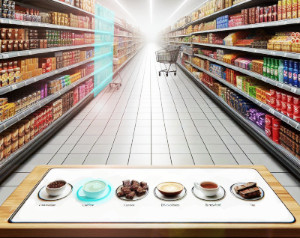
// collection of factories for domain-specific IoT elements.
import { retailElementFactoryCollection } from 'iot-elements-node';

// collection of factories for binding elements.
import { linuxBindingFactoryCollection } from 'iot-bindings-node';

// DOM for IoT
import { DOMIoT } from 'jsdomiot';

const html = `
<html>
    <iot-aisle id="aisle6" name="Coffee, Hot Beverages, Cookies & Chocolate">

        <iot-ibits-button-binding id="a6ButtonBinding" location="/dev/ihubx24-sim0">
        <iot-obits-color-binding id="a6ColorBinding" channels-per-element="2" colors-channel="white;blue" location="/dev/ohubx24-sim0">

        <iot-button id="a6Product1Button" shelving-unit-id="a6L1" binding="a6ButtonBinding:0">
        <iot-button id="a6Product2Button" shelving-unit-id="a6L2" binding="a6ButtonBinding:1">
        <iot-button id="a6Product3Button" shelving-unit-id="a6L3" binding="a6ButtonBinding:2">
        <iot-button id="a6Product4Button" shelving-unit-id="a6R1" binding="a6ButtonBinding">
        <iot-button id="a6Product5Button" shelving-unit-id="a6R2" binding="a6ButtonBinding:4">
        <iot-button id="a6Product6Button" shelving-unit-id="a6R3" binding="a6ButtonBinding:5">

        <iot-shelving-unit id="a6L1" name="Ground Coffee" style="color:white;" binding="a6ColorBinding:0">
        <iot-shelving-unit id="a6L2" name="Coffee Pods & K-Cups" style="color:white;" binding="a6ColorBinding:1">
        <iot-shelving-unit id="a6L3" name="Cookies and Biscuits" style="color:white;" binding="a6ColorBinding:2">

        <iot-shelving-unit id="a6R1" name="Premium Chocolate & Candy" style="color:white;" binding="a6ColorBinding:3">
        <iot-shelving-unit id="a6R2" name="Tea Selection" style="color:white;" binding="a6ColorBinding:4">
        <iot-shelving-unit id="a6R3" name="Snack Cakes, Muffins, Mini Pastries" style="color:white;" binding="a6ColorBinding:5">

    </iot-aisle>
</html>`;

// Create virtual IoT DOM
const domiot = new DOMIoT(html, [retailElementFactoryCollection, linuxBindingFactoryCollection]);
const document = domiot.window.document;

// Use standard DOM APIs
const button = document.getElementById('product1Button');
const shelvingUnit = document.GetElementById('a6L1`);

button.addEventListener('press', (ev) => {
    // physical button press triggers this:
    console.log(`Button ${ev.target.id} pressed, change color of the ${shelvingUnit.id} shelving unit to blue`);
    shelvingUnit.style.setProperty('color','blue'); // changes physical lights.
});

button.addEventListener('release', (ev) => {
    // physical button release triggers this:
    console.log(`Button ${ev.target.id} released, change color of the ${shelvingUnit.id} shelving unit to white`);
    shelvingUnit.style.setProperty('color','white'); // changes physical lights.
});
Run the code:
node main.mjsThen you can see how the simulated buttons' inputs trigger press and realease events, how the color of the shelving-units is updated accordingly (logs) and how these color changes translate into outputs:
watch -n 1 cat /tmp/ohubx24-output0Key Components
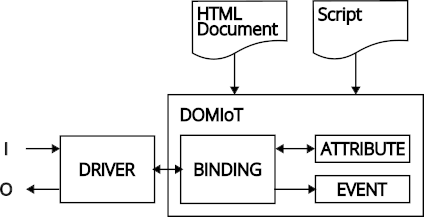
DOMIoT: DOM for IoT: Wraps jsdom and adds IoT functionality.
Elements: Domain-specific HTML elements for real-world objects (
<iot-room>,<iot-door>,<iot-button>,<iot-shelving-unit>, etc.). You can find element collections on GitHub: iot-elements-node and on npm: iot-elements-node.Bindings: HTML elements that connect virtual DOM elements to physical hardware devices. You can find binding collections on GitHub: iot-bindings-node and on npm: iot-bindings-node.
Drivers: Drivers are programs that enable communication with physical I/O components. The DOM for IoT uses bindings to allow communication between the DOM elements and the drivers. You can find drivers for testing on GitHub: drivers.
jsDOMIoT provides high-level, semantic abstractions that represent real-world objects and concepts.
Website
License
MIT.