
jsmdcui
v0.19.2
Published
Markdown as a Common UI for Terminals and Web Browsers
Downloads
554


Readme
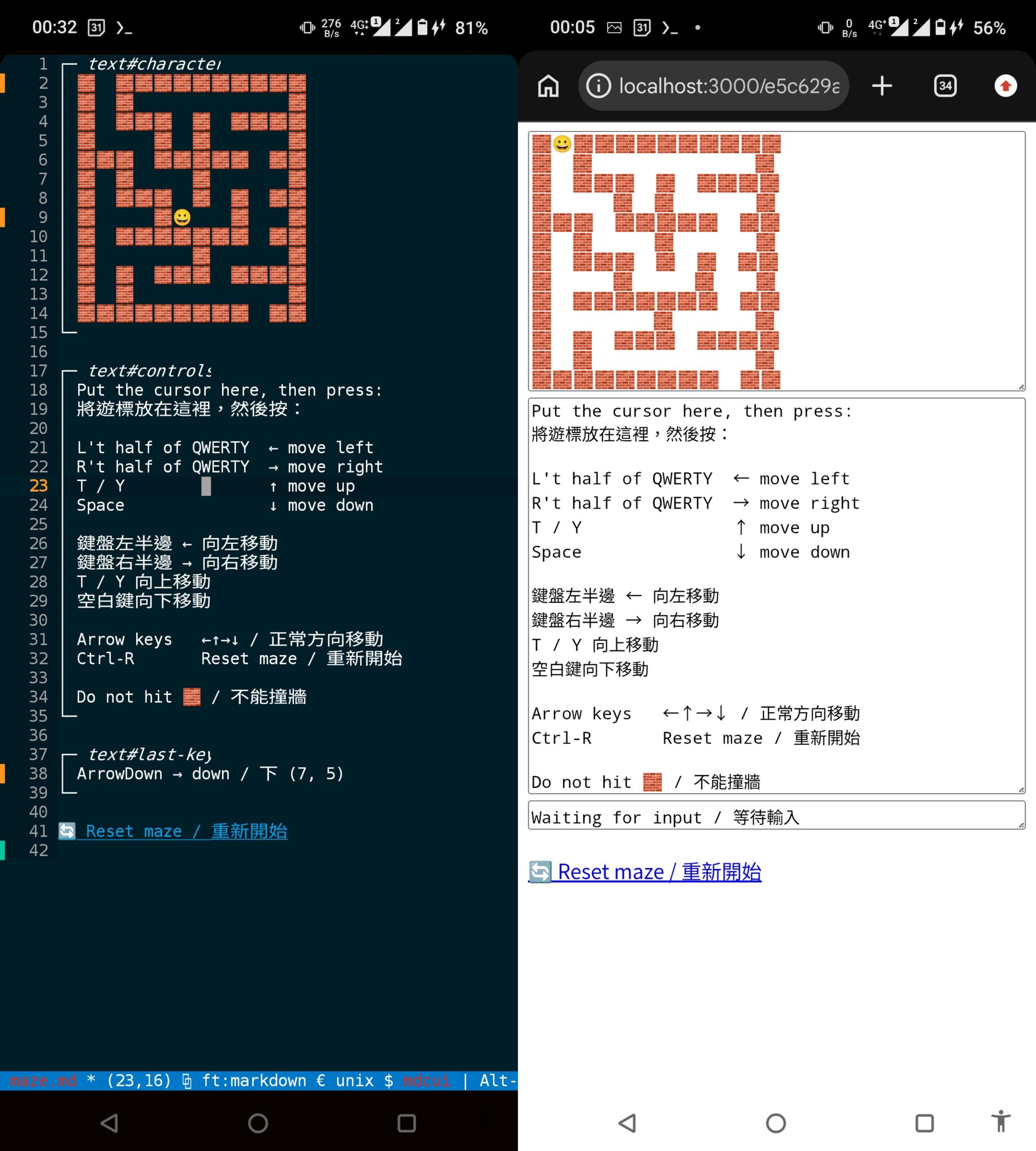
- Maze Game
- The TUI can be controlled through the Chrome DevTools Protocol (CDP). Codex successfully solved this maze using it.
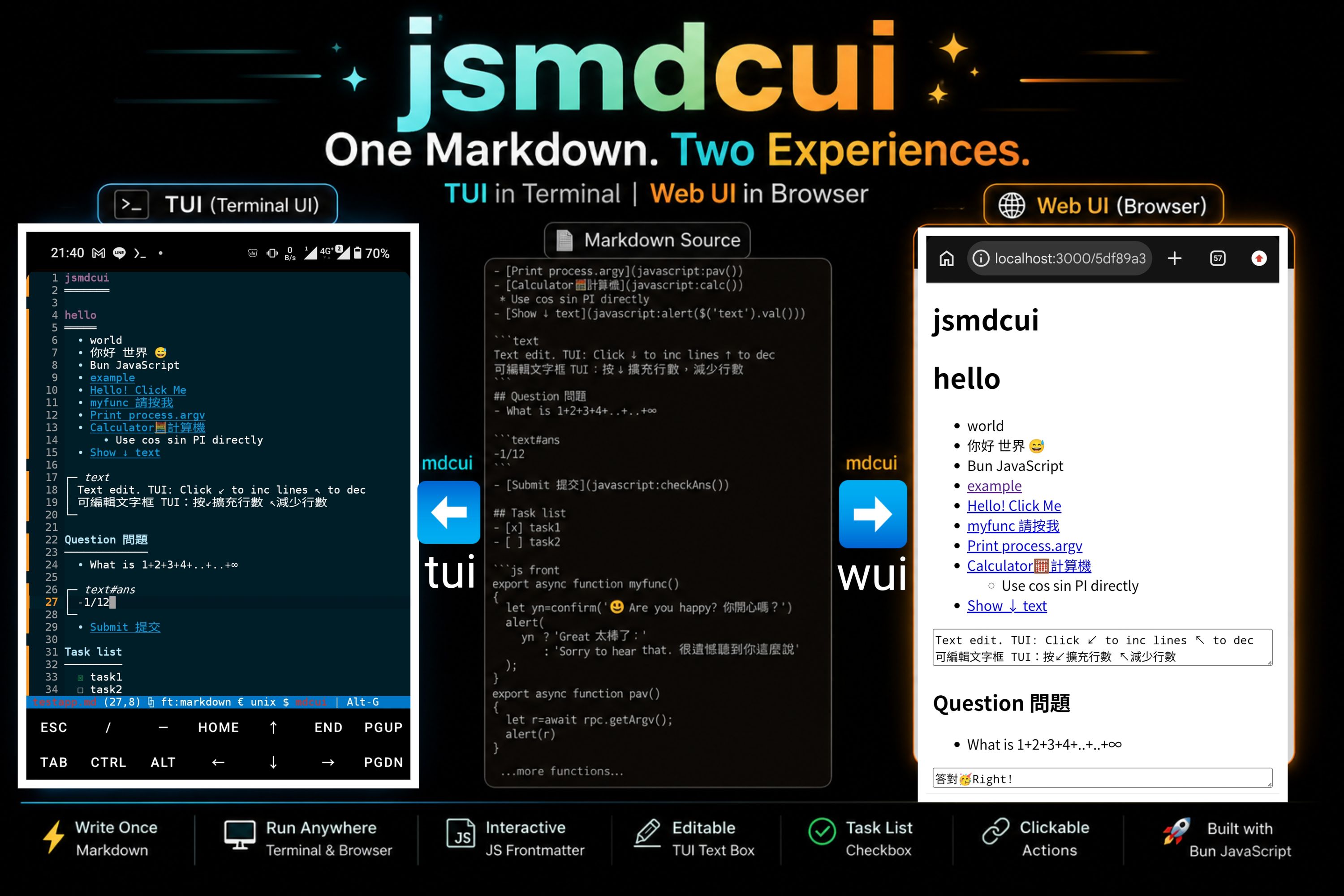
Demo App
My app
- Say hello
- Get server time
- Update text box
- Show selected
- [x] task1
- [x] task2
- [ ] unselected task
Editable in both TUI and WUIIntroduction
jsmdcui stands for:
JavaScript Markdown Cross-environment User Interface
The goal is to use Markdown as a Common UI for Terminals and Web Browsers
- TUI = Terminal User Interface
- WUI = Web User Interface
.
Use a single Markdown file to build interactive TUI and Web UI apps in minutes, then compile them into single-file executables in seconds
.
It's based on bunmicro, a terminal text editor derived from the Micro text editor
Original projects:
https://github.com/jjtseng93/bunmicro
https://github.com/micro-editor/micro
.
This README is itself a runnable app.
npx jsmdcui@latest README.mdQuick start
jsmdcui requires Bun ≥ 1.3.12. On Android, install it in Termux:
npm install -g bunOn other platforms, follow the official Bun installation guide.
Choose either of these two ways to run jsmdcui.
Important: Opening or rendering a local
.mdfile writes or overwrites 5 generated files beside it. Starting--wuiwithout a file or starting all the--demos writes the 5 files generated fromtestapp.mdin the current directory. The source Markdown is not changed, but you should run the demo in a directory where overwriting generated files is safe.
Route 1: Run with npx
- This route requires both
npxandbunon yourPATH; no source checkout is required.
Open the normal terminal editor
npx jsmdcuiStart testapp.md as the TUI/WUI demo
- If
testapp.mdis missing, the bundled copy is written to the current working directory - If
testapp.mdalready exists, it will be used and won't be overwritten.
# TUI(Terminal User Interface) Demo
npx jsmdcui --demo
List every bundled demo and its command-line option:
npx jsmdcui --demo-list# Bun.Image processor demo
npx jsmdcui --demo-imgtool# Traditional Chinese Bun.Image processor demo
npx jsmdcui --demo-imgtool-zh# Maze game demo
npx jsmdcui --demo-maze# Event context, heading references, and state demo
npx jsmdcui --demo-event# Text-to-speech reader
npx jsmdcui --demo-readerTo watch jsmdcui start the maze with a local CDP server and solve it automatically after three seconds, run:
npx jsmdcui --cdp-maze# WUI(Web User Interface) Demo
npx jsmdcui --wuiOpen your own Markdown CUI App
npx jsmdcui app.md
npx jsmdcui --wui app.md
Route 2: Clone the source
git clone https://github.com/jjtseng93/jsmdcui.git
cd jsmdcui
bun src/index.js testapp.md- The last command opens the included demo in the terminal
- Use arrow keys to move around
Enter,Space, or mouse click to activate an item, andCtrl-Qto quit.- To open the same demo in a browser instead:
bun src/index.js --wui testapp.md- After starting
--wui, open the last printedhttp://...URL in a browser. - Keep the command running while using the CUI App, and press
Ctrl-Cin that terminal to stop the server.
Usage table
The command table below assumes you're running from a cloned repository
If you use npx, replace
bun src/index.jswithnpx jsmdcuiI've also provided short aliases
- bun ./tui = bun src/index.js
- bun ./wui = bun src/index.js --wui
| Command | Result |
| --- | --- |
| bun src/index.js app.md | Render app.md as a read-only terminal UI and write five generated files beside it. |
| bun src/index.js --kitty app.md | Display Markdown images with Kitty graphics and the jsgotty MIME extension. |
| bun src/index.js --kitty-compat app.md | Convert Markdown images to PNG with Bun.Image and display them using the standard Kitty graphics protocol without the non-standard MIME U field. |
| JSMDCUI_KITTY_MODE=compat bun src/index.js app.md | Enable compat or extended Kitty mode without passing a Kitty command-line flag; the default and invalid values are off. |
| bun src/index.js --kitty --allow-url URL.md | Download trusted HTTP(S) Markdown and its HTTP(S) images, then display supported images with Kitty graphics. |
| JSMDCUI_KITTY_DEBUG=1 bun src/index.js --kitty app.md | Enable Kitty image placement logging to kitty-placement.log. |
| bun src/index.js --check app.md | Check heading and fenced-block IDs for collisions, print line-by-line details, and exit. |
| bun src/index.js --outline app.md | Print every heading and fenced-block ID without opening a UI or writing generated files. |
| bun src/index.js --edit app.md | Open app.md as editable UTF-8 source, overriding automatic Markdown UI detection. |
| bun src/index.js --cat app.md | Render the terminal version to stdout, write five generated files beside it, and exit. |
| bun src/index.js --testapp.md | Write the bundled testapp.md source to stdout and exit. |
| bun src/index.js --export-readme | Write or overwrite ./README.md with the bundled README source and exit. |
| bun src/index.js --export-cdp-maze | Write or overwrite ./cdp-maze.js with the bundled CDP maze solver and exit. |
| bun src/index.js --demo-list | List testapp.md and every bundled demos/*.md example with its command-line option, then exit. |
| bun src/index.js --demo | Use local testapp.md when present, otherwise write the bundled demo; open it in the terminal UI and write five generated files beside it. |
| bun src/index.js --overwrite-demo --demo | Replace an existing local testapp.md with the bundled copy before opening it. --overwrite-demo can modify any --demo-* option. |
| bun src/index.js --demo-<filename> | Load demos/<filename>.md; preserve an existing local copy or write the bundled copy, then open it and generate its five companion files. New files added under demos/ work automatically. |
| bun src/index.js --demo-imgtool | Load the compact table-based Bun.Image processor demo. |
| bun src/index.js --demo-imgtool-zh | Load the Traditional Chinese table-based Bun.Image processor demo. |
| bun src/index.js --demo-reader | Load the text-to-speech reader demo. |
| bun src/index.js --cdp-maze | Load the maze demo, start CDP on 127.0.0.1:9222, and run the bundled solver after three seconds. |
| bun src/index.js --allow-url URL.md | Download HTTP(S) Markdown to the current directory and, with Kitty mode enabled, download its HTTP(S) images; write 5 generated files and allow embedded code to run. Only use trusted URLs. |
| bun src/index.js --wui | Use local testapp.md when present, otherwise write the bundled demo; write five generated files in the current directory, then print and serve a random URL. |
| bun src/index.js --wui app.md | Write five generated files beside app.md, then print and serve a random URL. |
| bun src/index.js --wui --demo-<filename> | Load the selected bundled demo and serve it as a Web UI. |
| bun src/index.js --wui --print-ui app.md | Also print the generated TUI, raw ANSI, and HTML before starting the WUI server. |
| PORT=8080 bun src/index.js --wui app.md | Start the browser UI on another port. |
| bun src/index.js | Open the normal terminal editor with an empty buffer. |
Run npx jsmdcui --help or bun src/index.js --help for all command-line
options.
Write a Markdown UI
Create app.md:
## My app

- [Say hello](javascript:sayHello())
- [Get server time](javascript:showServerTime())
- [Update text box](javascript:updateText())
- [Show selected](javascript:alert(JSON.stringify($('#my-app').val())))
- [x] task1
- [x] task2
- [ ] unselected task

```text#myid.myclass
Editable in both TUI and WUI
```

```js front
export function sayHello() {
  const name = prompt("Your name:", "World");
  if (name) alert(`Hello, ${name}!`);
}

export async function showServerTime() {
  const time = await rpc.getServerTime();
  alert(time);
}

export function updateText() {
  $('#myid').val($('.myclass').val() + ' ✓');
}
```

```js back
export function getServerTime() {
  return new Date().toISOString();
}
```
Open it in either UI:
bun src/index.js app.md
bun src/index.js --wui app.md- The resulting App UI is shown at the beginning of this README.md
- Run this demo app directly by:
- bun src/index.js README.md
- If you didn't clone the repo, use --export-readme to write README.md to the current folder
Text blocks
Both text and textarea fenced blocks define editable text fields:
```text#message.note
Initial value
```
A fenced-block declaration must include a tag. Its supported identity syntax is
tag, optionally followed by #id and one or more .class names, for
example text#message.note or textarea#notes.readonly. Tags and class names
must begin with an ASCII letter or underscore; their remaining characters may
also include digits, _, -, and :. IDs may begin with _ or a Unicode
letter or number; later characters may additionally be Unicode combining
marks, _, -, or :. Declarations such as #message and #message.note
have no tag and are therefore not recognized as selectable fenced blocks.
The currently supported fenced-block tags are only text and textarea so
the same control works consistently in both the TUI and WUI. Selector queries
may omit the tag or classes after a valid declaration, so all of
$('text#message.note'), $('text#message'), $('#message.note'), and
$('#message') can select the example above.
Named controls and their @keydown declarations are recognized inside
blockquotes and list items as well as at the top level.
The same Markdown works in both interfaces. In the browser WUI it becomes a
native <textarea> with the declared ID and classes. Long text wraps
automatically, and the field height is recalculated when the user types, the
window is resized, or frontend code calls .val(value).
In the TUI, text remains a single-line control while textarea supports
native multiline editing. Enter splits the current body row and grows the
frame, Backspace at the start of a later row joins it to the previous row, and
Delete at the end of a row joins the following row. When the expanded control
does not fit on screen, the document viewport scrolls to keep the cursor
visible. The closing border and following Markdown content move with the
resized control.
A named text or textarea block can run inline front-end code before it
handles a key by placing a quoted HTML-style @keydown attribute after its
identity:
```text#command.field @keydown="handleCommand(event)"
Initial value
```

```js front
export function handleCommand(event) {
  if (event.key !== 'Enter') return;
  event.preventDefault();
  alert(`Command: ${$('#command').val()}`);
}
```
The block must have a unique ID. Both interfaces run the handler before their normal text-editing behavior and expose a consistent key and modifier state. The WUI also normalizes ordinary character input reported by software keyboards.
On Android browsers, Alt-E, Alt-N, Alt-U, and Alt-I may be consumed or
transformed by the software keyboard and therefore cannot always be observed
reliably by a keydown handler. Avoid relying on these combinations for portable
WUI controls.
Both interfaces expose event.key, modifier flags, event.target.id, and
event.target.value. Use event, the native inline-handler variable, rather
than Vue's $event alias. Double quotes delimit the handler; use single-quoted
JavaScript strings inside it or escape an embedded double quote as \".
Both interfaces add a non-enumerable event.toJSON() method with matching
keyboard, modifier, prevention, and target fields. JSON.stringify(event)
calls it automatically, so the resulting JSON is portable between the TUI and
WUI.
A keydown handler can call event.preventDefault() to stop text insertion or
cursor movement. The .prevent modifier applies this automatically:
```text#command @keydown.prevent="handleCommand(event)"
```
Use @input when the handler needs the value after an edit has completed.
@keydown runs before the edit and can prevent it; @input runs after a
successful text change and receives the updated value. The WUI adds oninput
without replacing its existing onkeydown or mobile onbeforeinput handling.
The TUI also dispatches @input after editing or paste. Traditional terminal
input does not report physical key releases reliably, so jsmdcui does not
provide or emulate @keyup in either interface. See demos/reactive.md for a
complete cross-interface example.
In the terminal TUI, only content after the protected │ or | prefix can
be edited, and the frame prefix cannot be deleted. Multiline paste remains
blocked. For single-line text controls, activate the lower-left frame corner
to add a row. Activate the upper-left frame corner to remove the trailing row
only when it is empty; non-empty content is never removed.
TUI text-control changes made through .val(value) participate in the same
history as direct editing. Ctrl-Z undoes the replacement and Ctrl-Y redoes
it, including multiline frame resizing and its associated rendered metadata.
Heading task lists and selector API
Headings can act as form-group selectors. For example, ## Select Color
becomes #select-color. When the usual generated ID would be empty, jsmdcui
normalizes the heading's visible Unicode text instead:
## 使用者 設定! becomes #使用者-設定. When normalization yields no usable
ID characters, the heading receives a stable mdcui-h-... fallback ID. A
heading referenced by app code should contain a meaningful letter or number;
treat mdcui-h-... as a fallback rather than hard-coding its hash. A heading
selection reads direct task items from the first list in the same Markdown
container after that heading. The search stops at the next heading or when the
enclosing blockquote or list item ends. In the TUI, the first rendered ☐ or
☒ establishes that list and its indentation. Nested task items are not
included in the outer list's value.
Heading IDs share the same selector namespace as all explicitly named fenced
blocks, not only text and textarea, so avoid name collisions between them.
For example, ## Write Status generates #write-status and must not be used
together with a block such as text#write-status or
textarea#write-status.
Otherwise, $('#write-status') may select the heading instead of the block and
updates can appear to do nothing. Rename either declaration so every
selectable ID is unique.
Duplicate source headings are treated as collisions when they generate the same base ID. Give each heading a name that produces a unique ID; do not rely on automatically added numeric suffixes.
Run bun src/index.js --check app.md (or jsmdcui --check app.md) to
check these IDs without opening either UI or writing generated files. The
command prints each collision with its source type, line number, and original
declaration, then exits immediately. Its exit status is 0 when all IDs are
unique, 1 when collisions are found, and 2 for invalid arguments or read
errors.
Run bun src/index.js --outline app.md (or jsmdcui --outline app.md) to
print the same selectable IDs as a compact outline. Heading IDs use indented
- items according to their heading level, while every named fenced block is
a top-level + item. Duplicate IDs are printed rather than treated as an
outline error; use --check when collisions should fail the command.
If the heading ID begins with select, .val() behaves like a single select:
it returns the first checked item or null. Other heading IDs behave like a
multiple select and return all checked items as an array, or [] when none are
checked.
Heading values contain the complete visible label, including any explanatory
text. When interpreting a selection, prefer value.includes(...) (or another
deliberate prefix/token parser) unless labels are guaranteed to be exact,
stable identifiers. For example, yes(flip vertically) should not be tested
with value === "yes".
## Select Color

- [ ] Red
- [x] Green
- [ ] Blue

## Features

- [x] Search
- [ ] Notifications
- [x] Offline mode

```js front
export function showValues() {
  alert(JSON.stringify({
    color: $('#select-color').val(),
    features: $('#features').val(),
  }));
}
```
The same getter works in TUI and WUI:
$('#select-color').val() // "Green"
$('#features').val()     // ["Search", "Offline mode"]
The first direct task list belonging to a heading can also be changed with Array-style methods. String arguments create unchecked items. Pass an object to choose the initial checked state:
$('#features').push('Export')
$('#features').unshift({ value: 'Import', checked: true })
$('#features').splice(1, 2, 'Replacement')
$('#features').slice(0, 2)
$('#features').pop()
$('#features').shift()
Like the corresponding Array.prototype methods, .push(...items) and
.unshift(...items) accept multiple items and return the new number of direct
items. .pop() and .shift() return the removed item's visible label, or
undefined when the list is empty. Nested task items are part of their parent
item: they are not counted separately, and are removed together with that
parent. These methods change the rendered TUI/WUI state; they do not rewrite
the source Markdown file. A heading must already have a task list before items
can be added. If API mutations remove its final item, it still counts as that
heading's existing list, so a later .push() or .unshift() repopulates the
same position after hide/show, text-control row changes, or a TUI rerender.
.splice(start, deleteCount, ...items) follows Array.prototype.splice():
negative indexes count from the end, omitting deleteCount removes through the
end, and the return value is an array containing the removed visible labels.
.slice(start, end) is read-only and follows Array.prototype.slice(). It
returns fresh item snapshots, including unchecked items, so changing the
returned array or its objects does not change the rendered list:
$('#features').slice()
// [
//   { value: 'Search', checked: true },
//   { value: 'Notifications', checked: false },
// ]
demos/todo.md and demos/todo-zh.md are runnable Todo examples that
demonstrate .push(),
.splice(), .slice(), and { value, checked } snapshots using editable text
controls instead of prompt() dialogs. Materialize one in the current
directory with its demo flag, or open the source-tree copy directly:
bun src/index.js --demo-todo
bun src/index.js --demo-todo-zh
bun src/index.js demos/todo.md
bun src/index.js --wui demos/todo-zh.md
The bundled demos/select.md is a multilevel runnable example. Use --demo-select
to write it into the current directory when missing and open it in the TUI, or
open it explicitly in either interface:
bun src/index.js --demo-select
bun src/index.js demos/select.md
bun src/index.js --wui demos/select.md
The available selector methods are:
★★ means the API is intended for portable use in both the TUI and WUI.
Visibility requirement: a selected heading and the content being changed must currently be shown before calling any update method, including
.data(),.val(value),.text(value), task-list mutations, or table-cell setters. Updating content inside a hidden section is not supported and can appear to do nothing. Call.show()first, perform the update, and hide the section again afterward if necessary. Reads and visibility operations such as.show()are not subject to this update requirement.
| Method | TUI | WUI |
| --- | --- | --- |
| ★★ .id | Return the selection's resolved ID; nested $($($(selection))) wrappers retain it. | Same. |
| ★★ .val() | Read text blocks or heading task-list values. | Read textareas/controls or heading task-list values. |
| ★★ .val(value) | Replace text-block contents, resize multiline values, and record Undo/Redo history. | Set textarea/control values and resize textareas. |
| ★★ .text() | Return a heading's rendered visible text or an object target's textContent. Heading string-selector setters are intentionally unsupported. | Read an element's textContent; .text(value) also updates it. |
| ★★ .show(), .hide(), .toggle() | Keep the heading visible and show or hide its section body. | Same. |
| ★★ .data(), .data(key, value) | Read or update user data associated with the selection ID. | Same. |
| ★★ .removeData(...) | Remove selected user keys or all user data without changing heading visibility. | Same. |
| ★★ .img(index = 0).src | Return the indexed OSC 8 image address below a heading and before the next heading, or "" when missing. | Return the indexed actual <img> element's current src, or "" when missing. |
| ★★ .scrollIntoView(value) | Move the heading cursor into view and align it to the top, center, or bottom of the current pane. | Call the heading element's native scrollIntoView() after translating the supported shortcuts. |
| ★★ .push(...items) | Append unchecked strings or { value, checked } task items; return the new direct-item count. | Same. |
| ★★ .pop() | Remove and return the last direct task item's label, or undefined. | Same. |
| ★★ .shift() | Remove and return the first direct task item's label, or undefined. | Same. |
| ★★ .unshift(...items) | Prepend unchecked strings or { value, checked } task items; return the new direct-item count. | Same. |
| ★★ .splice(start, deleteCount, ...items) | Remove and insert direct task items; return the removed labels as an array. | Same. |
| ★★ .slice(start, end) | Return { value, checked } snapshots without changing the direct task items. | Same. |
| ★★ .cell(row, col).text() | Read a heading-associated table cell using zero-based coordinates. Wrapped visual lines are joined without a separator. | Read the corresponding th or td text. |
| ★★ .cell(row, col).text(value) | Replace text within the cell's available space; excess text is truncated while table borders, formatting, and links stay intact. | Replace cell text while retaining existing elements such as links. |
| ★★ .cell(row, col).val() | Return true or false for the first ☒ or ☐ in the cell; if there is no checkbox, return the cell text. | Return the first checkbox input's checked state, or the cell text when none exists. |
| ★★ .cell(row, col).val(checked) | Set the first checkbox in the cell from a boolean value. A cell without a checkbox is unchanged. | Same. |
| ★★ .cell(...).row, .col, .left(), .right(), .up(), .down() | Inspect zero-based cell coordinates or move to a physical neighbor. .lt(), .rt(), and .dn() are aliases. Moving outside the table returns null. | Same. |
| ★★ .parent() | From a link event's $(this), return its containing table cell, or null. | From an element inside th or td, return the same cell selection. |
| .html() | For a heading selector, return its rendered inline HTML from the source Markdown. For an object target, read that object's own innerHTML property. There is no TUI DOM. | Return any successfully selected DOM element's actual innerHTML. |
| .line() | Return a heading's current 1-based TUI row, or 0 if missing. | Not available. |
Heading scrollIntoView() accepts the browser boolean forms plus three numeric
shortcuts. With no argument it aligns to the top. true and -1 mean top;
0 means center; false and 1 mean bottom. Any other first argument falls
back to center, and additional arguments are ignored:
$('#result').scrollIntoView()     // top
$('#result').scrollIntoView(true) // top
$('#result').scrollIntoView(-1)   // top
$('#result').scrollIntoView(0)    // center
$('#result').scrollIntoView(1)    // bottom
$('#result').scrollIntoView(false)// bottom
$('#result').scrollIntoView({})   // center fallback
At the start of any Markdown table cell, [ ] and [x] (or [X]) become
unchecked and checked controls. The TUI displays ☐ or ☒ without changing
the row layout and colors checked ☒ green like Bun task lists; the WUI
creates a native <input type="checkbox">. The same text elsewhere in a cell
is left unchanged. Use .cell(row, col).val() when application code needs the
checked state. WUI table cells are directly editable; programmatic changes can
still use .cell(row, col).text(value).
Every $() selection exposes its resolved .id. Passing an object with a
legal MDCUI ID immediately canonicalizes it to the same path as $('#id').
The original object's other fields are not retained, so repeated wrapping
follows that ID path at any nesting depth. Objects without a legal ID keep
their generic object-target behavior:
const source = { id: 'features', value: 'ignored after selection' }
const heading = $(source)       // exactly the same target as $('#features')
source.id = 'something-else'    // does not retarget heading
const nested = $($($($(heading))))

nested.id                 // "features"
nested.text()
nested.data() === heading.data()
User data belongs to the resolved ID and remains available while the document
is open, including when the corresponding WUI element is temporarily replaced.
Calling .removeData() does not change heading visibility.
Reactive Markdown templates
For React and Vue users, the closest mental model is a heading-scoped component
with shared state: the Markdown heading owns the data, each exactly
four-backtick md template or js template fence below it is a rendered view,
and the next heading starts a new scope. Templates under the same heading
therefore read and react to the same data object; templates under another
heading do not.
An md template source is automatically treated as a JavaScript template
literal. A js template source is instead used directly as a synchronous
render function body and must explicitly return Markdown, for example with a
return statement and a template literal. Both forms use the same component
and rendering pipeline; js template does not support async rendering yet.
The optional YAML front matter at the beginning of a template provides its
initial values, comparable to Vue's initial data() or React's initial state.
jsmdcui parses it with Bun.YAML and merges it into the owning heading's data
before any component performs its first render. The parsed values also remain
available as that component's initialData. Front matter is recognized only
when the first line and a later closing line are both exactly ---.
Inside a template, data is the owning heading's .data() object and acts as
heading-scoped reactive state, similar to Vue reactive state or React component
state. To update it and trigger rendering, call the heading selector's
.data(key, value) or .data(object).
For example, updating $('#profile') updates the state owned by the profile
heading. jsmdcui then automatically calls every template component under that
heading and replaces its rendered region in both the TUI and WUI; application
code does not call render() manually. Async updates from timers and promises
also request an immediate TUI redraw.
This is deliberately simpler than React reconciliation or Vue dependency tracking: a heading data setter rerenders all template components owned by that heading. Each render returns Markdown, which jsmdcui converts through the appropriate in-memory TUI or WUI Markdown step before replacing only that component's region.
During rendering, this is the template component instance. It exposes
source, templateType, initialData, last, data, id, index, and
render(data = {}); this.id is the owning heading ID and this.data is the
same shared object passed as data. A js template can use this.id to
identify its heading scope while implementing more dynamic render logic.
The full syntax and working input binding are kept in demos/reactive.md and demos/reader.md so
this runnable README does not declare a template component of its own.
For the detailed bilingual example with a text field and 200 ms debounce, read
demos/reactive.md or run it in either interface:
bun src/index.js --demo-reactive
bun src/index.js --wui --demo-reactive
Heading visibility boundaries
$('#topic').hide() keeps the heading visible and hides its content through the
next heading of equal or higher level, or through the end of its enclosing
blockquote or list item, whichever comes first. Lower-level headings and their
content belong to that section. .show() reveals it, and .toggle() switches
between the two states in both interfaces.
The first visible character of an identified Markdown heading is also a fixed
toggle target. Activate it with a mouse click, Enter, or Space. Markdown
headings always receive a nonempty ID.
Raw HTML headings follow interface-native behavior instead. In the WUI, an
h1-h6 with a nonempty id remains a DOM heading and receives a toggle; a
legal MDCUI ID also makes it selectable through $(). The TUI renders raw HTML
as literal text, so it is not a TUI heading selector or toggle target. Raw
heading IDs are still included in --check collision detection.
To change a TUI task list, its heading must be visible and must already contain a direct task list. Otherwise the mutation returns its normal empty result without changing a child heading's list or creating a new one.
Event context
A local javascript: Markdown link runs with a link-shaped this and matching
event targets in both interfaces:
[Inspect](javascript:inspect(this,event))export function inspect(target, event) {
console.log($(target).text())
console.log($(event.target).text())
console.log(event.type)
console.log(event.target === target)
console.log(event.currentTarget === target)
}For a TUI OSC 8 link, jsmdcui provides an anchor-like target containing
tagName, href, textContent, and innerHTML. Wrapped links remain active
on every displayed row. When jsmdcui can match the link to the current Markdown
source, innerHTML contains rendered inline HTML for its label; otherwise it
falls back to textContent. Mouse activation reports
event.type === "click". Enter and Space report
event.type === "keydown" with standard event.key values. In the WUI, the
native anchor is used as this and as both event targets.
Fence keydown code may likewise receive both values explicitly:
```text#command @keydown.prevent="handleKey(this,event)"
Focus here
```
Both interfaces bind the control as this, event.target, and
event.currentTarget. The TUI target is synthetic and provides a live
value; the WUI target is the native <textarea>.
For a complete interactive example in either interface, run:
bun src/index.js --demo-event
bun src/index.js --wui --demo-event
The demo reports results in its bottom Output Console and covers link
this, event targets, keyboard fields, nested $() selections, heading data,
and heading visibility.
TUI resize behavior
Changing terminal or split width rerenders MDCUI while preserving heading
visibility, task-list changes, edited table cells, checkbox state, and
fenced-control contents. Edited cell text is fitted into the resized table and
is truncated only when the new cell is too small. Multiline .val(value)
changes also update later heading positions.
The 3 UI building blocks are:
Regular Markdownprovides headings, text, lists, task checkboxes, code, and links.
js frontblock contains UI code. Exported functions can usealert,confirm,prompt, and the generatedrpcclient.
- A front module may export
async function onMdcuiLoad(). - It runs once after the TUI has completed startup layout and rendering, or
after the WUI
window.loadevent and installation of jsmdcui's browser selectors and template store. - A front module may export
async function onMdcuiExit({ reason, path, $ }). - The terminal UI awaits it before closing an
mdcuibuffer. - Modified
mdcuibuffers close without a save prompt.
js backblock exports trusted backend functions. In the browser WUI,rpcpublishes only exported functions whose exported names do not start with_. Call a published function from the front end withawait rpc.functionName(arg1, arg2).
Front code can use await $.tts(text, pitch, speed) to speak a sentence and
wait until it finishes. In the TUI, supplied pitch and speed values update
TTS_PITCH and TTS_SPEED for the current jsmdcui process only; they are not
persisted after exit. In the WUI, the same call uses the browser Web Speech API.
Successful calls resolve to undefined; WUI failures resolve to an error-reason
string instead of rejecting, so callers may inspect the awaited return value.
Call await $.tts.stop() to stop speech. In the TUI this uses the dedicated TTS
stop path; in the WUI it cancels browser speech synthesis. Pressing Escape in
the TUI also uses that same dedicated stop path while speech is active.
An
_prefix only hides a function from the browser WUI RPC interface. The local terminal UI imports the backend module directly, so_is a naming convention, not authentication or a security boundary. Use a name without_for a function that must work through RPC in both UIs.
Use a javascript: Markdown link to run front-end code:
[Button label](javascript:exportedFunction())Use onMdcuiExit when a terminal Markdown app needs to submit or otherwise
process edited fields before it closes:
export async function onMdcuiExit({ reason, path, $ }) {
  await rpc.saveDraft({
    reason,
    path,
    message: $('#message').val(),
  });
}
The callback is optional, may be asynchronous, and is called at most once for each mdcui buffer.
The front and back code blocks are not shown in the rendered UI. The generated
rpc client presents the same exported backend functions in both interfaces.
Terminal interaction
Markdown files automatically use mdcui mode. Most rendered content remains
protected, while text block content rows can be edited. Navigation,
selection, search, and copy remain available.
| Input | Result |
| --- | --- |
| Arrow keys, Home, End, PageUp, PageDown | Move through the rendered UI. |
| Enter or Space | Activate the cell under the cursor. A javascript: link runs, a #heading-id link jumps to and centers that heading, and ☐ or ☒ toggles when activated on or to its right. |
| Left click | Move to and activate the clicked cell. javascript: and #heading-id links follow the same behavior; clicking on or to the right of ☐ or ☒ toggles that task. |
| Mouse wheel | Scroll three rows at a time. |
| Shift + arrow keys | Select rendered text. |
| Ctrl-C | Copy the selection, or the current line when nothing is selected. |
| Ctrl-A | Select all rendered text. |
| Ctrl-F | Search; use Ctrl-N and Ctrl-P for the next and previous match. |
| Ctrl-G | Open the editor help. |
| Alt-G | Show or hide the shortcut bar. |
| Ctrl-W | Switch to the next pane in the current tab. |
| Ctrl-W twice quickly | Switch to the next tab like Alt-T. At the rightmost tab, if every tab contains only terminal panes, create a new editor tab instead of cycling back. |
| Ctrl-Q or Alt-Q | Close the current UI. |
To preview another color theme, press Ctrl-E or click on €, type theme , then use Tab
and the arrow keys to browse the available themes. Press Enter to switch to
the selected theme, or Esc to cancel and restore the previous one.
The terminal automatically reflows the Markdown when its width changes.
Same-document links such as [Jump](#target-heading) navigate to Markdown
heading IDs in the TUI. Only javascript: links execute code there; ordinary
web links behave as normal links in the browser.
Local Markdown images are displayed automatically in terminals that support
the Kitty graphics protocol. Relative image paths are resolved from the
Markdown file's directory. jsmdcui reads the image dimensions, reserves the
corresponding terminal rows, and updates the placement when the document is
scrolled, resized, or shown in a split pane. Unsupported or missing images, as
well as remote images not authorized with --allow-url, retain Bun's normal
linked 📷 fallback. All remote images in one TUI render share a 10-second
download budget; timed-out images are aborted and keep the same fallback. To
download trusted remote Markdown and display its supported HTTP(S) images with
Kitty graphics, combine the options:
bun src/index.js --kitty --allow-url https://example.com/app.mdImages referenced by an app built with --build-md-exe are embedded and remain
available to both the compiled WUI and Kitty-capable TUI. No second asset copy
is required.
To make a no-argument compiled app enable standard Kitty-compatible rendering immediately, inline the environment-mode value at build time:
npx jsmdcui --build-md-exe myapp.md \
  --define process.env.JSMDCUI_KITTY_MODE=compat
For the jsgotty MIME extension, use extended instead:
npx jsmdcui --build-md-exe myapp.md \
  --define process.env.JSMDCUI_KITTY_MODE=extended
Use the global expression process.env.JSMDCUI_KITTY_MODE exactly as shown;
do not import or alias process, because build-time definitions match that
expression.
CDP control for TUI automation
The terminal UI can expose a Chrome DevTools Protocol (CDP) server, so another Bun process can inspect the terminal buffer, click buffer coordinates, and send real keyboard events to the running TUI.
Start CDP from the command line when launching jsmdcui:
bun src/index.js --remote-debugging-port=9222 demos/maze.md
bun src/index.js --remote-debugging-port=9222 --remote-debugging-address=127.0.0.1 demos/maze.md
Or start it from inside the TUI editor command prompt(Ctrl-E or €):
Ctrl-E  cdp
Ctrl-E  cdp 9000
Ctrl-E  cdp --address=127.0.0.1
Ctrl-E  cdp 9000 --public
The default bind address is 127.0.0.1 and the default port is 9222.
Use --public or --address=0.0.0.0 only on a trusted network.
Like Chromium, jsmdcui rejects WebSocket connections carrying an Origin
header by default. This prevents ordinary web pages from controlling the TUI.
Non-browser automation clients, which omit Origin, continue to work. To
explicitly allow a trusted browser origin, use a comma-separated allowlist:
bun src/index.js --remote-debugging-port=9222 \
  --remote-allow-origins=http://localhost:8000 demos/maze.md
--remote-allow-origins=* disables this protection and should only be used in
a trusted environment. CDP can evaluate JavaScript and has the same authority
as the jsmdcui process.
Once CDP is running, control the TUI with Bun.WebView. For more info, enter
jsmdcui and use Ctrl-E or € → help cdp.
The cli flag --cdp-maze is a combination of
- Start the demos/maze.md
- Start a local CDP server
- Wait three seconds
- Run the solver cdp-maze.js automatically
The solver was
generated from the llm-maze.txt instructions; it focuses the maze controls,
resets the game, reads the maze from the TUI, solves it with breadth-first
search, and sends arrow-key input until the maze is escaped:
npx jsmdcui@latest --cdp-mazeFrom the source tree, run:
bun src/index.js --cdp-mazeUseful automation methods used by cdp-maze.js:
view.evaluate(js)view.evaluate("micro.getAllText()")view.evaluate("micro.getAllAnsiText()")
view.click(column, line)view.press(key, options)
Browser interaction
The WUI uses normal browser mouse and keyboard behavior. Clicking a
javascript: link calls its front-end function, regular links navigate
normally, and task checkboxes can be toggled by clicking either the checkbox or
its associated text. alert, confirm, and prompt use the browser's built-in
dialogs. Checkbox changes exist only in the current page: refreshing does not
preserve them and does not update the Markdown file.
The WUI first tries port 3000 and accepts connections through the machine's
available network interfaces. If port 3000 is already in use, the operating
system selects an available port instead; the printed URL always contains the
actual port. Set PORT to request another fixed port. The printed localhost
URL is for the same machine. From another device on the same network, replace
localhost with the server machine's IP address and keep the printed port and
full path.
Each server start prints a new random path. The old URL stops working after the
server is stopped or restarted. Keep the process running while using the page,
and press Ctrl-C in its terminal to stop it.
Reactive images
The reactive image heading must be visible when it is updated. Calling
.data('img', source)while that heading or one of its containing sections is hidden will not refresh the image. Show the heading first, update its data, then scroll to or hide it as needed:
const preview = $('#myimg')
preview.show()
preview.data('img', resolvedSource)
preview.scrollIntoView()- Use the heading image selector to obtain an image source:
$('#myimg').img().srcThe index is zero-based and defaults to
0.In the WUI,
srccomes from the actual<img>element.In the TUI, it is the image address stored in the rendered OSC 8 link below that heading and before the next heading.
Don't use relative paths when updating reactive md/js template images with .data
- Only use it in the initial markdown
- The WUI goes through Bun's standalone HTML bundler, which may embed an image and rewrite its simple relative path once the server started
- Therefore, do not update a template image by assigning a path such as
basic.jpgdirectly. - Read the bundled or otherwise resolved source
through
$(heading).img(index).src, save it, and pass that value to.data('img',src).
Images not intended to be visible initially must still appear in the Markdown so Bun can discover and embed them.
Put those images under a separate heading such as hidden and read their resolved sources during
onMdcuiLoad(), and then hide that heading:
# myimg
- four-backtick md template starts here
---
img: basic.jpg
---

- four-backtick md template ends here
- [Change picture](javascript:changePicture())
# hidden

```js front
let imageSources = []
let imageIndex = 0
export function onMdcuiLoad()
{
imageSources = [
$('#myimg').img(0).src,
$('#hidden').img(0).src,
].filter(Boolean)
$('#hidden').hide()
}
export function changePicture()
{
if (imageSources.length < 2) return
imageIndex = (imageIndex + 1) % imageSources.length
$('#myimg').data('img', imageSources[imageIndex])
}
```- This keeps both images available to Bun's bundler, while exposing only the reactive image heading to the user.
You can also pass a complete image data URL to a reactive template through
.data(). In that case, read the file in a js back function, convert its
bytes to Base64, and return the data URL through rpc.
For example, put this code in a js back fence:
import { readAssetBytes } from './single-exe/assetsHelper.js'

export async function readImageDataUrl(path)
{
  const bytes = await readAssetBytes(path)
  return `data:image/jpeg;base64,${Buffer.from(bytes).toString('base64')}`
}
Then put this code in the js front fence. The RPC result can be assigned
directly to the template's img data property:
export async function onMdcuiLoad()
{
  const src = await rpc.readImageDataUrl('demos/basic.jpg')
  $('#myimg').data('img', src)
}
The value must contain the complete prefix, such as
data:image/jpeg;base64,. A raw Base64 payload alone is not an image data URL.
This method does not require a hidden Markdown image because the image bytes
are loaded explicitly. When building a standalone executable, make sure the
file is either present in internalAssets or available under the external
REPO_ROOT fallback used by readAssetBytes().
Editing Markdown source
From a cloned repository, use the edit launcher to open a Markdown file as
ordinary editable UTF-8 source instead of rendering it as a Markdown UI:
bun ./edit app.mdThis is equivalent to:
bun src/index.js --edit app.mdAdditional file and cursor arguments are forwarded unchanged.
Generated files
Opening a local Markdown UI generates these files beside the source file:
app.md.front.js
app.md.back.js
app.md.html
app.md-rpc.js
app.md-server.js
They are regenerated from app.md, so edit the Markdown source rather than the
generated files. The source directory must be writable.
From the project directory, remove generated *.md.* and *.md-* companion
files while keeping the Markdown source files:
bun ./clean.shSecurity
A Markdown UI is an executable application, not a passive document. Starting a
WUI loads its backend module, loading the page runs its frontend module, and
activating a local terminal javascript: link runs frontend code. Backend and
terminal code can read or change files, start programs, access the network, and
read environment data with the permissions of the jsmdcui process. Only open
or serve Markdown UI files that you trust.
WUI network exposure
Warning: The WUI is intended for local or trusted-network use. It is not a production web server.
- There is no login, per-user authorization, or HTTPS. Traffic and results are sent over plain HTTP.
- The server may be reachable from other devices through the machine's network
interfaces, even though the printed URL says
localhost. - The random path makes the URL harder to guess, but it is not a password. Anyone who can reach the server and obtains the complete URL can load the page and call every backend function published through WUI RPC, using arguments they choose.
- A backend RPC function runs with the same operating-system permissions as jsmdcui. Its code determines what files, commands, network services, or secrets a visitor may be able to reach.
- Do not share the complete URL, forward the port to the public internet, or
run the WUI on an untrusted network. Use a firewall when needed and stop the
server with
Ctrl-Cas soon as you finish. - Prefixing a backend export with
_keeps it out of WUI RPC discovery and calls, but it does not protect the backend module from trusted local code and is not a substitute for authentication.
Distribution - Build single-file executables
Text editor distribution
Distributions intended primarily as text editors can include an empty
src/MDCUI_DEFAULT_EDIT file. When this marker exists, opening a .md file uses the
normal editable UTF-8 view instead of automatically entering mdcui mode.
Markdown UI support remains available explicitly with --mdcui or --tui;
both are equivalent to -encoding mdcui.
Build-time distribution constants
The following switch defines are presence-based: the program checks whether
they were passed, not whether their values are true. Consequently, =0 and
=false still enable a switch. Omit a define entirely to disable it. Examples
use =1 to make this explicit.
MDCUI_DEFAULT_EDIT=1: open files as editable text by default.MDCUI_DEFAULT_DEMO=1: add--demowhen launched without arguments.MDCUI_DEFAULT_DEMO_WUI=1: add--wuiwhen launched without arguments.MDCUI_OVERWRITE_DEMO=1: add--overwrite-demo; this modifies a selected demo but does not select one by itself.global.MDCUI_MAIN=<path>.md: embed a custom Markdown application and its generated front, RPC, back, HTML, and server modules. When this define is forwarded after--build-exeor--build-for, a non-primitive value such as a bare path is automatically encoded as a JavaScript string. An explicitly quoted string remains supported.
For the current platform, build an executable embedding myapp.md with:
npx jsmdcui --build-md-exe myapp.mdThis is a convenience alias for
--build-exe --define global.MDCUI_MAIN=myapp.md.
The generated HTML images are embedded by Bun and can be displayed by the
compiled TUI. Add
--define process.env.JSMDCUI_KITTY_MODE=compat after the Markdown path when
the executable should enable Kitty-compatible images on a no-argument launch.
For cross-compilation, specify the Bun target before the Markdown file:
npx jsmdcui --build-md-for bun-linux-x64-v1.3.14 myapp.mdThis similarly expands to
--build-for bun-linux-x64-v1.3.14 --define global.MDCUI_MAIN=myapp.md. Both aliases
are expanded before any generated application files are written.
Place every build define after --build-exe, or after the target argument of
--build-for. Choose at most one of MDCUI_DEFAULT_EDIT,
MDCUI_DEFAULT_DEMO, and MDCUI_DEFAULT_DEMO_WUI.
| Build defines | No-argument launch | Open the same app in the other UI |
| --- | --- | --- |
| none | normal CLI/TUI | ./mdcui --wui app.md |
| MDCUI_DEFAULT_EDIT=1 | text editor | ./mdcui --tui app.md |
| MDCUI_DEFAULT_DEMO=1 | testapp.md TUI | ./mdcui --wui --demo |
| MDCUI_DEFAULT_DEMO_WUI=1 | testapp.md WUI | ./mdcui --tui --demo |
| global.MDCUI_MAIN=../中文工具.md | embedded custom TUI | ./mdcui --wui --demo-中文工具 |
| MAIN plus MDCUI_DEFAULT_DEMO_WUI=1 | embedded custom WUI | ./mdcui --tui --demo-中文工具 |
Any explicit runtime argument suppresses the no-argument demo/WUI injection.
That is why the commands in the last column repeat --demo or
--demo-中文工具; ./mdcui --wui by itself does not implicitly select a custom
main application.
To package ../中文工具.md as a TUI by default:
bun src/index.js --build-exe \
  --define global.MDCUI_MAIN=../中文工具.md

./mdcui
./mdcui --wui --demo-中文工具
To package the same application as a WUI by default and explicitly switch back to its TUI:
bun src/index.js --build-exe \
  --define global.MDCUI_MAIN=../中文工具.md \
  --define MDCUI_DEFAULT_DEMO_WUI=1

./mdcui
./mdcui --tui --demo-中文工具
The MDCUI_MAIN basename must end with lowercase .md. Its demo-name portion
must start with a Unicode letter or number and may contain Unicode
letters/numbers (including Chinese), combining marks, dots, underscores, and
hyphens. Whitespace and path separators are not allowed.
When the configured custom demo is selected and its local Markdown byte length
matches the embedded copy, TUI uses the embedded front/RPC modules and WUI uses
the embedded server. A missing demo, or one selected with
MDCUI_OVERWRITE_DEMO=1, is first written from the embedded copy and then uses
embedded modules. A different byte length prints a warning and uses filesystem
companion modules. Directly opening ./mdcui app.md or
./mdcui --wui app.md has no demo provenance and therefore uses filesystem
modules even if the basename matches MDCUI_MAIN.
To retain the older repository-root testapp.md distribution instead, build a
TUI with:
bun src/index.js --build-exe \
  --define MDCUI_DEFAULT_DEMO=1 \
  --define MDCUI_OVERWRITE_DEMO=1
For a default WUI, replace MDCUI_DEFAULT_DEMO with
MDCUI_DEFAULT_DEMO_WUI.
You can rename and distribute the resulting binary. It contains the Bun runtime, jsmdcui, the packed runtime assets, and the configured demo or custom main application. The target directory must remain writable because launching an application creates its Markdown file and generated companion files there.
Development
npm run tui
npm run wui
npm run check
testapp.md is the main working example.
                     testapp.md
                          │
           ┌──────────────┴──────────────┐
           │                             │
           ▼                             ▼
      Browser HTML                    TUI ANSI
           │                             │
  javascript:foo()             extract javascript:
           │                             │
           ▼                             ▼
   window.frontFunc()          evalFront(frontMod, text)
           │                             │
           └──────────────┬──────────────┘
                          ▼
                testapp.md.front.js
                          │
                     rpc.someFunc()
              ┌───────────┴───────────┐
              │                       │
           Browser                   TUI
              │                       │
       RPC Proxy client       import * as rpc
              │               from back module
              ▼                       │
          fetch rpc                   │
              │                       │
              ▼                       │
         server.mjs                   │
              │                       │
              ▼                       │
   evalBack(backMod, reqjson)         │
              │                       │
              └───────────┬───────────┘
                          ▼
                testapp.md.back.js