
jsonresume-theme-colophon
v0.2.0
Published
A warm, text-first JSON Resume theme for self-contained HTML resumes and polished PDFs.

Maintainers
 dmnelson
Readme
jsonresume-theme-colophon




A warm, text-first JSON Resume theme for self-contained HTML resumes and polished PDFs.
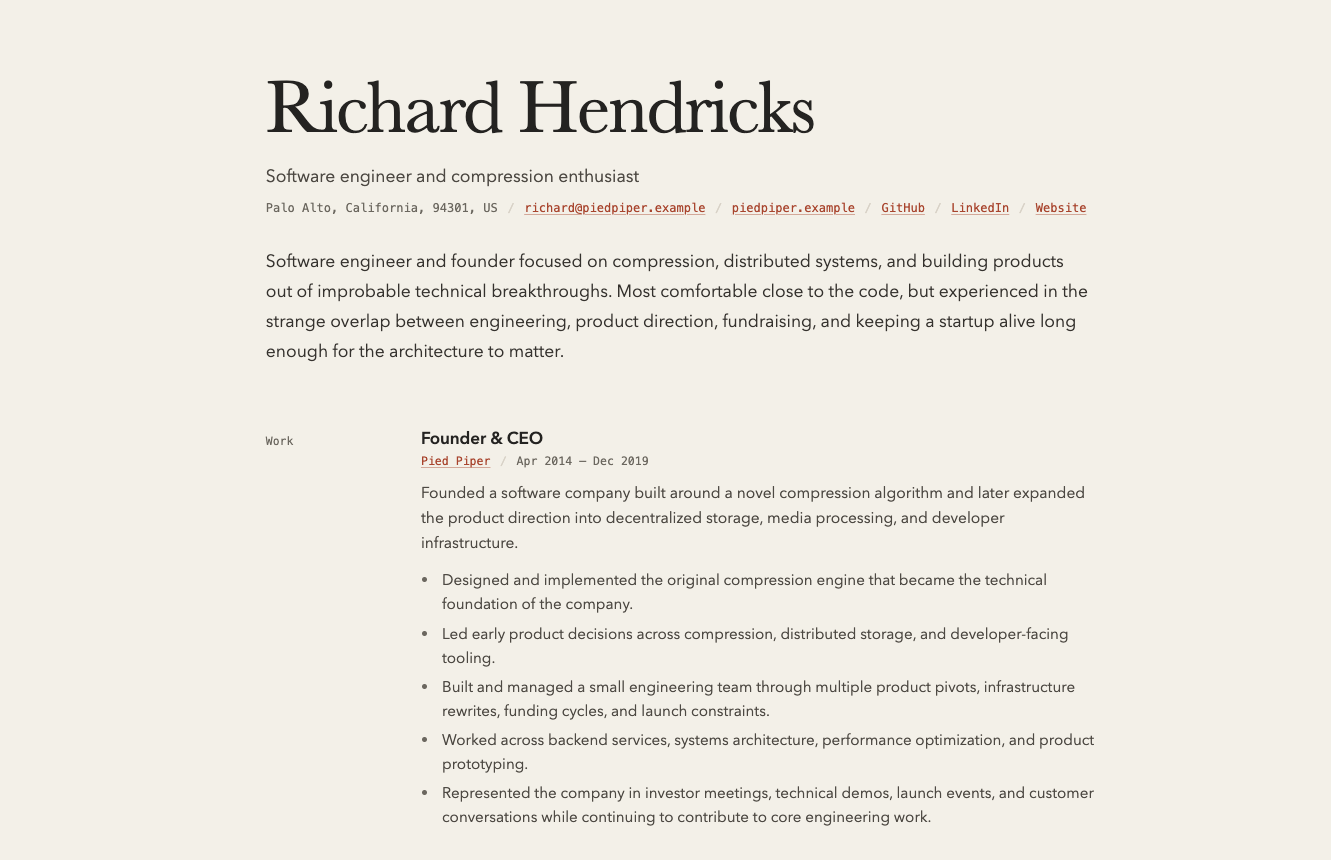
Colophon is built for resumes that read like considered documents rather than dashboards, templates, or landing pages. It pairs a large serif name with quiet monospace section labels, muted metadata, clay-colored links, and a single-column rhythm that stays readable on screen and in print.
Features
- Complete, self-contained HTML output with inlined CSS
- No runtime dependencies, client-side JavaScript, or external fonts
- Semantic, source-ordered HTML with ATS-oriented regression checks
- Responsive screen layout and single-column print styles
- Defensive HTML escaping and safe URL handling
- CommonJS package with TypeScript declarations
- Support for all standard JSON Resume sections
Screenshot
Installation
npm install resumed jsonresume-theme-colophonNode.js 18 or later is required.
CLI usage
npx resumed render resume.json \
  --theme jsonresume-theme-colophon \
  --output resume.html
Local theme development
Install a local checkout into the project containing your resume:
npm install resumed ./path/to/jsonresume-theme-colophon
npx resumed render resume.json \
  --theme jsonresume-theme-colophon \
  --output resume.html
With resumed 6.x, a direct local file URL also works without installing the
theme into the consuming project after building the package:
npm run build
npx resumed render resume.json \
  --theme file:///absolute/path/to/jsonresume-theme-colophon/dist/index.js \
  --output resume.html
resumed 6.x resolves theme names with JavaScript dynamic imports, so a
relative directory passed directly to --theme is not resolved from the
current working directory. Installing the local path and using the package
name is the most portable local workflow.
Programmatic API
The package exports a single render function:
const { render } = require("jsonresume-theme-colophon");
const html = render(resume);
render(resume)
Accepts a JSON Resume object and returns a complete HTML document as a string.
PDF export
To export a PDF with resumed, install Puppeteer in the same project:
npm install resumed puppeteer jsonresume-theme-colophon
npx resumed export resume.json \
  --theme jsonresume-theme-colophon \
  --output resume.pdf
You can also render HTML first and print it with Playwright, Puppeteer, or a browser. The theme includes print styles for white paper, quiet section breaks, sensible page margins, and reduced page breaks inside entries. The layout is designed to work on both A4 and Letter paper.
Supported sections
Colophon renders these JSON Resume sections when they contain data:
basics, includingbasics.profilesworkprojectsvolunteereducationskillspublicationscertificatesawardslanguagesinterestsreferences
URLs are supported on contact details, profiles, organizations, projects,
publications, certificates, awards, and education institutions. Date values in
YYYY-MM or YYYY-MM-DD form are displayed as Mon YYYY; an omitted end date
is displayed as Present.
All rendered text is HTML-escaped, and unsafe URL protocols are discarded. Summaries and highlights are rendered as plain text, not Markdown. Blank lines in summaries create paragraphs, and single line breaks are preserved.
Set meta.language to a BCP 47 language tag such as en, en-GB, or cy-GB
to use it as the document language. Invalid or omitted values fall back to
en.
ATS considerations
The theme keeps resume content in semantic, source-ordered HTML and switches to a single-column layout for print. It does not use tables, images, scripts, external fonts, or client-side rendering.
npm test includes ATS-oriented regression checks for semantic structure,
heading hierarchy, representative text extraction, descriptive links, local
font fallbacks, minimum screen text sizes, and print layout. Run only those
checks with:
npm run test:atsThese checks protect theme structure; they cannot guarantee behavior in every applicant tracking system or measure how well a particular resume matches a job description.
Development
Clone the repository and run the checks:
git clone https://github.com/dmnelson/jsonresume-theme-colophon.git
cd jsonresume-theme-colophon
npm install
npm test
npm run build:example
npm pack --dry-run
The generated example is written to example/resume.html. It is ignored by
Git so local render checks do not create repository noise.
The implementation is deliberately small:
index.jscontains the source renderer and data-formatting helpers.style.csscontains screen and print styles.dist/index.jsis generated bynpm run buildand is the published, serverless-compatible entrypoint with CSS embedded.example/resume.jsonexercises the supported section types.scripts/build-example.jsrenders the local example.test/render.test.jscovers the theme interface, sparse data, escaping, and the generated entrypoint.test/ats.test.jscovers ATS-oriented HTML, content, typography, and print invariants.
Release
For maintainers, update the version and changelog, then:
npm test
npm run build:example
npm pack --dry-run
npm login
npm publish
git tag vX.Y.Z
git push origin vX.Y.Z