
jspdf-invoice-template
v1.5.1
Published
PDF template created for invoice with optional parameters. Using jsPDF library.

Maintainers
 edisonneza
Readme
PDF Invoice Template
To fix Angular v13 and some NodeJs issues, I've separated into two different npm packages, as below:
For web browsers: npm i jspdf-invoice-template
For NodeJs: npm i jspdf-invoice-template-nodejs
PDF template created to generate invoices based on props object. Using jsPDF library. ( jsPDF is exported also, so it can be used without importing jsPDF separately. )
All this code works by using an object as parameter for the function. From v1.3.1 all properties are optional and you can add them as empty string or just remove them from the prop object, if you want to display nothing. Also it can be used in different languages because all labels (and all text) can be set in the props object.
Demo site | Demo images | jsPDF Documentation | Npm | Npm NodeJs
Install and usage
Get it from NPM:
npm i jspdf-invoice-templateOr for NodeJs:
npm i jspdf-invoice-template-nodejsAlternatively, load latest version from a CDN: (Recommended to use a static version (not @latest) to prevent failure when updates are made)
<script src="https://unpkg.com/[email protected]/dist/index.js"></script>Usage
You're ready to start creating your invoice PDF document:
//by importing
import jsPDFInvoiceTemplate from "jspdf-invoice-template";

//or directly in browser
jsPDFInvoiceTemplate.default( propsObject );


//you can either import the `OutputType` const or `jsPDF` class if you want to create another PDF from scratch (without using the template)
import jsPDFInvoiceTemplate, { OutputType, jsPDF } from "jspdf-invoice-template";

//or directly in browser
const outputTypes = jsPDFInvoiceTemplate.OutputType;
const jsPDF = jsPDFInvoiceTemplate.jsPDF();

jsPDFInvoiceTemplate.default( propsObject );
Parameters object
Just edit the props object and call the function, nothing more... 😊
const pdfObject = jsPDFInvoiceTemplate(props); //returns number of pages created

//or in browser
var pdfObject = jsPDFInvoiceTemplate.default(props); //returns number of pages created

var props = {
    outputType: OutputType.Save,
    onJsPDFDocCreation?: (jsPDFDoc: jsPDF) => void, //Allows for additional configuration prior to writing among others, adds support for different languages and symbols
    returnJsPDFDocObject: true,
    fileName: "Invoice 2021",
    orientationLandscape: false,
    compress: true,
    logo: {
        src: "https://raw.githubusercontent.com/edisonneza/jspdf-invoice-template/demo/images/logo.png",
        type: 'PNG', //optional, when src= data:uri (nodejs case)
        width: 53.33, //aspect ratio = width/height
        height: 26.66,
        margin: {
            top: 0, //negative or positive num, from the current position
            left: 0 //negative or positive num, from the current position
        }
    },
    stamp: {
        inAllPages: true, //by default = false, just in the last page
        src: "https://raw.githubusercontent.com/edisonneza/jspdf-invoice-template/demo/images/qr_code.jpg",
        type: 'JPG', //optional, when src= data:uri (nodejs case)
        width: 20, //aspect ratio = width/height
        height: 20,
        margin: {
            top: 0, //negative or positive num, from the current position
            left: 0 //negative or positive num, from the current position
        }
    },
    business: {
        name: "Business Name",
        address: "Albania, Tirane ish-Dogana, Durres 2001",
        phone: "(+355) 069 11 11 111",
        email: "[email protected]",
        email_1: "[email protected]",
        website: "www.example.al",
    },
    contact: {
        label: "Invoice issued for:",
        name: "Client Name",
        address: "Albania, Tirane, Astir",
        phone: "(+355) 069 22 22 222",
        email: "[email protected]",
        otherInfo: "www.website.al",
    },
    invoice: {
        label: "Invoice #: ",
        num: 19,
        invDate: "Payment Date: 01/01/2021 18:12",
        invGenDate: "Invoice Date: 02/02/2021 10:17",
        headerBorder: false,
        tableBodyBorder: false,
        header: [
          {
            title: "#",
            style: {
              width: 10
            }
          },
          {
            title: "Title",
            style: {
              width: 30
            }
          },
          {
            title: "Description",
            style: {
              width: 80
            }
          },
          { title: "Price"},
          { title: "Quantity"},
          { title: "Unit"},
          { title: "Total"}
        ],
        table: Array.from(Array(10), (item, index)=>([
            index + 1,
            "There are many variations ",
            "Lorem Ipsum is simply dummy text dummy text ",
            200.5,
            4.5,
            "m2",
            400.5
        ])),
        additionalRows: [
            {
                col1: 'Total:',
                col2: '145,250.50',
                col3: 'ALL',
                style: { fontSize: 14 }
            },
            {
                col1: 'VAT:',
                col2: '20',
                col3: '%',
                style: { fontSize: 10 }
            },
            {
                col1: 'SubTotal:',
                col2: '116,199.90',
                col3: 'ALL',
                style: { fontSize: 10 }
            },
        ],
        invDescLabel: "Invoice Note",
        invDesc: "There are many variations of passages of Lorem Ipsum available, but the majority have suffered alteration in some form, by injected humour, or randomised words which don't look even slightly believable. If you are going to use a passage of Lorem Ipsum, you need to be sure there isn't anything embarrassing hidden in the middle of text. All the Lorem Ipsum generators on the Internet tend to repeat predefined chunks as necessary.",
    },
    footer: {
        text: "The invoice is created on a computer and is valid without the signature and stamp.",
    },
    watermark: {
        text: "PRIVATE",    // text to stamp on the page
        color: "#b0b0b0",   // optional, default: #b0b0b0
        rotate: 45,         // optional, degrees — 45 diagonal, 0 horizontal; default: 45
        opacity: 0.5,       // optional, 0–1, default: 0.5
        bold: false,        // optional, default: false
        italic: false,      // optional, default: false
        fontSize: 60,       // optional, default: 60
        x: null,            // optional, mm from left — default: page center
        y: null,            // optional, mm from top  — default: page center
        inAllPages: true,   // optional, default: false (first page only)
    },
    pageEnable: true,
    pageLabel: "Page ",
};
{
pagesNumber: number, // (always) - number of pages
jsPDFDocObject: jsPDF, // if (returnJsPDFDocObject: true) - the doc already created. You can use it to add new content, new pages.
blob: Blob, // if (outputType: 'blob') - returns the created pdf file as a Blob object. So you can upload and save it to your server. (Idea from a comment on Twitter)
dataUriString: string, // if (outputType: 'datauristring')
arrayBuffer: ArrayBuffer // if (outputType: 'arraybuffer')
}
//store it to a variable and use it wherever you want
var pdfCreated = jsPDFInvoiceTemplate.default({ ...parameters });
var blob = pdfCreated.blob;
//...
var pagesNum = pdfCreated.pagesNumber;
var pdfObject = pdfCreated.jsPDFDocObject;//example: create a PDF using the template
var pdfCreated = jsPDFInvoiceTemplate.default({ ...parameters });
//add new page or new content -> see jsPDF documentation
pdfCreated.jsPDFDocObject.addPage();
pdfCreated.jsPDFDocObject.text("Test text", 10, 50);
//...
pdfCreated.jsPDFDocObject.save(); //or .output('<outputTypeHere>');Allowing the support of multiple languages and currencies for your invoice as outlined in jsPDF documentation:
Use of Unicode Characters / UTF-8: The 14 standard fonts in PDF are limited to the ASCII-codepage. If you want to use UTF-8 you have to integrate a custom font, which provides the needed glyphs.
Example Usage:
jsPDFInvoiceTemplate({
  //https://github.com/edisonneza/jspdf-invoice-template/issues/20#issuecomment-1859975854
  onJsPDFDocCreation: (doc: jsPDF) => {
      //var font = "...";
      doc.addFileToVFS('LiberationSans-Regular-normal.ttf', font);
      doc.addFont('LiberationSans-Regular-normal.ttf', 'LiberationSans-Regular', 'normal');
      doc.setFont('LiberationSans-Regular');

  },
});- Added
watermarkparameter — stamp text on any/all pages with configurable rotation, position (x/y), color, opacity, font size, and bold/italic
- Added support for modifying fonts via direct access to the jsPDF Document Object, enabling additional fonts and language support
- Dynamic rows at the end of the table (total, vat, subtotal etc) via
additionalRows - Added stamp image at the left bottom of the page (image as a qr code)
- Separated Node.js and web-based builds into two packages
- Fixed Image and Blob type (for Node.js)
- Added
compressoption - Added custom column style (width) — portrait: 210mm total; landscape: 297mm total
- Fixed package entry point
- Added feature to add or remove columns
- Dynamic height in all columns
- Added
returnJsPDFDocObjectprop - Added support for returning different outputs based on
outputTypeprop - All parameter object properties are now optional
- Return jsPDF doc object, so it can be extended with new content and output in any type jsPDF supports
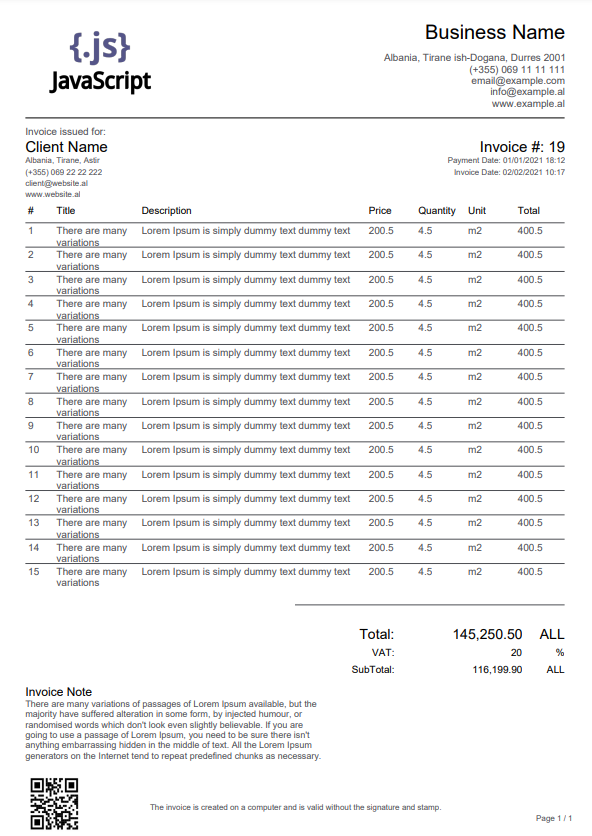
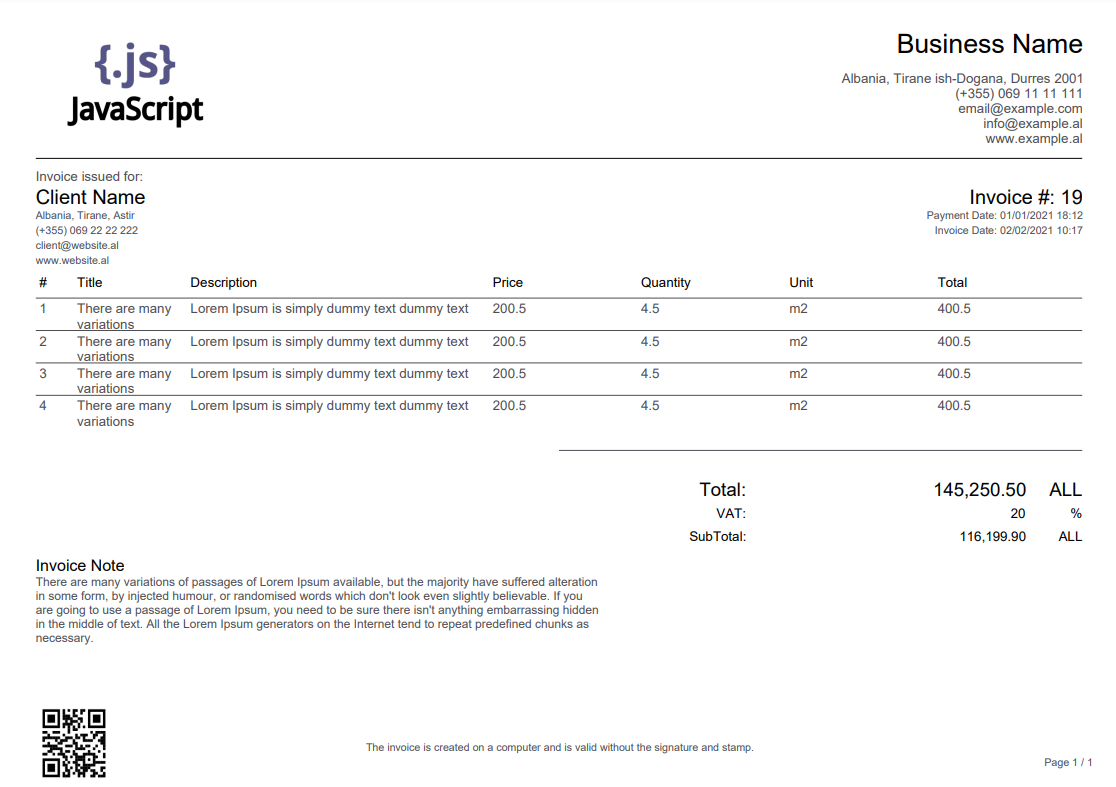
Demo images
Landscape:
Running the demo locally
1. Clone the repository
git clone https://github.com/edisonneza/jspdf-invoice-template.git
cd jspdf-invoice-template
2. Install dependencies
npm install3. Build the dist bundle
npm run build4. Point the demo pages to the local build
Both index.html and json.html load the library from a CDN by default. To use your local build, replace the CDN script tag in either file:
<!-- change this -->
<script src="https://unpkg.com/jspdf-invoice-template@latest/dist/index.js"></script>

<!-- to this -->
<script src="./dist/index.js"></script>
5. Serve the files through a local web server
The demo requires a server (not file://) because jsPDF loads images via fetch. Any static server works:
# using Node.js
npx serve .

# using Python
python -m http.server 8080
Then open http://localhost:3000 (or whichever port the server reports).
6. Open a demo page
| Page | Description |
|---|---|
| index.html | Visual invoice editor — click any field to edit, use Advanced Settings to configure the watermark, then click Refresh to preview or Download PDF to save |
| json.html | JSON editor — paste or edit the raw props object and click Generate PDF Invoice |
👋
Development - Generate types
npx -p typescript tsc src/index.js --declaration --allowJs --emitDeclarationOnly --outDir dist/src/

npx -p typescript tsc src/index.js --declaration --allowJs --emitDeclarationOnly
Copyright (c) 2022 Edison Neza, https://github.com/edisonneza/jspdf-invoice-template
Permission to use, copy, modify, and/or distribute this software for any purpose with or without fee is hereby granted, provided that the above copyright notice and this permission notice appear in all copies.
THE SOFTWARE IS PROVIDED "AS IS", WITHOUT WARRANTY OF ANY KIND, EXPRESS OR IMPLIED, INCLUDING BUT NOT LIMITED TO THE WARRANTIES OF MERCHANTABILITY, FITNESS FOR A PARTICULAR PURPOSE AND NONINFRINGEMENT. IN NO EVENT SHALL THE AUTHORS OR COPYRIGHT HOLDERS BE LIABLE FOR ANY CLAIM, DAMAGES OR OTHER LIABILITY, WHETHER IN AN ACTION OF CONTRACT, TORT OR OTHERWISE, ARISING FROM, OUT OF OR IN CONNECTION WITH THE SOFTWARE OR THE USE OR OTHER DEALINGS IN THE SOFTWARE.