
judithq-md-links
v1.1.4
Published
md-links


Readme
Markdown Links
Libreria que permite analizar archivos markdown extrayendo sus links, para mostrarte su ruta, texto y el estado de los links.
Markdown
Markdown es un lenguaje de marcado ligero muy popular entre developers. Es usado en muchísimas plataformas que
manejan texto plano (GitHub, foros, blogs, ...), y es muy común
encontrar varios archivos en ese formato en cualquier tipo de repositorio
(empezando por el tradicional README.md).
Estos archivos Markdown normalmente contienen links (vínculos/ligas) que
muchas veces están rotos o ya no son válidos y eso perjudica mucho el valor de
la información que se quiere compartir.
Dentro de una comunidad de código abierto, nos han propuesto crear una
herramienta usando Node.js, que lea y analice archivos
en formato Markdown, para verificar los links que contengan y reportar
algunas estadísticas.
Versión
1.1.4
Homepage
Flujograma
El siguiente flujograma representa el algoritmo que soluciona el problema, mostrando las fases de implementación y los procesos inmersos en cada una de estas.
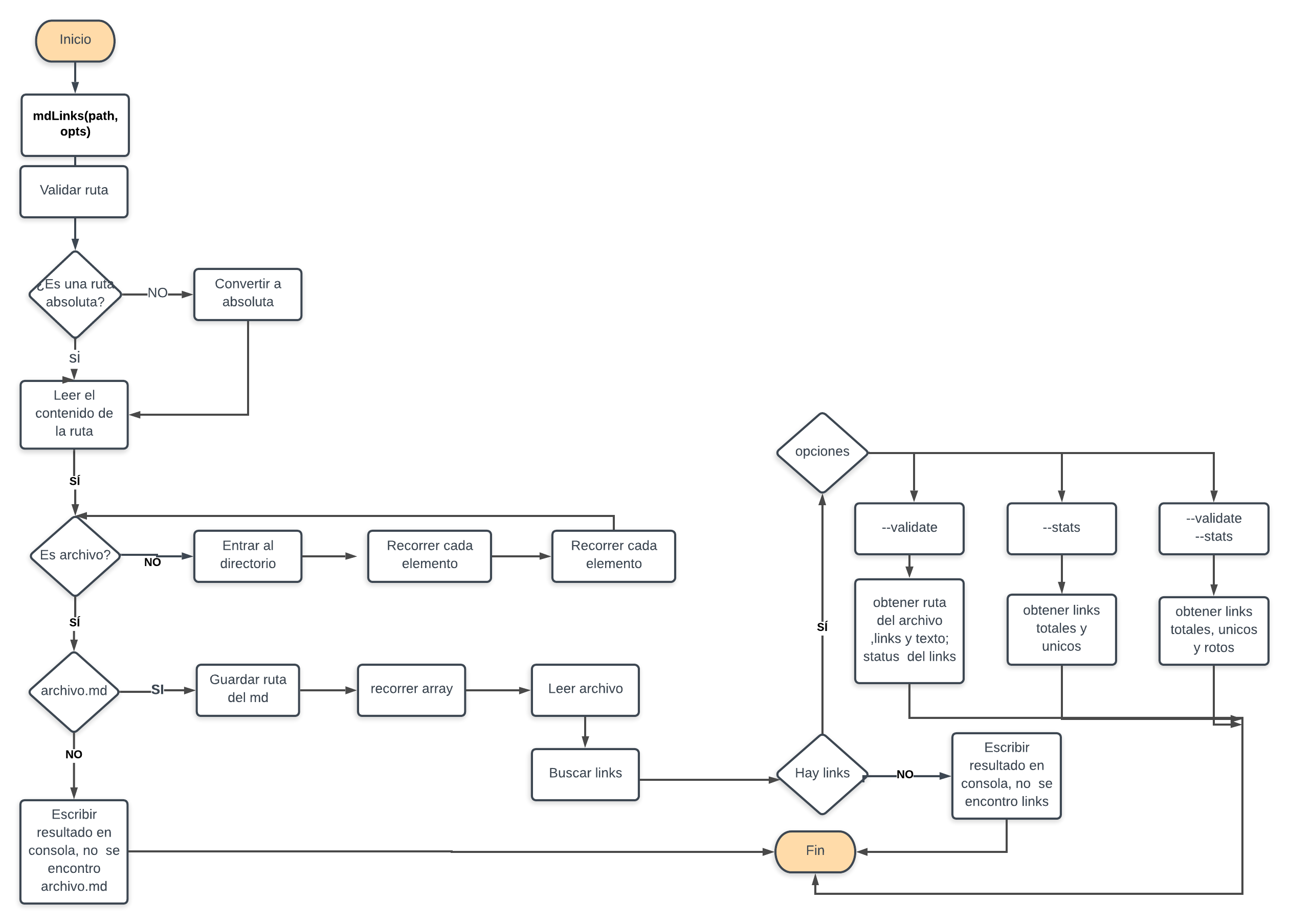
Instalación
Puede instalar la librería de la siguiente forma npm install
npm install --g judithq-md-linkso de manera local para usar la Api
npm install --save judithq-md-linksGuía de uso
md-links <path> <options>path: es la ruta de la carpeta o archivo.option:--validate: estas opción validan si el link funciona o no.--stats: estas opción muestran estadísticas de los links(existentes y únicos) Al combinar las opciones mostrará la cantidad de links que hay, los rotos y únicos.
JavaScript API
El módulo se puede importar en otros scripts de Node.js y ofrece la siguiente interfaz:
mdLinks(path, options)
Argumentos
path: Ruta absoluta o relativa al archivo o directorio. Si la ruta pasada es relativa, se resuelve como relativa al directorio desde donde se invoca node - current working directory).options: Un objeto con las siguientes propiedades:validate: Booleano que determina si se desea validar los links encontrados.
Valor de retorno
La función retorna una promesa (Promise) que resuelve a un arreglo
(Array) de objetos (Object), donde cada objeto representa un link y contiene
las siguientes propiedades:
href: URL encontrada.text: Texto que aparecía dentro del link ([]).file: Ruta del archivo donde se encontró el link.
Ejemplo
const mdLinks = require('judithq-md-links')

mdLinks.mdLinks('/home/judith-c-q-i/Escritorio/LIM009-fe-md-links/README.md')
 .then((result)=>{
  console.log(result)
   // => [{ href, text, file }]
 })
  .catch((e)=>{
   console.log(e)
 })

mdLinks.mdLinks('/home/judith-c-q-i/Escritorio/LIM009-fe-md-links/README.md', {validate:true})
 .then((result)=>{
  console.log(result)
   // => [{ href, text, file, code, status }]
 })
  .catch((e)=>{
   console.log(e)
 })

mdLinks.mdLinks('/home/judith-c-q-i/Escritorio/LIM009-fe-md-links/README.md', {validate:false})
 .then((result)=>{
  console.log(result)
   // => [{ href, text, file }]
 })
  .catch((e)=>{
   console.log(e)
 })
CLI (Línea de comandos)
md-links <path> <options>Si desea retornar las propiedades href, text y file, ejecute:
$ judithq-md-links ./README.md
href:https://github.com/JudithCristina/LIM009-fe-md-links
text:[GitHub Judith Quiñones]
file:/home/judith-c-q-i/Escritorio/LIM009-fe-md-links/README.md

href:https://github.com/Judith//-
text:[mi github]
file:/home/judith-c-q-i/Escritorio/LIM009-fe-md-links/README.md

href:https://github.com/JudithCristina/LIM009-fe-md-links/files/3331762/Diagrama.de.flujo.Proyecto-Laboratoria.1.pdf
text:[Diagrama de flujo Proyecto-Laboratoria(1).pdf]
file:/home/judith-c-q-i/Escritorio/LIM009-fe-md-links/README.md
Si desea retornar las propiedades file, href, text, code y status, ejecute:
$ judithq-md-links ./README.md --validate
href:https://github.com/JudithCristina/LIM009-fe-md-links
text:[GitHub Judith Quiñones]
file:/home/judith-c-q-i/Escritorio/LIM009-fe-md-links/README.md
code:200
status:OK

href:https://github.com/Judith//-
text:[mi github]
file:/home/judith-c-q-i/Escritorio/LIM009-fe-md-links/README.md
code:404
status:Fail

href:https://github.com/JudithCristina/LIM009-fe-md-links/files/3331762/Diagrama.de.flujo.Proyecto-Laboratoria.1.pdf
text:[Diagrama de flujo Proyecto-Laboratoria(1).pdf]
file:/home/judith-c-q-i/Escritorio/LIM009-fe-md-links/README.md
code:200
status:OK
Si desea retornar las propiedades total(cantidad total de links) y unique(cantidad de links unicos), ejecute:
$ judithq-md-links ./README.md --stats
Total: 3
Unique: 3
Si desea retornar las propiedades total(cantidad total de links) y unique(cantidad de links unicos) y broken cantidad de links inactivos), ejecute:
$ judithq-md-links ./README.md --validate --stats
Total: 3
Unique: 3
Broken: 1
Casos de error
Si ingresamos una ruta inválida, se podrá leer el mensaje:
`Ruta incorrecta`Si se ingresa una ruta en la que no se encuentren archivos con extensión -md se podrá leer el mensaje:
`No se encontraron archivos .md` Autor
Judith Cristina Quiñones Inga