
k-anime-cli
v2.0.6
Published
A high-performance, bulk anime downloader CLI with smart resume and parallel downloads.


Readme
K-ANIME 🚀


K-ANIME is a high-performance, bulk anime downloader CLI. Designed for speed and ease of use, it allows you to search, filter, and download entire series in parallel with a modern interactive interface.
📸 Preview
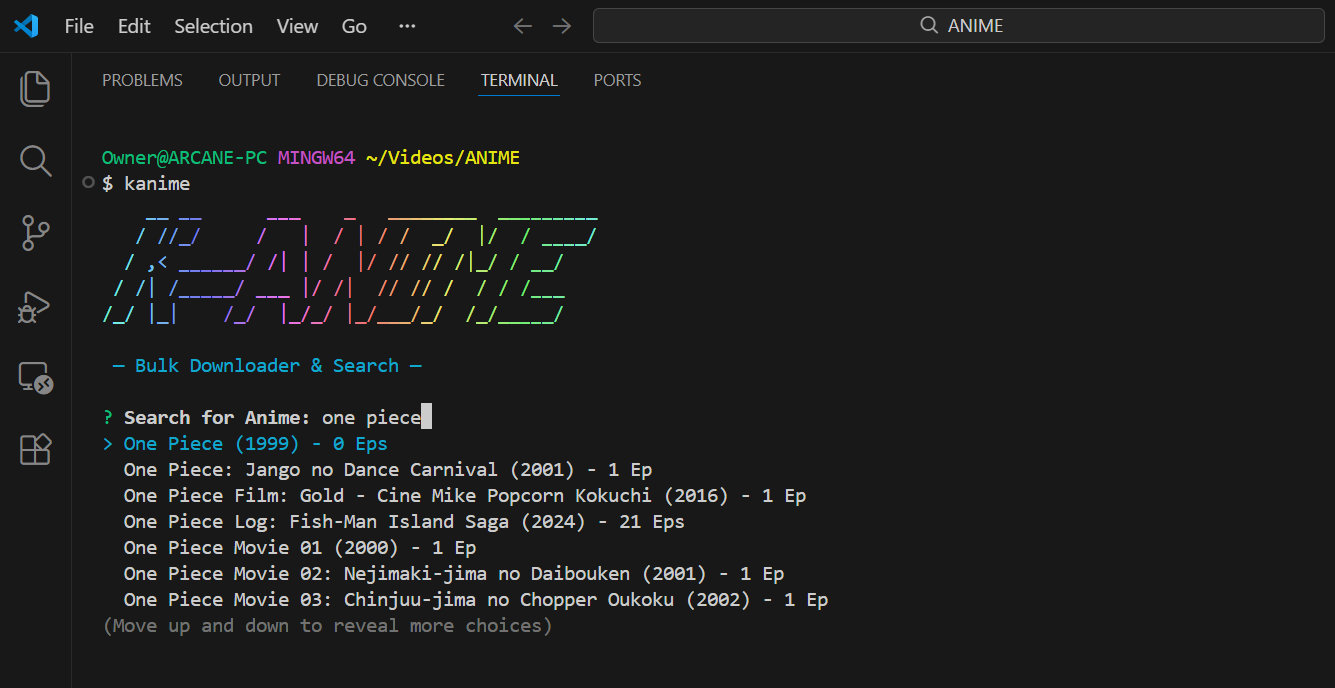
✨ Features
- 🔍 Real-time Search: Search for any anime and see instant suggestions as you type.
- 📦 Bulk & Range Downloads: Download a single episode, a specific range, or an entire series (up to 50 episodes per batch).
- ⚡ Multi-threaded Engine: Configure up to 50 parallel downloads to maximize your bandwidth.
- 🔄 Smart Resume:
- Interrupted Downloads: Automatically resumes partial files where they left off.
- Smart Series Logic: Detects already downloaded episodes in your folder and suggests starting the next batch from the next missing episode.
- 🛠️ Configurable Defaults: Saves your preferred quality (360p, 480p, 720p, 1080p), audio language (Sub/Dub), and concurrency settings.
- 📊 Rich UI: Beautiful progress bars, estimated total size calculation, and a clean pastel aesthetic.
🚀 Quick Start
Prerequisites
- Node.js (v18.0.0 or higher)
Installation
npm install -g k-anime-cli🛠 Usage
Simply run the command from any directory where you whttps://huggingface.co/datasets/arcane-nx/uploads/resolve/main/k-ANIME-UI.pngant to save your anime:
kanimeInteractive Workflow:
- Search: Start typing the anime name. Use arrow keys to select from the results.
- Auto-Detect: If you've downloaded episodes of this anime before, K-ANIME will notify you and suggest the next episode.
- Configure:
- Range: Enter the
FromandToepisode numbers. - Quality: Select your preferred resolution.
- Audio: Choose between Subbed or Dubbed (if available).
- Concurrency: Choose how many parallel downloads to run (1–50).
- Range: Enter the
- Confirm: Review the estimated total file size and start the download!
📁 Project Structure
k-anime/
├── K-ANIME.js      # Main CLI entry point & interactive logic
├── utils.js        # Core engine, API handlers, & download logic
├── package.json    # Metadata & dependencies
└── README.md       # Documentation
⚙️ Configuration
The tool stores your preferences in ~/.k-anime-config.json. You can choose to update these defaults every time you start a download.
🤝 Contributing
- Fork the Project
- Create your Feature Branch (
git checkout -b feature/AmazingFeature) - Commit your Changes (
git commit -m 'Add some AmazingFeature') - Push to the Branch (
git push origin feature/AmazingFeature) - Open a Pull Request
📜 License
Distributed under the ISC License. See package.json for details.
👤 Author
Arcane - GitHub Profile
Disclaimer: This tool is for educational purposes only. Please support the official releases of the anime you watch.