npm package discovery and stats viewer.

Discover Tips

  • General search

    [free text search, go nuts!]

  • Package details

    pkg:[package-name]

  • User packages

    @[username]

Sponsor

Optimize Toolset

I’ve always been into building performant and accessible sites, but lately I’ve been taking it extremely seriously. So much so that I’ve been building a tool to help me optimize and monitor the sites that I build to make sure that I’m making an attempt to offer the best experience to those who visit them. If you’re into performant, accessible and SEO friendly sites, you might like it too! You can check it out at Optimize Toolset.

About

Hi, 👋, I’m Ryan Hefner  and I built this site for me, and you! The goal of this site was to provide an easy way for me to check the stats on my npm packages, both for prioritizing issues and updates, and to give me a little kick in the pants to keep up on stuff.

As I was building it, I realized that I was actually using the tool to build the tool, and figured I might as well put this out there and hopefully others will find it to be a fast and useful way to search and browse npm packages as I have.

If you’re interested in other things I’m working on, follow me on Twitter or check out the open source projects I’ve been publishing on GitHub.

I am also working on a Twitter bot for this site to tweet the most popular, newest, random packages from npm. Please follow that account now and it will start sending out packages soon–ish.

Open Software & Tools

This site wouldn’t be possible without the immense generosity and tireless efforts from the people who make contributions to the world and share their work via open source initiatives. Thank you 🙏

© 2026 – Pkg Stats / Ryan Hefner

karin-plugin-chaite

v1.1.8

Published

karin plugin chaite

Readme

karin的ts插件开发模板

前言

ts插件的开发较为繁琐,但请不要着急,容我娓娓道来~

  • TypeScript 开发编写 -> 编译为js -> 发布 npm 包 -> 用户安装

克隆模板仓库

需要注意 请先安装karin哦~

打开模板仓库

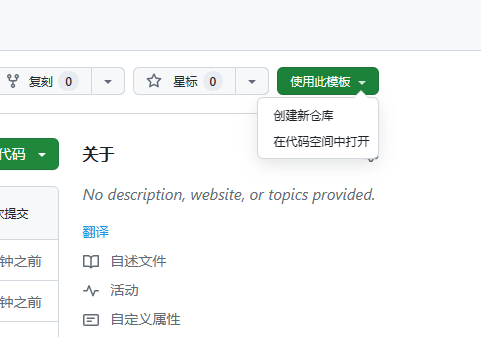
点击Use this template使用此模板按钮,创建自己的仓库。 202404121412587

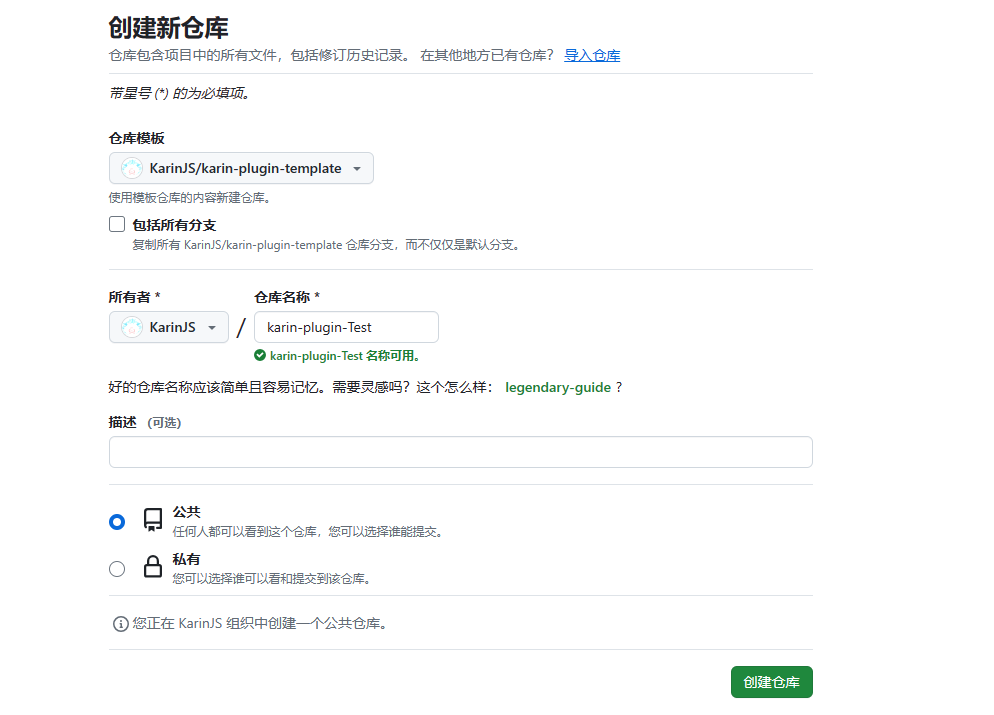
填写仓库名称,描述,选择是否公开。 202404121414580

# 请改成你自己的仓库 注意! 现在是克隆成单独的文件夹 而不是以前一样作为插件
git clone https://github.com/karinjs/karin-plugin-template-ts.git

安装开发依赖

pnpm install

开始你的开发

npx karin ts
# 编译
npm run build
# or
pnpm build

配置基本秘钥

需要1个基本的npm秘钥

  1. 前往npmjs注册账号
  2. 注册完成点击右上角头像 -> Access Tokens -> Granular Access Token -> Classic Token
  3. 填写tokenname,选择Automation,如下图 npm
  4. 随后点击Generate Token即可
  5. 打开Github,请自行登录账号。
  6. 打开你刚才Fork的仓库,点击Settings(设置) -> Secrets and variables(机密和变量) -> actions(操作)
  7. 选择Repository secrets(仓库机密),点击New repository secret(新建仓库机密)
  8. Name *(名称 *) 输入 NPM_TOKENSecret *(机密 *) 输入你刚才得到的npm秘钥,随后保存即可。
  9. 允许github-actions发起pr,打开仓库主页,点击Settings(设置) -> Actions(操作) -> 勾选Allow GitHub Actions to create and approve pull requests(允许 GitHub Actions 创建和批准拉取请求) -> Save(保存)

这里的步骤很长,请仔细认真一步步来,npm的秘钥,获取一次之后,多个仓库都可以重复使用,建议npm账户打开2FA

设置npm包名称

[!IMPORTANT] 对于包名,请自行查看npm上是否已经冲突,npm的包名必须是唯一的。

你需要更改以下这些选项:

  • package.json:
    • name: 改成npm包名,请注意使用全部小写
    • author: 改成你的名字,需要英文哦
    • description: 改成插件描述
    • homepage: npm显示的主页
    • bugs.url: 反馈bug
    • repository: 指定项目的代码存储库地址
  • .github/workflows/release-please.yml:
    • 修改其中的package-name,注意,这里需要和上面package.json的一致。

对于更多选项,请自行查看注释。

推送

[!IMPORTANT] 编写好代码之后,正常git pull,随后等待几秒钟,合并pr即可。

利用Gihub提供的actions来编译,推送npm

安装发布的包

# 在karin根目录执行
pnpm add package.name -w