
karin-plugin-mys-core
v1.1.2
Published
karin-plugin-mys-core


Readme
📖 目录
快速安装
- 本插件已加入插件商店,可在插件商店中一键下载安装。
# 或使用 npm 安装
npm add karin-plugin-mys-core -w
快速开始
import { Config } from 'karin-plugin-mys-core/config'
import { Database, DatabaseType } from 'karin-plugin-mys-core/database'
import { ReactRender, React } from 'karin-plugin-mys-core/render'

// 1. 配置管理
const config = new Config('my-plugin:config', './config', {
  enable: true,
  users: []
}, {})

// 2. 数据库操作
const db = Database.get()
await db.init('./data', 'users', [
  Database.PkColumn('userId', 'STRING'),
  Database.Column('nickname', 'STRING', '')
], {}, DatabaseType.Db)

// 3. 渲染组件
const render = new ReactRender({
  name: 'my-plugin',
  version: '1.0.0',
  pluginDir: __dirname,
  ResourcesDir: path.join(__dirname, '../resources')
})

const Card = ({ text }) => <div className="card">{text}</div>
const image = await render.template('card', Card, { text: 'Hello' })
游戏模块
[!TIP] 本插件并不直接提供完整的游戏功能
- 自行编写请查看karin-plugin-mys-template
API 文档
配置模块 (config)
配置模块提供了强大的配置文件管理功能,包括配置类和增强数组类。
导入方式
import { Config } from 'karin-plugin-mys-core/config'Config 类
用于管理 JSON 配置文件,支持自动补全、类型安全和实时监听。
特性
- ✅ 自动补全缺失的配置项
- ✅ 自动过滤未定义的配置项
- ✅ 支持深层嵌套路径访问
- ✅ 文件变更自动监听
- ✅ 类型安全的 TypeScript 支持
构造函数
const config = new Config<ConfigType>(
  'plugin-name:config-name',  // 配置名称(格式:插件名:配置名)
  '/path/to/config',          // 配置文件目录
  defaultConfig,              // 默认配置对象
  defineConfig                // 配置定义对象(用于嵌套对象的结构定义)
)注意:配置文件会自动保存为
{config-name}.json
主要方法
// 获取配置值(支持深层路径)
const value = config.get('key.path')

// 获取整个配置对象
const allConfig = config.get('')

// 获取数组配置(返回 EnhancedArray)
const arr = config.get('users', true)  // 第二个参数为 true 表示返回数组
// 或使用第三个参数提供默认值
const arrWithDefault = config.get('users', true, [])

// 获取默认配置
const defaultValue = config.getDef('key.path')
const allDefaults = config.getDef('')

// 设置配置值
config.set('key.path', value, true)   // 第三个参数为 true 表示立即保存
config.set('key.path', value, false)  // false 表示不立即保存

// 监听配置变化(文件修改时触发)
config.watch((self, oldData, newData) => {
  console.log('配置已更新')
  console.log('旧配置:', oldData)
  console.log('新配置:', newData)

  // 可以在这里处理配置变化后的逻辑
  if (oldData.enable !== newData.enable) {
    console.log('功能启用状态已改变')
  }
})

// 手动保存配置
config.save()

// 重新加载配置
config.loadConfig()
示例
interface MyConfig {
  enable: boolean
  users: string[]
  settings: {
    timeout: number
  }
}

const config = new Config<MyConfig>(
  'my-plugin:config',
  './config/config.json',
  {
    enable: true,
    users: [],
    settings: { timeout: 5000 }
  },
  {}
)

// 获取配置
const isEnabled = config.get<boolean>('enable')

// 设置配置
config.set('settings.timeout', 10000, true)

// 获取数组(第二个参数为 true)
const users = config.get('users', true)
users.add('user1', true, true)

// 监听配置文件变化
config.watch((self, oldData, newData) => {
  console.log('配置文件已被外部修改')

  // 检查特定字段的变化
  if (oldData.enable !== newData.enable) {
    console.log(`功能状态变更: ${oldData.enable} -> ${newData.enable}`)
  }

  if (oldData.settings.timeout !== newData.settings.timeout) {
    console.log(`超时时间变更: ${oldData.settings.timeout}ms -> ${newData.settings.timeout}ms`)
  }
})
EnhancedArray 类
扩展的数组类,提供了更多便捷的操作方法。
主要方法
// 检查元素是否存在
arr.has(element)

// 添加单个元素(isEqual: 是否去重,save: 是否保存)
arr.add(element, isEqual, save)

// 批量添加元素
arr.addSome(elements, isEqual, save)

// 按条件删除元素
arr.remove(predicate, save)

// 按索引删除元素
arr.pullAt(index, save)

// 批量删除指定元素
arr.pullAll(elements, save)

// 清空数组(不保存)
arr.clear()
示例
// 获取数组配置
const users = config.get('users', true)

// 添加元素(去重 + 保存)
users.add('user1', true, true)

// 批量添加(去重 + 保存)
users.addSome(['user2', 'user3'], true, true)

// 按条件删除
users.remove(user => user.startsWith('test'), true)

// 按索引删除
users.pullAt(0, true)

// 批量删除指定元素
users.pullAll(['user1', 'user2'], true)

// 检查元素是否存在
if (users.has('user1')) {
  console.log('用户存在')
}

// 清空数组(需要手动保存)
users.clear()
config.save()
数据库模块 (database)
数据库模块提供了统一的数据库访问接口,支持 SQLite 等多种数据库。
导入方式
import { Database } from 'karin-plugin-mys-core/database'Database 对象
主要方法
// 获取数据库实例
const db = Database.get<TableType, DatabaseType>()

// 设置默认数据库(不要在你的插件中随意使用)
Database.default(Dialect.Sqlite)

// 添加新的数据库支持
await Database.Add(DatabaseFn, StaticClass)

// 获取数据库列表
const dbList = Database.details
列定义方法
// 1. 主键列 - PkColumn(key, type, options?)
Database.PkColumn(
  'userId',           // 列名(必须与 schema 中的 key 一致)
  'STRING',           // 数据类型:STRING, INTEGER 等
  {                   // 可选配置(已包含 primaryKey: true, allowNull: false)
    autoIncrement: true  // 自动递增(仅数字类型)
  }
)

// 2. 普通列 - Column(key, type, defaultValue, options?)
Database.Column(
  'nickname',         // 列名(必须与 schema 中的 key 一致)
  'STRING',           // 数据类型:STRING, INTEGER, BOOLEAN, TEXT 等
  'Guest',            // 默认值
  {                   // 可选配置
    allowNull: false, // 是否允许为空
    unique: true      // 是否唯一
  }
)

// 3. 数组列 - ArrayColumn(key, transformFn?)
Database.ArrayColumn(
  'tags',             // 列名(必须与 schema 中的 key 一致)
  (data) => data      // 可选:数据转换函数(在 set 时调用)
)
// 存储格式:逗号分隔的字符串 "tag1,tag2,tag3"
// 读取返回:DatabaseArray<T> 类型(扩展数组,支持 push、splice 等标准数组方法)

// 4. JSON 列 - JsonColumn(key, defaultValue)
Database.JsonColumn(
  'metadata',         // 列名(必须与 schema 中的 key 一致)
  {}                  // 默认值(JSON 对象)
)
// 存储格式:JSON 字符串
// 读取返回:自动解析为对象
完整列定义示例
import { Database } from 'karin-plugin-mys-core/database'

// Schema 使用数组形式
const userSchema = [
  // 主键列:列名 + 数据类型 + 可选配置
  Database.PkColumn('userId', 'STRING'),

  // 普通列:列名 + 数据类型 + 默认值 + 可选配置
  Database.Column('nickname', 'STRING', 'Guest', { allowNull: false }),
  Database.Column('email', 'STRING', '', { unique: true }),
  Database.Column('age', 'INTEGER', 0),
  Database.Column('active', 'BOOLEAN', true),
  Database.Column('bio', 'TEXT', ''),

  // 数组列:列名 + 可选转换函数
  Database.ArrayColumn('tags'),
  // 或带转换函数
  Database.ArrayColumn('roles', (data) => {
    return data.filter(role => role !== 'banned')
  }),

  // JSON 列:列名 + 默认值对象
  Database.JsonColumn('profile', { level: 1, exp: 0 }),
  Database.JsonColumn('settings', { theme: 'light' }),
  Database.JsonColumn('metadata', {})
]

// 使用时
const db = Database.get()
await db.init('./data', 'users', userSchema, {}, DatabaseType.Db)
数据库类型
本模块支持三种数据库存储类型:
| 类型 | 说明 | 存储方式 | 适用场景 |
|------|------|---------|---------|
| DatabaseType.Db | SQL 数据库 | SQLite/MySQL 等数据库表 | 大量结构化数据、需要复杂查询 |
| DatabaseType.File | 单文件存储 | 每个记录一个 JSON 文件 | 小量数据、独立配置文件 |
| DatabaseType.Dir | 目录存储 | 每个记录一个目录,目录内多个 JSON 文件 | 复杂数据结构、需要分文件存储 |
[!IMPORTANT] 大型数据库说明:当使用 PostgreSQL、MySQL、MariaDB 等大型数据库时,三种类型的存储方式都会统一使用 SQL 数据库表。只有在使用 SQLite 时,才会根据不同的
DatabaseType采用不同的存储策略(文件、目录或数据库)。 不论在使用什么数据库,编写代码时统一只考虑数据库为 SQLite 时使用何DatabaseType类型// 使用 PostgreSQL 时(不要在你的插件中随意使用) Database.default(Dialect.PostgreSQL) // 这三种初始化方式最终都会使用 PostgreSQL 数据库表 await db.init('./data', 'users', schema, DatabaseType.Db) // ✅ 数据库表 await db.init('./data', 'users', schema, DatabaseType.File) // ✅ 数据库表(非文件) await db.init('./data', 'users', schema, DatabaseType.Dir) // ✅ 数据库表(非目录)
初始化表
根据不同的数据库类型初始化表:
// 1. SQL 数据库模式(推荐用于大量数据)
const dbInstance = Database.get<UserType, DatabaseType.Db>()
await dbInstance.init(
  './data',              // 数据目录
  'users',               // 表名
  schema,                // 表结构(数组形式)
  {},                    // Schema 定义(通常为空对象)
  DatabaseType.Db        // 数据库类型:SQL 数据库
)
// 存储位置:./data/database/sqlite3.db(表名:users)

// 2. 单文件存储模式(适合独立配置)
const fileInstance = Database.get<ConfigType, DatabaseType.File>()
await fileInstance.init(
  './data',              // 数据目录
  'configs',             // 目录名
  schema,                // 数据结构(数组形式)
  {},                    // Schema 定义(通常为空对象)
  DatabaseType.File      // 数据库类型:单文件
)
// 存储位置:./data/configs/{userId}.json

// 3. 目录存储模式(适合复杂数据)
const dirInstance = Database.get<ComplexType, DatabaseType.Dir>()
await dirInstance.init(
  './data',              // 数据目录
  'userdata',            // 目录名
  schema,                // 数据结构(数组形式)
  {},                    // Schema 定义(通常为空对象)
  DatabaseType.Dir       // 数据库类型:目录
)
// 存储位置:./data/userdata/{userId}/*.json
数据库操作
所有类型的数据库都支持统一的操作接口:
// 查找记录(主键)
const record = await db.findByPk(pk)              // 不存在返回 undefined
const record = await db.findByPk(pk, true)        // 不存在则创建

// 查找多个记录(批量查询)
const records = await db.findAllByPks(['pk1', 'pk2', 'pk3'])

// 查找所有记录
const allRecords = await db.findAll()             // 查找所有
const someRecords = await db.findAll(['pk1'])     // 排除指定主键

// 保存记录(会自动合并数据,只更新提供的字段)
await record.save({
  nickname: 'new name',   // 只更新这些字段
  level: 10
})

// 删除记录
await record.destroy() // 删除数据库记录/文件/目录注意:
save方法会自动过滤未定义的字段,并与现有数据合并
示例
示例 1:SQL 数据库模式 - 用户信息表
import { Database, DatabaseType } from 'karin-plugin-mys-core/database'

// 定义用户表结构(数组形式)
const userSchema = [
  Database.PkColumn('userId', 'STRING'),                                      // 主键
  Database.Column('nickname', 'STRING', '', { allowNull: false }),            // 默认值 '', 不允许为空
  Database.Column('level', 'INTEGER', 1),                                     // 默认值 1
  Database.Column('coins', 'INTEGER', 0),                                     // 默认值 0
  Database.Column('vip', 'BOOLEAN', false),                                   // 默认值 false
  Database.ArrayColumn('tags'),                                               // 数组列
  Database.JsonColumn('data', {})                                             // JSON 列,默认值 {}
]

// 初始化 SQL 数据库
const userDB = Database.get<UserType, DatabaseType.Db>()
await userDB.init('./data', 'users', userSchema, {}, DatabaseType.Db)

// 操作数据
const user = await userDB.findByPk('123456', true)  // 不存在则创建
await user.save({
  level: 10,
  coins: 1000,
  data: { lastLogin: Date.now() }
})

// 批量查询
const users = await userDB.findAllByPks(['123456', '789012'])

// 查询所有用户
const allUsers = await userDB.findAll()
示例 2:单文件存储 - 配置文件
import { Database, DatabaseType } from 'karin-plugin-mys-core/database'

// 定义配置结构(数组形式)
const configSchema = [
  Database.PkColumn('key', 'STRING'),                    // 主键
  Database.Column('value', 'TEXT', ''),                  // 默认值 ''
  Database.Column('type', 'STRING', 'string'),           // 默认值 'string'
  Database.Column('updatedAt', 'INTEGER', 0)             // 默认值 0
]

// 初始化文件存储
const configDB = Database.get<ConfigType, DatabaseType.File>()
await configDB.init('./config', 'settings', configSchema, {}, DatabaseType.File)

// 操作配置
const config = await configDB.findByPk('app_name', true)
await config.save({
  key: 'app_name',
  value: 'My App',
  type: 'string',
  updatedAt: Date.now()
})
// 将保存到:./config/settings/app_name.json
示例 3:目录存储 - 复杂用户数据
import { Database, DatabaseType } from 'karin-plugin-mys-core/database'

// 定义复杂数据结构(数组形式)
const complexSchema = [
  Database.PkColumn('userId', 'STRING'),                           // 主键
  Database.JsonColumn('profile', {}),                              // JSON 列,默认值 {}
  Database.JsonColumn('inventory', { items: [] }),                 // JSON 列,默认值 { items: [] }
  Database.ArrayColumn('achievements'),                            // 数组列
  Database.JsonColumn('settings', {})                              // JSON 列,默认值 {}
]

// 初始化目录存储
const complexDB = Database.get<ComplexType, DatabaseType.Dir>()
await complexDB.init('./data', 'userdata', complexSchema, {}, DatabaseType.Dir)

// 操作数据
const userData = await complexDB.findByPk('123456', true)
await userData.save({
  userId: '123456',
  profile: { name: '玩家', avatar: 'url' },
  inventory: { items: [], weapons: [] },
  achievements: ['first_login', 'level_10'],
  settings: { theme: 'dark', language: 'zh-cn' }
})
// 将保存到:./data/userdata/123456/ 目录下的多个 JSON 文件

// 删除数据
await userData.destroy()  // 删除整个目录
数据库方言对比
import { Dialect } from 'karin-plugin-mys-core/database'

// SQLite(默认)- 支持三种存储模式
Database.default(Dialect.Sqlite)
// ✅ DatabaseType.Db   → SQLite 数据库表
// ✅ DatabaseType.File → JSON 文件存储
// ✅ DatabaseType.Dir  → 目录 + JSON 文件

// PostgreSQL/MySQL/MariaDB 等 - 所有数据都使用 Db 模式
Database.default(Dialect.PostgreSQL)  // 或 MySQL, MariaDB
// ✅ DatabaseType.Db   → PostgreSQL 数据库表
// ✅  DatabaseType.File → PostgreSQL 数据库表
// ✅  DatabaseType.Dir  → PostgreSQL 数据库表
内置表
插件提供了三个内置的米游社相关表:
import {
  MysUserInfoDB,      // 用户信息表:存储用户的 ltuid、stuid 等信息
  MysAccountInfoDB,   // 账号信息表:存储米游社账号的 cookie、stoken 等
  MysDeviceInfoDB     // 设备信息表:存储设备信息(设备指纹等)
} from 'karin-plugin-mys-core/database'

// 使用内置表(需要 await)
const userDB = await MysUserInfoDB()
const user = await userDB.findByPk(userId, true)

// 账号信息表
const accountDB = await MysAccountInfoDB()
const account = await accountDB.findByPk(ltuid, true)

// 设备信息表
const deviceDB = await MysDeviceInfoDB()
const device = await deviceDB.findByPk(deviceMd5, true)
米游社模块 (mys)
米游社模块提供了完整的米游社 API 调用和用户管理功能。
导入方式
import {
  UserInfo,           // 用户信息类
  MysGame,            // 游戏注册管理
  DefineApi,          // API 定义类
  MysApp,             // 米游社应用配置
  MysHosts            // 米游社主机地址
} from 'karin-plugin-mys-core/mys'
UserInfo 类
管理用户的米游社账号信息。
创建用户信息
// 创建用户信息实例
const userInfo = await UserInfo.create(userId, initAll?: boolean)

// 刷新 UID
const result = await UserInfo.refreshUid({
  userId: 'xxx',
  cookie: 'xxx',
  ltuid: 'xxx',
  type: MysAccountType.cn
}, UidPermission.Allow)
属性和方法
// 获取 ltuid 列表
const ltuids = userInfo.ltuids

// 获取 stuid 列表
const stuids = userInfo.stuids

// 获取账号信息列表
const accounts = userInfo.LtuidInfoList

// 获取特定账号信息
const account = userInfo.getLtuidInfo(ltuid)

// 获取设备信息列表
const devices = await userInfo.getDeviceInfoList()

// 保存用户信息
await userInfo.saveUserInfo({ key: value })

// 保存米游社账号信息
await userInfo.saveMysAccountInfo(ltuid, { cookie: 'xxx' })

// 刷新用户信息
await userInfo.refresh()
MysGame 游戏管理
注册和管理游戏模块。
注册游戏
使用 RegisterGameBase 类注册新游戏:
import { MysGame, RegisterGameBase } from 'karin-plugin-mys-core/mys'
import { GameUserInfo } from './GameUserInfo'  // 你的游戏用户信息类

// 创建游戏注册对象
const MyGame = new RegisterGameBase(
  'gs',                    // 游戏标识(如:gs, sr, zzz)
  '原神',                  // 游戏名称
  ['原神', 'gs', 'ys'],    // 指令前缀数组(不含 #)
  GameUserInfo,            // 游戏用户信息类
  async (info, options) => {   // UID 刷新函数
    // info: 米游社返回的角色列表
    // options: { userId, cookie, ltuid, type }
    return info
      .filter(role => role.game_biz === 'hk4e_cn')  // 过滤对应游戏
      .map(role => role.game_uid)                   // 返回 UID 数组
  }
)

// 注册到 MysGame
MysGame.RegisterGame(MyGame)
游戏匹配
// 通过指令前缀匹配游戏(传入去掉 # 的指令前缀)
const game = MysGame.match('原神')  // 或 'gs', 'ys'
if (game) {
  console.log('匹配到游戏:', game.name)      // '原神'
  console.log('游戏标识:', game.game)        // 'gs'
  console.log('列键名:', game.columnKey)     // { uids: 'gs-uids', main: 'gs-main' }
}
遍历游戏
// 遍历所有已注册的游戏
await MysGame.forEachGame(async (game) => {
  console.log(`游戏: ${game.name}`)
  console.log(`标识: ${game.game}`)

  // 如果需要中断遍历,返回 'break'
  if (someCondition) {
    return 'break'
  }
})

// 获取已注册游戏数量
console.log(`已注册 ${MysGame.num} 个游戏`)
完整示例
import {
  MysGame,
  RegisterGameBase,
  GameUserInfoBase
} from 'karin-plugin-mys-core/mys'

// 1. 定义游戏用户信息类(继承自 GameUserInfoBase)
class GenshinUserInfo extends GameUserInfoBase<GenshinUserInfoTableType> {
  static async create(userId: string) {
    // 实现创建逻辑
    const userInfo = new GenshinUserInfo(userId)
    await userInfo.refresh()
    return userInfo
  }

  async refresh() {
    // 实现刷新逻辑
    return this
  }
}

// 2. 创建并注册游戏
const Genshin = new RegisterGameBase(
  'gs',                         // 游戏标识
  '原神',                       // 游戏名称
  ['原神', 'gs', 'ys'],         // 指令前缀数组(不含 #)
  GenshinUserInfo,              // 用户信息类
  async (roleList, options) => {     // UID 提取函数
    return roleList
      .filter(role => role.game_biz === 'hk4e_cn')
      .map(role => role.game_uid)
  }
)

MysGame.RegisterGame(Genshin)

// 3. 使用游戏
const game = MysGame.match('原神')  // 去掉 # 的指令前缀
if (game) {
  // 创建用户信息
  const userInfo = await game.UserInfo.create(userId)

  // 获取主 UID
  console.log('主 UID:', userInfo.main_uid)

  // 获取所有绑定的 UID
  console.log('绑定 UID:', userInfo.bind_uids)

  // 获取 UID 信息
  const uidInfo = userInfo.getUIDInfo(uid)
}
DefineApi API 定义
定义和调用米游社 API。
// 定义 API
const myApi = new DefineApi<ResponseType, RequestType>(
  (self, data) => ({
    Method: 'POST',
    Url: new URL('https://api.example.com/endpoint'),
    Body: data,
    HeaderFn: self.DefaultHeaders
  })
)

// 调用 API
const response = await myApi.request({
  ltuid: 'xxx',
  cookie: 'xxx',
  type: MysAccountType.cn,
  // 其他请求参数...
})
内置 API
import {
  fetchQRcode,                    // 获取二维码
  queryQRcode,                    // 查询二维码状态
  getTokenByGameToken,            // 通过游戏 Token 获取 Token
  getCookieTokenBySToken,         // 通过 SToken 获取 CookieToken
  getUserGameRolesByCookie        // 获取用户游戏角色
} from 'karin-plugin-mys-core/mys'
配置常量
// 米游社应用配置
MysApp.version  // { cn: '2.70.1', os: '1.5.0' }
MysApp.appId    // 游戏 ID
MysApp.salt     // 签名盐值

// 米游社主机地址
MysHosts.bbs      // 社区 API
MysHosts.web      // Web API
MysHosts.record   // 记录 API
MysHosts.hk4e     // 原神 API
// 更多主机地址...
渲染模块 (render)
渲染模块提供了基于 React 的模板渲染功能,可以将 React 组件渲染为图片。
导入方式
import { ReactRender, React } from 'karin-plugin-mys-core/render'
// 或者单独导入
import React from 'karin-plugin-mys-core/render'
ReactRender 类
用于将 React 组件渲染为图片的核心类。
类型定义
interface RenderCfg {
  /** 插件名称 package.json 的 name */
  name: string
  /** 插件版本 package.json 的 version */
  version: string
  /** 根目录绝对路径 */
  pluginDir: string
  /** 插件资源目录 @karinjs/karin-plugin-xxx/resources */
  ResourcesDir: string
}

class ReactRender<P extends Record<string, any>, K extends string>
构造函数
const render = new ReactRender<PluginOptions, TemplateName>(
  {
    name: 'karin-plugin-example',
    version: '1.0.0',
    pluginDir: '/path/to/plugin',
    ResourcesDir: '/path/to/@karinjs/karin-plugin-example/resources'
  },
  {
    // 自定义插件参数(可选)
    customOption: 'value'
  }
)
主要属性
// 获取插件信息
render.plugin
// 返回:
// {
//   name: string              // 插件名称
//   version: string           // 插件版本
//   resources: {
//     default: string         // 插件内部资源路径(绝对路径)
//     download: string        // 插件外部资源路径(@karinjs 目录,绝对路径)
//   }
//   ...customOptions          // 自定义选项
// }
template 方法
将 React 组件渲染为图片。
async template<C extends React.ComponentType<any>>(
  template: K,                           // 模板名称
  component: C,                          // React 组件
  props: React.ComponentProps<C>,        // 组件 props
  options?: {
    type?: 'png' | 'jpeg' | 'webp'      // 图片格式,默认 'jpeg'
    plugin?: Record<string, any>         // 额外插件参数(当前未使用)
    render?: {                           // 渲染选项
      name?: string                      // 文件名(不含后缀),默认使用模板名+随机字符串
      setViewport?: {
        deviceScaleFactor?: number       // 设备缩放比例,默认 3
      }
      // 更多 karin.render 选项...
    }
  }
): Promise<string | null>
返回值
- 成功:返回
'base64://...'格式的 base64 图片字符串 - 失败:返回
null
渲染流程
- 将 React 组件渲染为 HTML 字符串
- 生成完整的 HTML 文档,自动引入 CSS 文件
- 保存 HTML 到临时目录
- 使用 Puppeteer 将 HTML 渲染为图片
- 返回 base64 格式的图片数据
CSS 文件要求
CSS 文件应放置在 resources/styles/{插件名}.css 路径下,会自动被引入到渲染的 HTML 中。
完整示例
import { ReactRender, React } from 'karin-plugin-mys-core/render'
import path from 'path'

// 定义模板名称类型
type Templates = 'userCard' | 'stats'

// 定义自定义插件选项(可选)
interface PluginOptions {
  theme: string
}

// 创建渲染器实例
const render = new ReactRender<PluginOptions, Templates>(
  {
    name: 'karin-plugin-example',
    version: '1.0.0',
    pluginDir: path.resolve(__dirname, '..'),
    ResourcesDir: path.resolve(__dirname, '../resources')
  },
  {
    theme: 'light'  // 自定义选项
  }
)

// 定义组件的 Props 类型
interface UserCardProps {
  username: string
  level: number
  avatar: string
}

// 创建 React 组件
const UserCard: React.FC<UserCardProps> = ({ username, level, avatar }) => {
  // 访问插件信息
  const plugin = render.plugin

  return (
    <div className="user-card">
      <img src={avatar} alt="avatar" />
      <h2>{username}</h2>
      <p>等级: {level}</p>
      <p>主题: {plugin.theme}</p>
      {/* 使用插件资源 */}
      <img src={`${plugin.resources.default}/image/icon.webp`} />
    </div>
  )
}

// 渲染组件为图片
async function renderUserCard(userId: string) {
  const image = await render.template(
    'userCard',           // 模板名称
    UserCard,             // 组件
    {                     // Props
      username: '玩家',
      level: 60,
      avatar: 'https://...'
    },
    {                     // 选项
      type: 'png',        // PNG 格式
      render: {
        name: `user-${userId}`,  // 自定义文件名
        setViewport: {
          deviceScaleFactor: 2   // 2倍缩放(高清)
        }
      }
    }
  )

  if (image) {
    console.log('渲染成功:', image)
    // 返回 'base64://...'
    return image
  } else {
    console.error('渲染失败')
    return null
  }
}
在消息事件中使用
import { plugin } from 'node-karin'
import { ReactRender, React } from 'karin-plugin-mys-core/render'

// 创建渲染器
const render = new ReactRender<{}, 'profile'>(
  {
    name: 'my-plugin',
    version: '1.0.0',
    pluginDir: __dirname,
    ResourcesDir: path.join(__dirname, 'resources')
  }
)

// 定义组件
interface ProfileProps {
  nickname: string
  uid: string
  level: number
}

const ProfileCard: React.FC<ProfileProps> = ({ nickname, uid, level }) => (
  <div className="profile-card">
    <h1>{nickname}</h1>
    <p>UID: {uid}</p>
    <p>等级: {level}</p>
  </div>
)

// 在插件中使用
export const showProfile = plugin({
  name: '查看信息',
  rule: [{ reg: /^#查看信息$/i }]
}, async (e) => {
  // 渲染图片
  const image = await render.template(
    'profile',
    ProfileCard,
    {
      nickname: e.sender.card || e.sender.nickname,
      uid: e.userId,
      level: 60
    },
    { type: 'jpeg' }
  )

  if (image) {
    // 直接发送 base64 图片
    await e.reply(image)
  } else {
    await e.reply('渲染失败')
  }

  return true
})
使用 Tailwind CSS
插件支持 Tailwind CSS,可以在组件中直接使用 Tailwind 类名:
const Card: React.FC<{ title: string }> = ({ title }) => (
  <div className="bg-white rounded-lg shadow-md p-4">
    <h2 className="text-xl font-bold text-gray-800">{title}</h2>
    <div className="mt-2 space-y-2">
      <p className="text-sm text-gray-600">这是一段文字</p>
    </div>
  </div>
)
确保已引入 Tailwind:
@tailwind base;
@tailwind components;
@tailwind utilities;

/* 自定义样式 */
.custom-class {
  /* ... */
}
高级用法:复杂布局
// 布局组件
const DefaultLayout: React.FC<{ children: React.ReactNode }> = ({ children }) => (
  <div className="min-h-screen bg-gradient-to-br from-blue-50 to-indigo-100 p-4">
    <div className="max-w-4xl mx-auto">
      {children}
    </div>
  </div>
)

// 内容组件
const ContentCard: React.FC<{ data: any[] }> = ({ data }) => (
  <DefaultLayout>
    <div className="bg-white rounded-2xl shadow-xl p-6">
      <h1 className="text-3xl font-bold mb-4">标题</h1>
      {data.map((item, idx) => (
        <div key={idx} className="border-b py-2">
          {item.name}
        </div>
      ))}
    </div>
  </DefaultLayout>
)

// 渲染
const image = await render.template('content', ContentCard, {
  data: [{ name: '项目1' }, { name: '项目2' }]
})
注意事项
- CSS 文件位置:CSS 文件必须位于
resources/styles/{插件名}.css,否则样式无法加载 - 图片格式:
jpeg(默认):文件更小,适合大多数场景,不支持透明背景png:支持透明背景,文件较大webp:现代格式,体积小且质量好
- 性能优化:默认使用
deviceScaleFactor: 3渲染高清图片,可自定义降低以提升速度 - 临时文件:HTML 临时文件保存在
@karinjs/temp/html/{插件名}/{模板名}/目录 - 资源路径:
render.plugin.resources.default:插件内部资源(开发时的 resources 目录)render.plugin.resources.download:插件外部资源(@karinjs 目录下的 resources)
- 选择器:默认使用
container选择器,确保你的根元素有container类名或根据需要自定义选择器
工具模块 (utils)
工具模块提供了常用的工具函数和渲染功能。
导入方式
import { common } from 'karin-plugin-mys-core/utils'common 工具函数
// 生成随机字符串
const str = common.randomString(10, 'All')  // 'Lower' | 'Upper' | 'All'

// 生成设备 GUID
const guid = common.getDeviceGuid()

// 字符串转对象
const obj = common.StrToObj<{ key: string }>('key=value&foo=bar', '&')

// 对象转字符串
const str = common.ObjToStr({ key: 'value', foo: 'bar' }, '&')
贡献者
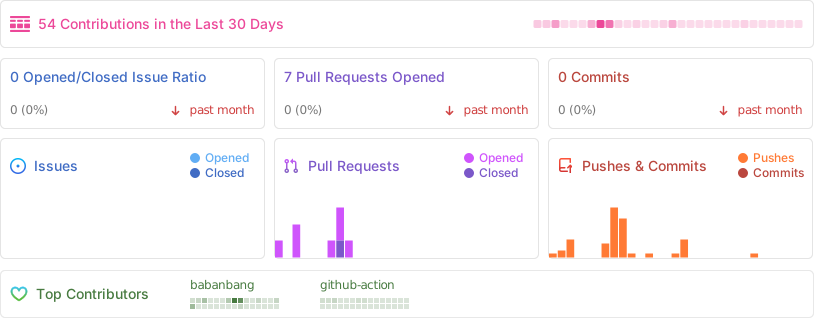
如何参与贡献(PR)
- Fork 本仓库,创建你的分支
- 提交你的更改,附上简要说明
- 发起 Pull Request,耐心等待 Review
- 你的名字将出现在贡献者列表,收获一份开源荣誉!
- 有任何建议或问题,欢迎在 Issues 提出。
💡 欢迎任何形式的贡献,无论是代码、文档、建议还是灵感!