
kavrix
v0.2.49
Published
Local-first secrets firewall for developers, applications, and AI agents

Maintainers
 alien257
Readme
kavrix
Secrets stay in Kavrix. Applications get access. Agents get permission.
Local-first secrets firewall for developers, applications, and AI agents.
Kavrix provides zero-knowledge local encryption: it never sees your passphrases or plaintext credentials.
Give applications and AI agents access to credentials without handing them your
.env. kavrix run injects only the values a process needs; policies and
temporary grants bound what each executable may do; kavrix agent run brokers
every request from AI coding agents. Encrypted storage stays on your machine
(local file or your own MongoDB) — no Kavrix server, account, or telemetry.

Installation
npm install --global kavrix
kavrix --version
kavrix --help
kavrix update --check
kavrix update upgrades a global npm install of kavrix from the registry
(--check never installs; exits 0 on success and check-mode query failures;
--json always emits { installed, latest, updateAvailable, channel, action, error? }
including failures). Unsupported: Homebrew, pnpm, yarn, npx, workspace/dev
checkouts. Non-TTY stdout is always JSON; use a TTY for the status line, or pass
--json explicitly.
Requires Node.js >=24.12.0 <25 or >=25.1.0. MongoDB is needed only if you
select that datastore; database writes require a transaction-capable replica
set or sharded topology.
Run a command with scoped secrets
kavrix run --secret AWS_KEY=aws/deploy-key -- terraform plan

kavrix policy create deploy --secret aws/deploy-key \
  --command terraform --hash terraform=<sha256> --ttl 30m --require-confirmation
kavrix policy check deploy -- terraform plan
kavrix policy explain deploy -- terraform plan
kavrix policy lint
kavrix policy suggest

kavrix grant create aws/deploy-key --ttl 15m --max-uses 3
kavrix grant show <grant-id>

kavrix agent run --agent bot --config kavrix.yaml --profile work -- codex
kavrix audit
Policies are evaluated fail-closed before any child process spawns, grants are
consumed atomically and can be revoked immediately, and kavrix audit records
policy, grant, authorization, and completion events without secret material.
Interactive TUI
Manage the secrets firewall interactively (profiles, vaults, credentials,
doctor, recovery). On Linux, macOS, and Windows with Node.js >=24.12.0,
Kavrix ships a real Ink terminal UI backed by CLI-owned use cases:
kavrix init   # TUI onboarding on an interactive TTY (default)
kavrix tui    # full app
Use kavrix init --no-tui for classic line prompts, or stdin/explicit routing
for scripts.
Version 0.2.49 aligns TUI list details in one column and marks cut-off rows with an ellipsis. See changes.
Version 0.2.48 makes the TUI responsive on short and narrow terminals. See changes.
Version 0.2.47 adds kavrix export, kavrix import archive, and
kavrix generate. See
changes and limits.
Version 0.2.46 makes Home arrow and page navigation follow the displayed groups and speeds up command lookup and successive credential name searches. Digit shortcuts and mouse row targets retain their existing destinations. See changes and limits.
Version 0.2.45 redesigns the TUI around orientation and next steps. The Home
menu groups its destinations into Set up, Secrets, Security, and Tools; every
screen states what it is for and which keys act on it; empty lists offer the one
key that moves you forward; and the notice row carries a tone glyph so a
NO_COLOR or --ascii session reads the same. No screen, keybinding, or
mnemonic changes. See
changes and limits.
Version 0.2.43 rejects undeclared agent names as configuration errors and denies unknown or explicitly blocked permissions before executable lookup or hashing. This preserves denial auditing and avoids unnecessary work on rejected requests. See changes and limits.
Version 0.2.42 stops completed TUI animation clocks and removes redundant per-frame loading-time updates, coalesces resize bursts, honors reduced motion while loading, and fixes fail-closed agent project-file discovery. The new agent guide explains configuration validation, live requests, and failure recovery; the TUI guide includes PowerShell and POSIX troubleshooting. See changes and limits.
Version 0.2.41 reuses authenticated keys for common database TUI actions while
closing storage between actions. The TUI locks after two idle minutes or fifteen
minutes since unlock. Browse and Policy/Grant/Audit load one snapshot each;
kavrix policy snapshot --json also exposes the latter to scripts. Agent brokers
support up to four concurrent requests with bounded admission and isolated I/O.
See behavior and security limits.
Version 0.2.39 fixes existing-vault unlock routing, preserves MongoDB connections after unlock, and adds direct passphrase unlock with Shift+U. Common credential actions avoid duplicate protected profile reads and honor the selected vault. Operation names and elapsed time make progress visible. See the changes and compatibility checks.
Version 0.2.38 adds Home/End and Page Up/Page Down navigation in the main TUI, skips redundant state updates for ignored input and repeated terminal sizes, and reduces reveal countdown redraws. See the changes and limits.
Version 0.2.37 adds review before creation, confirmed permission repair inside Kavrix's own artifact directory, a read-only MongoDB connection test, actual creation stages and elapsed time, cursor editing, and a bounded folder browser. Clipboard messages state whether clearing is scheduled or unavailable. See the six improvements and limits.
Version 0.2.36 fills the terminal during setup and management, with bottom-pinned
controls, larger setup click targets, and a progress guide on wide screens. Click
storage choices and Continue/Back/Help, or use the keyboard. Setup Help (Ctrl+G)
pages long repair instructions without submitting the active field. Touch works
where the terminal translates taps into mouse clicks. Use kavrix init --no-mouse
or kavrix tui --no-mouse for native text selection.
Version 0.2.35 checks setup destinations early on Windows, Linux, and macOS. Permission problems keep the destination editable with repair instructions and Enter to recheck. Both file and MongoDB storage require a protected local key.
Version 0.2.34, TUI refreshed, adds compact session context, clickable
tabs/rows/action chips, wheel navigation, bounded lists, and Help topics, and
paints the workspace full-screen. Mouse input requires a terminal with SGR
reporting support. Use kavrix tui --no-mouse for native selection. Reveal and
destructive actions retain confirmation.
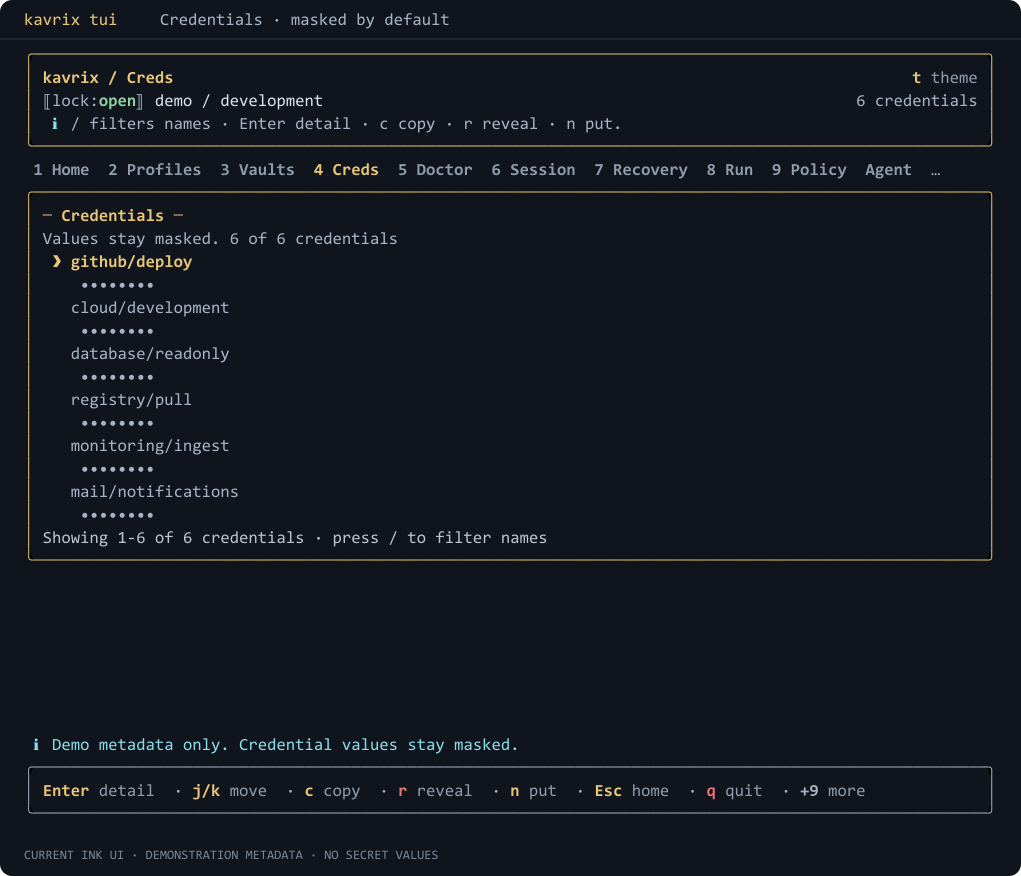
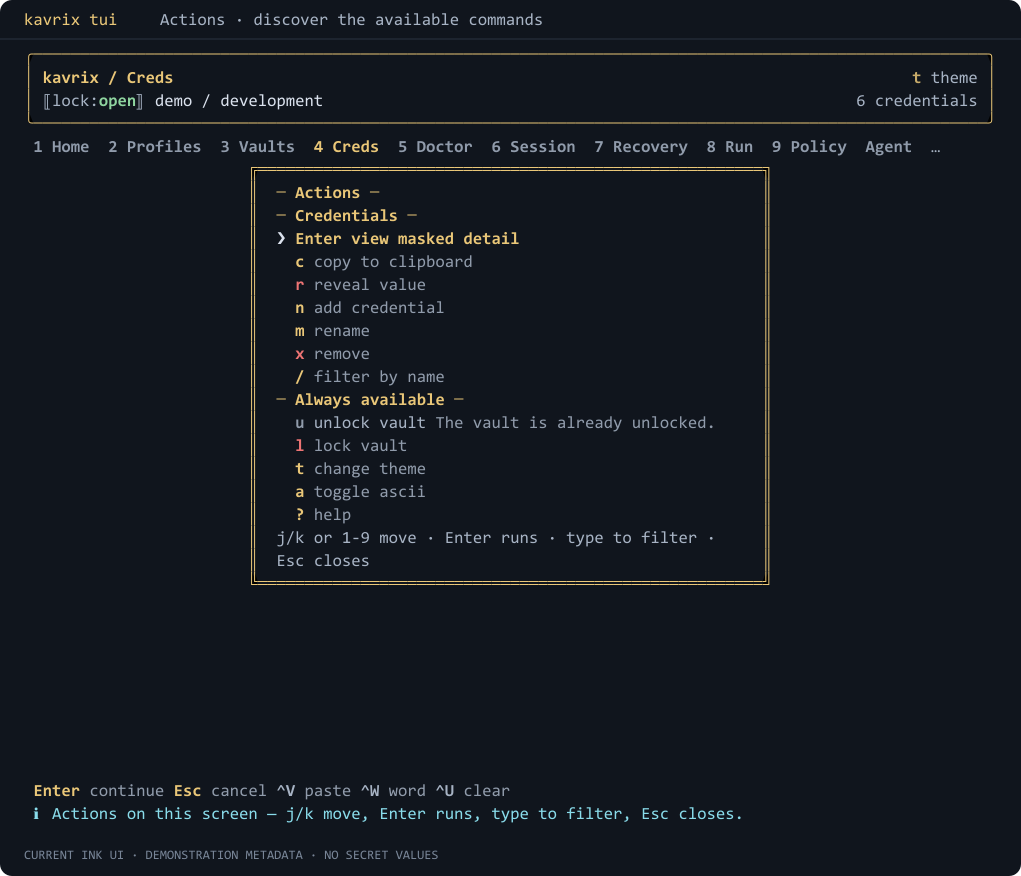
Current Ink UI captures use demonstration names and masked values.
Credentials: / filters names; Enter opens detail. Values remain masked.
Actions: : or Ctrl+K shows commands, shortcuts, and availability.
Quick start
For a new local-file setup on an interactive TTY:
kavrix initTTY Ink onboarding (kavrix init, or kavrix init --no-tui for classic masked
prompts) preflights destinations, creates an encrypted database-container,
one default vault, a verified recovery kit, and selects the new profile so
put / get / kavrix run work next.
Scripted / non-TTY file init (--json / --passphrase-stdin) also creates a
bound database-container profile so put and kavrix run work immediately.
It does not create a recovery kit unless you pass --recovery-file (then
it creates and verifies the kit in the same invocation). Pass --legacy only
when you need a version-2 single-vault migrate source. MongoDB scripted setup
uses db profile / db init / db vault (see below), or --legacy for
migrate sources.
After init (interactive or scripted file), typical next commands:
kavrix put github/token
kavrix list
kavrix get github/token --reveal
kavrix run --secret TOKEN=github/token -- printenv TOKEN
kavrix run takes the child as remaining arguments. -- is recommended when
the child has its own flags; policy check|explain still require --. Use
--no-config to ignore a cwd kavrix.yaml for pure --secret runs.
Without --profile, root put / get / list default --datastore to
file (aligned with init). Prefer --profile after onboarding; pass
--datastore mongodb explicitly for MongoDB without a profile.
Node.js engines (required): >=24.12.0 <25 or >=25.1.0. If npm fails
with an engines/EBADENGINE error, switch Node before retrying.
Protected labels and passphrases never enter argv, environment variables, or the generated non-secret config reference.
For MongoDB or explicitly routed setup, use the database commands directly:
# 1. Register and select a non-secret route to your datastore.
kavrix db profile add work --datastore file \
  --data-file ./work.kavrix --key-file ./work.kavrix.key
kavrix db profile use work

# 2. Initialize the database and create a vault.
kavrix db init --profile work
kavrix db vault create --profile work

# 3. Authenticate and select the returned opaque vault ID for this profile.
kavrix db vault use <vault-id> --profile work

# 4. Vault-scoped commands now use that profile default.
kavrix put github/token --profile work
kavrix get github/token --reveal --profile work

# Or create an explicit project/service/item hierarchy.
kavrix context create platform --environment production --profile work
kavrix service create github --context platform --profile work
kavrix item create deploy --context platform --service github --profile work
kavrix field set token --type api-key --context platform --service github \
  --item deploy --profile work
Sensitive input is prompted for or read from stdin; it is never accepted as a
normal argument. Use kavrix <command> --help for the exact protected-input
options in your installed version.
Interactive protected prompts show each non-secret requirement before entry
and keep [i], [OK], and [X] meaningful without color. Invalid local input
retries only that field, while a confirmation mismatch retries both passphrase
entries. ANSI color is TTY-only and respects NO_COLOR and TERM=dumb;
protected stdin remains silent and ANSI-free.
Each datastore profile keeps its own opaque default vault ID in the protected
non-secret registry. An explicit --vault <id> overrides it for one invocation.
Without either selection, Kavrix fails before requesting secret input. Profiles
never store MongoDB credentials, passphrases, private labels, keys, or values.
Command overview
| Group | Purpose |
| -------------------------------------------------------------------------- | ------------------------------------------------------------------------------------- |
| run | Execute one command with selected credentials injected as environment variables only. |
| policy create/list/show/remove/check/explain/lint/diff/suggest | Stored rules plus read-only simulation, diagnostics, previews, and narrowing advice. |
| grant create/list/show/revoke | Temporary consumable authorizations with live expiry, restrictions, and use caps. |
| audit | Plaintext-free security audit trail. |
| agent run, agent exec | Credential firewall that brokers AI coding agents. |
| db profile ... | Manage non-secret datastore routes. |
| db init, db status | Initialize or authenticate a multi-vault database. |
| db vault ... | Create, list, inspect, rename, or select encrypted vaults. |
| db key create | Create an exact-snapshot key for full local-file sharing. |
| db recovery ... | Manage database-root recovery kits. |
| migrate database | Copy one legacy version 2 vault into a database. |
| context, service, item, field | Manage structured project credentials and schema-driven typed fields. |
| note | Manage encrypted notes attached to one credential item. |
| put, get, list, view, search, stats, has, rename, remove | Store, read, and organize credentials. |
| key status/verify/copy/replicate/assign/rewrap | Manage protected key files. |
| recovery create/verify/status/revoke/use | Manage recovery kits. |
| doctor, doctor health | Validate a vault; --heal repairs incomplete profiles, dangling pointers, ACL drift. |
| update | Upgrade a global npm install (--check / --json; npm-global only). |
| tui / ui | Full interactive Ink app against the real CLI (TTY required). |
| init, vault, legacy v2 commands | TTY: Ink onboarding; scripted file init binds a profile for put/run; --legacy = v2. |
Sensitive plaintext output is opt-in through --reveal or multiline-safe
--reveal-base64; listing and dashboard commands never display field values.
field get may return a non-sensitive value according to its schema.
kavrix note add reads a note body through a masked prompt or --content-stdin
/ --content-stdin-base64, never argv; note list never prints a body, and
note show --reveal is the only way to print a sensitive one.
Database vaults organize private data as project context/environment →
service/group → credential item → typed fields. The root flat commands remain
a compatibility projection over the default context/service and never split a
literal name such as github/token into hierarchy segments. Field definitions
carry copy, reveal, reauthentication, and export policies; present values stay
redacted until an allowed explicit reveal.
Options worth knowing
| Flag | What it does |
| ----------------------------------- | -------------------------------------------------------------------------- |
| --profile, --profile-config-dir | Select a datastore profile without storing secrets. |
| --vault <id> | Override the selected profile's default vault for one command. |
| --passphrase-stdin | Read the key passphrase from stdin. |
| --database-url-stdin | Read the MongoDB URI from stdin. |
| --value-stdin | Read a credential value from stdin. |
| --secrets-stdin | Read every unlock secret from exact stdin frames. |
| --reveal | The explicit guard that prints plaintext. |
| --reveal-base64 | Authorized multiline-safe field-value output. |
| --json | Masked machine-readable output. |
| --overwrite | Opt in to replacing something that already exists. |
| --allow-insecure-transport | Explicit opt-in to unencrypted MongoDB transport (isolated networks only). |
Security honesty
Kavrix controls which process receives a credential. Once an authorized process receives it, Kavrix cannot control what that program does.
Vault payloads, the private database catalog, and wrapped keys use XChaCha20-Poly1305 authenticated encryption. Protected key and recovery files derive keys with Argon2id; HKDF-SHA-256 separates key purposes. Ciphertext is bound to exact database/vault identity, purpose, versions, revision, and a metadata digest, and a root-key-authenticated local revision anchor rejects rollback, forks, and inconsistent heads before plaintext is returned.
MongoDB stores ciphertext plus opaque routing metadata in two collections; it never receives passphrases, root keys, labels, or decrypted values. Remote URIs must explicitly enable validated TLS.
Deep security docs on GitHub:
Limitations
- Kavrix cannot protect an unlocked machine from administrators, same-user malware, keyloggers, terminal capture, or process-memory inspection, and an authorized program can always read its own environment.
- Losing all valid owner keys and all database recovery kits makes the database permanently unrecoverable by design; there is no reset or escrow.
- User identities, public enrollment, per-vault grants and roles, revocation with rotation, and ownership transfer are not yet implemented. Structured payloads model notes, attachment ownership, and history, but the current CLI does not add attachment transfer or history-restore commands.
- Windows command scripts (
.bat,.cmd,.com) are refused for execution; invoke real executables.
For local sharing, create a fresh share key with kavrix db key create and
transfer it with its exact matching encrypted database file; deliver the
passphrase separately. The pair grants access to all vaults once unlocked.
Documentation and support
Word-list attribution
Generated passphrases use EFF Short Wordlist for Passphrases #1, from https://www.eff.org/files/2016/09/08/eff_short_wordlist_1.txt, licensed under CC BY 4.0: https://creativecommons.org/licenses/by/4.0/.
License
MIT