
keepitmovin
v4.1.0
Published
Run your AI coding tools (Claude Code, Codex, Kimi CLI, Google Antigravity, opencode, Pi, Grok Build, Cursor Agent, GitHub Copilot CLI, Factory Droid, Amp, Qwen Code, Ollama) in one terminal. When one hits its usage limit, keepitmovin hands the next tool

Maintainers
 garrettsiegel
Readme
keepitmovin


Agents hit limits. Your work doesn't.
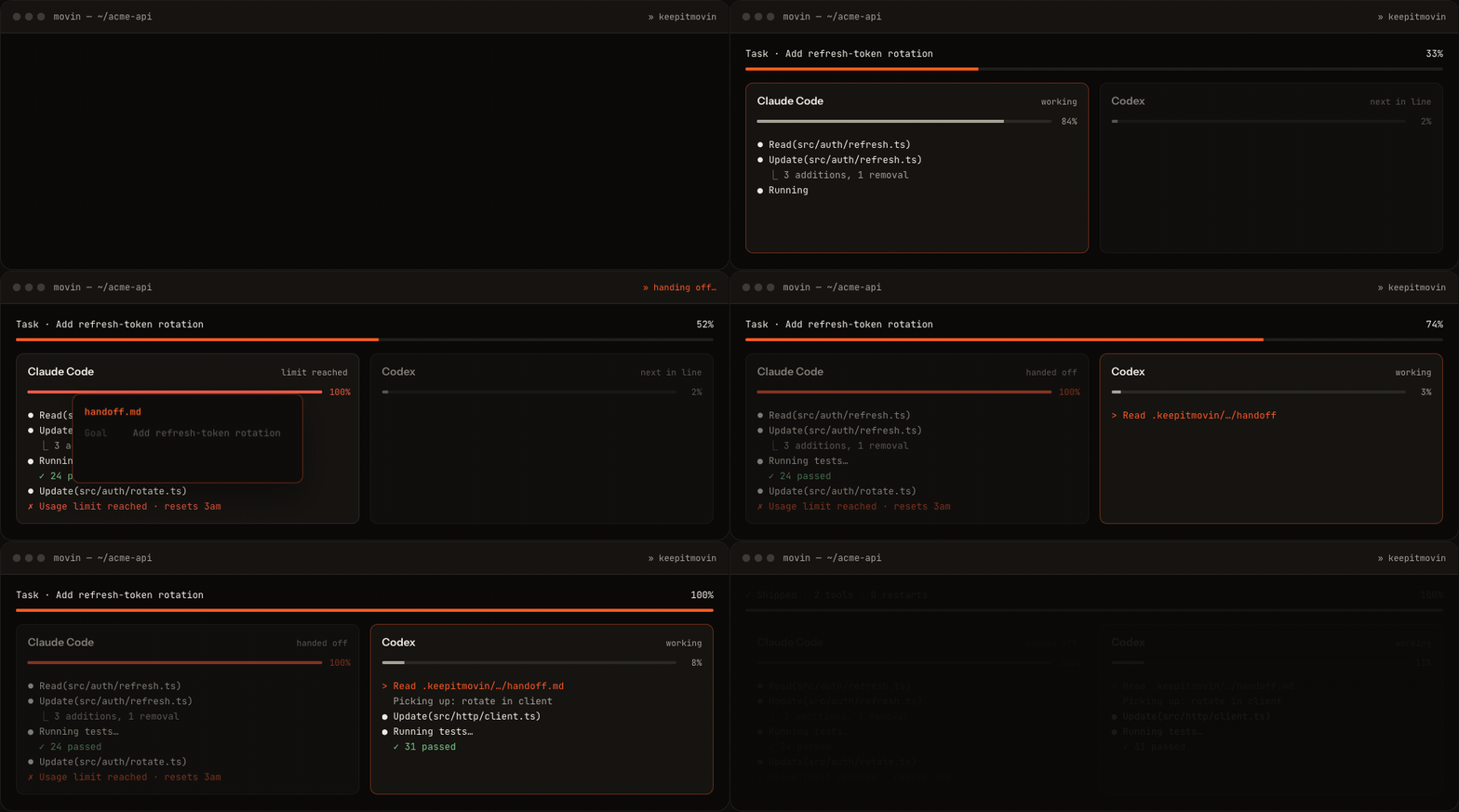
keepitmovin runs your AI coding tools in one terminal, in a fallback order you choose. When one hits its usage limit, keepitmovin hands the next tool a structured record of the goal, changes, blockers, and next step — so switching tools doesn't mean starting over.
Install
npm install -g keepitmovin
movin
Or run it without installing anything: npx keepitmovin.
Needs Node 22.12+. keepitmovin runs your tools in a real terminal via node-pty, which has no
prebuilt binary for Linux — install a C/C++ toolchain first (build-essential and python3 on
Debian/Ubuntu). If it can't load, keepitmovin warns and falls back to plain pipes, where
full-screen tools like Claude Code may not work. movin doctor shows your setup.
On first run, keepitmovin detects which tools you have installed and asks one question: which ones do you want to use. It suggests a fallback order and offers to change it. Every run after that starts immediately.
How it works
movinstarts your first tool in a real terminal. It looks and feels exactly like running that tool directly — your keystrokes go straight through.- keepitmovin watches for trouble — a usage limit, quota issue, sign-in failure, or a usage
check showing the tool is nearly spent — while keeping
.keepitmovin/current/handoff.mdupdated with your goal, changed files, blockers, and next step. - When a tool is blocked, the next one takes over, already holding the handoff file. You see a short "switching tools" message and the work continues.
Press Ctrl+] any time to switch tools right now — useful when you just want a different tool's take, not only when a limit hits.
What it can't do
keepitmovin cannot copy a tool's private chat/session state into another tool — no coding agent
exposes a reliable API for that. Instead of pretending to transfer your conversation, it preserves
practical continuity: the handoff file, your working directory, git status and changed files,
project instructions like AGENTS.md, terminal transcript excerpts, and the reason for the switch.
The active tool keeps that file updated as it works, so this costs no extra AI calls.
Supported tools
keepitmovin fully supports thirteen tools. Each has a verified way to start it, pass it your task, and recognize its exact limit messages — so the handoff fires reliably.
| Tool | How keepitmovin starts it |
|---|---|
| Claude Code (claude) | Passes your task as a command-line argument. |
| Codex (codex) | Passes your task as a command-line argument. |
| Kimi CLI (kimi) | Starts the app, then hands it the handoff file (its -p mode exits after one turn). |
| Google Antigravity (agy) | Uses agy --prompt-interactive with your task. |
| opencode (opencode) | Starts with --prompt. opencode retries limits forever instead of exiting, so keepitmovin hands off on its retry message. |
| Pi (pi) | Passes your task as a command-line argument. Works with most model providers and subscription logins. |
| Grok Build (grok) | Passes your task as a command-line argument. |
| Cursor Agent (agent) | Passes your task as a command-line argument. Config name is cursor. |
| GitHub Copilot CLI (copilot) | Starts the app, then hands it the handoff file. Needs a Copilot subscription. |
| Factory Droid (droid) | Passes your task as a command-line argument. |
| Amp (amp) | Starts the app, then hands it the handoff file (Amp has no interactive task argument). |
| Qwen Code (qwen) | Starts with -i and your task (a plain argument would run once and exit). |
| Ollama (ollama) | Local last resort — runs ollama run llama3.2 (pull it first with ollama pull llama3.2). A chat model for advice and planning, not a file-editing tool, so it sits last. |
Kimi CLI, GitHub Copilot CLI, Amp, and Ollama can't take your task as a command-line argument, so keepitmovin starts them and pastes a single line pointing at the handoff file. This is automatic.
Each tool's limit messages were gathered from its source code, GitHub issues, and docs, then manually checked against reported messages. Factory Droid and Amp are closed source, so theirs come from the text inside their shipped binaries and haven't yet been seen in a real session. Live limit events cannot be forced on demand, so keepitmovin keeps a general-purpose limit detector as a backup.
Want another tool? A tool only belongs in a fallback chain if keepitmovin can reliably tell when it's blocked, so entries are added once their real limit messages are confirmed from a primary source. See CONTRIBUTING.md to add one.
Commands
| Command | What it does |
|---|---|
| movin | Start (or resume) your session. |
| movin providers | Change which tools you use and their fallback order (--all browses every tool, --reset starts over from the defaults). |
| movin doctor | Check your config, tools, and git status (--all includes unverified tools). |
| movin handoff | Show the current handoff file's path and a preview. |
| movin session | Show a summary of your most recent session. |
| movin clear | Delete local handoff and session files (--yes skips the confirmation). |
| movin mcp | Serve the read-only MCP continuity integration (movin mcp install sets it up in your other tools). |
| movin --help | See every command and option. |
Configuration
keepitmovin works with no config at all. For the optional settings — usage checks, handoff refresh, the idle timeout, tool updates, task routing, and MCP — see docs/configuration.md.
Task routing is local by default. To opt into Jev, set routing.classifier to "jev" and export
TYPESAFE_API_KEY. Jev receives only sanitized task text (code blocks, recognizable secrets,
absolute paths, URLs, and emails are removed), times out after 2.5 seconds, and silently falls
back to the local classifier on any failure. The key is read only from the environment.
Safety defaults
- keepitmovin never pushes changes, and never commits by default.
- Tool commands are configured explicitly; nothing is guessed or auto-installed without asking.
- Handoff prompts are generated entirely locally from your repo context and terminal transcript — no extra network calls.
- Handoff files and session logs under
.keepitmovin/can contain secrets. keepitmovin gitignores them and best-effort redacts common credential formats, but treat them as sensitive.
Contributing
keepitmovin is a small TypeScript CLI (Node 22.12+). See CONTRIBUTING.md to build it from source, and CLAUDE.md for the architecture guide. Release history lives in CHANGELOG.md, also published at keepitmovin.dev/changelog.