
kid-gloves
v0.0.22
Published
🌐 Kid Gloves


Readme
kid-gloves
🌐 Kid Gloves
Program with a gentler touch.
Kid Gloves patches a bunch of JS quirks that potentially throw errors and turns those into warnings. This is intended to be used as a learning tool and for debugging purposes and not meant to monkey patch live production software.
Note: This only aims to patch errors where the alternative outcome is obvious and doesn't change the existing behavior. So while functions like JSON.parse commonly error, there is no way to determine an appropriate return value without drastically changing behavior. document.querySelector on the other hand, already has a value for when the query fails to match an element and this makes a good alternative to throwing an error.
Installation:
Stick this url in a script tag just above the code you want to debug https://unpkg.com/kid-gloves/kid-gloves.js like so;
<!DOCTYPE html>
<html>
<body>
  <div></div>
  <script src="https://unpkg.com/kid-gloves/kid-gloves.js"></script>
  <script>
    document.querySelector(new Symbol('div')).innerHTML = 'Hello World';
  </script>
</body>
</html>
Normally this code would error and present a blank page but this runs and the errors are converted into warnings.
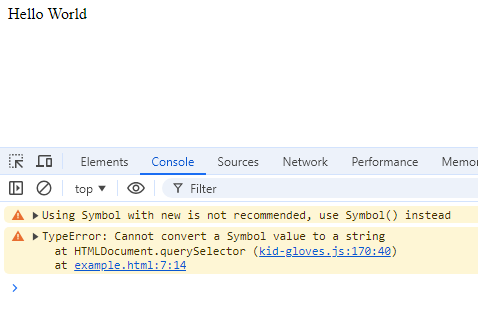
Fixes So far:
Use new with BigInt and Symbol
Using the new keyword returns an Object wrapped version of BigInt and Sybmol while printing a warning to the console recommending to switch to not using it
Use Promise, Set, and Map
These objects can be called as a constructor without using the new keyword and prints a warning
Missing Map element
Attempting to access a Map element that does not exist prints a warning
document.querySelector
document.querySelector returns null even when given an invalid query and prints the typical error as a warning
document.querySelectorAll
document.querySelectorAll returns an empty NodeList even when given an invalid query and prints the typical error as a warning
document.getElementById
document.getElementById returns null even when given an invalid query and prints the typical error as a warning
document.getElementsById
document.getElementsById warns the user of a potential typo and returns document.querySelectorAll(`[id="${String(query)}"]`);
document.getElementsByTagName
document.getElementsBy(TagName|TagNameNS|ClassName|Name) returns an empty HTMLCollection even when given an invalid query and prints the typical error as a warning
Object.create
Gives a warning if the target prototype is not an object and attempts to coerce it into an object. If coercion fails then return Object.create(null)
parseFloat,parseInt,Number.parseFloat,Number.parseInt
Attempts to safely coerce a Symbol into a string before parsing. If parsing fails for any reason it will return NaN.
Symbol Coercion
Many functions that expect a string will attempt to coerce inputs into strings. The default coercion for Symbol into string throws an error. Many of these have been patched to do a safe coercion from Symbol to String and printing a warning to the console. The typical coercion takes the form of String(sym.description ?? sym)
Object Coercion
Some functions expect an object as input and will throw an error when passed a literal. That error is printed as a warning and the literal will be converted to an object using Object()