
knockout.contextmenu
v1.0.0
Published
knockout contextmenu extension

Maintainers
 nescalante
Readme
knockout.contextmenu 
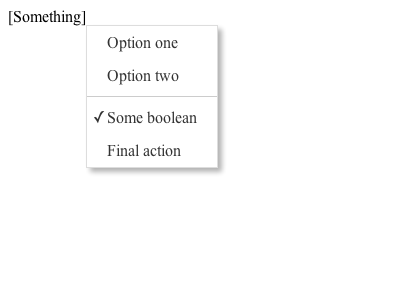
Contextual menu, anywhere you need it
Install
npm install knockout.contextmenu --save

bower install knockout.contextmenu
With npm
Just do:
require('knockout.contextmenu');Usage
To bind a context menu to an element:
<td data-bind="contextMenu: { 'Option 1': $root.rootMethod, 'Option 2': itemMethod, 'Option 3': anotherMethod }">Dont forget to include the .css file.
You can also bind a boolean observable to the context menu, that will work as a 'check':
{
    "Boolean": someObservableBoolean,
    "One method": $root.test
}
You can also set dynamic 'text' and 'visible' values binding an object with the following values instead of a method:
Option | Description
-----------|-----------------------------------------------
url | Direct access to an URL.
text | Set menu text.
visible | Show/hide item (result must be boolean).
action | Item method, mandatory if not url defined.
disabled | Disable menu item.
Example:
{
    "Complex item": {
        "text": $root.someObservableText(),
        "visible": someMethod() == '1',
        "action": $root.someAction
    },
    "One method": $root.test
}
To create a separator between two menus, just create an object with the property separator with true:
{
    "Some item": methodOne,
    "Separator": {
        "separator": true,
        "visible": someMethod()
    },
    "Just another item": methodTwo
}
Bind it with left click, if you want to:
<td data-bind="contextMenu: { 'Options': justGoHere }, bindMenuOnClick: true, bindMenuOnContextMenu: false">Also supports observableArrays!
var menu = ko.observableArray([{ text: 'Item 1', action: doSomething }, { text: 'Item 2', action: doMore }]); <td data-bind="contextMenu: menu">License
MIT