
kouxiangtang
v0.1.63
Published
`kouxiangtang` 通用的管理后台前端框架,此框架带有明确的后台数据管理目的。


Readme
kouxiangtang
介绍
kouxiangtang 通用的管理后台前端框架,此框架带有明确的后台数据管理目的。
(一)安装使用
通过 npm 命令行安装
npm install kouxiangtang -S(二)定义一个领域模型(domain)
src下创建
domains文件夹文件夹中创建
config.js,exportdomainConfigsconst domainConfigs = { admin: { admins: { name: "管理员" }, user: { name: "用户" }, "city-users": { name: "城市用户统计" } } }; export default domainConfigs;创建如命名为
admin文件夹,文件夹内包含页面结构信息
src下创建
layouts文件夹layout.vue
    <template>
      <BaseLayout :config="props.config">
        <template #user-profile>
          <UserProfile />
        </template>
      </BaseLayout>
    </template>

    <script setup>
    import { BaseLayout } from "kouxiangtang";
    import UserProfile from "./UserProfile.vue";

    const props = defineProps({
      config: {
        type: Object,
      },
    });
    </script>

    <style scoped lang="scss"></style>
side-menus.js ,用于项目菜单管理。
  import {
    House,
    PieChart,
    Refrigerator,
    Setting,
    Location
  } from "@element-plus/icons-vue";

  const adminMenus = [
    { title: "首页", home: true, icon: House, route: "/admin/home" },
    { title: "统计", home: true, icon: PieChart, route: "/admin/statistics" },
    {
      title: "用户",
      icon: User,
      children: [
        { title: "用户", route: "/admin/user/list" },
        { title: "SSO", route: "/admin/user-sso/list" },
        { title: "城市用户统计", route: "/admin/city-users/list" },
        { title: "信息更正申请", route: "/admin/identity-update-apply/list" },
        { title: "登录日志", route: "/admin/user-login-ip/list" },
        { title: "黑名单", route: "/admin/black-list/list" },
      ],
    }
  ];

  export default {
    admin: adminMenus,
  };
UserProfile.vue
  <template>
      <el-dropdown trigger="click">
        <span class="username">
          {{ currentUser }}
          <el-icon class="el-icon--right">
            <ArrowDown />
          </el-icon>
        </span>
        <template #dropdown>
          <el-dropdown-menu>
            <el-dropdown-item @click="logout"> 退出</el-dropdown-item>
          </el-dropdown-menu>
        </template>
      </el-dropdown>
    </template>

    <script setup>
    import { useRouter } from "vue-router";
    import { ArrowDown } from "@element-plus/icons-vue";
    import { ref, watch } from "vue";
    import adminApi from "@/requests/admin";

    const router = useRouter();
    const currentUser = ref("...");

    function logout() {
      ElMessageBox.confirm("确定注销并退出系统吗?", "提示", {
        confirmButtonText: "确定",
        cancelButtonText: "取消",
        type: "warning",
      }).then(() => {
        localStorage.clear();
        router.replace("/sso/login");
      });
    }

    watch(
      () => router.currentRoute.value,
      () => {
        currentUser.value = localStorage.getItem("currentUser");
      },
      { immediate: true },
    );
    </script>
    <style lang="scss" scoped>
    .username {
      cursor: pointer;
      display: flex;
      align-items: center;
    }
    </style>
(三)每个领域模型都有列表页
页面文件夹下fields.js
- 字段为列表,详情,编辑 通用字段
- 可通过
editable: true,等属性控制具体的页面显示。showInList: false,等。
      import SSOTenant from "./components/SSOTenant.vue";
      import bannerTypes from "@/constants/banner-types";

      const fields = [
        {
          code: "id",
          label: "ID",
          rowQuery: (row) => {
            return { stationCode: row.code };
          },
        },
        {
          code: "indexLetter",
          label: "索引",
          width: 50,
          editable: true,
          showInList: false,
        },
        {
          code: "enabled",
          label: "启用",
          type: "boolean",
          width: 60,
          editable: true,
        },
        {
          code: "mode",
          label: "首页模版",
          editable: true,
          type: "select",
          options: () =>
            bannerTypes.filter((item) => {
              return item.code?.toString().charAt(0) == 6;
            }),
          width: 150,
        },
        { code: "createdAt", label: "创建时间" },
        { code: "updatedAt", label: "更新时间" },
      ];

      export default fields;
(四)每个领域模型都有详情页
  {
    code: "id",
    label: "ID",
    rowQuery: (row) => {
      return { stationCode: row.code };
    },
  },
(五)每个领域模型根据 API 接口情况提供标准的增删改查的操作
页面文件夹下rest.js
- 为领域下的接口请求,
getListupdatecreate等。
 import http from "@/utils/http";

  function getList(data) {
    return http.get("stations", data).then((res) => ({ data: res }));
  }

  function getOne({ id }) {
    return http.get(`stations/${id}`).then((res) => ({ data: res }));
  }

  function update(station) {
    return http.put(`stations/${station.id}`, station);
  }

  function create(station) {
    return http.post("stations", station);
  }

  function getBound(data) {
    return http.get("station-customers/binds", data);
  }

  function getUnbound() {
    return http.get("station-customers/unbound");
  }

  function updateStationCustomers(data) {
    return http.put(`station-customers/${data.id}/bind`, data);
  }

  function removeStationCustomers(id) {
    return http.remove(`station-customers/${id}/bind`);
  }

  function bindStationCustomers(data) {
    return http.post(`station-customers/bind`, data);
  }

  export default {
    getList,
    getOne,
    update,
    create,
    getBound,
    getUnbound,
    updateStationCustomers,
    removeStationCustomers,
    bindStationCustomers,
  };
(六)列表页提供可配置的数据过滤方式
页面文件夹下filters.js
- 为领域下的设置搜索条件。
import http from "@/utils/http";

const filters = {
  name: {
    name: "名称",
  },
  cityCode: {
    name: "城市",
  },
  enabled: {
    name: "启用",
    type: "boolean",
  },
  defaultStation: {
    name: "默认",
    type: "boolean",
  },
  hasLocalService: {
    name: "开通服务",
    type: "boolean",
  },
  isPriority: {
    name: "重要客户",
    type: "boolean",
  },
};

export default filters;
(七)提供针对列表页数据集的批量操作(PageAction)
页面文件夹下page-actions.js
- 为列表数据集的批量操作。
    import Test from "./components/Test.vue";

    const pageActions = [
      {
        name: "敏感词测试",
        component: Test,
      },
    ];

    export default pageActions;
(八)提供针对单条数据的操作(RowAction)
页面文件夹下row-actions.js
- 为针对单挑数据操作。
import RegionEditor from "./components/ToExamine.vue";

const rowActions = [
  {
    component: RegionEditor,
    isVisible: (data) => {
      return true;
    },
  },
];

export default rowActions;
(九)提供针对数据关联的显示
从属于:
belongs-to- 为跳转到其他功能的详情页面。
{ code: "messageRuleId", label: "规则名称", width: 150, type: "belongs-to", belongsTo: "message-send-rule", }, belongs-to对应为目标功能页面的codeexport default defineDomain("admin", { name: "消息发送规则", code: "message-send-rule", fields, filters, rest, hasMany: ["message-push"], });
- 为跳转到其他功能的详情页面。
一对多:
has-many。功能页面
config.js配置hasMany,对应为此功能页面的子功能。可以为系统内的任何其他功能页面,hasMany对应数组,item为子功能的code。
import { defineDomain } from "kouxiangtang"; import rest from "./rest.js"; import fields from "./fields.js"; import filters from "./filters.js"; import rowActions from "./row-actions.js"; export default defineDomain("admin", { name: "资产", code: "currency", fields, rest, filters, rowActions, actionsWidth: 240, hasMany: ["account", "asset-details", "rewards-rules"], });- 如下图
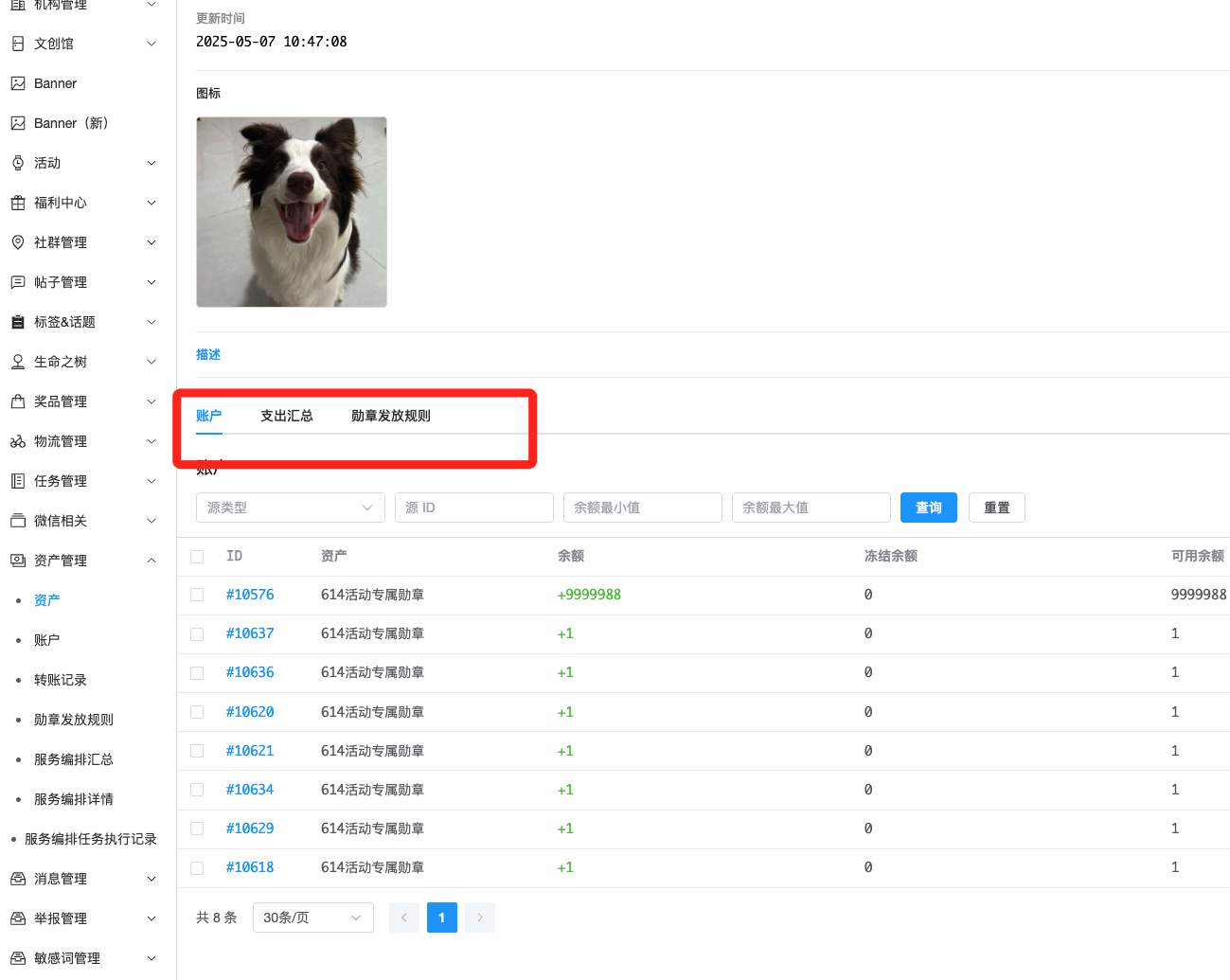
- 如下图
(十)组件的使用
页面文件夹下components
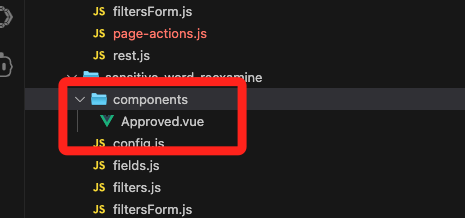
- 使用组件示例。
  import Approved from "./components/Approved.vue";

  const rowActions = [
    {
      component: Approved,
      isVisible: (data) => {
        return true;
      },
    },
  ];

  export default rowActions;