krry-transfer-fa
v1.0.5
Published
ali.g.rahmati made it for farsi


Readme
krry-transfer
基于 Element UI 的升级版穿梭框组件
- 多级多选穿梭框(常用于省市区三级联动)
- 针对数据量庞大的分页穿梭框
Example
kr-cascader

kr-paging

Specialty
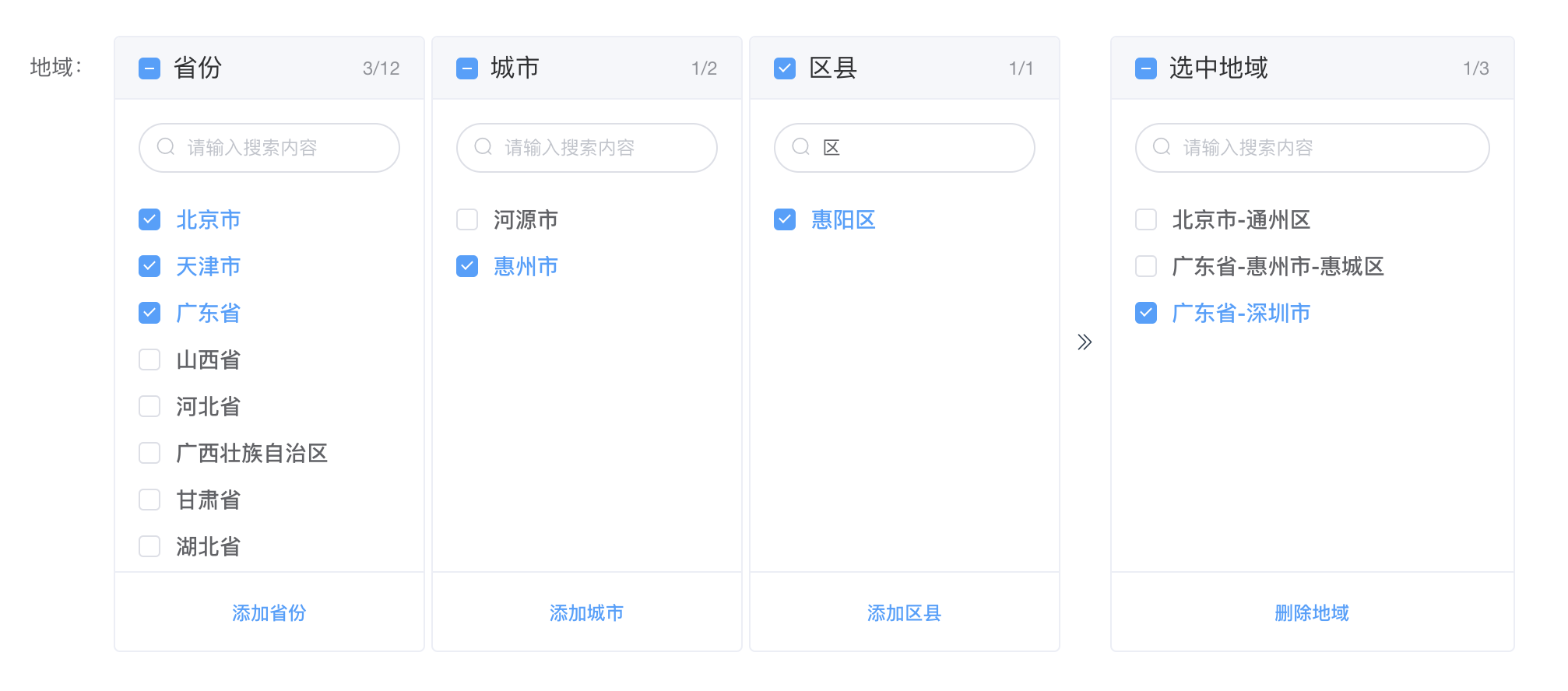
kr-cascader 多级多选穿梭框
- 多级多选
- 当勾选省级并添加,过滤备选框的当前省级,同时在已选框该省级的子级合并成一个省级
- 当勾选市级并添加,过滤备选框的当前市级,同时在已选框该市级的子级合并成一个市级
- 当从已选框中移除数据,针对移除的数据是省、市、区分别在备选框新增这些数据
- 当父级勾选多个数据,下级方框展示的数据为最后勾选父级的子级集合
- 当多个勾选的父级逐个取消勾选,下级方框展示的数据为上一次勾选父级的子级集合
- 支持搜索
kr-paging 数据量庞大的分页穿梭框
- 实现分页
- 没有设置异步时,搜索将在所有数据里搜索,这样就不用在每个分页都搜索一次,搜索后的结果会自动分页
- 全选只在当前页里的全选
- 添加已选/删除已选 将自动计算分页条目
- 穿梭框左右两个框的联动
- 支持分页异步请求数据
- 支持分页搜索异步请求数据
Install
npm install krry-transfer --saveUse
依赖 Element checkbox、button 组件和样式
import Vue from 'vue'
import krryTransfer from 'krry-transfer'

Vue.use(krryTransfer)

/*
 * or 按需引入
 * import { krryCascader, krryPaging } from 'krry-transfer'
 *
 * Vue.use(krryCascader)
 * Vue.use(krryPaging)
 */
kr-cascader
<template>
  <div>
    <kr-cascader
      :dataObj="dataObj"
      :selectedData="selectedData"
      @onChange="onChange"
    ></kr-cascader>
  </div>
</template>

<script>
export default {
  data() {
    return {
      dataObj: {
        province: {
          '101103': '广东省',
        },
        city: {
          '101103': [
            {
              id: 101164181112,
              label: '深圳市'
            }
          ]
        },
        county: {
          '101164181112': [
            {
              id: 106105142126,
              label: '宝安区'
            }
          ]
        }
      },
      selectedData: [
        {
          id: '101101-101101101112',
          label: '北京市-通州区'
        }
      ]
    }
  },
  methods: {
    onChange(val) {
      console.log('انتخاب شده:', val)
    }
  }
}
</script>
kr-paging
<template>
  <div>
    <kr-paging
      :dataList="dataList"
      :selectedData="selectedData"
      :pageSize="100"
      @onChange="onChange"
    ></kr-paging>
  </div>
</template>

<script>
export default {
  data() {
    return {
      dataList: [
        {
          id: 0,
          label: '这是第0条数据'
        },
        {
          id: 1,
          label: '这是第1条数据'
        }
      ],
      selectedData: [
        {
          id: 0,
          label: '这是第0条数据'
        }
      ]
    }
  },
  methods: {
    onChange(val) {
      console.log('انتخاب شده:', val)
    }
  }
}
</script>
Browser Support
Modern browsers and Internet Explorer 10+.
API ( kr-cascader )
Attributes
|name|type|default|description| |:-|:-|:-|:-| |boxTitle|Array|['省份', '城市', '区县', '选中地域']|按顺序指定每个方框的 title| |boxOperation|Array|['添加省份', '添加城市', '添加区县', '删除地域']|按顺序指定每个方框底部的操作文案| |dataObj|Object|{}|kr-cascader 的数据源| |selectedData|Array|[]|已选数据集合| |filterable|Boolean|false|是否可搜索| |filter-placeholder|String|محتوای جستجو را وارد کنید|搜索框占位符|
Events
|name|params|description| |:-|:-|:-| |onChange|Array: value(已选数据集合)|当已选区数据变化时触发的事件|
Methods
|name|params|description| |:-|:-|:-| |getSelectedData|-|获取已选数据集合的钩子|
注:dataObj、selectedData 的数据格式如下
dataObj(kr-cascader 的数据源):
dataObj: {
  province: {
    '省id': 'xx省'
  },
  city: {
    '省id': [
      {
        id: '市id',
        label: 'xx市'
      }
    ]
  },
  county: {
    '市id': [
      {
        id: '区id',
        label: 'xx区'
      }
    ]
  }
}
selectedData(已选数据集合):
selectedData: [
  {
    id: '101111',
    label: '内蒙古自治区'
  },
  {
    id: '101101-101101101112',
    label: '北京市-通州区'
  },
  {
    id: '101103-101164001112-106197987125',
    label: '广东省-惠州市-惠城区'
  }
]
API ( kr-paging )
Attributes
|name|type|default|description| |:-|:-|:-|:-| |boxTitle|Array|['انتخاب', 'انتخاب شده']|按顺序指定每个方框的 title| |pageSize|Number|160|分页大小| |dataList|Array|[]|kr-paging 的数据源| |selectedData|Array|[]|已选数据集合| |filterable|Boolean|false|是否可搜索| |filter-placeholder|Array|['محتوای جستجو را وارد کنید', 'محتوای جستجو را وارد کنید']|左右两边搜索框占位符| |pageTexts|Array|['قبلی', 'صفحه بعد']|分页按钮文案| |sort|Boolean|false|已选区数据是否根据انتخاب的数据进行排序,设置为 true 后,性能有所下降;当 async 为 true 时,sort 属性无效| |async|Boolean|false|分页是否异步请求,当设置为 true,dataList 无需设置,请设置 getPageData 方法来获取分页数据| |getPageData|Function|() => []|异步请求分页数据的方法,参数:pageIndex, pageSize| |getSearchData|Function|-|异步搜索数据的方法,仅分页是异步请求时使用,参数:keyword, pageIndex, pageSize;搜索框失焦或回车执行| |isHighlight|Boolean|false|搜索后关键词是否高亮展示| |highlightColor|String|#ff2b2b|关键词高亮颜色值| |showClearBtn|Boolean|false|是否在搜索框末尾展示清空按钮|
Events
|name|params|description| |:-|:-|:-| |onChange|value(已选数据集合 id),moveKeys(移动的集合 id)|当已选区数据变化时触发的事件|
Methods
|name|params|description| |:-|:-|:-| |getSelectedData|-|获取已选数据集合的钩子| |clearQueryInp|String: 'left' / 'right'|清空某个面板的搜索框| |getData|Number: pageIndex|异步获取分页数据的钩子|
当设置分页异步请求接口数据时,设置方法如下:
- async 属性设置为 true
- dataList 无需设置
- 第一页和后续分页的数据都是通过设置 getPageData 属性方法获取
- 可设置异步搜索的方法 getSearchData,انتخاب的搜索框将启用远程搜索(搜索框失焦或回车执行)
注意:
- 此时 sort 属性无效;
- 若没有设置异步搜索方法 getSearchData,انتخاب的搜索将在当前页搜索
若分页不是异步请求,即不设置 async 或 :async="false",انتخاب的搜索将在所有数据中搜索,搜索后的结果会自动分页
<!-- 可设置异步搜索方法:getSearchData -->
<kr-paging
  :selectedData="selectedData"
  :async="true"
  :getPageData="getPageData"
  :getSearchData="getSearchData"
></kr-paging>
类型为 Function 的绑定属性:getPageData、getSearchData 配置如下 |name|params|return| |:-|:-|:-| |getPageData|pageIndex, pageSize|[{id: xxx, label: xxx}...]| |getSearchData|keyword, pageIndex, pageSize|[{id: xxx, label: xxx}...]|
methods: {
  // 异步获取分页数据 انتخاب点击قبلی/صفحه بعد执行
  async getPageData(pageIndex, pageSize) {
    // 掉接口请求数据
    const resData = await getData({
      pageIndex: pageIndex,
      pageSize: pageSize
    })
    // 将 resData 的数据结构处理成如 dataList、selectedData 一样
    return resData
  },
  // 异步搜索的方法配置如下 搜索框失焦或回车执行
  async getSearchData(keyword, pageIndex, pageSize) {
    // 掉接口请求数据
    const resData = await getDataByKeyword({
      keyword: keyword,
      pageIndex: pageIndex,
      pageSize: pageSize
    })
    // 将 resData 的数据结构处理成如 dataList、selectedData 一样
    return resData
  }
}
Demo
在线 demo: 省市级联动多选穿梭框、 分页穿梭框
使用 krry-transfer 组件的示例 demo git:my-transfer
About
npm:krry-transfer
Blog:Krryblog
GitHub:krry-transfer
Donation
If you find KrryTransfer useful, you can buy me a cup of coffee