kubefn
v1.0.3
Published
Save time writing your Kubernetes microservices, coding only what truly matters.
Downloads
34


Readme
Save time writing your Kubernetes microservices, coding only what truly matters.
This project is still in alpha, please be patient :)
Prerequisites
- An already installed and configured Kubernetes cluster
- An already configured kubectl to contact the Kubernetes cluster
- A docker image repository (for now tested only with GitLab image repo)
- A secret set in the Kubernetes cluster to access the docker image repository (for now it's mandatory)
- An Ingress in Kubernetes to access your microservices (for now it's mandatory)
Quick Start
Install via NPM
npm install -g kubefnRead the docs
Read the full list of command and their parameters
kubefnInitialize your microservice
kubefn bootstrap microservice-nameNavigate into the newly created directory
cd microservice-nameConfigure your function
You can modify your parameters in the kubefn.config.js to configure kubefn.
module.exports = {
  "config": {
    "port": 3000,
    "imageregistry": "registry.gitlab.com", // Your docker image repository
    "imageregistrypath": "registry.gitlab.com/luno721/allstampsbackend", // The path where you want to save your image
    "imagepullsecret": "docker-repo-credential", // The secret you've set up in your kubernetes cluster to access to image repository
    "replicas": "2" // [optional] Number of replicas of the FN. Default: 2
  }
}
Run locally your microservice
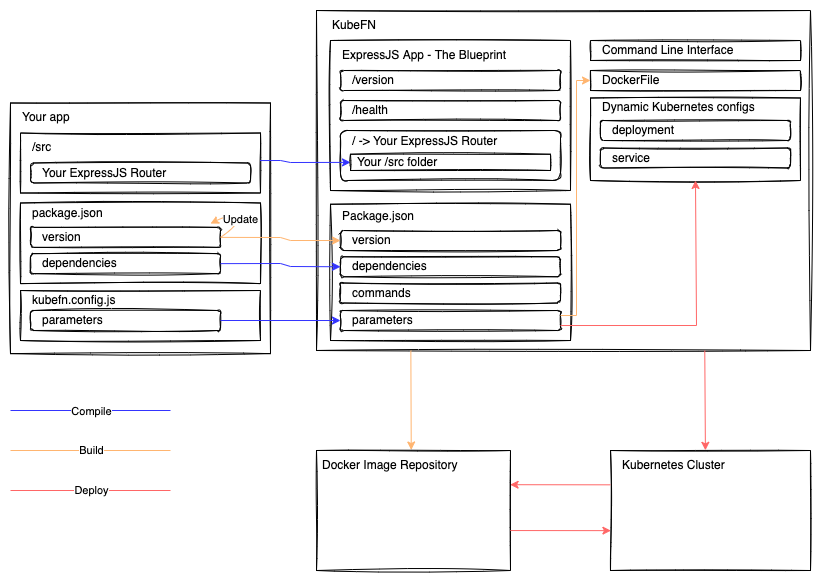
Use this command to copy your ./src directory into the expressjs blueprint and run the expressjs server locally
kubefn runDeploy your microservice
Creates the Kubernetes deployment and service for your function.
You still need to configure your Kubernetes Ingress to redirect traffic to your function.
kubefn deploy [semver_increment] # semver_increment: patch, minor, majorRollback your microservice
Rollback to a previous version of your function
kubefn rollback <semver> # semver ex: 1.2.3Destroy your microservice
kubefn destroyRemember to fix your Kubernetes Ingress accordingly.
How it works