
lazydlp
v0.0.14
Published
A sleek, interactive Terminal User Interface (TUI) for `yt-dlp`.


Readme
Lazydlp
A sleek, interactive Terminal User Interface (TUI) for yt-dlp.
Lazydlp provides a gorgeous, interactive, and user-friendly experience for downloading videos straight from your terminal. Built with React and Ink, it transforms the powerful but complex yt-dlp command-line tool into an intuitive visual application.
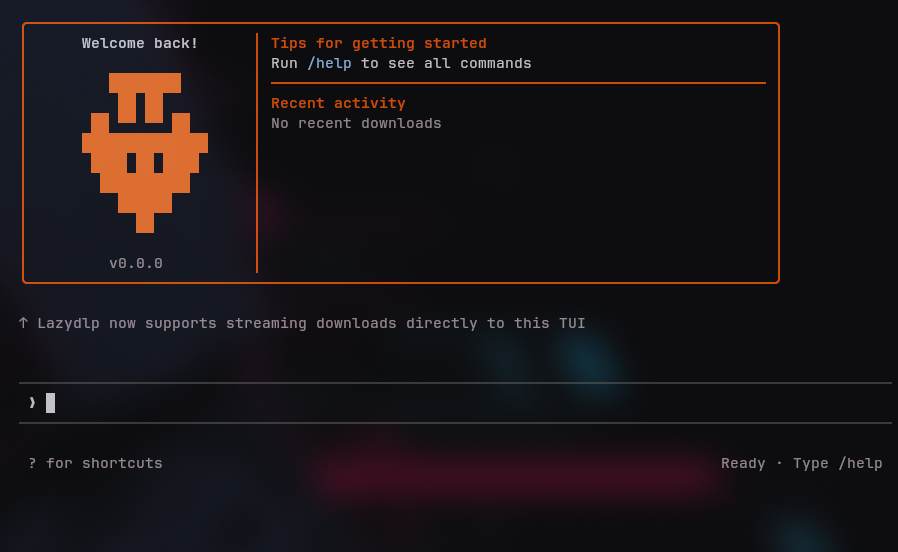
Features
- Interactive TUI: Navigate via keyboard shortcuts in a beautifully themed terminal interface.
- Zero Config Setup: Automatically downloads and manages the latest version of
yt-dlpfor you. - Streaming Progress: Real-time progress bars, download speeds, and ETAs rendered beautifully without terminal flickering.
- Persistent History: Keeps track of your recent downloads locally so you can easily review them.
- Smart Suggestions: Autocompletes commands and arguments as you type.
- Interactive Action Menu: Quickly play downloaded media or open their containing folders directly from your recent history.
- Android / Termux Ready: Automatically detects Termux environments, safely maps to your Android shared storage, and guides you through setup.
- Cross-Platform: Works smoothly on Windows, macOS, Linux, and Android.
Quick Start (No Installation Required)
You can run Lazydlp instantly without installing anything using your favorite package manager:
Using npm:
npx lazydlpUsing Bun:
bunx lazydlpUsing pnpm:
pnpm dlx lazydlpUsing Yarn:
yarn dlx lazydlp📱 Android (Termux) Setup
Lazydlp works flawlessly on Android via Termux! To ensure the best experience:
- Allow Termux to access your phone's shared storage so downloaded videos appear in your Gallery:
termux-setup-storage - Install Python (required to run
yt-dlpon Android architectures):pkg install python - Run
npx lazydlp! Lazydlp will automatically detect your environment and save videos directly to your phone'sDownloadsfolder.
Global Installation
If you prefer to have the lazydlp command permanently available on your system, you can install it globally:
npm install -g lazydlpThen, simply run:
lazydlpCommands
Once inside the app, you can use the following commands:
/download <url>- Download a video URL/setdir <path>- Change your default download directory/update- Force update Lazydlp and the underlyingyt-dlpbinary/configure- Run the initial setup wizard manually/clear- Clear your terminal message history/help- Open the interactive help menu/exit- Close the application
Global Shortcuts
?- Instantly open the keyboard shortcuts menuCtrl + C- Safely abort downloads and exit the app↑ / ↓- Navigate the command autocomplete suggestionsEnter- Execute command or confirm dialogsEsc- Dismiss dialogs
Requirements
- Node.js >= 16
License
MIT