
lazygitrs
v0.0.36
Published
A faster, memory-safe, more ergonomic slopfork of lazygit


Readme
lazygitrs
A faster, memory-safe, more ergonomic slopfork of lazygit (🦀 rust btw).
This is mostly a "for me" tool — built for my own workflow. Not saying you shouldn't use it, but don't expect it to be a community project. But hey, it works for me!
Why fork? PRs were sitting too long, or the upstream direction didn't match how I wanted to work.
The goal: everything lazygit does, but faster and with opinions I actually agree with. (I can't promise backwards-compat w/ lazygit's config since it'll eventually drift w/ my own opinions, but I made sure to do that)
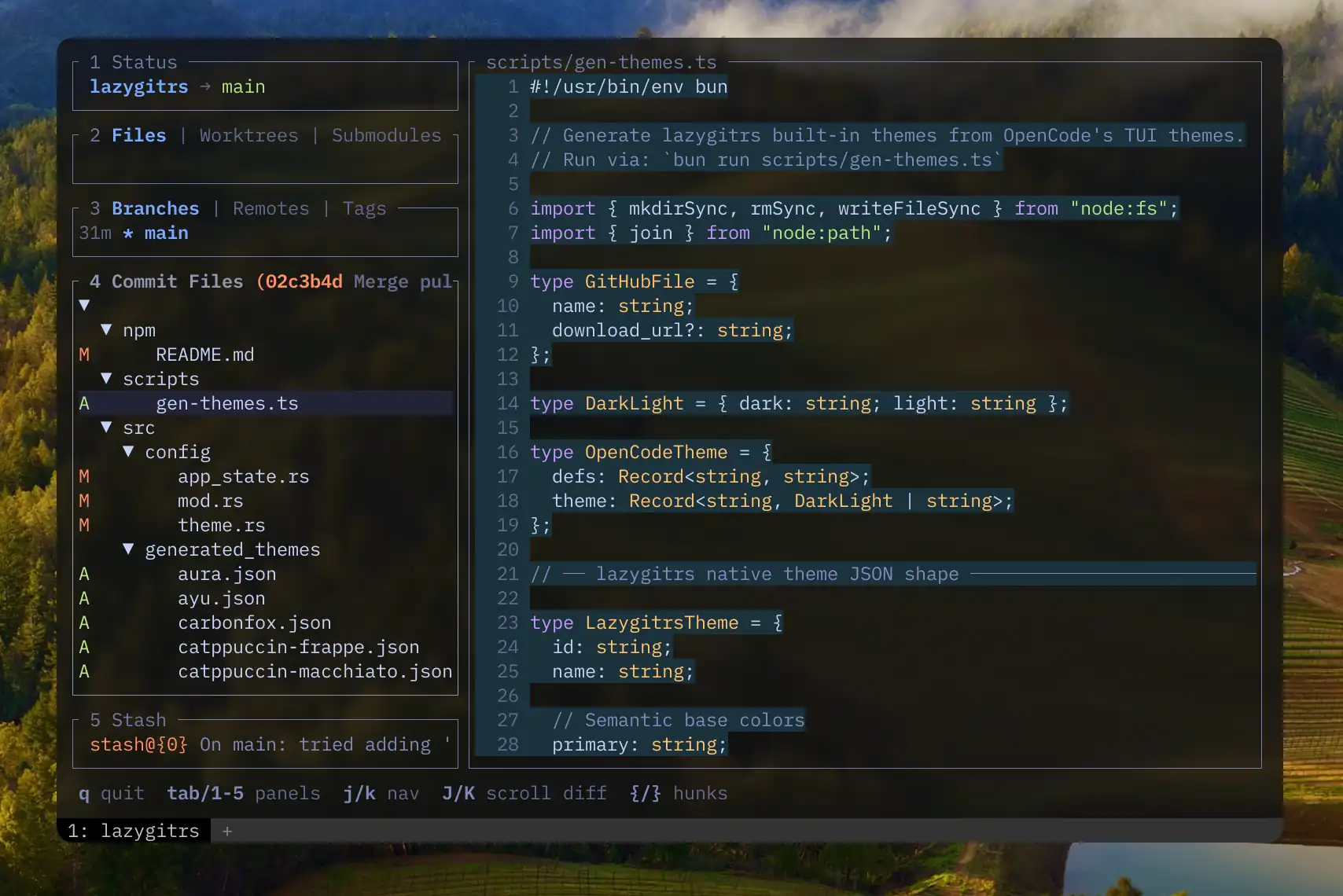
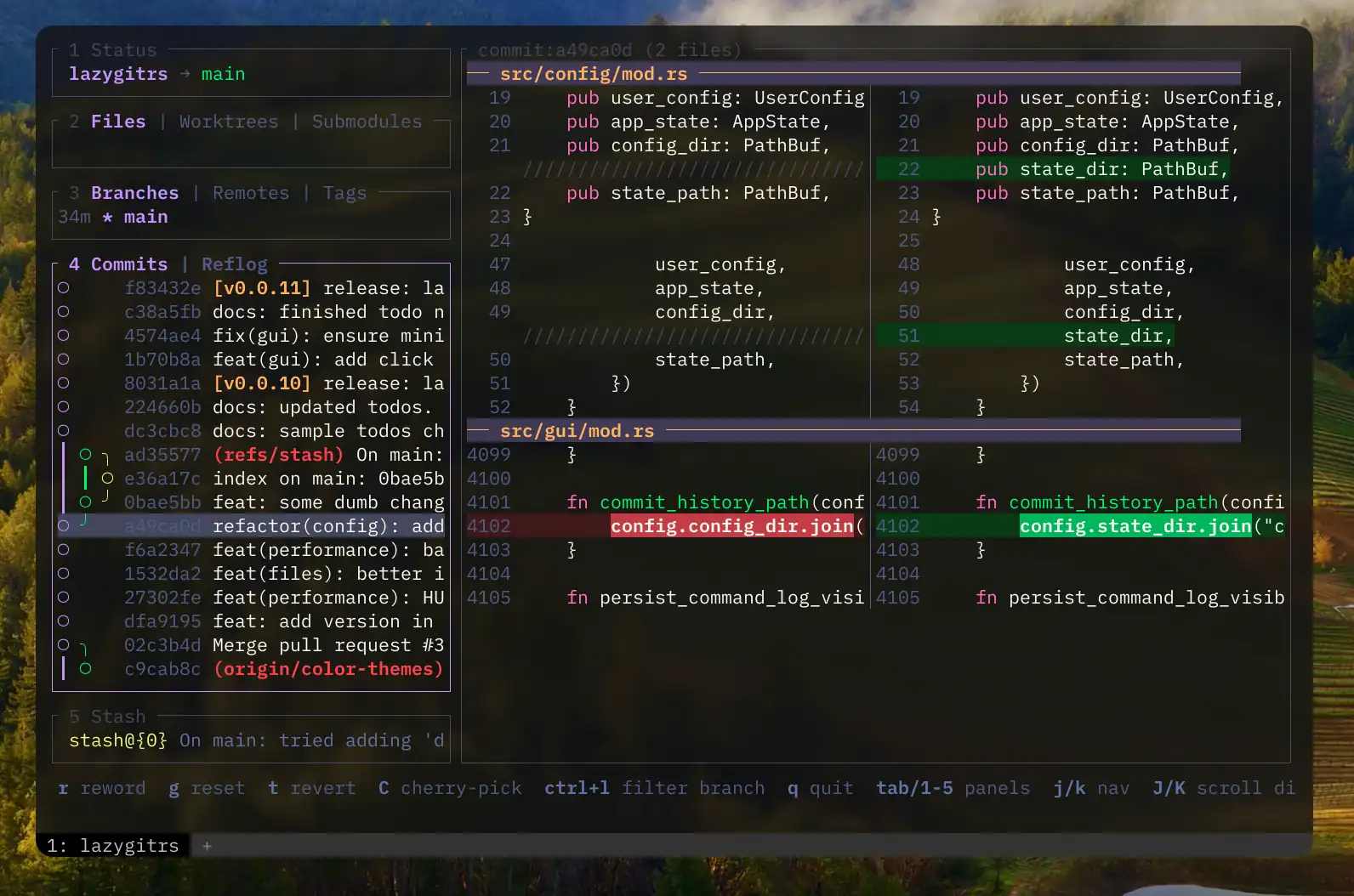
Install
Make sure you have:
brew install blankeos/tap/lazygitrs # Homebrew (macOS/Linux)
npm install -g lazygitrs            # or npm
bun install -g lazygitrs            # or bun
cargo binstall lazygitrs            # or cargo-binstall (prebuilt binary, faster)
cargo install lazygitrs             # or cargo (build from source)
curl -sSL https://raw.githubusercontent.com/Blankeos/lazygitrs/main/install.sh | sh # or linux/macos (via curl)
Then run:
lazygitrsWhat's different
[x] AI commit messages — works with whatever agent you already use (claude, opencode, codex, or my minimal shim modelcli). Set
git.commit.generateCommand(see Configuration):# ~/.config/lazygitrs/config.yml git: commit: # Using claude generateCommand: "claude -p 'Generate a conventional commit message for this diff.' --no-session-persistence" # Using opencode generateCommand: "opencode run 'Generate a conventional commit message for this diff.'" # Using codex generateCommand: "codex exec --ephemeral 'Generate a conventional commit message for this diff.'" # Using modelcli generateCommand: 'DIFF=$(git diff --cached) && modelcli "Generate a conventional commit message for this diff. Always provide a bulletpoint body. $DIFF"'[x] Side-by-side + unified diffs with syntax highlighting by default and unified as well, no pager hacks needed
[x] Better diff navigation UX —
[]new/old only views,{}for hunk traveling,hjkl←↑↓→for line-by-line scrolling, supports mouse select/scroll too. Lots inspired by lumen[x] Default GitHub conveniences — copy repo url, open repo url, copy PR create url, open PR create, copy pr url, open pr. (The 'copy' variants are useful if you use different default browsers for work/personal.)
[x] Branch Filtering — better experience in the Commits tab, compare what actually matters.
[x] Built-in compare tool — Again, inspired by lumen, but more built into the TUI. Pick a commit/branch A and a commit/branch B, then see how they differ.
[x] Interactive rebasing — inspired by gitlens, a clean and easy-to-use UI for pick, reword, edit, squash, fixup, drop and fast rebasing.
[x] Commit Details — Inspired by zed, just a small details panel about the commit that's easier to look at.
[x] Command Palette — easily access stuff like:
- [x]
git reset(globalG) — asks which branch/commit, has quick search, then soft/mixed/hard options. - [x]
git diff/compare(globalW) and then asks what branch/commit A and B, has quick search. - [x]
git rebase(globalI) and then asks rebase on top of what branch/commit. - [x] 🎨 Themes + Theme-Picker!
- [x]
Configuration
Config goes in ~/.config/lazygitrs/config.yml or ~/.config/lazygit/config.yml — both work, using either only won't break anything so you can reference the original lazygit config guide.
Persisted State lives at ~/.local/state/lazygitrs/state.yml and ~/.local/state/lazygitrs/commit_message_history you won't need to touch this.
New config properties:
git.commit.generateCommand— shell command for AI-generated commit messages. See What's different for examples.~/.config/lazygitrs/themes/*.json— drop custom theme files here. See Themes.
Themes
lazygitrs ships with 30+ built-in color themes (Catppuccin, Dracula, Tokyo Night, Gruvbox, Nord, etc.) sourced from OpenCode's TUI theme collection.
Unlike original lazygit, you can switch themes without touching any config file — just press ? > Color Themes > Enter. Your choice is saved automatically.
Custom themes: Drop a .json file into ~/.config/lazygitrs/themes/ and it appears in the picker. Start by copying an existing theme from src/generated_themes/ and tweaking the colors. The format is a flat JSON with all fields optional (unset values are derived from semantic base colors like primary, success, error):
{
  "id": "my-theme",
  "name": "My Custom Theme",
  "primary": "#ff6600",
  "success": "#00ff88",
  "error": "#ff3333",
  "warning": "#ffcc00",
  "text_strong": "#ffffff",
  "background": "#1a1a2e"
}
Benchmarks
Startup benchmark using hyperfine:
Benchmark 1: lazygitrs --version
  Time (mean ± σ):       4.2 ms ±   1.3 ms    [User: 1.2 ms, System: 0.9 ms]
  Range (min … max):     2.7 ms …  15.4 ms    830 runs

Benchmark 2: lazygit --version
  Time (mean ± σ):      13.5 ms ±   2.5 ms    [User: 6.4 ms, System: 5.2 ms]
  Range (min … max):    10.2 ms …  21.2 ms    224 runs

Summary
  lazygitrs --version ran
    3.24 ± 1.16 times faster than lazygit --version
MIT
Feel free to fork and give it your own spin.